Introduction
This manual provides comprehensive instructions for the setup, operation, maintenance, and troubleshooting of your Frienhund 7L Automatic Pet Feeder. Designed for convenience and pet well-being, this feeder ensures your pets receive timely and portion-controlled meals, even when you are away. Please read this manual thoroughly before using the device to ensure proper function and safety.
Product Features
- Intuitive Information Display: Features a 2.4-inch high-definition display for clear viewing of feeding schedules and status. Supports up to 6 meals per day with 1-9 portions per meal.
- Dual Feeding Bowls: Two feeding bowls are positioned 18.7 inches apart to provide ample space for two pets to eat simultaneously without conflict.
- Large Capacity Food Storage: A 7L (29 Cup) transparent food tank with a desiccant compartment keeps food fresh for weeks, suitable for multiple cats or small to medium dogs.
- Slow Feeding Mode: Dispenses food portions one minute apart to prevent rapid eating, regurgitation, bloating, and obesity. This mode can be activated for all feeding plans.
- Easy to Clean: The food tank and stainless steel bowls are detachable for thorough cleaning. Stainless steel bowls are dishwasher safe.
- Dual Power Supply: Operates with a DC 5V power adapter for daily use and can be powered by 3 D cell batteries (not included) for continuous operation during power outages. Features chip memory to retain settings.
- Stable and Secure Design: Engineered with a stable triangular structure and includes a carabiner for optional wall attachment to prevent overturning by active pets.
- Versatile Food Compatibility: The elastic silicone shaft accommodates various dry food types up to 15mm, including freeze-dried, air-dried, and multi-pieced foods.
- Anti-Bite Power Cord: Equipped with a specially made anti-bite nylon braided power cord to protect against pet chewing.
Visual Overview
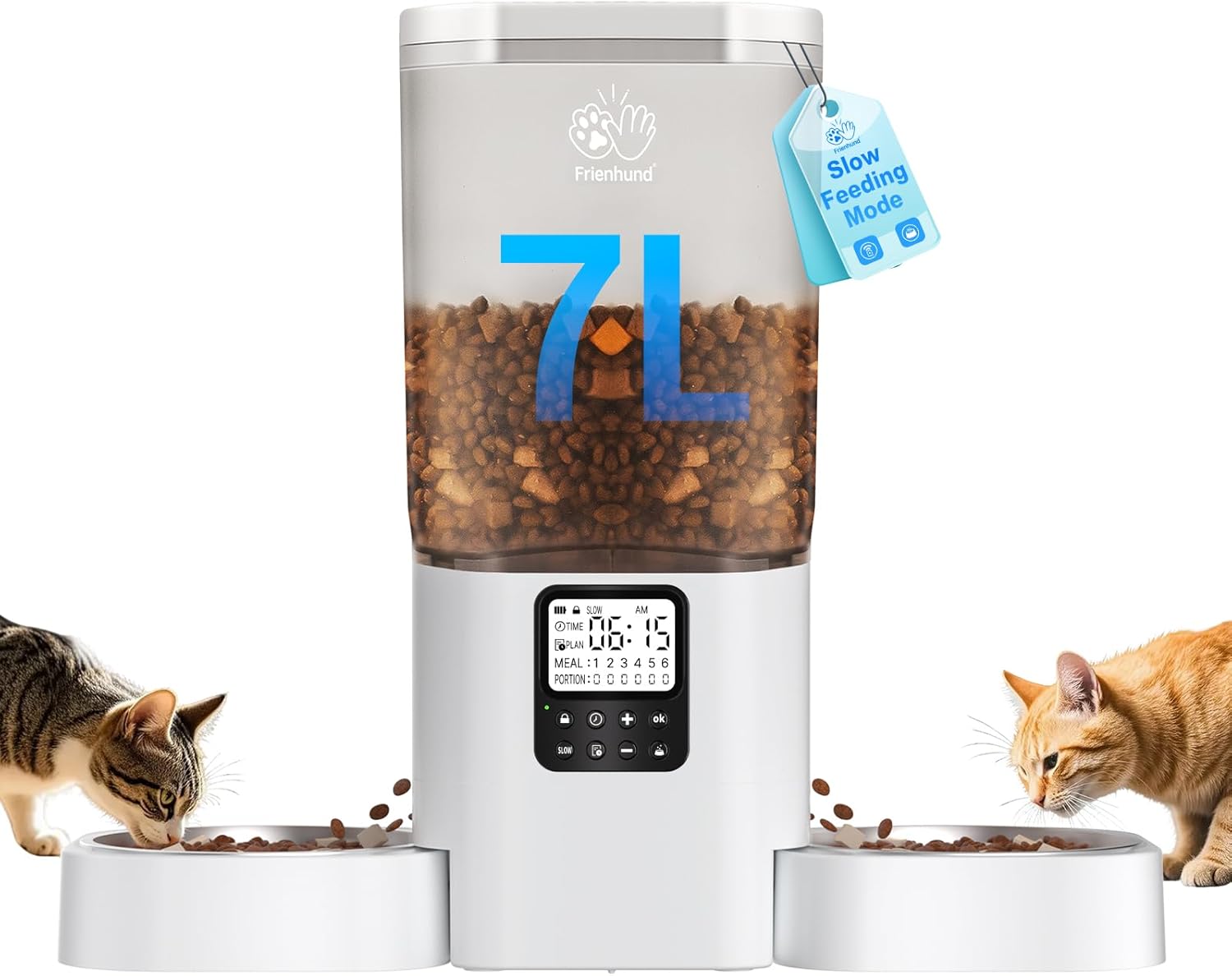
Figure 1: The Frienhund 7L Automatic Pet Feeder, showcasing its large capacity and dual feeding bowls, with two cats enjoying their meal.

Figure 2: Illustration of the 18.7-inch safe distance between the two feeding bowls, designed to prevent food aggression and allow two pets to eat comfortably side-by-side.
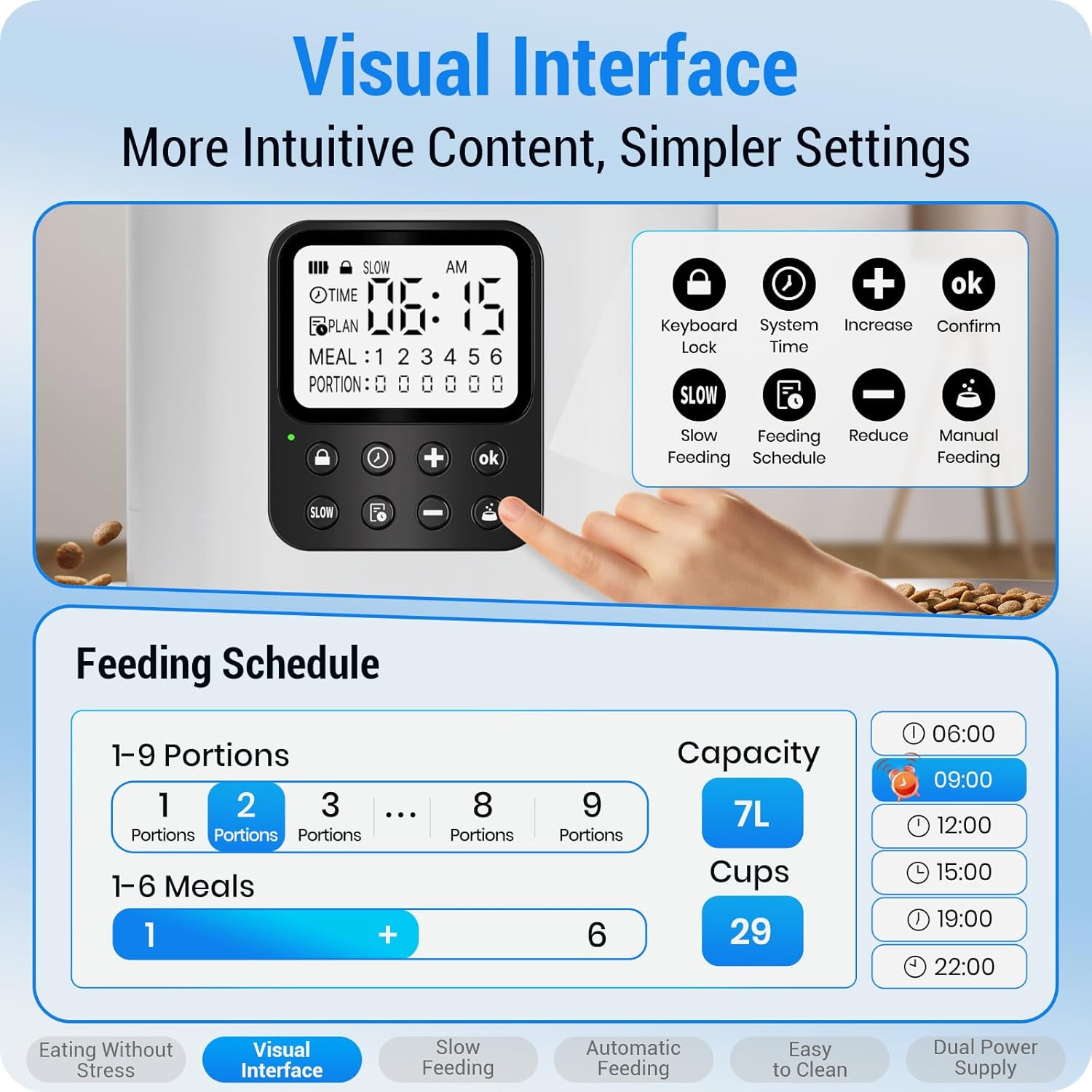
Figure 3: The intuitive 2.4-inch high-definition display, providing clear visual feedback for setting feeding schedules, including meal times and portion sizes.

Figure 4: The Slow Feeding Mode feature, which dispenses food gradually to prevent common issues such as rapid eating, bloating, and obesity in pets.

Figure 5: The dual power supply system, featuring a 5V power adapter and backup D cell batteries, ensuring continuous operation even during power outages.
Video 1: An official demonstration of the Frienhund Automatic Pet Feeder in action, showing two cats being fed simultaneously. This video highlights the feeder's ability to dispense food and the pets' interaction with the device.
Setup
Package Contents:
- Pet Feeder Unit x1
- Lid x1
- Meal Splitter x1
- Power Adapter x1
- Nylon Braided Data Cable x1
- Desiccant x1
- Stainless Steel Feeding Bowl x2
- Desiccant Compartment x1
- Bowl Tray x1
- ABS Wall Hook x1
- Screws x4
- Anchors x4
- User Manual x1
Assembly Steps:
- Unpack all components and verify against the package contents list.
- Insert the meal splitter into the base of the food tank, ensuring it is securely in place to direct food to both bowls.
- Place the bowl tray onto the feeder base, then position the two stainless steel feeding bowls into the designated slots on the tray.
- Open the lid of the food tank and insert the desiccant into its compartment to maintain food freshness.
- Fill the food tank with dry pet food. Ensure the food size is within 5-15mm (0.19-0.59 inches) for optimal dispensing.
- Close the lid securely.
- Connect the nylon braided data cable to the feeder and the power adapter. Plug the adapter into a standard electrical outlet.
- (Optional) For battery backup, install 3 D cell batteries (not included) into the battery compartment at the bottom of the feeder.
- (Optional) To prevent overturning, use the provided ABS wall hook, screws, and anchors to secure the feeder to a wall.
Operating Instructions
Setting Time and Feeding Schedule:
The feeder features a 2.4-inch HD display and control buttons for easy programming.
- Set Current Time: Press the "System Time" button (often represented by a clock icon) to enter time setting mode. Use the "+" and "-" buttons to adjust hours and minutes. Press "OK" to confirm.
- Program Feeding Plans:
- Press the "Feeding Schedule" button (often represented by a plan icon) to cycle through meal settings (Meal 1 to Meal 6).
- For each meal, set the desired feeding time using the "+" and "-" buttons, then press "OK".
- Next, set the number of portions (1-9) for that meal using the "+" and "-" buttons, and press "OK" to confirm.
- Repeat for all desired meals.
- Activate Slow Feeding Mode: Press the "SLOW" button to toggle the slow feeding mode on or off. When activated, the "SLOW" icon will appear on the screen, and each portion will be dispensed one minute apart.
- Manual Feeding: Press the "Manual Feeding" button (often represented by a paw icon) to dispense one portion of food immediately.
- Keyboard Lock: To prevent accidental changes, press the "Keyboard Lock" button (often represented by a lock icon) to lock the control panel. Press again to unlock.
The feeder's chip memory will retain your settings even if power is lost, provided backup batteries are installed.
Maintenance and Cleaning
Regular cleaning ensures hygiene and extends the life of your pet feeder.
Cleaning Steps:
- Unplug the feeder from the power outlet and remove any backup batteries.
- Empty any remaining food from the tank.
- Remove the lid, desiccant compartment, food tank, meal splitter, bowl tray, and stainless steel bowls.
- The stainless steel bowls are dishwasher safe.
- The food tank, meal splitter, bowl tray, and desiccant compartment can be hand-washed with mild soap and water. Rinse thoroughly.
- Wipe the main feeder unit (base with display) with a damp cloth. Do not submerge the main unit in water.
- Ensure all parts are completely dry before reassembling and refilling with food.

Figure 6: The detachable design of the feeder, illustrating how the food tank and stainless steel bowls can be easily removed for cleaning, with bowls being dishwasher safe.
Troubleshooting
| Problem | Possible Cause | Solution |
|---|---|---|
| Feeder not dispensing food. | Food tank empty; food jammed; dispenser blocked; incorrect settings. | Refill food tank. Check for food jams and clear any blockages. Ensure food size is appropriate (5-15mm). Verify feeding schedule and portion settings. |
| Display is off or not responding. | No power; power adapter loose; batteries drained (if using backup). | Check power connection. Ensure adapter is securely plugged in. Replace D cell batteries if using backup power. |
| Pets are fighting over food. | Insufficient space or food for both pets. | Ensure bowls are correctly positioned with adequate space. Consider increasing portion sizes or adding more feeding times if needed. The 18.7-inch bowl separation is designed to mitigate this. |
| Feeder is being knocked over. | Active pets. | Utilize the provided ABS wall hook, screws, and anchors to secure the feeder to a wall for added stability. |
| Slow feeding mode not working. | Mode not activated. | Press the "SLOW" button on the control panel to activate the slow feeding mode. Verify the "SLOW" icon is displayed. |
Specifications
| Feature | Detail |
|---|---|
| Model Name | automatic cat feeders 2 cat |
| Item Model Number | ACF200W |
| Capacity | 7 Liters (29 Cups) |
| Material | Acrylonitrile Butadiene Styrene (BPA-Free), Stainless Steel |
| Item Dimensions (LxWxH) | 18.5 x 7.09 x 15.75 inches |
| Item Weight | 4.09 pounds (1.86 Kilograms) |
| Power Supply | DC 5V Adapter, 3 x D Cell Batteries (not included) |
| Power Cord Length | 59 inches |
| Display | 2.4-inch High-Definition |
| Max Food Size | 15mm |
| Care Instructions | Dishwasher Safe (bowls), Hand Wash Only (other detachable parts) |
| Target Species | Cats, Dogs |
Warranty and Support
Frienhund offers a free one-year warranty for this automatic pet feeder. For any issues or inquiries, please contact our customer service team.
- Warranty Period: One Year from date of purchase.
- Customer Service: 24/7 online service available. Please refer to your purchase platform (e.g., Amazon) for specific contact methods (order page, email, or phone).
We are committed to resolving any problems you may encounter to your satisfaction.


