
1. Introduction
Thank you for choosing the VGR V-992 Professional Hair Trimmer. This device is engineered for precision grooming, offering both corded and cordless operation. It features advanced ceramic and DLC-coated blades, a powerful 9000 RPM motor, and an intuitive LED display. This manual provides essential information for safe and effective use, maintenance, and troubleshooting.
2. Product Overview and Components
The VGR V-992 trimmer comes with a comprehensive set of accessories to enhance your grooming experience.

Image 1: VGR V-992 Trimmer with charging base, guide combs, oil, and cleaning brush.
Included Items:
- VGR V-992 Hair Trimmer
- Charging Base
- 3 Guide Combs (1mm, 2mm, 3mm)
- Cleaning Brush
- Lubricating Oil
- USB Type-C Charging Cable
- Protection Cap

Image 2: All components of the VGR V-992 grooming kit.
3. Setup
Initial Charging:
Before first use, fully charge the trimmer. Connect the USB Type-C cable to the charging base and then to a 5V-1A USB power adapter (not included) or a power bank/laptop. Place the trimmer on the charging base. The LED display will indicate the charging status. A full charge takes approximately 2.5 hours and provides up to 240 minutes of cordless operation.
Image 3: The VGR V-992 Trimmer placed on its charging base.
Attaching Guide Combs:
Select the desired guide comb (1mm, 2mm, or 3mm) for your preferred hair length. Align the comb with the trimmer blade and push it firmly until it clicks into place. To remove, gently pull the comb away from the blade.
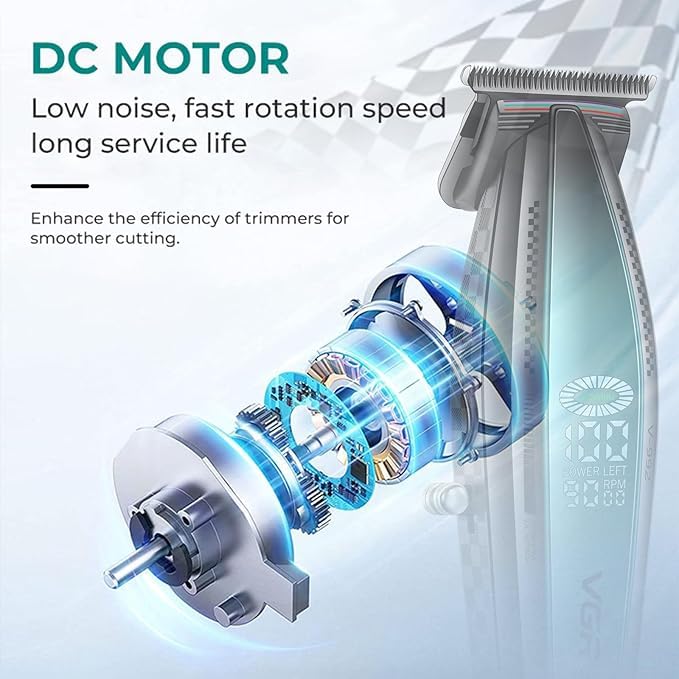
Image 4: The three guide combs for varying hair lengths.
4. Operating Instructions
Powering On/Off:
Press the power button to turn the trimmer on. Press it again to turn it off.
Using the Trimmer:
- Ensure the trimmer is charged or connected to power for corded use.
- Attach the appropriate guide comb for your desired hair length.
- Hold the trimmer with the blades facing the area to be trimmed.
- Move the trimmer against the direction of hair growth for an even and effective trim.
- For detailing or edging, remove the guide comb and use the bare blade carefully.
LED Display:
The smart LED display provides real-time information:
- Battery Percentage: Shows the remaining battery life.
- Motor Speed (RPM): Indicates the current operating speed of the motor.
- Maintenance Alerts: May display indicators for cleaning or oiling the blades.

Image 5: The LED display showing battery level and motor speed.

Image 6: Illustration emphasizing the high-speed 9000 RPM motor.
5. Maintenance
Regular maintenance ensures optimal performance and extends the lifespan of your trimmer.
Cleaning the Blades:
- After each use, turn off and unplug the trimmer.
- Use the provided cleaning brush to remove any loose hairs from the blades.
- For a more thorough cleaning, the blades can be carefully detached and rinsed under running water. Ensure they are completely dry before reattaching.
Lubricating the Blades:
Apply a few drops of the provided lubricating oil to the blades after every few uses or after cleaning. Turn the trimmer on for a few seconds to allow the oil to distribute evenly. This helps maintain smooth operation and prevents rust.
Storage:
Store the trimmer in a cool, dry place. Always use the protection cap to cover the blades when not in use to prevent damage and ensure safety.
6. Safety Information
- Keep the trimmer away from water, heat, and fire to prevent damage or hazards.
- Unplug the trimmer before cleaning.
- Use only a 5V-1A charger for safe charging.
- This product is not intended for use by children. Store safely to avoid accidents.
- Always clean and lubricate the blades for optimal performance and longevity.
- Discontinue use if irritation or discomfort occurs.
7. Troubleshooting
If you encounter any issues with your VGR V-992 trimmer, please refer to the following common solutions:
- Trimmer not turning on: Ensure the battery is charged. If using corded, check the power connection.
- Poor cutting performance: Clean the blades thoroughly to remove any trapped hair. Apply lubricating oil to the blades. Ensure the guide comb is correctly attached.
- Excessive noise or vibration: This may indicate a need for blade cleaning and lubrication. If the issue persists, contact customer support.
- Battery not charging: Verify the USB Type-C cable and charging base are properly connected. Ensure the power adapter is 5V-1A.
8. Specifications
| Feature | Detail |
|---|---|
| Model Number | V-992 Professional |
| Blade Material | Ceramic & DLC-Coated Blades |
| Motor Speed | 9000 RPM |
| Power Source | Battery Powered (Cordless & Corded) |
| Battery Type | 2000mAh Lithium Battery |
| Charging Time | 2.5 hours |
| Operating Time | Up to 240 minutes |
| Charging Interface | USB Type-C |
| Guide Combs | 1mm, 2mm, 3mm |
| Item Weight | 241 Grams |
| Product Dimensions | 15.4 x 3.8 x 3.3 Centimeters |
| Country of Origin | China |
9. Warranty and Support
This product comes with a standard brand warranty. For any warranty claims, technical support, or inquiries, please contact VGR customer service.
Contact Information:
- Email: customercare@vgrofficial.in
- Phone: 18002578939
- Website: www.vgrofficial.in
- Operating Hours: 10:00 AM to 6:00 PM, Monday to Saturday
Extended warranty plans may be available for purchase. Please refer to the product detail page or contact customer support for more information.


