
Introduction
This manual provides detailed instructions for the assembly, operation, and maintenance of your VECELO KHD-RQ13-BGE Queen Size Upholstered Bed Frame. Please read this manual thoroughly before assembly and use to ensure safe and correct operation. Keep this manual for future reference.
The VECELO Queen Size Upholstered Bed Frame features a sturdy construction combining wood and metal, a velvet upholstered headboard, integrated LED lighting, a built-in charging station with USB ports and AC outlets, and three capacious storage drawers. It is designed for comfort, convenience, and durability.
Safety Information
WARNING: Failure to follow these safety instructions could result in injury or damage to the product.
- Do not exceed the maximum weight capacity of 800 pounds (approximately 363 kg).
- Be cautious of pinch points when operating the storage drawers and adjusting the headboard.
- Always follow the assembly instructions carefully. Incorrect assembly can lead to instability and potential collapse.
- Ensure all connections are secure before use. Periodically check and tighten all bolts and screws.
- This bed frame is intended for bedroom and hotel use only.
- Keep children away from the assembly area. Small parts can be a choking hazard.
- Do not stand or jump on the bed frame.
- Disconnect power to the charging station and LED lights before cleaning or maintenance.
Package Contents
Before beginning assembly, verify that all parts listed below are present and undamaged. If any parts are missing or damaged, do not proceed with assembly and contact customer support.
- 1x Queen Bed Frame (Disassembled components)
- 1x User Manual (This document)
- 1x Installation Tool Kit (Includes necessary wrenches and hex keys)
- 3x Storage Drawers (Disassembled components)
- 1x LED Light Strip with Controller
- 1x Remote Control for LED Lights
- 1x Power Adapter for LED Lights and Charging Station
Product Dimensions
The VECELO Queen Size Upholstered Bed Frame has the following approximate dimensions:
- Overall Dimensions (Length x Width x Height): 82.28" x 62.60" x 41.14" (2.09m x 1.59m x 1.05m)
- Recommended Mattress Thickness: 8, 10, or 12 inches
- Weight Capacity: 800 lbs

Setup and Assembly
Assembly typically requires two adults and takes approximately 1-2 hours. Follow the steps below carefully. Do not overtighten screws until instructed.
- Unpack and Identify Parts: Lay out all components on a clean, soft surface (like a carpet) to prevent scratches. Compare all parts with the included parts list to ensure nothing is missing.
- Assemble the Headboard: Attach the headboard panels and shelves according to the diagrams in your specific assembly guide. Ensure the charging station and LED light channel are correctly oriented.
- Attach Side Rails: Connect the side rails to the headboard and footboard using the provided bolts and washers. Hand-tighten initially.
- Install Center Support Beam: Secure the center support beam(s) to the headboard and footboard, and attach any support legs.
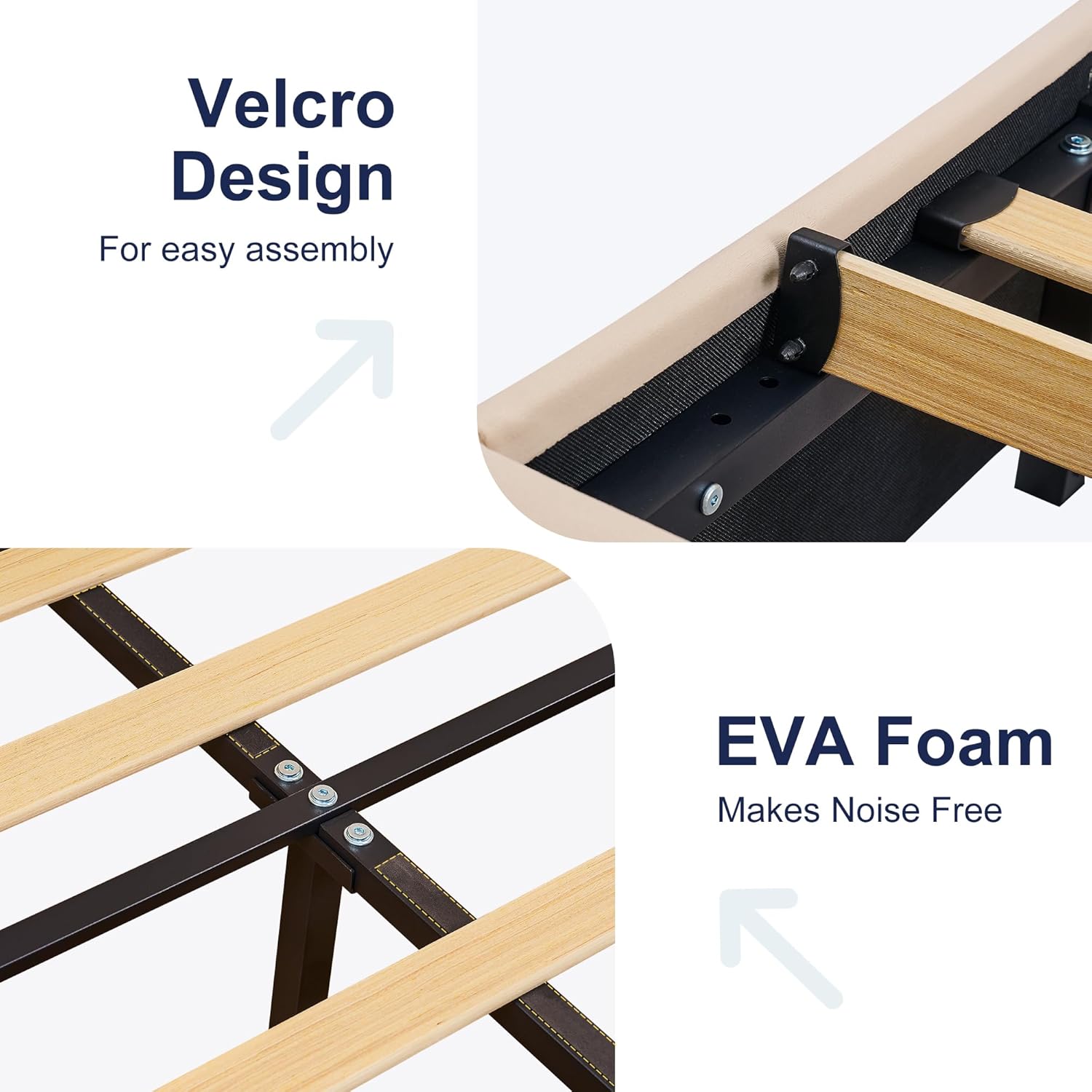
- Place Bed Slats: Roll out the bed slats onto the side rails. The bed frame features a Velcro design for easy and secure slat placement. Ensure the EVA foam strips are correctly positioned to minimize noise.
- Assemble Storage Drawers: Follow the separate instructions for assembling the three storage drawers. Ensure the wheels are securely attached for smooth operation.
- Insert Drawers: Slide the assembled drawers into their designated positions under the bed frame.
- Install LED Lights: Adhere the LED light strip into the channel on the headboard. Connect the LED controller and power adapter.
- Connect Charging Station: Plug the charging station's power cord into the main power adapter or a wall outlet as per instructions.
- Final Tightening: Once all components are in place and aligned, fully tighten all bolts and screws using the provided tool. Do not overtighten.
Operating Instructions
LED Lighting System
The integrated LED lighting system can be controlled via a remote control or a smartphone application (iOS/Android).

- Power On/Off: Use the power button on the remote or within the app to turn the lights on or off.
- Color Selection: Choose from 7 preset colors or create custom colors using the app.
- Brightness Adjustment: Adjust between 8 brightness levels using the remote or app.
- Modes: Select various modes such as Music Modes, Timing Function, and Dynamic effects.
- App Control: Download the specified app (refer to the QR code in the assembly guide or product packaging) from your device's app store. Pair your device with the LED controller via Bluetooth.
Charging Station
The headboard includes a built-in charging station for your electronic devices.

- USB Ports: Use the 5V/2A USB ports to charge smartphones, tablets, and other USB-powered devices.
- AC Outlets: The 125V/12A AC outlets provide power for lamps, laptops, or other small appliances.
- Usage: Ensure the bed frame's power adapter is plugged into a functional wall outlet for the charging station to operate.
Storage Drawers
The bed frame features three capacious drawers for convenient storage.

- Opening/Closing: Gently pull or push the drawers to open and close them. Avoid excessive force.
- Capacity: Utilize the drawers for storing seasonal clothing, bedding, books, or other personal items to keep your bedroom tidy.
Maintenance
- Cleaning the Frame: Wipe the metal and wood surfaces with a soft, damp cloth. Avoid harsh chemicals or abrasive cleaners.
- Cleaning Upholstery: For velvet upholstery, use a soft brush or vacuum cleaner with an upholstery attachment to remove dust. For spills, blot immediately with a clean, dry cloth. Do not rub. Professional cleaning may be required for stubborn stains.
- Hardware Check: Periodically (every 3-6 months) check all bolts, screws, and connections to ensure they are tight. Retighten as necessary to maintain stability and prevent squeaking.
- Drawer Maintenance: Keep the drawer tracks clean and free of debris for smooth operation.
- Electrical Components: Ensure the power adapter and cables for the LED lights and charging station are not pinched or damaged. If any damage is observed, discontinue use and contact customer support.
Troubleshooting
| Problem | Possible Cause | Solution |
|---|---|---|
| Bed frame is wobbly or squeaks. | Loose bolts or screws; uneven floor; slats not properly seated. | Tighten all assembly hardware. Ensure the bed is on a level surface. Check that all slats are correctly positioned and the EVA foam is intact. |
| LED lights are not working. | Power adapter unplugged; remote battery dead; loose connection; LED strip damaged. | Ensure the power adapter is securely plugged into a working outlet and the LED controller. Replace remote control batteries. Check all cable connections. If still not working, contact customer support. |
| Charging station (USB/AC outlets) is not working. | Power adapter unplugged; loose connection; device not compatible. | Verify the bed frame's main power adapter is plugged in. Check connections to the charging station. Ensure your device is compatible with the output specifications (5V/2A for USB, 125V/12A for AC). |
| Drawers are difficult to open/close. | Obstruction in the track; wheels damaged; drawer overloaded. | Check for any items blocking the drawer tracks. Inspect drawer wheels for damage. Reduce the weight or volume of items stored in the drawer. |
Specifications
| Feature | Detail |
|---|---|
| Model Number | KHD-RQ13-BGE |
| Size | Queen |
| Material | Wood, Velvet, Metal |
| Color | Beige |
| Product Dimensions (L x W x H) | 82.28" x 62.60" x 41.14" (2.09m x 1.59m x 1.05m) |
| Weight Capacity | 800 Pounds (approx. 363 kg) |
| Recommended Mattress Thickness | 8, 10, or 12 inches |
| Storage | 3 Capacious Drawers |
| LED Lighting | 7 Colors, 8 Brightness Levels, Remote & App Control |
| Charging Station | 2x AC Outlets (125V/12A), 2x USB Ports (5V/2A) |
| Noise Reduction | Shock-absorbing strips, soundproof coating, EVA foam |
| Assembly Required | Yes |
| Box Spring Required | No |
Warranty and Customer Support
VECELO products are designed for quality and durability. For warranty information, product support, or to order replacement parts, please refer to the contact information provided on your purchase receipt or visit the official VECELO website.
When contacting support, please have your model number (KHD-RQ13-BGE) and purchase date available.
Note: Warranty terms and conditions may vary by region and retailer.


