
Introduction
Thank you for choosing the VGR 994 Professional Hair Trimmer. This manual provides essential information for the safe and effective use, maintenance, and care of your new grooming device. Please read it thoroughly before first use and retain it for future reference.
Safety Information
Important Safety Instructions:
- Always keep the trimmer away from water sources. Do not use it near bathtubs, showers, basins, or other vessels containing water.
- Do not use on infants or children.
- Avoid contact with eyes and skin during operation.
- Always unplug the trimmer when not in use, before cleaning, and before performing any maintenance.
- Follow recommended cleaning and maintenance procedures to prevent skin irritation or injury.
- Do not operate the trimmer if it has a damaged cord or plug, if it is not working properly, or if it has been dropped or damaged.
- This appliance is intended for household use only.
Package Contents
Verify that all items listed below are included in your package:

This image displays the complete VGR 994 Hair Trimmer kit, including the trimmer, guide combs, charging dock, USB cable, cleaning brush, oil, screwdriver, and travel case.
- VGR-994 Hair Trimmer (x1)
- Precision Guide Combs (1.5mm, 3mm, 6mm) (x3)
- Charging Dock with Ring Light Indicator (x1)
- Woven USB Charging Cable (x1)
- Modular Black Metal Cover (x1)
- Extra Screws (x3)
- Mini Screwdriver (x1)
- Cleaning Brush (x1)
- Lubricating Oil (x1)
- Travel Case (x1)
Product Overview
The VGR 994 features a high-performance vector motor and a durable DLC T-blade for precise grooming.

This image highlights the VGR 994 trimmer's internal vector motor, indicating its 8000-10000 RPM speed and DLC coating on the fixed blade for enhanced durability and cutting performance.
Key Features:
- Ultra-Powerful Vector Motor: Delivers 10,000 RPM for consistent cutting speed and power, adapting to hair thickness.
- Advanced DLC T-Blade: Diamond-Like Carbon coated blade for exceptional hardness, wear resistance, and precise zero-gap trimming. Hypoallergenic properties reduce skin irritation.
- Long-Lasting Battery: 2000mAh lithium-ion battery provides up to 150 minutes of runtime on a single charge.
- Ergonomic Design: Textured, non-slip grip for maximum control and precision.
- Customizable Aesthetics: Includes interchangeable metal covers (gold and black) for personalized style.
Setup
Charging the Trimmer:
- Place the VGR 994 trimmer onto the charging dock.
- Connect the USB charging cable to the charging dock and then to a suitable USB power adapter (not included) or a USB port.
- The illuminated ring light indicator on the charging dock will show the charging status. A full charge provides approximately 150 minutes of runtime.
- The battery requires approximately 2.5 hours for a full charge.

This image shows the VGR 994 trimmer placed on its charging dock, illustrating the charging process. The dock features a ring light indicator.
Attaching Guide Combs:
- Ensure the trimmer is turned off before attaching or removing guide combs.
- Select the desired guide comb (1.5mm, 3mm, or 6mm).
- Align the comb with the trimmer blade and push it firmly until it clicks into place.
- To remove, gently pull the comb away from the blade.
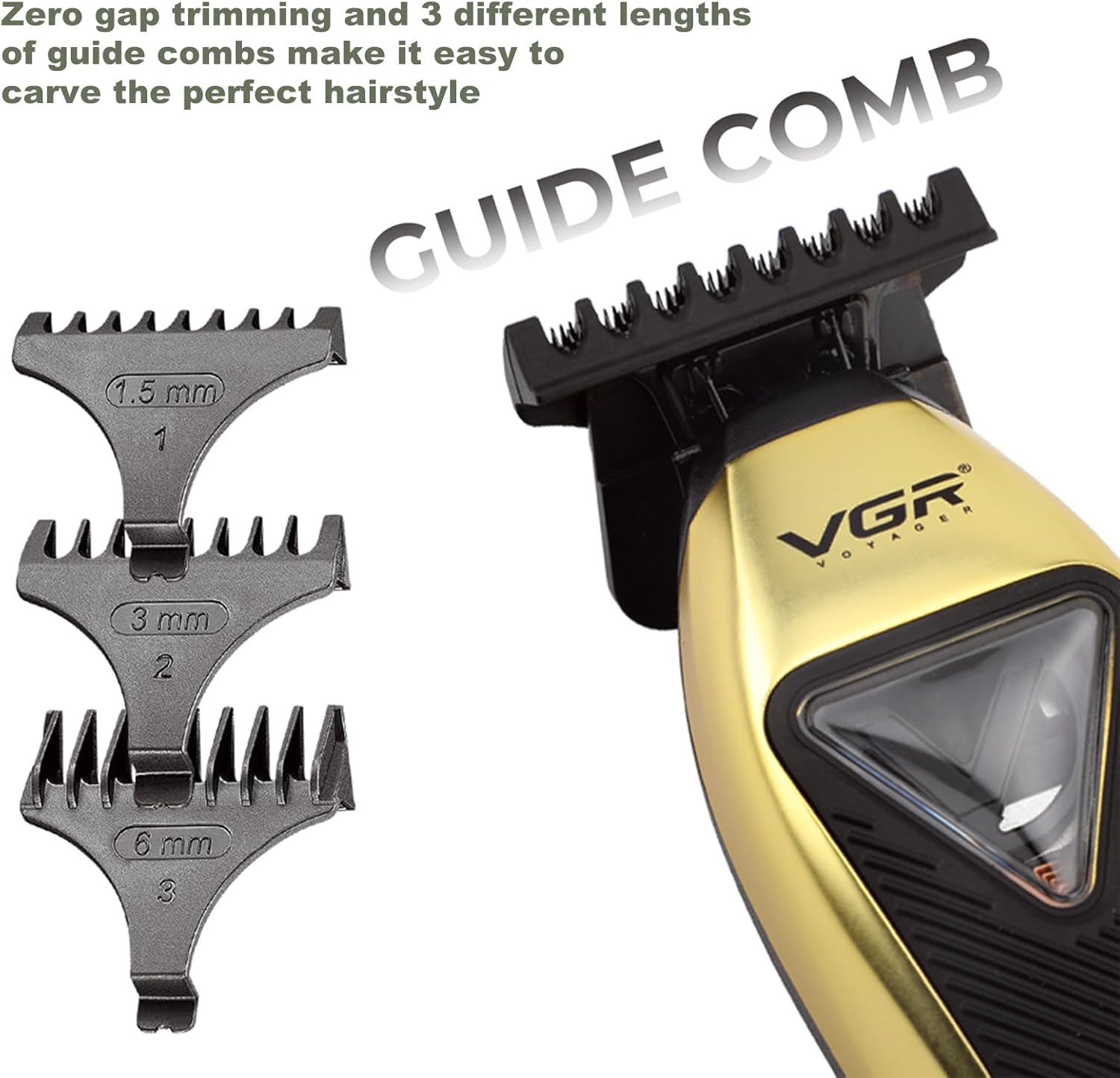
This image illustrates the VGR 994 trimmer with its three guide combs (1.5mm, 3mm, 6mm) detached, demonstrating how they are used for different trimming lengths.
Operating Instructions
General Trimming:
- Ensure your hair is clean and dry before trimming.
- Attach the appropriate guide comb for your desired hair length. For zero-gap trimming, use without a comb.
- Press the power button to turn on the trimmer.
- Hold the trimmer with the blade flat against the skin or at a slight angle, moving against the direction of hair growth.
- Use slow, controlled strokes for an even cut.
- For detailing and outlining, remove the guide comb and use the T-blade directly.

This image shows a man receiving a haircut using the VGR 994 trimmer, demonstrating its use for professional hair cutting.
Changing Modular Covers:
The VGR 994 comes with interchangeable metal covers (gold and black) for customization.
- Ensure the trimmer is turned off and unplugged.
- Use the provided mini screwdriver to carefully remove the screws holding the current cover in place.
- Gently detach the cover.
- Align the new modular cover and secure it with the screws using the mini screwdriver.

This image displays two VGR 994 trimmers, one with a gold cover and one with a black cover, alongside a screwdriver, illustrating the interchangeable modular covers feature.
Maintenance
Cleaning the Blades:
- Turn off the trimmer and unplug it from the charging dock.
- Use the provided cleaning brush to remove any loose hairs from the blades and the trimmer head.
- The blades can be rinsed under running water, but do not submerge the entire trimmer. Ensure blades are dry before reassembly or storage.
Oiling the Blades:
- After cleaning and drying, apply a few drops of the provided lubricating oil to the blades.
- Turn on the trimmer for a few seconds to allow the oil to distribute evenly.
- Wipe off any excess oil with a soft cloth. Regular oiling ensures optimal performance and extends blade life.
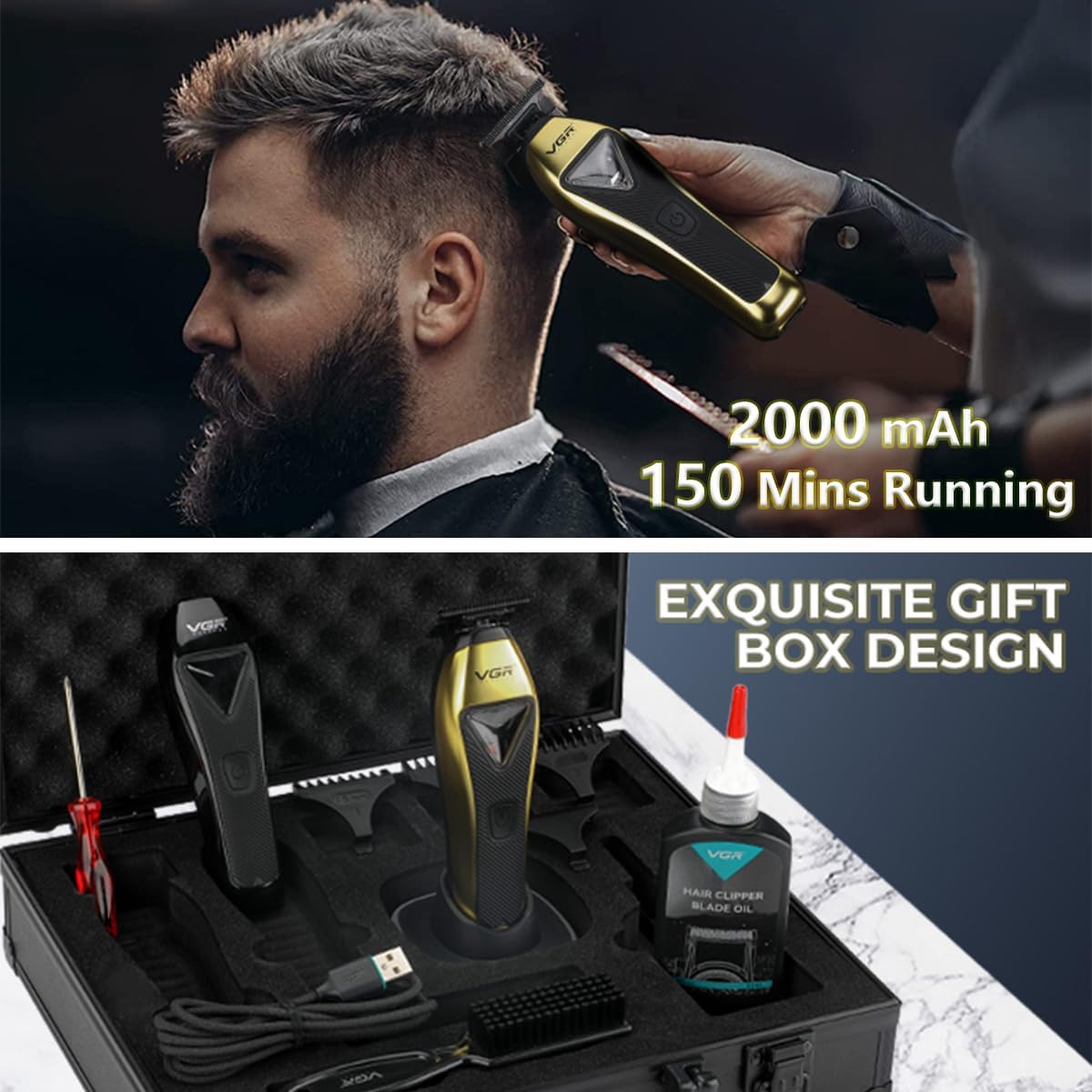
This image shows the VGR 994 trimmer along with its cleaning brush and a bottle of blade oil, essential tools for proper maintenance.
Troubleshooting
| Problem | Possible Cause | Solution |
|---|---|---|
| Trimmer does not turn on. | Battery is depleted. | Charge the trimmer fully using the charging dock and USB cable. |
| Poor cutting performance or pulling hair. | Blades are dull, dirty, or not oiled. | Clean the blades thoroughly and apply lubricating oil. If performance does not improve, consider professional blade sharpening or replacement. |
| Trimmer gets hot during use. | Extended use or insufficient lubrication. | Allow the trimmer to cool down. Ensure blades are properly oiled. Avoid continuous operation for excessively long periods. |
| Charging indicator not working. | Improper connection or faulty cable/dock. | Ensure the USB cable is securely connected to both the dock and power source. Check for any damage to the cable or dock. |
Specifications
| Feature | Detail |
|---|---|
| Model | VGR-994 |
| Motor Type | Vector Motor |
| Motor Speed | 10,000 RPM |
| Blade Material | DLC T-Blade |
| Battery Type | Lithium-ion |
| Battery Capacity | 2000mAh |
| Runtime | Up to 150 minutes |
| Charging Time | Approximately 2.5 hours |
| Guide Combs Included | 1.5mm, 3mm, 6mm |
| Power Source | Battery Powered |
| Product Dimensions | 5.91 x 1.61 x 1.34 inches |
| Item Weight | 7.93 ounces (224.7 Grams) |
Warranty and Support
VGR provides a 1-Year Warranty for the VGR 994 Professional Hair Trimmer, covering manufacturing defects from the date of purchase.
For technical assistance, troubleshooting, or warranty claims, please contact VGR customer support. We offer 24-hour support to assist you with any inquiries.

This image depicts a customer support representative, symbolizing the availability of assistance for product users.
Please visit the official VGR store on Amazon for more information and to register your product: VGR Official Store


