
1. Safety Information
Please read all instructions carefully before using the VGR Hair Clippers and Trimmers Set. Keep this manual for future reference.
- Keep blades away from face and eyes during operation.
- Do not use the devices while sleeping or in the shower.
- Keep all components out of reach of children.
- Follow proper cleaning and maintenance instructions to ensure longevity and safe operation.
- Do not immerse the devices in water.
- Use only the provided charging cables and adapters.
2. Product Overview
The VGR Hair Clippers and Trimmers Set includes a VGR-640 hair clipper, a VGR-378 precision trimmer, and a triple floating blade foil shaver, designed for comprehensive hair grooming.
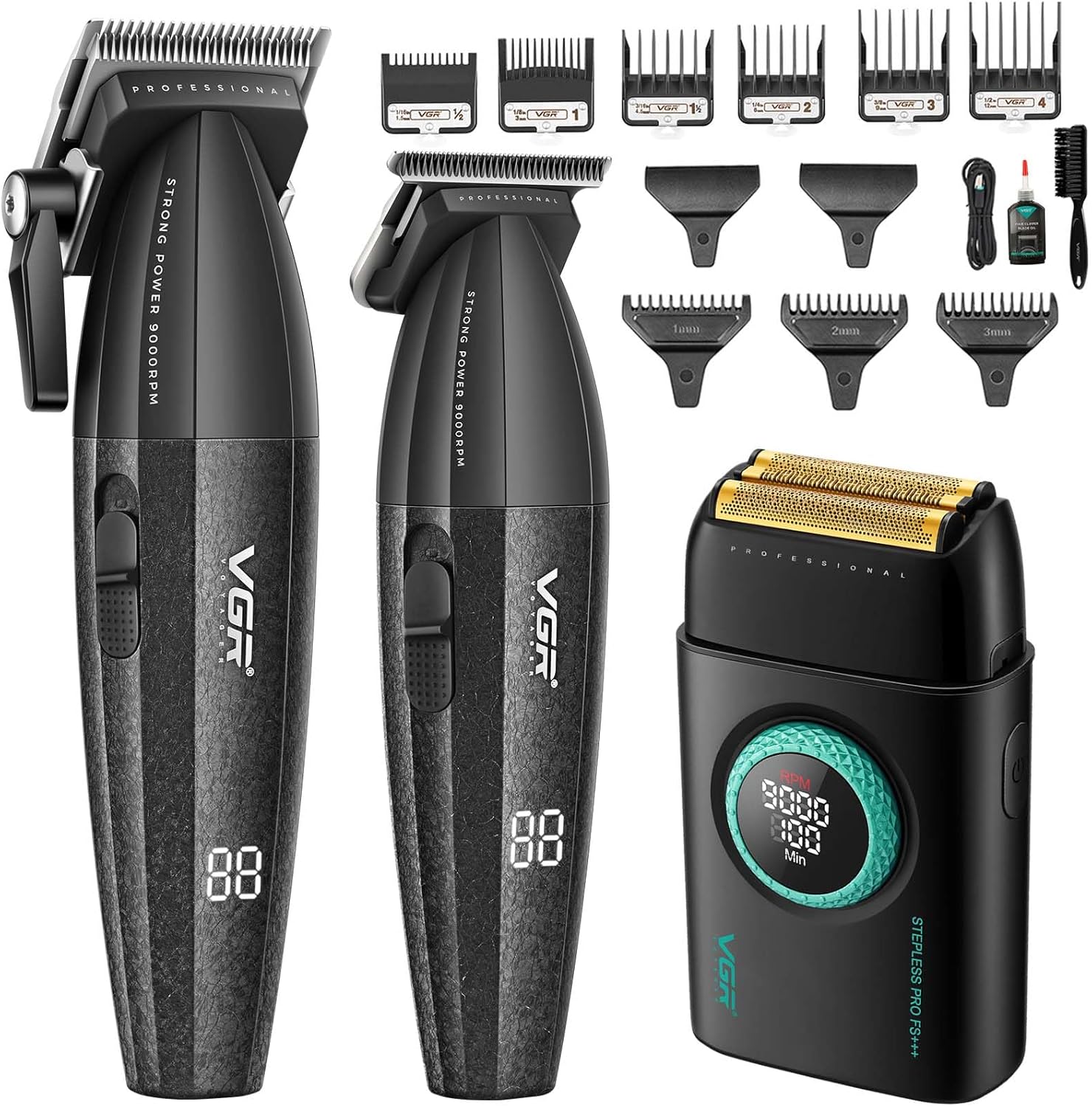
Image 2.1: Overview of the VGR Hair Clippers and Trimmers Set, including the clipper, trimmer, foil shaver, and various guide combs.
Key Features:
- VGR-640 Clipper: Intelligent torque motor with dual-speed adjustments up to 9000 RPM. Equipped with ceramic and powder metallurgy blades for smooth cutting. Features an adjustable taper lever and LED display.
- VGR-378 Trimmer: Precision DLC-coated T-blade for sharp lines and detailing.
- Foil Shaver: Ultra-thin gold titanium hypoallergenic foils with a three-blade system and adjustable motor speeds (7000–9000 RPM) for irritation-free shaving.
- Long Battery Life: Clipper (2500mAh, up to 250 minutes runtime), Trimmer (240 minutes runtime), Foil Shaver (100 minutes runtime).
- Smart LED Displays: Each device features an LED display for battery levels and RPM.
- Comprehensive Kit: Includes 6 guide combs for the clipper (1.5–12mm) and 3 for the trimmer (1–3mm), cleaning brush, lubricating oil, protective covers, and a storage bag.

Image 2.2: Detailed view of the VGR clipper highlighting its ON/OFF switch, USB charging capability, long work time, and taper lever.

Image 2.3: Illustration of the clipper's DLC coating fixed blade, ceramic moving blade, and turbo function with 7000 RPM and 9000 RPM settings.
3. Setup
3.1 Initial Charging
Before first use, fully charge each device. Connect the provided USB charging cable to the device and a suitable USB power source (e.g., computer, laptop, USB charger, power bank).
- VGR-640 Clipper: Approximately 3 hours for a full charge, providing up to 250 minutes of work time.
- VGR-378 Trimmer: Provides up to 240 minutes of work time on a full charge.
- Foil Shaver: Approximately 2 hours for a full charge, providing up to 100 minutes of running time.
The LED display will indicate charging status and battery level.

Image 3.1: Information on the VGR clipper's 3-hour charge time, 250-minute work time, and 9000 RPM DC motor.

Image 3.2: The VGR shaver's USB-C charging port, showing its 1400 mAh Li-ion battery, 2-hour charge time, and 100-minute running time.
3.2 Attaching Guide Combs
Select the desired guide comb for your preferred hair length. Align the comb with the blade and push it firmly until it clicks into place. Ensure it is securely attached before use.
- Clipper Guide Combs: 1.5mm, 3mm, 4.5mm, 6mm, 9mm, 12mm.
- Trimmer Guide Combs: 1mm, 2mm, 3mm.

Image 3.3: Display of the various guide combs included for both the clipper (1.5mm to 12mm) and the trimmer (1mm to 3mm).
4. Operating Instructions
4.1 Power On/Off
To turn on the device, slide the ON/OFF switch upwards. To turn off, slide it downwards.
4.2 Using the VGR-640 Clipper
- Adjusting Taper Lever: The clipper features an adjustable taper lever on the side. Move the lever up or down to adjust the cutting length without changing guide combs, typically ranging from 0.5mm to 2.5mm.
- Selecting Speed: The clipper has dual-speed adjustments up to 9000 RPM. Use the speed control button to switch between modes (e.g., 7000 RPM for normal hair, 9000 RPM for thicker hair or faster cutting).
- Cutting Hair: Start with a longer guide comb if unsure of the desired length. Hold the clipper with the blade flat against the head and move it slowly against the direction of hair growth.
4.3 Using the VGR-378 Trimmer
- Detailing and Edging: Use the trimmer without a guide comb for precise edging around the neckline, sideburns, and beard lines.
- Short Trims: Attach the appropriate guide comb (1mm, 2mm, or 3mm) for maintaining shorter hair lengths or beard styles.
4.4 Using the Foil Shaver
- Close Shaving: For a smooth, irritation-free shave, hold the shaver flat against the skin and move it in short, gentle strokes against the direction of hair growth.
- Speed Adjustment: The shaver offers 21 levels of speed adjustment (7000-9000 RPM). Adjust the speed using the rotary knob to suit your skin sensitivity and hair thickness.
- Finishing: Ideal for cleaning up stubble, fading, and achieving a very close finish after using the clipper or trimmer.
5. Maintenance
Regular cleaning and maintenance will ensure optimal performance and extend the lifespan of your VGR grooming tools.
5.1 Cleaning Blades
- After each use, turn off the device and remove any attached guide combs.
- Use the provided cleaning brush to brush away loose hairs from the blades and the inside of the cutting head.
- For the foil shaver, press the release button and pull out the shaver head for easy cleaning of stubble and debris with the brush.

Image 5.1: Instructions for detaching the shaver head by pressing the release button for thorough cleaning of stubble and debris.
5.2 Lubricating Blades
- After cleaning, apply a few drops of the provided lubricating oil to the blades.
- Turn on the device for a few seconds to allow the oil to distribute evenly across the blades. This helps maintain cutting efficiency and prevents rust.
5.3 Storage
Store the devices and accessories in the provided storage bag in a cool, dry place, away from direct sunlight and moisture.

Image 5.2: Diagram illustrating the various accessories for the VGR shaver, including titanium coating foils, release button, ON/OFF button, RPM display, remaining usage time display, 21-level speed rotary knob, and Type-C charging port.
6. Troubleshooting
If you encounter any issues with your VGR grooming set, please refer to the following common solutions:
| Problem | Possible Cause | Solution |
|---|---|---|
| Device does not turn on. | Low battery or not charged. | Ensure the device is fully charged. Check charging cable and power source. |
| Poor cutting performance / pulling hair. | Blades are dull, dirty, or not lubricated. | Clean blades thoroughly and apply lubricating oil. If blades are dull, consider replacement if available. |
| Excessive noise or vibration. | Blades are loose or need lubrication. | Ensure blades are securely attached. Lubricate blades. |
| Foil shaver causes skin irritation. | Improper technique or foils are dirty/damaged. | Ensure skin is clean and dry. Use gentle strokes. Clean foils. If irritation persists, foils may need replacement. |
If the problem persists after attempting these solutions, please contact VGR customer support.
7. Specifications
| Feature | Description |
|---|---|
| Brand | VGR |
| Model Names | VGR-640 (Clipper), VGR-378 (Trimmer & Foil Shaver) |
| Power Source | Battery Powered (Cordless) |
| Battery Type | Lithium-Ion |
| Clipper Battery Capacity | 2500mAh |
| Clipper Runtime | Up to 250 minutes |
| Trimmer Runtime | Up to 240 minutes |
| Foil Shaver Battery Capacity | 1400mAh |
| Foil Shaver Runtime | Up to 100 minutes |
| Motor Speed (Clipper/Trimmer) | Up to 9000 RPM |
| Motor Speed (Foil Shaver) | 7000-9000 RPM (21 levels) |
| Clipper Blades | Ceramic and Powder Metallurgy |
| Trimmer Blades | DLC-coated T-blade |
| Foil Shaver Foils | Gold Titanium Hypoallergenic |
| Unit Count | 2.00 Count (Clipper and Trimmer/Shaver) |
8. Warranty and Support
VGR products are designed for quality and durability. This product comes with a 1-Year Warranty from the date of purchase.

Image 8.1: Visual representation of VGR's 1-year warranty and 24-hour support commitment.
For any questions, technical assistance, or warranty claims, please contact VGR customer support. Our support team is available to assist you with any inquiries.
You can find more information and contact details by visiting the official VGR Store: VGR Store on Amazon.


