
1. Introduction
This manual provides comprehensive instructions for the proper use and care of your Casio MRW-230H Series watch. Please read this manual thoroughly to ensure correct operation and to maximize the lifespan of your timepiece. This watch is designed for everyday wear and features 100-meter water resistance, a rotating bezel, and a day-date display.
2. Product Overview
The Casio MRW-230H is a robust and functional watch, ideal for various activities. Familiarize yourself with its components and features.
2.1 Watch Components
- Dial: The watch face displaying time, day, and date.
- Hour Hand: Indicates the hour.
- Minute Hand: Indicates the minute.
- Second Hand: Indicates the second.
- Crown: Used for setting time and date.
- Rotating Bezel: Outer ring used for elapsed time measurement.
- Day Display: Shows the current day of the week.
- Date Display: Shows the current day of the month.
- Resin Case and Band: Provides durability and comfort.
2.2 Key Features
- 100-Meter Water Resistance: Suitable for swimming and snorkeling, but not for scuba diving.
- Day-Date Display: Conveniently shows the current day of the week and date.
- Rotating Bezel: Allows for simple elapsed time tracking.
- Long Battery Life: Approximately 3 years on a single battery.
- Quartz Movement: Ensures accurate timekeeping.
- Lightweight Design: Resin case and band for comfortable wear.
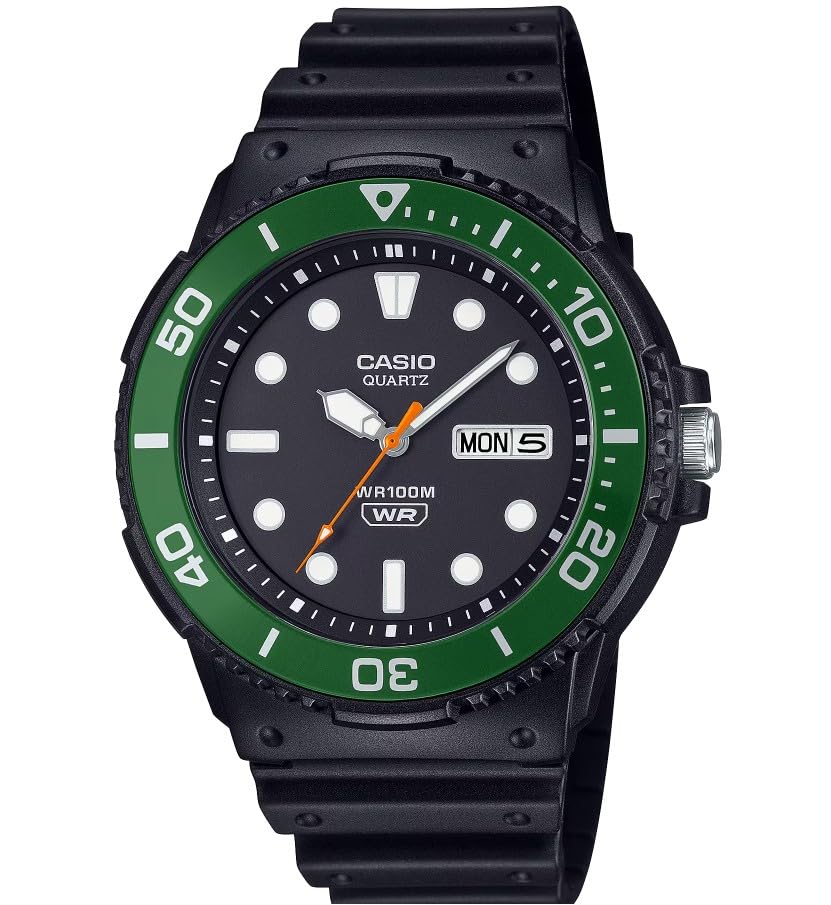
Figure 1: Front view of the Casio MRW-230H Series watch, highlighting the dial, hands, day-date display, and rotating bezel.
3. Setup and Time Adjustment
Follow these steps to set the time, day, and date on your watch.
3.1 Setting the Time
- Pull the crown out to the second click (position 2). The second hand will stop.
- Rotate the crown to move the hour and minute hands to the desired time. Ensure the AM/PM setting is correct if your watch has a 24-hour indicator or if you are setting the day/date.
- Push the crown back in to the normal position (position 0). The second hand will resume movement.
3.2 Setting the Day and Date
- Pull the crown out to the first click (position 1).
- Rotate the crown clockwise to adjust the date.
- Rotate the crown counter-clockwise to adjust the day of the week.
- Once the correct day and date are displayed, push the crown back in to the normal position (position 0).
Note: Avoid setting the date between 9:00 PM and 4:00 AM, as this may interfere with the automatic date change mechanism. If you need to set the date during this period, first set the time outside this range, adjust the date, then reset the time.
4. Operating the Watch
4.1 Using the Rotating Bezel
The rotating bezel can be used to measure elapsed time. This is useful for activities like timing a dive, a cooking process, or a workout.
- Align the "0" mark on the bezel with the minute hand at the start of the event you wish to time.
- As time passes, the minute hand will move. Read the elapsed time by noting the number on the bezel that the minute hand points to.
Note: The bezel on this model is unidirectional, meaning it only rotates in one direction (typically counter-clockwise) to prevent accidental changes that would indicate less elapsed time than actual.
4.2 Water Resistance
Your Casio MRW-230H watch is rated for 100-meter (10 BAR) water resistance. This means it is suitable for everyday use, swimming, and snorkeling. It is not suitable for scuba diving or high-impact water sports.
- Do not operate the crown or any buttons while the watch is wet or submerged.
- Avoid exposing the watch to hot water, such as in showers or saunas, as this can compromise the water seals.
- After exposure to saltwater, rinse the watch thoroughly with fresh water and dry it with a soft cloth.
5. Maintenance
Proper maintenance will help ensure the longevity and performance of your watch.
5.1 Cleaning
- Wipe the watch case and band with a soft, dry cloth regularly to remove dirt and moisture.
- For resin bands, you can use a mild soap solution and a soft brush, then rinse thoroughly with fresh water and dry completely.
- Avoid using harsh chemicals, solvents, or abrasive cleaners, as these can damage the watch's finish and materials.
5.2 Battery Replacement
The watch is powered by a single nonstandard battery with an approximate lifespan of 3 years. When the battery runs low, the watch may lose accuracy or stop functioning.
- Battery replacement should be performed by a qualified watch technician to ensure the water resistance seal is properly maintained.
- Attempting to replace the battery yourself may void the warranty and compromise the watch's water resistance.
6. Troubleshooting
If you encounter issues with your watch, refer to the following common problems and solutions.
| Problem | Possible Cause | Solution |
|---|---|---|
| Watch stops or loses time. | Low battery. | Have the battery replaced by a professional. |
| Date changes at noon instead of midnight. | AM/PM setting incorrect during time adjustment. | Advance the time by 12 hours. |
| Water inside the watch or fogging. | Compromised water resistance seal or crown not fully pushed in. | Immediately take the watch to a service center. Avoid further water exposure. |
7. Specifications
| Feature | Detail |
|---|---|
| Model Number | MRW-230H-1E3VCF |
| Movement | Quartz |
| Water Resistance | 100 Meters (10 BAR) |
| Case Material | Resin |
| Band Material | Resin |
| Case Diameter | 44.6 millimeters |
| Case Thickness | 12.3 millimeters |
| Dial Window Material | Resin |
| Display Type | Analog |
| Clasp Type | Buckle |
| Battery Life | Approx. 3 years |
| Item Weight | 5 ounces |
8. Warranty and Support
Your Casio MRW-230H watch is covered by a manufacturer's warranty. For specific warranty details and to make a request, please contact Casio customer service or refer to the warranty information provided with your purchase.
For further assistance, technical support, or service inquiries, please visit the official Casio website or contact their customer support channels.
Online Support: www.casio.com/support


