
BaldrTherm HCS015ARF-V2/HCS0565ARF-V4/HWG023WBRF-V2
BaldrTherm Smart Pool Thermometer with WiFi Gateway Instruction Manual
Model: HCS015ARF-V2/HCS0565ARF-V4/HWG023WBRF-V2
Introduction
The BaldrTherm Smart Pool Thermometer with WiFi Gateway provides accurate and convenient remote monitoring of water temperature in various aquatic environments. This manual will guide you through the setup, operation, and maintenance of your new device to ensure optimal performance.
What's in the Box
- Smart Pool Thermometer (Floating Sensor)
- WiFi Gateway (Mini Box Hub)
- Indoor Monitor Display
- USB Power Cable for Gateway
- Instruction Manual

Image: The complete BaldrTherm Smart Pool Thermometer kit, showing the floating sensor, indoor monitor, and WiFi gateway.
Setup
1. Install Batteries
Insert batteries into the Indoor Monitor Display first (2*AA batteries, not included). Ensure the signal indicator is blinking. Then, insert batteries into the Floating Pool Sensor (3*AAA batteries, not included). The temperature will display on the monitor once connected.

Image: Step 1 - Insert batteries into the monitor. Make sure the signal indicator is blinking.

Image: Step 2 - Install batteries into the pool sensor. The temperature will display on the monitor once connected.
2. Connect to App (HomGar)
Download the HomGar app from your device's app store. Log in to the app and start adding the hub. Plug in the WiFi Gateway (Mini Box Hub) and hold the button until the blue light starts blinking. Follow the in-app instructions to complete the hub setup. Finally, add the Indoor Monitor Display to the hub in the app to complete all connections.

Image: Step 3 - Log in to the HomGar app and start adding the hub.

Image: Step 4 - Plug in the hub and hold the button until the blue light starts blinking. Follow the app instructions to complete the hub setup.

Image: Step 5 - Hold the hub connection button on the back of the monitor until the signal indicator blinks.

Image: Step 6 - Add the monitor to the hub in the app to complete all connections.
Operating Instructions
Reading Temperature
The floating sensor features a 360° reading design with three large screens, allowing you to easily read the water temperature from any angle. The indoor monitor displays both pool temperature and ambient indoor temperature/humidity.
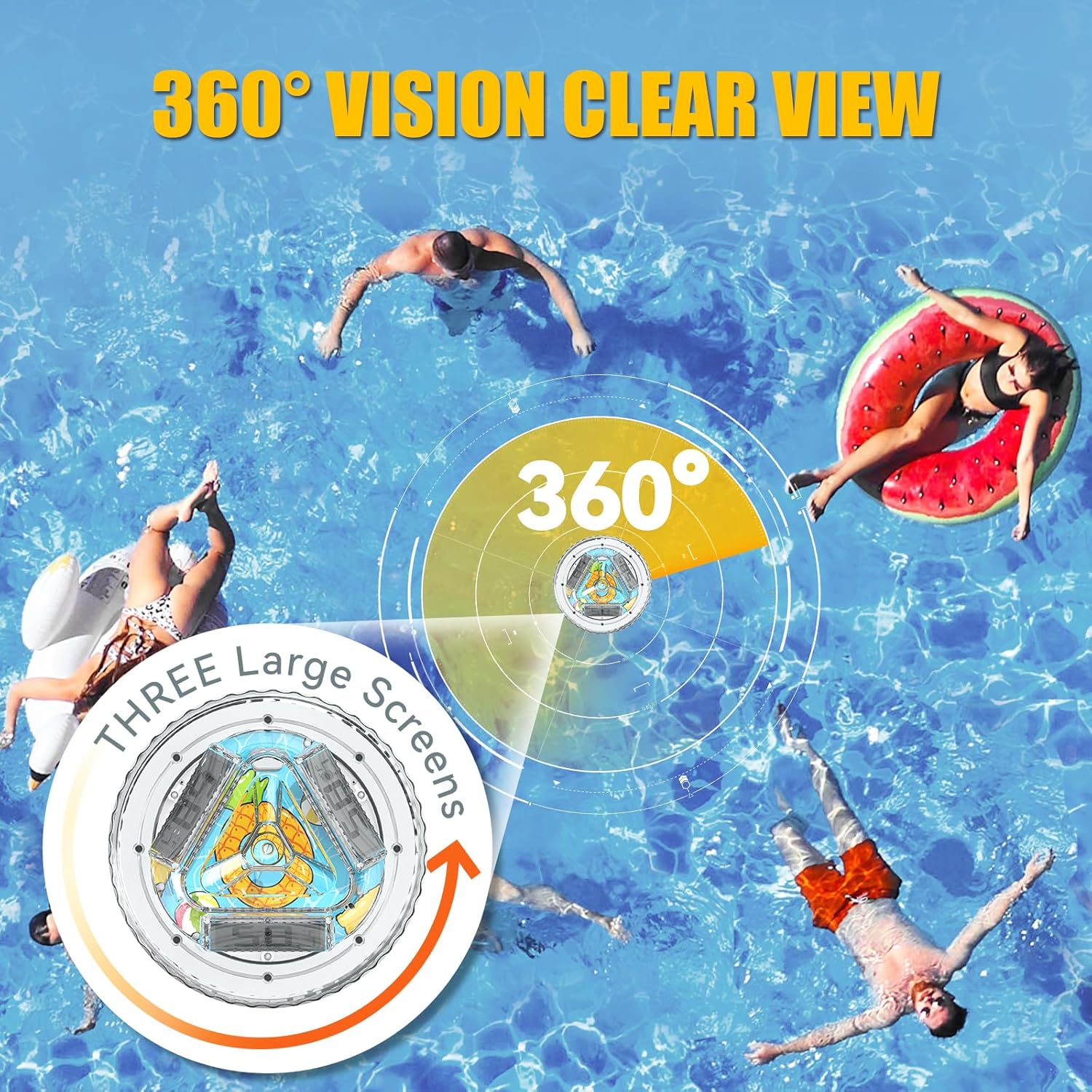
Image: The floating sensor provides a 360° clear view of the temperature display.

Image: The indoor monitor features a large display screen for easy readability of pool temperature, indoor temperature, and humidity.
Remote Monitoring & Alerts
With the connected WiFi Gateway, you can monitor water temperature data in real-time from anywhere using the HomGar App. Set custom temperature ranges, and receive instant alarm notifications on your app if the temperature exceeds or falls below your set limits. The system offers a long transmission distance of up to 330 feet (100 meters).

Image: App monitoring allows you to track temperature trends anytime, anywhere.

Image: The system supports 330ft remote monitoring, allowing you to check the pool temperature from inside your home.
Video: An official product video demonstrating the smart pool thermometer's features, including app connectivity and temperature monitoring.
Temperature Accuracy & Updates
The thermometer uses high-precision sensors for accurate and reliable data (Accuracy: ±1°F/°C). Data is automatically updated every 5 seconds, ensuring you stay informed about temperature changes. You can also switch between Celsius and Fahrenheit readings on the device.

Image: The thermometer features an ultra-precision temperature sensor for fast and accurate readings.
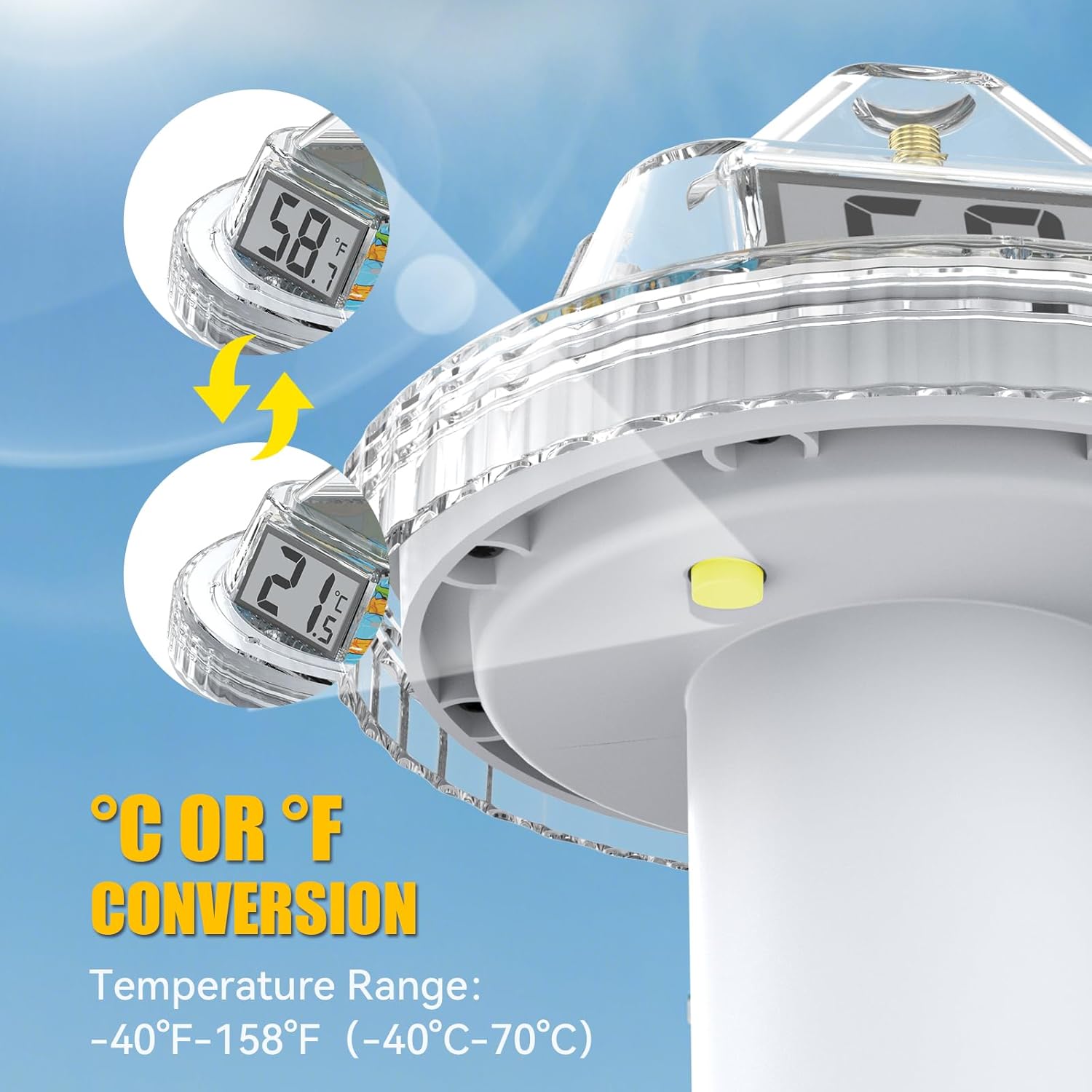
Image: Easily convert between Celsius and Fahrenheit readings on the device.
Data Storage & Export
The BaldrTherm pool temperature monitor supports online viewing of 30-day data graphs and allows for the export of data recorded over the past 2 years, useful for tracking long-term trends.
Multi-Scenario Applications
This thermometer is ideal for a variety of water bodies, including swimming pools, paddling pools, hot tubs, fish ponds, jacuzzis, spas, and aquariums.

Image: The thermometer is suitable for various aquatic environments such as pools, hot tubs, and aquariums.
Maintenance
Waterproofing & Anti-Fog Design
The digital swimming pool thermometer features an IPX7 waterproof rating with a fully sealed, double-layer waterproof structure using waterproof rings and ultrasonic technology. This design prevents water vapor from entering the interior, ensuring accurate readings and preventing fogging even when immersed in water.

Image: The IPX7 waterproof and anti-fog design ensures clear readings and durability.
Battery Replacement
When the low battery indicator appears on the indoor monitor, replace the batteries in both the monitor and the floating sensor as described in the Setup section. Ensure the battery compartments are securely closed after replacement to maintain waterproofing.
Troubleshooting
| Issue | Possible Cause | Solution |
|---|---|---|
| No temperature reading on monitor. | Batteries not installed or low; sensor not paired. | Install/replace batteries in both units. Re-pair the sensor and monitor as per setup instructions. |
| WiFi Gateway not connecting to app. | Incorrect WiFi password; 2.4GHz network required; out of range. | Ensure correct WiFi password. Confirm your network is 2.4GHz. Move gateway closer to router. |
| Inaccurate temperature readings. | Sensor not fully submerged; sensor placed in direct sunlight for prolonged periods; sensor malfunction. | Ensure sensor is fully submerged. Place sensor in a shaded area if possible. Contact support if issue persists. |
| Floating sensor does not float properly. | Possible manufacturing defect or water ingress. | Ensure battery compartment is sealed correctly. If issue persists, contact customer support for warranty claim. |
Specifications
- Brand: BaldrTherm
- Model Number: HCS015ARF-V2/HCS0565ARF-V4/HWG023WBRF-V2
- Material: Acrylonitrile Butadiene Styrene
- Display Type: Digital
- Connectivity Technology: Wi-Fi (2.4GHz network only)
- Temperature Accuracy: ±1°F/°C
- Data Update Frequency: Every 5 seconds
- Waterproof Rating: IPX7
- Transmission Range: Up to 330ft (100m)
- Power Source (Monitor): 2*AA Batteries (not included)
- Power Source (Sensor): 3*AAA Batteries (not included)
- Data Storage: 30-day in-app graphs, 2-year exportable data
Warranty and Support
BaldrTherm offers an extensive 3-year warranty for this product. Each package includes a detailed instruction manual for guidance. For any inquiries or assistance, our 24/7 online support team is ready to help. Please refer to the contact information provided in your product packaging or visit the official BaldrTherm website for support details.
Ask a question about this manual
Ask about setup, troubleshooting, compatibility, parts, safety, or missing instructions. Manuals+ will review the question and use this page’s manual context to help answer it.