
AC Infinity AC-SLS3
AC Infinity Soil Sensor Probe User Manual
Model: AC-SLS3
Introduction
The AC Infinity Soil Sensor Probe (Model: AC-SLS3) is designed to provide precise monitoring of soil moisture and saturation levels. This sensor integrates exclusively with AC Infinity AI Controllers, enabling advanced environmental control and data tracking via the AC Infinity app. Its robust construction and thoughtful design ensure reliable performance in various growing environments, from gardens to grow tents.

Figure 1: AC Infinity Soil Sensor Probe, showing its main body and detachable stem.
Key Features
- Exclusive Compatibility: Designed specifically for seamless integration with AC Infinity AI Controllers.
- Moisture & Saturation Monitoring: Accurately detects and tracks soil moisture and saturation levels.
- App Integration: Enables advanced controls, data logging, and alerts through the AC Infinity mobile application via Wi-Fi.
- Detachable Stem: Features a detachable stem for secure and deeper sensor placement, ensuring accurate readings.
- IP67 Rated: Provides sealed protection against liquids and dirt, ensuring durability in damp soil conditions.
- Root-Friendly Design: Probe crafted to be gentle on plant roots, suitable for various growing mediums including soil and potting mixes.
- Durable Construction: Made with corrosion-resistant fiberglass for long-lasting use.

Figure 2: The soil sensor provides precise measurements that can be tracked via the AC Infinity app.
Setup Instructions
- Unpack the Sensor: Carefully remove the AC Infinity Soil Sensor Probe from its packaging.
- Attach Detachable Stem (Optional): For deeper soil penetration and more stable placement, attach the detachable stem to the main sensor body. Ensure it clicks securely into place.
- Connect to AI Controller: Plug the sensor's UIS cord into an available UIS port on your AC Infinity AI Controller. Ensure the connection is firm.
- Placement in Soil:
- Gently insert the sensor probe into the soil or growing medium at the desired depth. The sensor is designed to be gentle on roots.
- For optimal readings, ensure the sensor's measurement prongs are fully submerged in the soil.
- Avoid placing the sensor directly against the pot wall or in areas with excessive air pockets.
- Controller Configuration: Refer to your AC Infinity AI Controller's manual for specific instructions on how to configure the soil sensor input and set desired moisture thresholds.
- App Pairing: If not already done, pair your AI Controller with the AC Infinity mobile app to enable remote monitoring and control of soil moisture data.
Note: Only one soil sensor may be used per AI controller at a time. If you need to monitor multiple locations, use sensor splitters (sold separately) to pair additional sensors.
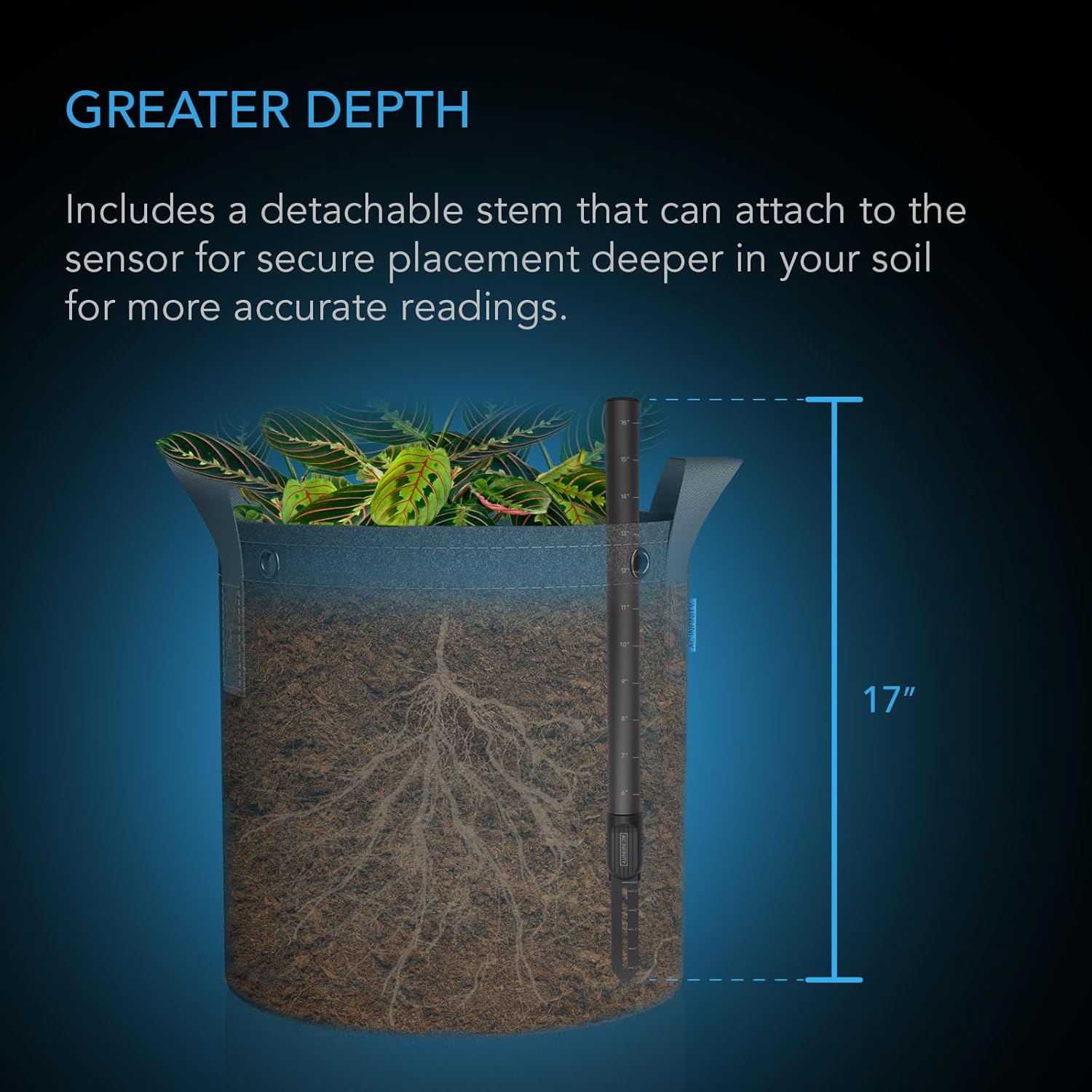
Figure 3: The detachable stem allows for deeper and more secure placement of the sensor in various growing containers.
Operating Instructions
Once the AC Infinity Soil Sensor Probe is connected and configured with your AI Controller, it will begin to monitor soil moisture and saturation levels. The data will be displayed on your controller's screen and accessible through the AC Infinity app.
- Monitoring Data: View real-time soil moisture and saturation readings directly on your AI Controller or through the AC Infinity app. The app provides historical data and trends.
- Setting Automation Triggers: Utilize the AI Controller's programming features to set automated actions based on soil moisture levels. For example, you can configure the controller to activate a watering device when moisture drops below a certain threshold.
- Receiving Alerts: Configure the AC Infinity app to send push notifications or email alerts when soil moisture levels reach critical high or low points, or when automated actions are triggered.
- Adjusting Thresholds: Periodically review and adjust your desired moisture thresholds based on plant needs, growth stage, and environmental conditions.

Figure 4: The sensor's design is gentle on roots, allowing for safe placement near plants.
Maintenance
Proper maintenance ensures the longevity and accuracy of your AC Infinity Soil Sensor Probe.
- Regular Cleaning: Periodically remove the sensor from the soil and gently wipe the probe prongs with a soft, damp cloth to remove any accumulated soil or debris. Avoid abrasive materials.
- Inspect for Damage: Before re-inserting, inspect the sensor and its cable for any signs of physical damage, wear, or corrosion.
- Storage: When not in use, store the sensor in a clean, dry place away from extreme temperatures and direct sunlight.
- Avoid Harsh Chemicals: Do not use harsh chemicals or solvents to clean the sensor, as this may damage the materials or affect its calibration.
Troubleshooting
| Problem | Possible Cause | Solution |
|---|---|---|
| Sensor not detected by controller. | Loose connection; faulty cable; controller port issue. | Ensure the UIS cable is securely plugged into the controller. Try a different UIS port if available. Inspect the cable for damage. |
| Inaccurate moisture readings. | Sensor not fully submerged; air pockets around probe; dirty probe; sensor calibration issue. | Re-insert the sensor ensuring the prongs are fully in contact with the soil. Gently compact soil around the probe. Clean the probe prongs. Consult your AI Controller manual for calibration options. |
| App not showing sensor data. | Controller not connected to Wi-Fi; app not synced; outdated app version. | Verify your AI Controller's Wi-Fi connection. Ensure the app is updated to the latest version. Try restarting the app or controller. |
| Automated actions not triggering. | Incorrect threshold settings; device not connected to controller; sensor reading outside trigger range. | Review and adjust the trigger thresholds in your AI Controller settings. Ensure the device to be controlled (e.g., pump) is properly connected and functional. Check current sensor readings. |
If you continue to experience issues, please refer to the comprehensive troubleshooting guide in your AC Infinity AI Controller manual or contact AC Infinity customer support.
Specifications
| Attribute | Detail |
|---|---|
| Model | AC-SLS3 |
| Detection | Soil Moisture & Saturation |
| Sensor Material | Fiberglass |
| Waterproof Rating | IP67 |
| Refresh Rate | 1 second |
| Accuracy | ±5% |
| Product Dimensions (Sensor only) | 5.15" (13.1 cm) height x Ø0.94" (2.4 cm) diameter |
| Product Dimensions (with short stem) | 11.92" (30.3 cm) height x Ø0.94" (2.4 cm) diameter |
| Product Dimensions (with long stem) | 17.07" (43.4 cm) height x Ø0.94" (2.4 cm) diameter |
| UIS Cord Length | 12' (144") |
| Item Weight | 6.4 ounces |
| Manufacturer | AC Infinity |
| Country of Origin | China |
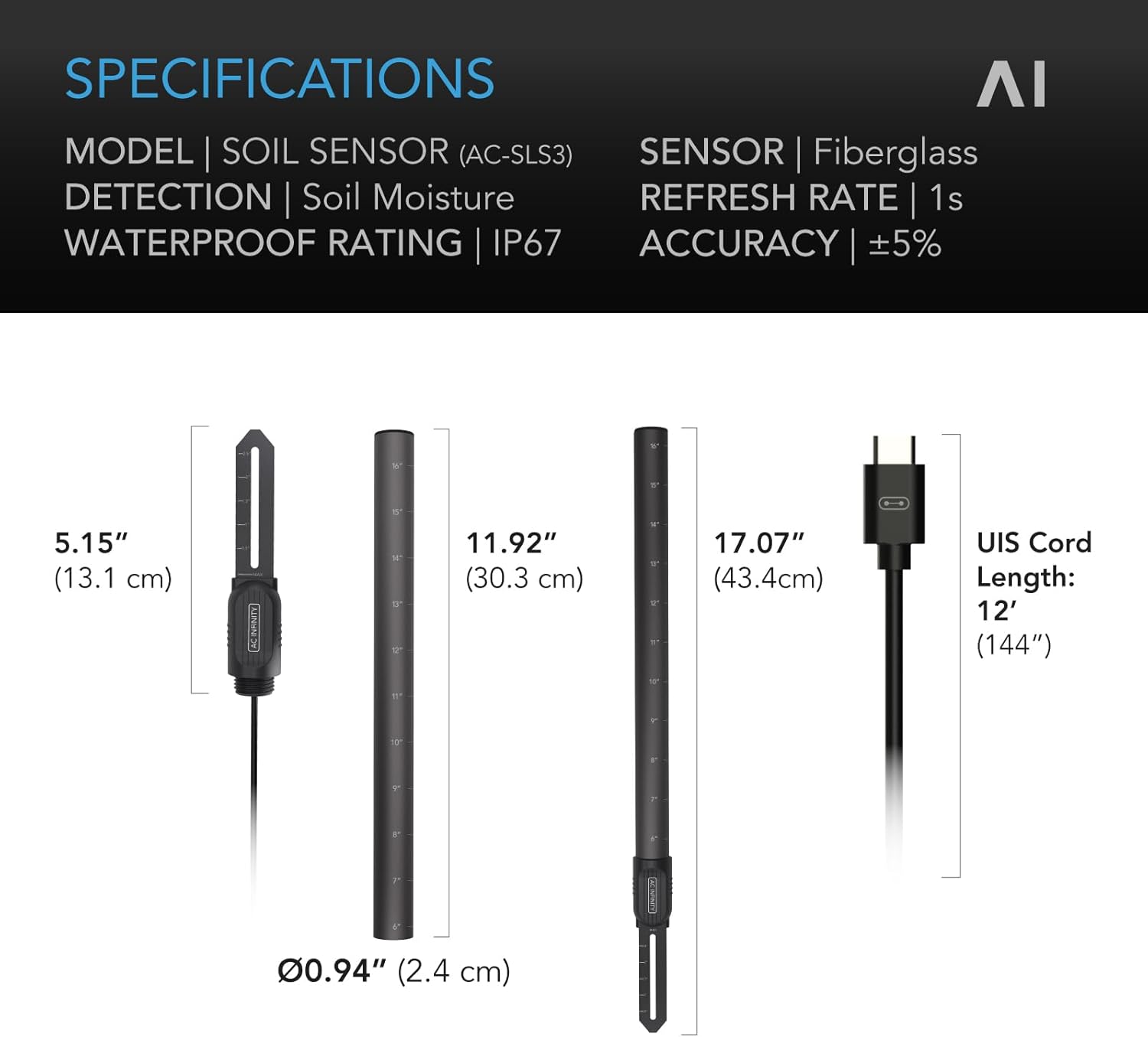
Figure 5: Detailed dimensions and specifications of the AC Infinity Soil Sensor Probe.
Warranty and Support
AC Infinity products are designed for reliability and performance. For information regarding product warranty, please refer to the warranty policy provided with your original purchase or visit the official AC Infinity website.
For technical support, troubleshooting assistance, or any inquiries regarding your AC Infinity Soil Sensor Probe, please contact AC Infinity Customer Support:
- Website: www.acinfinity.com/support/
- Email: Refer to the AC Infinity website for current support email addresses.
- Phone: Refer to the AC Infinity website for current support phone numbers.
When contacting support, please have your product model number (AC-SLS3) and purchase information readily available.
Related documentsAC-SLS3

Ask a question about this manual
Ask about setup, troubleshooting, compatibility, parts, safety, or missing instructions. Manuals+ will review the question and use this page’s manual context to help answer it.