
Introduction
Thank you for choosing the EUQQ Open Ear Bluetooth 5.4 Earbuds. These innovative headphones are designed to provide a comfortable, stable, and high-quality audio experience while maintaining situational awareness. Featuring an open-ear design, Bluetooth 5.4 connectivity, and a long-lasting battery, they are ideal for sports, work, and daily use. This manual will guide you through the setup, operation, maintenance, and troubleshooting of your new earbuds.

Image: The EUQQ Open Ear Bluetooth 5.4 Earbuds, showcasing their sleek design and the compact charging case.
What's in the Box
Please check the contents of your package to ensure all items are present:
- EUQQ Open Ear Headphones (Left and Right)
- Charging Case
- USB Type-C Charging Cable
- User Manual (this document)
- Product Box

Image: A visual representation of all items included in the EUQQ Open Ear Earbuds package.
Setup
1. Initial Charging
Before first use, fully charge the earbuds and the charging case. Connect the provided USB Type-C charging cable to the charging port on the case and a power source. The LED digital display on the charging case will indicate the battery level. A full charge takes approximately 1.5 hours.

Image: The charging case displaying battery levels for both the case and individual earbuds.
2. Pairing with Your Device
- Open the charging case. The earbuds will automatically enter pairing mode.
- On your device (smartphone, tablet, computer), enable Bluetooth.
- Search for available Bluetooth devices and select "YYK-Q16" from the list.
- Once connected, you will hear a confirmation sound, and the earbuds will be ready for use.
The earbuds support multi-point connection, allowing seamless transmission between two connected devices.

Image: Illustration showing the wide compatibility of the earbuds with notebooks, desktops, watches, TVs, phones, and tablets.
3. Wearing the Earbuds
The EUQQ Open Ear Earbuds feature an ergonomic hook design for secure and comfortable wear.
- Take the earbuds out of the charging case.
- Hang the end of the earphone hook over your ear bone.
- Turn the earphone body and slide it behind your ear.
- Adjust the ear hook and gently pull down to ensure a secure and comfortable fit.
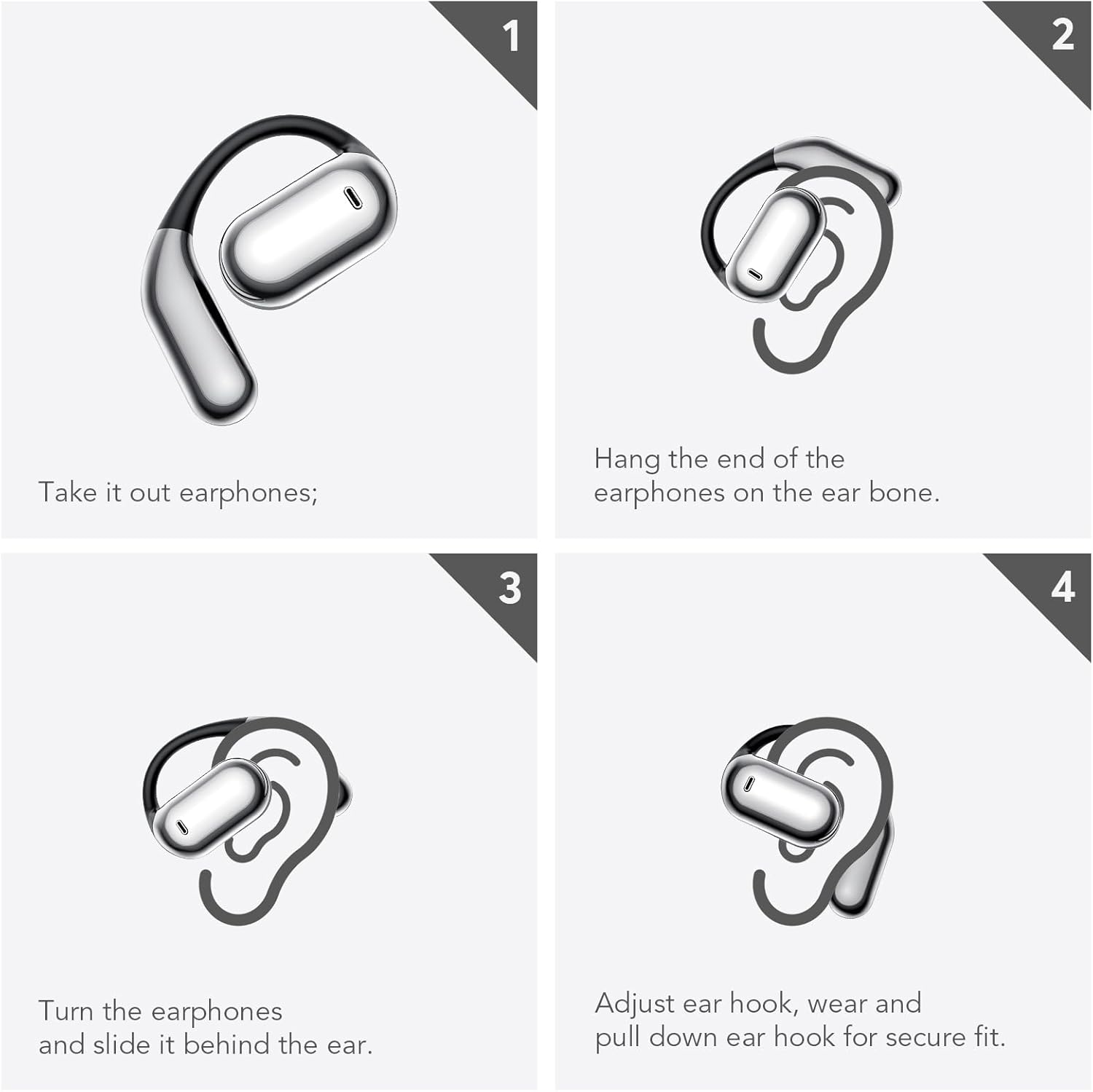
Image: A step-by-step guide demonstrating the correct way to wear the open-ear headphones.
Operating Instructions
The EUQQ Open Ear Earbuds are equipped with intuitive touch controls on each earbud. Refer to the diagram below for specific functions:

Image: A comprehensive diagram illustrating the touch control functions for music playback, calls, and voice assistant.
Music Playback
- Play/Pause: Single tap on either L or R earbud.
- Volume +: Double tap on the Right earbud.
- Volume -: Double tap on the Left earbud.
- Next Song: Long press (1s) on the Right earbud.
- Previous Song: Long press (1s) on the Left earbud.
Call Management
- Answer Call: Single tap on either L or R earbud.
- Reject Call/Hang Up: Long press (1s) on either L or R earbud.
Voice Assistant
- Activate Siri/Voice Assistant: Triple tap on either L or R earbud.
Reset Earbuds
To reset the earbuds, disconnect them from your phone. Then, quickly press the left and right buttons 5 times simultaneously.
Maintenance
Cleaning
Regular cleaning helps maintain the performance and longevity of your earbuds.
- Wipe the earbuds and charging case with a soft, dry, lint-free cloth.
- Do not use abrasive cleaners, solvents, or harsh chemicals.
- Ensure charging contacts are clean and free of debris.
Water Resistance (IPX7)
The earbuds are IPX7 waterproof, meaning they can withstand immersion in water up to 1 meter for 30 minutes. However, the charging case is not waterproof. Do not expose the charging case to water or moisture.
- Do not charge the earbuds if they are wet. Ensure they are completely dry before placing them back in the charging case.
- Avoid using the earbuds in saltwater or chlorinated water.
Storage
When not in use, store the earbuds in their charging case to protect them and keep them charged. Store in a cool, dry place away from extreme temperatures.
Troubleshooting
If you encounter any issues with your EUQQ Open Ear Earbuds, please refer to the following common solutions:
| Problem | Possible Cause | Solution |
|---|---|---|
| Earbuds not pairing | Bluetooth is off; earbuds not in pairing mode; previously paired with another device. | Ensure Bluetooth is on. Place earbuds in case, close, then open to re-enter pairing mode. Forget device on your phone and re-pair. Try resetting the earbuds (see Operating Instructions). |
| No sound from one earbud | Low battery; earbud not connected; mono mode enabled. | Charge both earbuds. Re-pair the earbuds. Check your device's audio settings to ensure stereo output. |
| Charging case not charging | Cable issue; power source issue; dirty charging port. | Try a different USB-C cable and power adapter. Ensure the charging port is clean and free of debris. |
| Low volume or poor sound quality | Earbuds not positioned correctly; device volume too low; dirty speaker mesh. | Adjust earbuds for a better fit. Increase volume on your device. Gently clean the speaker mesh. |
| Earbuds frequently disconnect | Out of Bluetooth range; interference; low battery. | Stay within 15 meters of your device. Avoid strong electromagnetic interference. Charge earbuds fully. |
Specifications
| Feature | Detail |
|---|---|
| Model Name | YYK-Q16-Black |
| Connectivity Technology | Wireless (Bluetooth 5.4) |
| Bluetooth Range | Up to 15 meters |
| Earbud Battery Life | Up to 10 hours (single charge) |
| Total Playtime (with case) | Up to 50 hours |
| Charging Time | Approx. 1.5 hours (for case) |
| Water Resistance | IPX7 (earbuds only) |
| Control Type | Touch Control |
| Audio Driver Type | Bone Conduction Driver (Note: Product features an open-ear design for situational awareness) |
| Frequency Range | 20 Hz - 20,000 Hz |
| Material | Plastic, Soft Silicone |
| Earbud Weight | Approx. 0.25 oz (per earbud) |
| Package Dimensions | 6.02 x 4.09 x 1.18 inches |
Warranty and Support
For warranty information and customer support, please refer to the documentation included with your purchase or contact EUQQ customer service directly. You can often find support contact details on the official EUQQ website or through the retailer where you purchased the product.
Please retain your proof of purchase for any warranty claims.

