1. Safety Information
This product is CE/FCC safety certified and suitable for individuals over 8 years old. It features no sharp edges. Always supervise children under 12 years old during use. Keep the product away from naked flames or direct heat sources. The blade tip is not intended for eye contact.
2. Package Contents
The package includes the following items:
- 1 x Lightsaber Hilt
- 1 x PC Blade (82cm/32in)
- 1 x Type-C Charging Cable
- 1 x Instruction Manual
- 1 x Allen Key
- 4 x Screws

Image: Illustration of the ZHUO HAO lightsaber package contents, showing the hilt, blade, charging cable, instruction manual, Allen key, and screws.
3. Setup and Charging
3.1. Blade Assembly
- Insert the PC blade into the emitter opening of the metal hilt.
- Locate the two small screws on the hilt near the emitter.
- Use the provided Allen key to gently tighten these screws until the blade is securely held in place. Do not overtighten to avoid damaging the blade.
3.2. Initial Charging
Before first use, fully charge the lightsaber. The lightsaber features a 2000mAh battery with charge and discharge protection.
- Unscrew the bottom part of the hilt to reveal the battery compartment and the USB-C charging port.
- Connect the Type-C charging cable to the port.
- Plug the other end of the cable into a suitable USB power source.
- The lightsaber will automatically stop charging when the battery is full (approximately 2 hours for a full charge, providing about 4 hours of use).
- Once charged, disconnect the cable and re-secure the bottom part of the hilt.
Video: Demonstrates the assembly and charging process of the ZHUO HAO lightsaber, including how to access the USB-C port and secure the blade.

Image: Detailed view of the lightsaber hilt's internal components, highlighting the 2000mAh battery, RGB chip, and porous design for enhanced sound.
4. Operating Instructions
4.1. Power On/Off
- To power on: Press and hold the main button on the hilt. The blade will illuminate and emit a power-on sound.
- To power off: Press and hold the main button again. The blade will retract and emit a power-off sound.
4.2. Color Changes
The lightsaber features 12 infinite color changes.
- While powered on, short press the main button to cycle through the available colors.
4.3. Sound Fonts and Volume
The lightsaber includes 16 cinematic sound fonts and 3 levels of volume adjustment (high, low, mute).
- To change sound fonts: While powered on, perform a quick twist of the hilt when the hilt is downward.
- To adjust volume: Consult the detailed instructions in the included manual for specific button combinations for volume control.
4.4. Motion Control Functions
The lightsaber is equipped with sensitive smooth swing and motion control features.
- Smooth Swing: The sound effects will change dynamically with the amplitude of your swing.
- Flash on Clash (FOC): The lightsaber will change color and emit a sound effect upon impact.
- Blaster Deflection: When wielding the lightsaber in the dark, it can stun and deflect blaster fire.
- Lock-up: Specific motion or button combinations can activate a lock-up effect. Refer to the manual for details.
- Motion Control for On/Off: Simple operation gestures can achieve all functions. For example, a quick twist to change sound font or play background music (BGM).
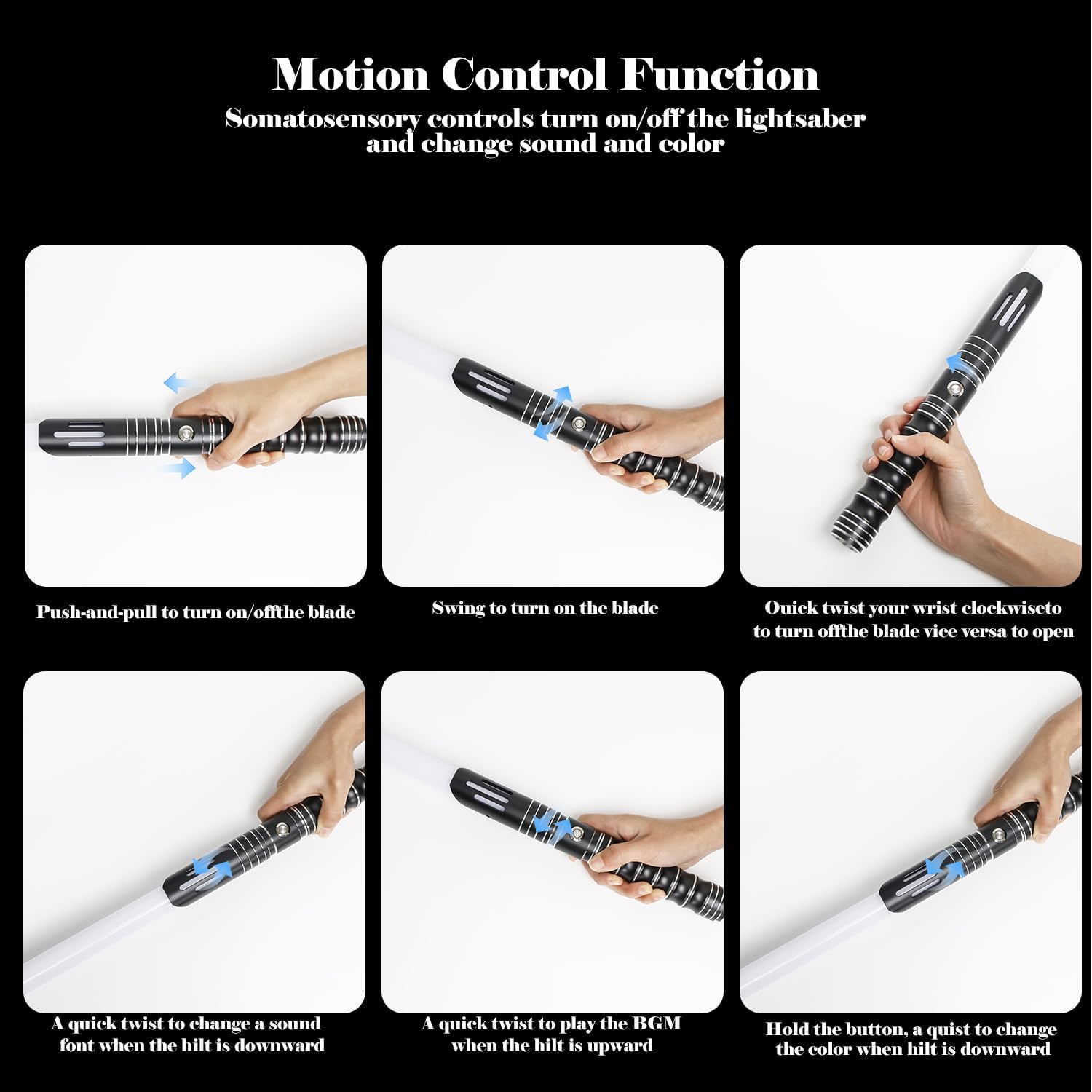
Image: Visual guide illustrating different motion control gestures for operating the lightsaber, including turning on/off, changing sound fonts, and playing BGM.
Video: Demonstrates the lightsaber's sound effects, color changes, and motion-activated features in action.
5. Maintenance
5.1. Cleaning
Wipe the lightsaber hilt and blade with a soft, dry cloth. Avoid using abrasive cleaners or solvents that could damage the finish or electronic components.
5.2. Storage
Store the lightsaber in a cool, dry place away from direct sunlight and extreme temperatures. If storing for an extended period, ensure the battery is partially charged (around 50%) to prolong its lifespan.
5.3. Battery Care
The 2000mAh battery is designed for durability. Avoid fully discharging the battery frequently. Recharge promptly when the lightsaber indicates low power. The built-in charge protection prevents overcharging.
6. Troubleshooting
- Lightsaber not turning on: Ensure the battery is fully charged. Check if the battery is properly seated in its compartment.
- No sound or low volume: Check the volume settings. Refer to the manual for specific instructions on adjusting volume or switching sound fonts.
- Blade is dim or flickering: Ensure the battery is fully charged. If the issue persists, ensure the blade is securely attached and the screws are tightened.
- Motion control not responding: Ensure the lightsaber is fully charged. Recalibrate motion control if necessary (refer to the full manual for advanced settings).
7. Specifications
- Hilt Material: Metal Aluminum
- Blade Material: High-impact, high-transparency PC (Polycarbonate)
- Blade Length: 82cm / 32 inches
- Blade Diameter: 1 inch
- Total Product Dimensions: 40.6 x 1.8 x 1.79 inches
- Item Weight: 1.5 pounds
- Battery Capacity: 2000mAh (Nonstandard Battery)
- Charging Time: Approximately 2 hours
- Usage Time: Approximately 4 hours
- Color Changes: 12 infinite RGB colors
- Sound Fonts: 16 cinematic sound fonts
- Features: Sensitive Smooth Swing, Flash on Clash (FOC), Lock-up, Blaster, Motion Control, 3 Volume Levels (high, low, mute), 3 BGM sets.
- Recommended Age: 8 years and up (Manufacturer recommended age: 12 months - 4 years, but product description states 8+ for safety).
- Safety Certifications: CE/FCC
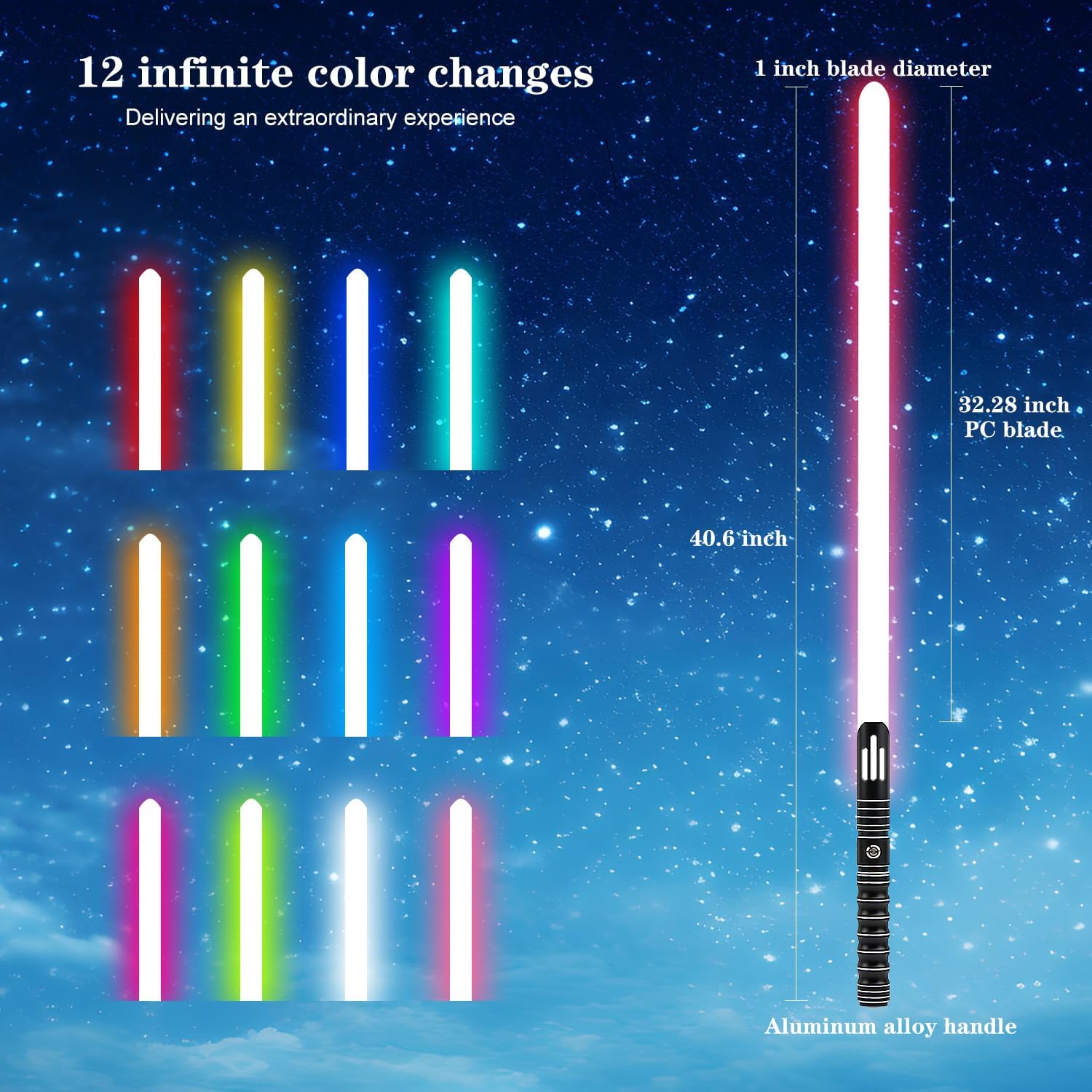
Image: Visual representation of the lightsaber's dimensions (40.6 inches total length, 32.28 inch PC blade, 1 inch blade diameter) and a display of 12 infinite color options.

Image: Comparative chart highlighting the advantages of the ZHUO HAO lightsaber, including heavier weight (300g), standard hilt ports for replaceable blades, and a sturdy 1-inch blade diameter.
8. Warranty and Support
For warranty information, technical support, or any inquiries regarding your ZHUO HAO lightsaber, please contact the seller directly through your purchase platform. Keep your proof of purchase for any warranty claims.


