Introduction
This manual provides detailed instructions for the safe and effective use of your Monster Open Ear AC326 Headphones. Please read this guide thoroughly before operating the device and retain it for future reference.
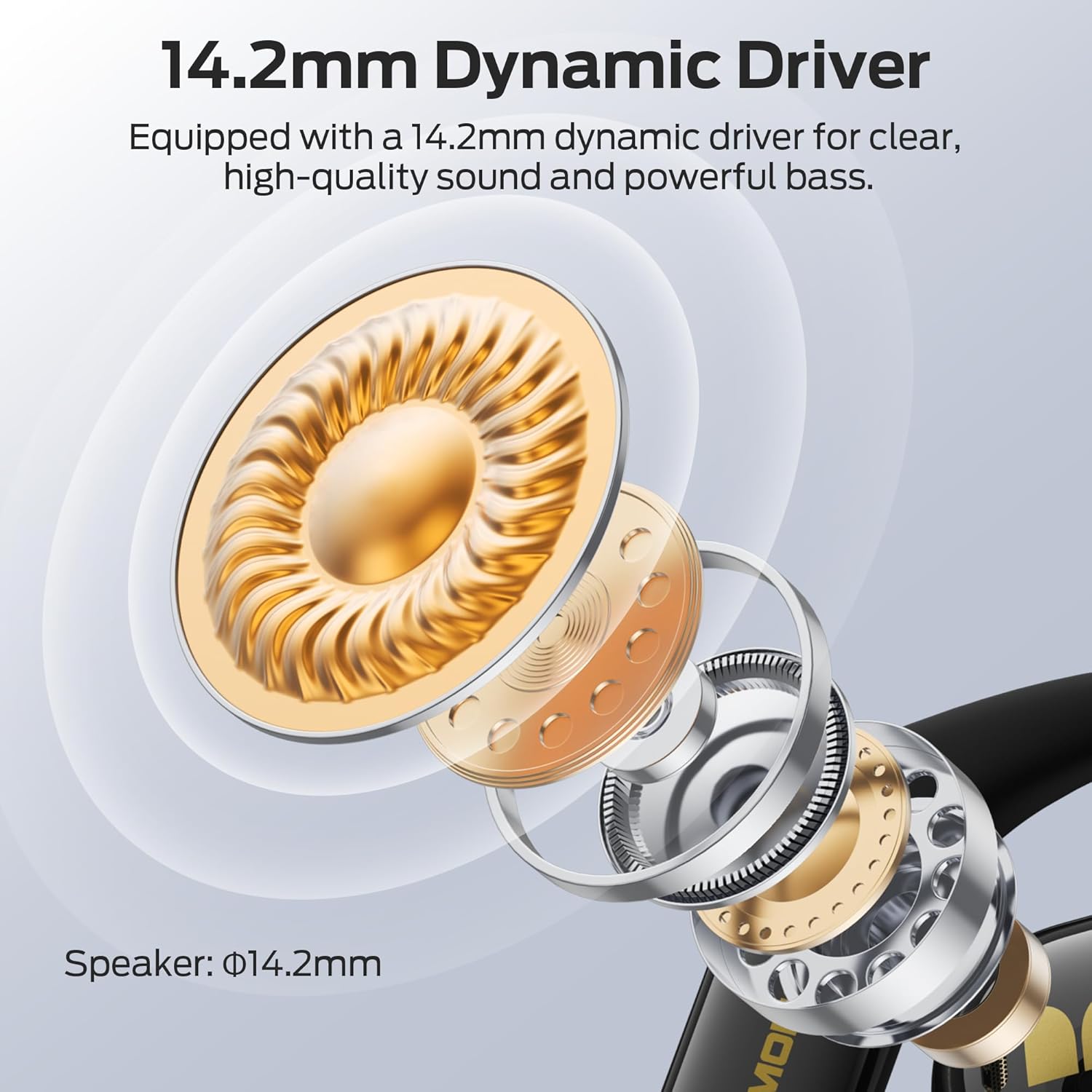
Image: Monster Open Ear AC326 Headphones shown in their charging case.
Key Features
- Open-Ear Design: Maintains situational awareness by allowing you to hear your surroundings while enjoying audio.
- Premium Sound Quality: Equipped with a 14.2mm dynamic driver for clear audio, deep bass, and crisp highs. Features dual noise-reducing microphones for clear calls.
- Advanced Bluetooth 6.0: Ensures fast, stable connections with ultra-low latency for seamless audio streaming and calls.
- Comfortable & Secure Fit: Ergonomic ear hooks and soft silicone material provide a stable, pressure-free fit suitable for extended wear and sports.
- Long Battery Life: Up to 10 hours of playtime per charge, extended to 35 hours with the charging case.
- IPX5 Water Resistance: Designed to withstand sweat and light rain, making them suitable for workouts and outdoor activities.
- Spatial Audio: Experience immersive sound with 3D six-axis head tracking and spatial audio output.

Image: Diagram highlighting the open-ear design, allowing users to remain aware of their surroundings.
What's in the Box
Upon unpacking, please ensure all items are present:
- Wireless Earbuds x2 (Left and Right)
- Charging Case x1
- Charging Cable x1
- Product Manual x1 (This document)
- Spare Silicone Tips x1 (Note: The product description mentions ear tips, but the AC326 is an open-ear design. This might refer to ear hook adjustments or a general inclusion for other models. Please verify if physical ear tips are included.)

Image: Visual representation of the items included in the product packaging.
Setup Instructions
1. Initial Charge
Before first use, fully charge the headphones and charging case. Connect the provided USB-C cable to the charging port on the case and a power source. The indicator lights on the case will show charging status.

Image: The charging case and earbuds, illustrating battery life and Bluetooth version.
2. Wearing the Headphones
- Take out the earbuds from the charging case.
- Place the ear hooks over your ears.
- Rotate the earbuds backward until they fit snugly and comfortably. Adjust the ear hooks for optimal fit and sound direction.

Image: Step-by-step guide on correctly placing the earbuds over the ear for a secure fit.

Image: The flexible ear hook design ensures a secure and stable fit, ideal for sports and active use.
3. Bluetooth Pairing
- Open the charging case. The earbuds will automatically enter pairing mode (indicator lights will flash).
- On your device (smartphone, tablet, etc.), go to Bluetooth settings.
- Select "Monster AC326" from the list of available devices.
- Once connected, you will hear a confirmation tone, and the indicator lights will stop flashing.
Operating Instructions
The Monster AC326 Headphones feature touch controls on each earbud. The functions can be customized via the companion app.
Touch Controls Overview:
- Long press for 2s (L/R): Reject calls.
- Long press for 3s (R): Activate Voice Assistant.
- Long press for 3s (L): Toggle Spatial Audio.
- Short press (L): Volume -.
- Short press (R): Volume +.
- Double click (L/R): Play/Pause music, Answer/End Call.
- Triple click (L): Previous song.
- Triple click (R): Next song.

Image: Visual guide to the various touch controls available on the earbuds.
Music Playback:
- To play or pause music, double-click either earbud.
- To skip to the next track, triple-click the right earbud.
- To go to the previous track, triple-click the left earbud.
- Adjust volume with a short press on the left (down) or right (up) earbud.
Call Management:
- To answer or end a call, double-click either earbud.
- To reject an incoming call, long press either earbud for 2 seconds.

Image: The dual-mic ENC technology ensures clear calls by reducing ambient noise.
Maintenance
Cleaning:
- Regularly clean the earbuds and charging case with a soft, dry, lint-free cloth.
- Avoid using abrasive materials, solvents, or chemical cleaners.
- Ensure charging contacts on both earbuds and case are clean and dry for proper charging.
Water Resistance (IPX5):
The headphones are IPX5 water-resistant, meaning they can withstand splashes of water and sweat. They are not designed for submersion in water. Ensure the earbuds are completely dry before placing them back in the charging case to prevent damage.

Image: The earbuds are shown with water droplets, indicating their IPX5 water-resistant rating.
Troubleshooting
No Sound or Intermittent Connection:
- Ensure both earbuds are charged.
- Verify Bluetooth is enabled on your device and the headphones are connected.
- Move closer to your device to avoid interference.
- Try unpairing and re-pairing the headphones with your device.
Earbuds Not Charging:
- Check if the charging cable is securely connected to both the case and the power source.
- Ensure the charging contacts on the earbuds and inside the case are clean and free of debris.
- Confirm the earbuds are correctly seated in the charging case.
Poor Call Quality:
- Ensure the microphones are not obstructed.
- Move to a quieter environment if experiencing excessive background noise.
- Check your device's call volume settings.
Specifications
| Brand | Monster |
| Model Name | E69 (AC326) |
| Form Factor | Open Ear |
| Connectivity Technology | Wireless (Bluetooth 6.0) |
| Wireless Communication Technology | Bluetooth |
| Water Resistance Level | IPX5 Water Resistant |
| Item Weight | 6.4 ounces |
| Package Dimensions | 5.08 x 4.57 x 1.54 inches |
| Batteries | 1 A batteries required (included) |
| Date First Available | February 19, 2025 |
Warranty and Support
For warranty information and customer support, please refer to the official Monster website or contact their customer service directly. Details can typically be found on the product packaging or the manufacturer's official online resources.


