
Introduction and Product Overview
This manual provides essential information for the safe and efficient use of your LUMISOL Twin XL Murphy Bed with Desk, LED Light, and USB Charging Station. This innovative furniture piece is designed to maximize space in guest rooms, home offices, or any area requiring versatile functionality. It seamlessly transitions from a compact cabinet with a desk to a comfortable Twin XL bed, offering both utility and comfort.
Key features include a built-in desk, integrated LED lighting with three color options (yellow, white, light blue), and a convenient dual power/USB module for charging devices. Constructed from solid pine wood and commercial-grade MDF, this Murphy bed is built for stability and durability.

Figure 1: The LUMISOL Twin XL Murphy Bed in its closed, cabinet configuration, ready for use as a desk or compact furniture piece.
Important Safety Information
Please read and understand all safety warnings and instructions before assembly and use. Failure to follow these instructions can result in serious injury or property damage.
- Wall Anchoring: Always secure the Murphy bed to a sturdy wall using the provided hardware. This is critical to prevent tip-over, which can cause severe or fatal injuries. If you are unsure about wall types or anchoring methods, consult a qualified professional.
- Weight Capacity: Do not exceed the maximum weight capacity of 500 lbs (227 kg) for the bed. Overloading can compromise the structural integrity and lead to collapse.
- Assembly: Assembly must be performed by at least two adults. Follow the detailed assembly instructions carefully, step by step. Ensure all fasteners are securely tightened before use.
- Clearance: Ensure adequate clearance around the bed when opening and closing. Keep children and pets away from the unit during operation.
- Electrical Safety: When using the integrated power/USB module, ensure the power cord is not pinched or damaged. Do not overload the outlets. Disconnect power before cleaning or maintenance of electrical components.
- Mattress Compatibility: Use a mattress with a recommended thickness of 8-10 inches. Using an incompatible mattress may affect the bed's operation and storage.
Setup and Assembly
The LUMISOL Twin XL Murphy Bed is designed for straightforward assembly. All necessary tools and components are included. Please ensure you have sufficient space for assembly and refer to the detailed assembly instructions provided in the packaging for step-by-step guidance.
Pre-Assembly Checklist:
- Verify all parts are present against the component list in the separate assembly guide.
- Ensure you have a clear, spacious area for assembly.
- Have a second person available to assist with lifting and securing components.
- Identify the wall where the bed will be anchored and ensure it is structurally sound.
Assembly Steps Overview:
- Unpack all components and lay them out, verifying against the parts list.
- Assemble the main cabinet frame according to the provided diagrams.
- Install the bed frame mechanism and slats into the cabinet.
- Attach the desk and shelving components.
- Install the LED lighting and connect the USB/power module.
- Crucially, secure the assembled unit to the wall using the anti-tip hardware.
- Place your Twin XL mattress (8-10 inches thick) into the bed frame.

Figure 2: Internal view of the bed mechanism, illustrating the robust support structure.
Operating Instructions
Converting from Desk to Bed:
- Clear any items from the desk surface. The desk is designed to remain level as the bed is lowered, but heavy or unstable items should be removed.
- Locate the handles or release mechanism on the front of the cabinet.
- Gently pull the bed frame downwards. The hydraulic mechanism will assist in a smooth, controlled descent.
- Extend the support legs at the foot of the bed to ensure stability.
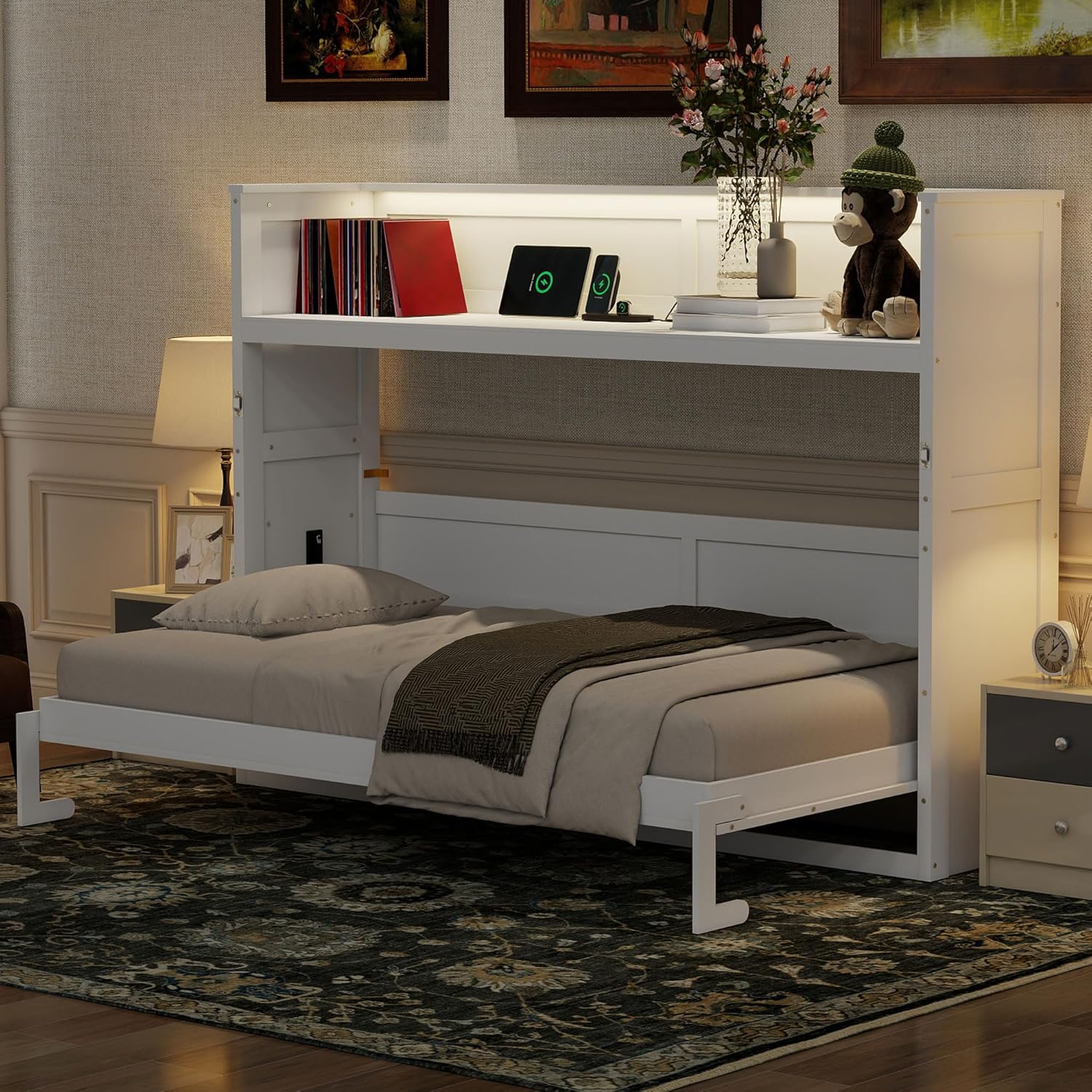
Figure 3: The Murphy Bed in its fully extended position, ready for use.
Converting from Bed to Desk:
- Ensure no items are on the bed that would obstruct its closure.
- Fold the support legs back into their stored position.
- Grasp the bed frame and gently lift it upwards. The hydraulic mechanism will assist in a smooth, controlled ascent until it locks into the cabinet position.

Figure 4: The Murphy Bed in its closed position, functioning as a desk and cabinet.
Using the LED Light:
The integrated LED light is located above the desk/bed area. It offers three color temperatures: yellow, white, and light blue. A touch-sensitive switch or button controls the light. Tap to cycle through colors and long-press to adjust brightness (if applicable).

Figure 5: Detail of the integrated LED lighting and power module.
Using the USB Charging Station and Power Outlets:
The dual power/USB module provides convenient access to power for your devices. Simply plug your phone, tablet, or other electronics into the USB ports or standard AC outlets. Ensure the bed is connected to a wall power source for these features to function.

Figure 6: Detail of the dual power and USB charging station.
Maintenance
Regular maintenance will help prolong the life and functionality of your Murphy bed.
- Cleaning: Wipe surfaces with a soft, damp cloth. Avoid harsh chemicals or abrasive cleaners, which can damage the finish. For the electrical components, ensure they are unplugged before cleaning.
- Hardware Check: Periodically check all screws and fasteners to ensure they remain tight. Re-tighten if necessary.
- Mechanism Inspection: Occasionally inspect the bed's opening and closing mechanism for any signs of wear or obstruction. Keep the area around the moving parts clear of debris.
- Mattress Care: Follow your mattress manufacturer's care instructions.
Troubleshooting
If you encounter any issues with your LUMISOL Murphy Bed, refer to the following common problems and solutions:
| Problem | Possible Cause | Solution |
|---|---|---|
| Bed does not open/close smoothly. | Obstruction, loose hardware, or uneven installation. | Check for any items blocking the mechanism. Ensure all assembly hardware is tightened. Verify the unit is level and securely anchored to the wall. |
| LED light not working. | Power not connected, loose wiring, or faulty switch. | Ensure the bed's power cord is plugged into a working outlet. Check for any visible loose connections. If the issue persists, contact customer support. |
| USB ports/outlets not charging. | Power not connected, device compatibility, or module issue. | Verify the bed is plugged in. Test with a different device or cable. Ensure the device is compatible with USB charging. |
| Bed feels unstable. | Not properly anchored to the wall, support legs not extended, or loose fasteners. | Immediately re-check wall anchoring. Ensure support legs are fully extended when the bed is open. Tighten all assembly fasteners. |
Specifications
| Feature | Detail |
|---|---|
| Product Type | Murphy Bed with Desk |
| Material | Pine Wood + MDF |
| Size | Twin XL |
| Color | White |
| Overall Product Dimensions (Closed) | 88.2''L x 19.1''W x 57.4''H |
| Bed Dimension (Open) | 81.1''L x 39''W (for mattress) |
| Recommended Mattress Thickness | 8-10 inches |
| Bed Weight Capacity | 500 lbs (227 kg) |
| Assembly Required | Yes |
| Origin | Vietnam |
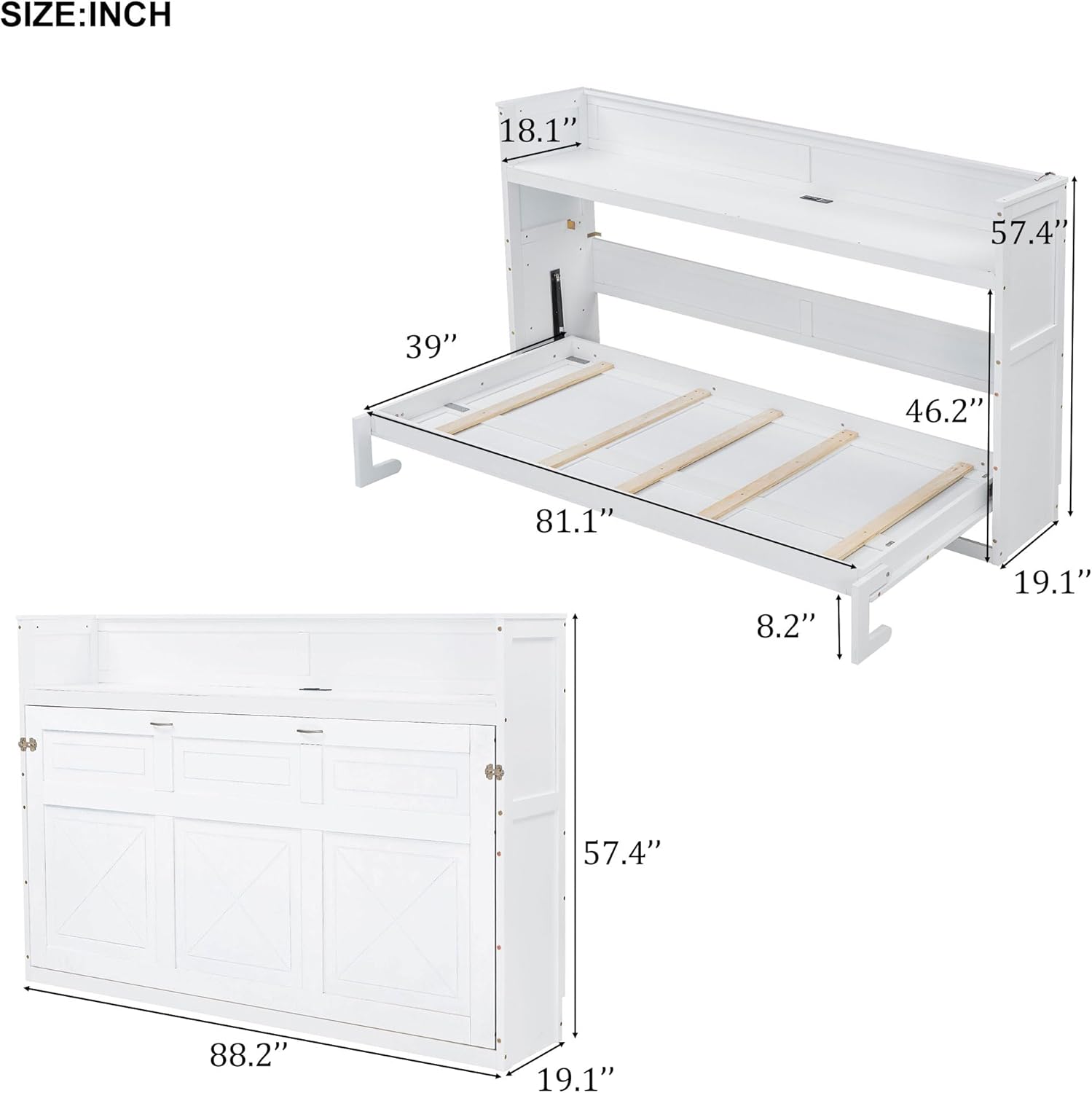
Figure 7: Detailed dimensions of the Murphy Bed.
Warranty and Customer Support
For information regarding warranty coverage, please refer to the warranty card included with your product packaging or contact the retailer where you purchased the LUMISOL Twin XL Murphy Bed. Warranty terms and conditions may vary.
If you require assistance with assembly, have questions about product operation, or need to report a missing/damaged part, please contact LUMISOL customer support through the contact information provided by your retailer or on the manufacturer's official website.
Please have your model number (Twin XL Murphy Bed) and purchase date ready when contacting support.