
usmile C10
usmile C10 Portable Water Flosser Instruction Manual
Model: C10
Brand: usmile
Introduction
The usmile C10 Portable Water Flosser is designed to enhance your daily oral hygiene routine. This travel-friendly device features advanced pulse water stream technology, offering superior cleaning for teeth, braces, implants, and sensitive gums. With multiple customizable modes and a long-lasting battery, the C10 provides a convenient and effective solution for a healthier smile.
Important Safety Instructions
- Do not charge the device while wet.
- Keep away from children.
- Do not use with certain medical conditions without consulting a professional.
- Always follow the instructions provided with the device.
- Charge only in a cool, dry place away from heat sources.
- Avoid overcharging.
- When plugging or unplugging the cable, handle it gently and make sure the charging port is completely dry with the waterproof cover securely closed.
Package Contents
Verify all items are present in the box:
- usmile C10 Portable Water Flosser x 1
- Standard Nozzle x 1
- Orthodontic Nozzle x 1
- Guidance Tip Nozzle x 1
- Nozzle Storage Case x 1
- Charging Cable x 1

Product Overview & Features
Key Features at a Glance

4 Customizable Cleaning Modes
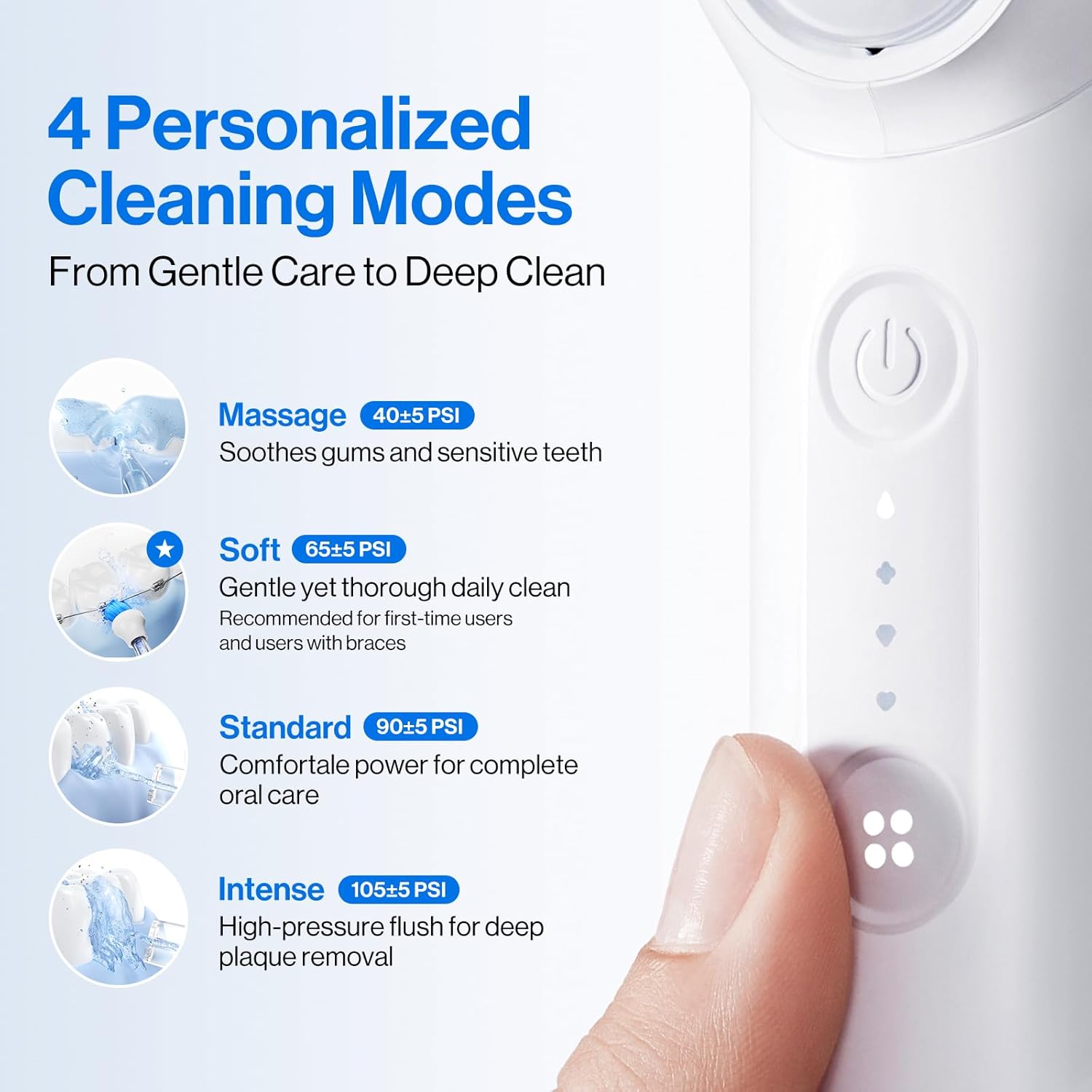
The usmile C10 offers four distinct water pressure modes to cater to various oral care needs:
- Massage Mode (40±5 PSI): Soothes gums and sensitive teeth.
- Soft Mode (65±5 PSI): Gentle yet thorough daily clean, recommended for first-time users and those with braces.
- Standard Mode (90±5 PSI): Comfortable power for complete oral care.
- Intense Mode (105±5 PSI): High-pressure flush for deep plaque removal.
Specialty Nozzles
The device comes with three specialty tips to address different cleaning requirements:
- Guidance Tip: Targets teeth gaps with precision.
- Orthodontic Tip: Flushes debris around braces and wires.
- Standard Tip: Powerful everyday clean.

Ultra-Portable Design
The usmile C10 is designed for convenience and travel. Its lightweight and collapsible structure makes it ideal for on-the-go use.
- 95-Day Battery Life: Enjoy extended use without frequent charging.
- IPX7 Waterproof: Safe for use in the shower and easy to clean.
- 180ml Tank: Sufficient capacity for a complete cleaning session.


Setup
- Insert a Tip: Gently insert your desired nozzle tip into the top of the flosser until it clicks into place.
- Fill the Reservoir: Pull out the handle to detach the water tank. Fill the 180ml tank with warm water. You can also open the top lid for faster refills without detaching the tank.
- Reattach Tank: Securely reattach the water tank to the main unit.
- Charge the Device: If needed, charge the device using the provided USB-C cable. The charging port is located under a waterproof cover.

Operating Instructions
- Select a Mode: Press the Mode button to cycle through the 4 water pressure modes (Massage, Soft, Standard, Intense) until your desired setting is indicated by the LED lights.
- Position the Nozzle: Place the 360° nozzle in your mouth, tilting your head back slightly. Partially close your lips to prevent splashing.
- Start Flossing: Press the Power button to turn on the device and begin flossing.
- Guide the Stream: Maneuver the nozzle along your teeth and gums, pausing briefly between each tooth.
- Finish: After use, press the Power button again to turn off the device.
Official Product Video: Introducing the usmile C10 Portable Water Flosser
Maintenance
- Daily Cleaning: After each use, clean the nozzle and empty the water tank. Rinse both thoroughly with clean water.
- Regular Cleaning: For optimal results, perform a mid-level clean weekly using a mild cleaning solution or a water and vinegar mix.
- Storage: Store the device in a cool, dry place. You can store the nozzles inside the flosser or in the dedicated nozzle case.
- Nozzle Replacement: For optimal hygiene and performance, replace the nozzle every 3-6 months.
Troubleshooting
- No Water Flow: Ensure the water tank is properly filled and securely attached. Check if the nozzle is correctly inserted.
- Weak Water Pressure: Verify the device is fully charged. Select a higher mode setting if desired.
- Device Not Turning On: Ensure the device is charged. Press the power button firmly.
- Leaking: Check that the water tank is properly sealed and the charging port cover is securely closed.
Product Specifications
| Feature | Detail |
|---|---|
| Product Dimensions | 1.75 x 5.78 x 2.85 inches; 1.37 Pounds |
| Model Name | C10 Portable Oral Irrigator |
| Water Tank Volume | 180 Milliliters |
| Battery Life | Up to 95 days |
| Waterproof Rating | IPX7 |
| Power Source | Battery Powered |
| Color | White |
| Material Type | Plastic |
Warranty and Support
Every usmile product comes with a 30-day hassle-free return policy and 1-year after-sale service for worry-free shopping. If you need assistance, please contact us anytime, even after the return window closes.
To Contact Support:
- Log in to Amazon.
- Go to "Your Orders".
- Find your order ID for the usmile C10 Portable Water Flosser.
- Click "Contact Seller".
Related documentsC10


Ask a question about this manual
Ask about setup, troubleshooting, compatibility, parts, safety, or missing instructions. Manuals+ will review the question and use this page’s manual context to help answer it.