
1. Introduction
Thank you for choosing the MELOKEA E060B Ergonomic Office Chair. This manual provides essential information for the safe assembly, operation, and maintenance of your new chair. Please read these instructions carefully before assembly and retain them for future reference. This chair is designed to provide optimal comfort and support, complying with European standards EN 12520 for living room seating furniture.
2. Safety Instructions
- Ensure all components are present and undamaged before assembly. Do not use if any parts are missing or broken.
- Assemble the chair on a soft, clean surface to prevent scratches.
- Do not overtighten screws during assembly, as this may damage components.
- This chair is designed to support a maximum weight of 200 kg (440 lbs). Do not exceed this weight limit.
- Use the chair only for its intended purpose as an office or desk chair.
- Keep children and pets away from the assembly area.
- Regularly check all screws and connections to ensure they remain tight.
- Avoid standing on the chair or using it as a step stool.
3. Package Contents
Please verify that all the following components are included in your package:
- Backrest Assembly
- Seat Cushion Assembly
- Headrest
- Armrests (2)
- Gas Lift Cylinder
- Star Base
- Casters (5)
- Mechanism Plate
- Screw Kit and Allen Wrench
- User Manual
4. Assembly Instructions
Follow these steps to assemble your MELOKEA E060B office chair:
- Attach Casters to Base: Insert the five casters into the holes at the end of each leg of the star base. Push firmly until they click into place.
- Insert Gas Lift: Place the gas lift cylinder into the center hole of the star base.
- Attach Mechanism to Seat: Align the mechanism plate with the screw holes on the underside of the seat cushion. Ensure the front of the mechanism faces the front of the seat. Secure with screws using the provided Allen wrench.
- Attach Armrests to Seat: Attach the armrests to the sides of the seat cushion using the designated screws. Do not fully tighten yet.
- Attach Backrest to Seat/Armrests: Connect the backrest to the seat assembly and armrests. Secure with screws. Once all screws are in place for the backrest and armrests, tighten all screws firmly.
- Attach Headrest: Slide the headrest into the slots at the top of the backrest.
- Connect Seat to Gas Lift: Carefully place the assembled seat and backrest onto the gas lift cylinder, ensuring the center hole of the mechanism plate aligns with the top of the gas lift. Press down firmly to secure.

Figure 1: Overall dimensions and key features of the MELOKEA E060B chair.

Figure 2: High-quality rubber casters for smooth, quiet, and floor-protective movement.
5. Operating Instructions and Adjustments
The MELOKEA E060B chair offers multiple adjustment options for personalized comfort:
- Seat Height Adjustment: Locate the lever on the right side under the seat. To raise the seat, lift the lever while taking your weight off the chair. To lower the seat, lift the lever while seated. The seat height can be adjusted between 48 cm and 59 cm.
- Backrest Tilt and Lock: Use the lever on the left side under the seat to adjust the backrest tilt. Pull the lever out to allow the backrest to recline. Push the lever in to lock the backrest at your desired angle (90°, 110°, 120°, or 130°).
- Backrest Height Adjustment: The backrest can be adjusted vertically by 6 cm. To adjust, lift the backrest to its highest position, and it will automatically return to the lowest position. Repeat until the desired height is reached. This feature is suitable for users between 1.55 m and 2.05 m.
- Seat Depth Adjustment: A lever or button typically located on the side of the seat allows for 4 cm of seat depth adjustment. Slide the seat forward or backward to find your preferred depth.
- 4D Armrest Adjustments: The armrests offer four-dimensional adjustments:
- Height: Press the button on the side of the armrest and move it up or down (7.5 cm range).
- Forward/Backward: Slide the armrest pad forward or backward (5 cm range).
- Sideways: Slide the armrest pad left or right (2 cm range).
- Rotation: Rotate the armrest pad inward or outward (30° range).
- 2D Headrest Adjustment: The headrest can be adjusted vertically by 8 cm and rotated by 90° to support your neck and head.
- Self-Adjusting Lumbar Support: The chair features a self-adjusting lumbar support system that adapts to your lower back curvature for continuous support and pressure relief.

Figure 3: Overview of the 19 individually adjustable modes for personalized comfort.

Figure 4: 6-stage backrest height adjustment for various body sizes.
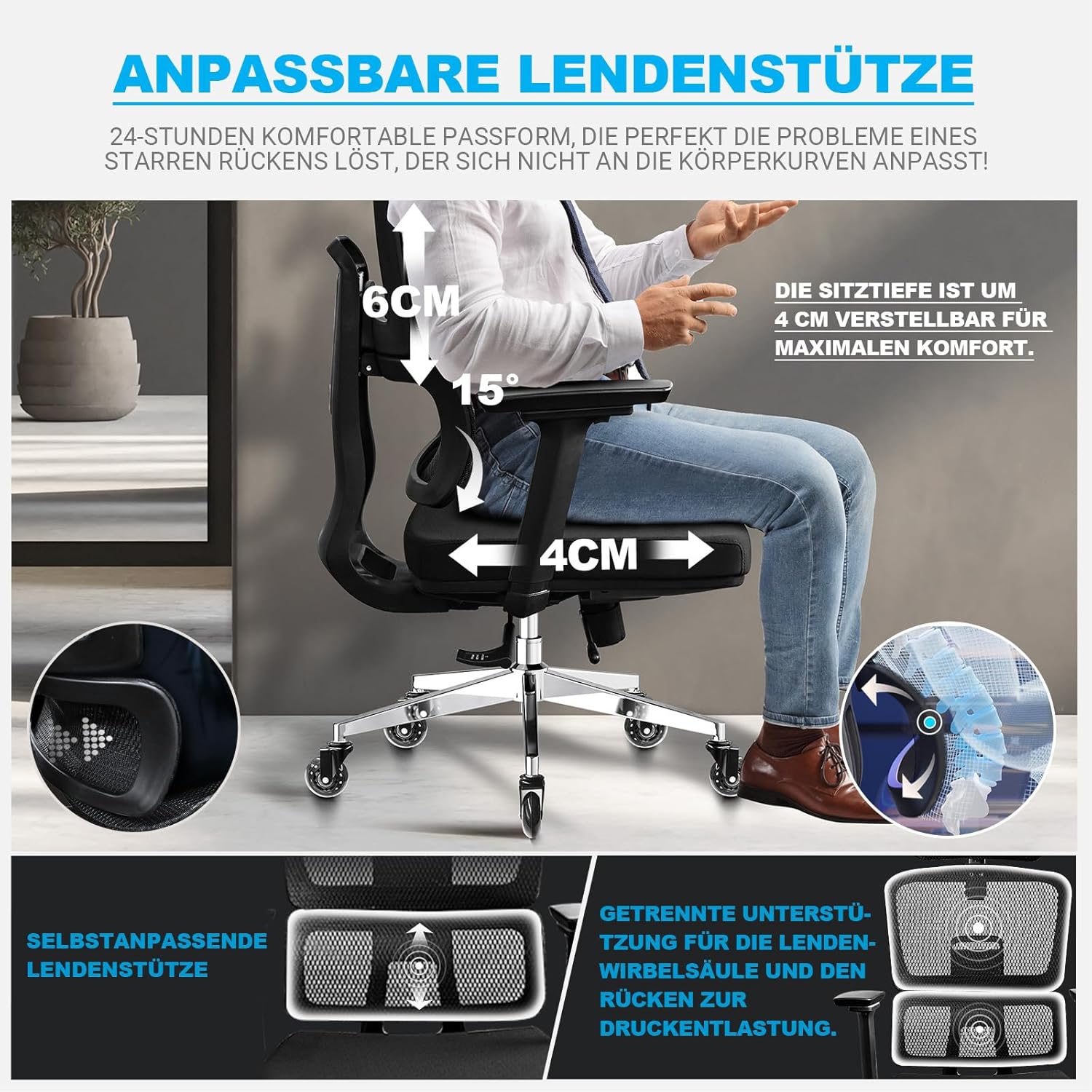
Figure 5: Adjustable lumbar support and 4 cm seat depth adjustment.
6. Maintenance
- Cleaning: Wipe the chair with a soft, damp cloth. For mesh areas, a soft brush can be used. Avoid harsh chemicals or abrasive cleaners.
- Inspection: Periodically check all screws and bolts to ensure they are tight. Retighten if necessary.
- Casters: Keep the casters clean from hair and debris to ensure smooth rolling.
- Gas Lift: Do not attempt to disassemble or repair the gas lift cylinder yourself. Contact customer support if it malfunctions.
7. Troubleshooting
| Problem | Possible Cause | Solution |
|---|---|---|
| Chair wobbles or is unstable | Loose screws or uneven assembly. | Check and tighten all screws. Ensure the chair is on a flat surface. |
| Gas lift not adjusting height | Lever not engaged or gas lift malfunction. | Ensure the lever is fully engaged. If the problem persists, contact customer support. |
| Casters not rolling smoothly | Debris caught in casters or damaged casters. | Remove any hair or debris from the caster wheels. If damaged, consider replacement. |
| Backrest does not lock in position | Tilt lock lever not fully engaged. | Push the tilt lock lever fully inward to engage the locking mechanism. |
8. Specifications
| Feature | Detail |
|---|---|
| Brand | MELOKEA |
| Model Number | E060B |
| Maximum Weight Recommendation | 200 Kilograms (440 lbs) |
| Product Dimensions (D x W x H) | 29.13" x 12.6" x 20.47" (Packaging/Base) |
| Seat Height Adjustment | 48 cm - 59 cm |
| Backrest Height Adjustment | 6 cm vertical adjustment |
| Seat Depth Adjustment | 4 cm adjustment |
| Armrests | 4D Adjustable (Height, Forward/Backward, Sideways, Rotation) |
| Headrest | 2D Adjustable (8 cm height, 90° rotation) |
| Casters | Quiet Rubber Wheels, 360° rotation |
| Gas Lift | SGS Certified |
| Certifications | EN 12520 (European Standard for Household Chairs) |
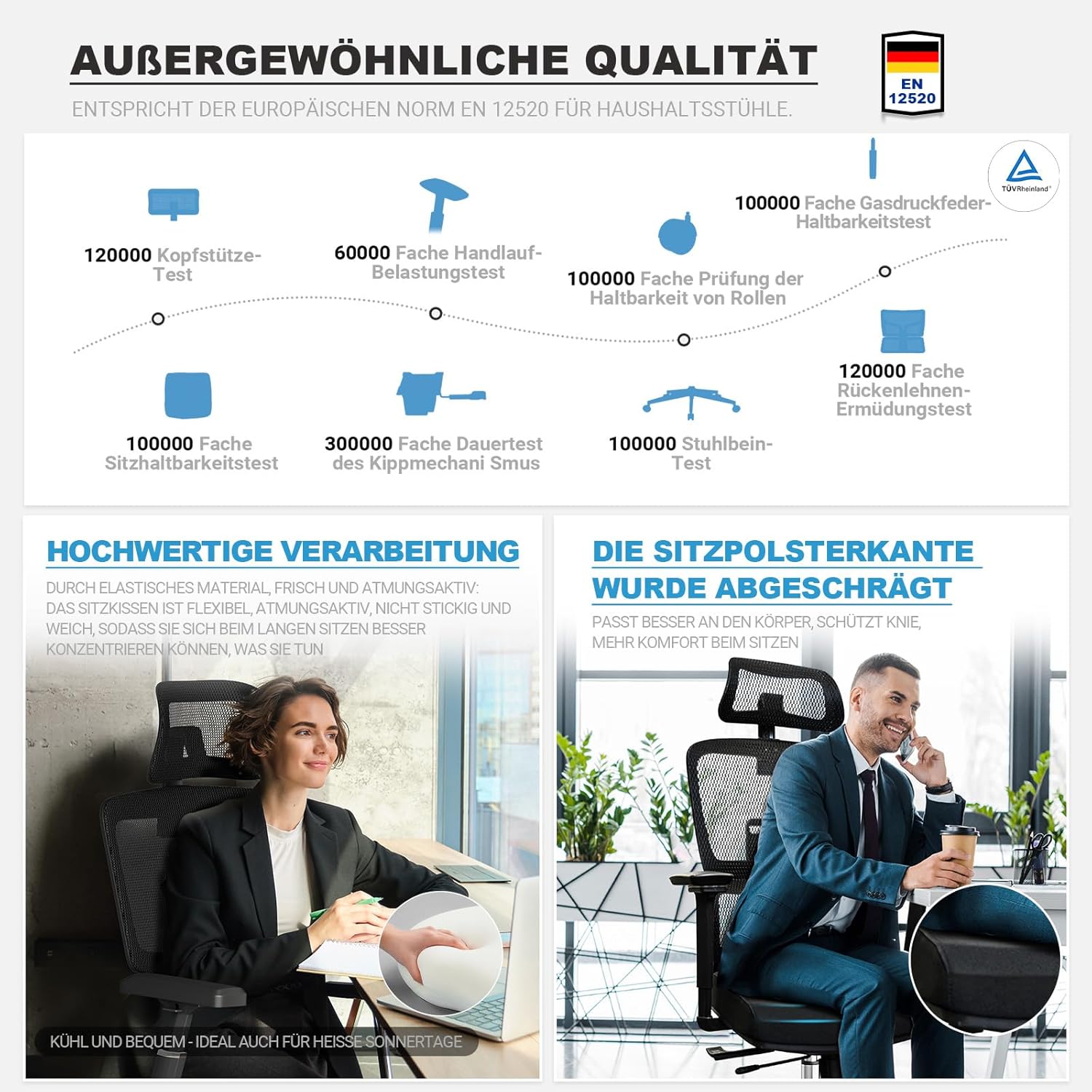
Figure 6: Quality standards and durability tests for the MELOKEA E060B chair.
9. Warranty and Support
MELOKEA offers a 5-year warranty on this product, exceeding industry standards. This warranty covers manufacturing defects and significant malfunctions under normal use.
If you encounter any issues or have questions regarding your MELOKEA E060B office chair, please contact our customer support team. We are committed to finding a satisfactory solution for you.
Contact Information: Please refer to the contact details provided on your purchase receipt or the official MELOKEA website for support.


