
radtel RT-900
Radtel RT-900 8W Multi Band Ham Radio Handheld Walkie Talkie User Manual
Model: RT-900
Introduction
The Radtel RT-900 is an 8W multi-band handheld walkie-talkie designed for clear and reliable communication. It features advanced noise reduction, a large LCD display, and the ability to receive aviation band communications. With 256 channels and flexible programming options, it is suitable for various demanding environments and enthusiast use.
Key features include:
- Flexible Programming: Easily configure via mobile app (iOS/Android), PC CPS software, or CHIRP programming.
- Advanced Noise Reduction: Ensures clear communication even in noisy environments like construction sites or outdoor activities.
- Large LCD Display: Shows channel number, frequency, and names simultaneously for easy navigation.
- Aviation Band Reception: Allows listening to air traffic communications (108-136 MHz).
- Multi-Band Operation: Supports AM: 108-136MHz RX, 144-146Mhz TX/RX, 430-440Mhz TX/RX.
Setup
Unboxing and Components
Upon opening the package, ensure all components are present:
- Radtel RT-900 Radio Unit
- Air Band Flex Antenna (108-136Mhz)
- Charging Cable (Type-C)

Image: The Radtel RT-900 handheld radio shown alongside its programming interface on a smartphone, highlighting its compact design and digital display.
Charging the Battery
The RT-900 features convenient Type-C fast charging. Before first use, fully charge the radio's battery. Connect the Type-C cable to the radio and a compatible USB power source. The charging indicator will show the charging status.

Image: The Radtel RT-900 charging via its Type-C port, demonstrating its compatibility with various power sources like wall adapters, laptops, and car chargers.
Attaching the Antenna
Carefully screw the provided Air Band Flex Antenna onto the antenna connector at the top of the radio until it is finger-tight. Do not overtighten.

Image: The flexible whip antenna, measuring 385mm (15.16 inches), shown with an illustration of its bendable design for durability and portability.
Programming the Radio
The Radtel RT-900 offers multiple programming methods:
- Mobile App: Supports both iOS and Android devices, allowing for convenient on-the-go configuration.
- PC CPS Software: For detailed programming and management of channels and settings via a computer.
- CHIRP Programming: Compatible with CHIRP software for open-source programming flexibility.

Image: The Radtel RT-900's display alongside a smartphone screen, illustrating the user-friendly interface of the mobile programming application for channel and frequency management.
Operating Instructions
Power On/Off and Volume
To power on the radio, rotate the top knob clockwise. Continue rotating to adjust the volume. Rotate counter-clockwise until a click is heard to power off.
Channel Selection and Frequency Mode
Use the up/down arrow buttons to navigate through channels. The large LCD display shows the current channel number, frequency, and channel name. Press the VFO/MR button to switch between Frequency (VFO) mode and Memory (MR) channel mode.
Push-to-Talk (PTT) Button
Press and hold the PTT button on the side of the radio to transmit. Release the button to receive.
Noise Reduction
The RT-900 features advanced noise reduction. This function is automatically active to provide clearer audio in noisy environments. Ensure your microphone is positioned correctly for optimal performance.
Aviation Band Reception
The RT-900 can receive communications on the aviation band (108-136 MHz). To access this, ensure you are in the correct frequency range. This feature is for listening only and does not permit transmission on aviation frequencies.
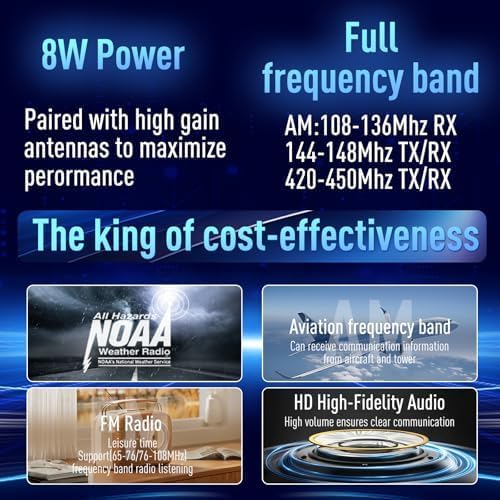
Image: An overview of the Radtel RT-900's capabilities, highlighting its 8W power output, wide frequency coverage, NOAA weather radio support, aviation band reception, FM radio, and high-fidelity audio.
Maintenance
To ensure the longevity and optimal performance of your Radtel RT-900, follow these maintenance guidelines:
- Cleaning: Use a soft, damp cloth to clean the radio's exterior. Do not use harsh chemicals or abrasive cleaners.
- Storage: Store the radio in a cool, dry place away from direct sunlight and extreme temperatures.
- Battery Care: Avoid fully discharging the battery frequently. If storing for extended periods, charge the battery to about 50% capacity.
- Antenna: Handle the antenna with care to prevent bending or damage.
Troubleshooting
| Problem | Possible Cause | Solution |
|---|---|---|
| Radio does not power on | Low battery; Power knob off | Charge the battery; Rotate power knob clockwise |
| Cannot transmit or receive | Incorrect frequency/channel; Antenna not attached; Battery low | Verify channel/frequency settings; Attach antenna securely; Charge battery |
| Poor audio quality | Weak signal; Obstructions; Volume too low/high | Move to an open area; Adjust volume; Check noise reduction settings |
| Programming issues | Incorrect software/driver; Cable connection issue | Ensure correct software version; Check USB cable connection; Consult programming guide |
Specifications
| Feature | Detail |
|---|---|
| Brand | radtel |
| Model Number | 7a1a4e93-0512-45f3-8aec-ed8d1c6f62e1 |
| Number of Channels | 256 |
| Frequency Range | 108-136 MHz (RX), 144-146 MHz (TX/RX), 430-440 MHz (TX/RX) |
| Special Features | Air Band Antenna, Noise Reduction |
| Water Resistance Level | Not Water Resistant |
| Included Components | Radio, Antenna |
| Compatible Devices | Smartphone (for programming) |
| First Available Date | February 16, 2025 |
Warranty and Support
For warranty information and technical support, please refer to the documentation provided with your purchase or visit the official Radtel website. Keep your proof of purchase for warranty claims.
Related documentsRT-900


Ask a question about this manual
Ask about setup, troubleshooting, compatibility, parts, safety, or missing instructions. Manuals+ will review the question and use this page’s manual context to help answer it.