
Setup Instructions
For ease and safety, two people are recommended for assembly. Ensure all parts are included and in good condition before starting. The assembly process typically takes 45 minutes to 1 hour.
This desk offers a reversible design, allowing the L-shelf to be installed on either the left or right side as needed.
Assembly Guide Video
Official ODK installation guide video for the L-shaped desk with desktop shelf. This video provides detailed visual instructions for assembling the desk, including frame construction, desktop placement, and shelf installation. It demonstrates both left and right corner configurations.
Key Dimensions
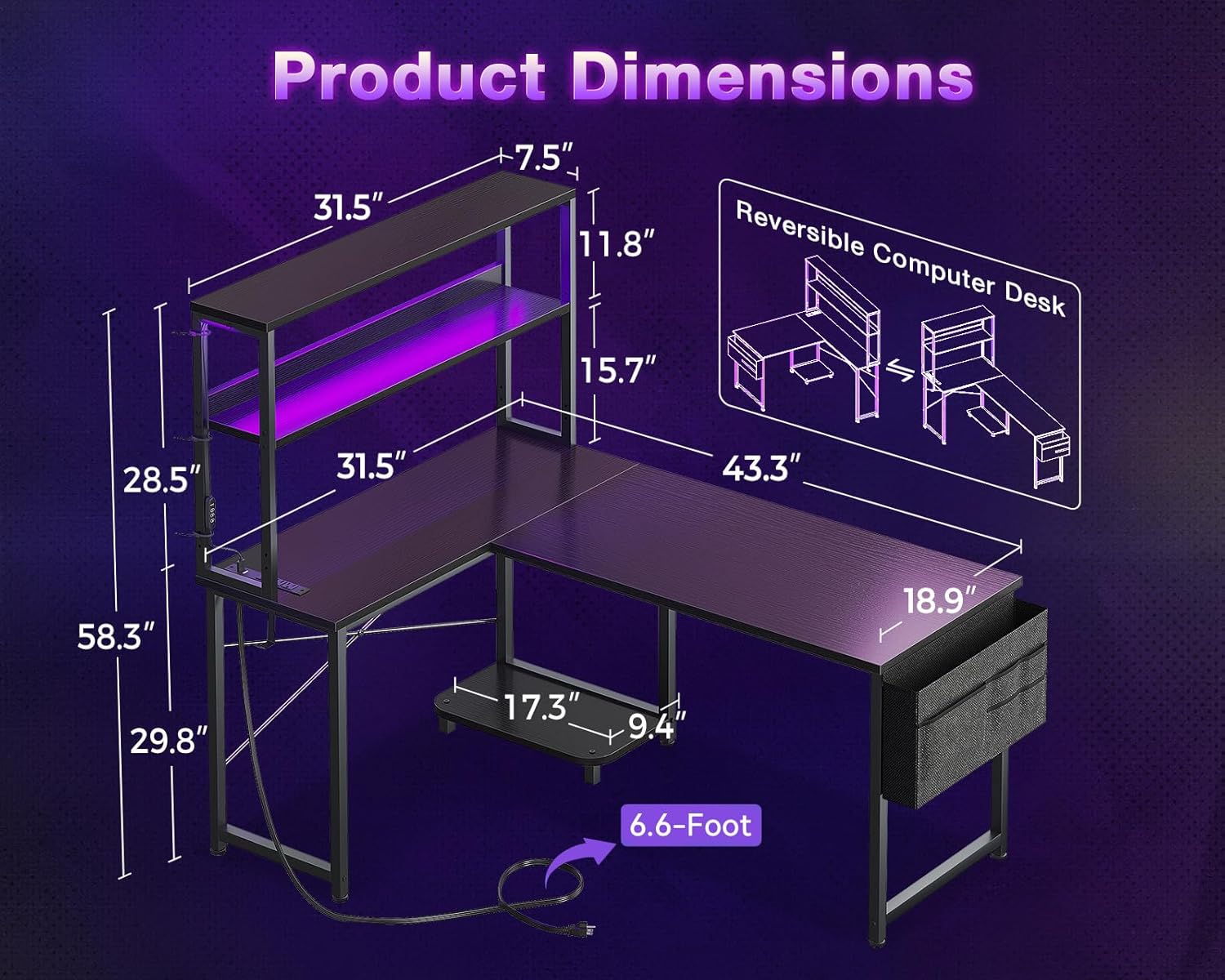
Diagram showing the key dimensions of the ODK 43 Inch L Shaped Desk, including overall width, depth, height, and shelf measurements. The desk measures 43.31"D x 31.5"W x 29.6"H.
Operating Instructions
LED Lighting System
The integrated RGB LED strip offers 10 color presets and 8 brightness levels. It also features 10 dynamic modes and a memory function to recall your last setting. Control is via a switch.

Close-up image of the LED light strip and its controller, highlighting the light-diffusive lampshade, longevity LED beads, enhanced copper circuit board, and rigid LED strip base. It shows options for 10 dynamic modes and 10 static colors.
Built-in Power Outlets
The desk is equipped with 3 AC outlets (125V/12A) and 2 USB ports (5V/2A) for convenient power access. A 5-foot power cord is included. Use these outlets for desktop equipment and mobile device charging.

Image showing the built-in power strip with 3 AC outlets and 2 USB ports integrated into the desk, with a smartphone charging. Specifications of 125V/12A for AC and 5V/2A for USB are displayed.
Storage Features
- Dual Shelves: For organizing books, decor, or monitors.
- CPU Stand: Keeps your computer tower off the floor.
- Accessory Hook: Ideal for headphones or bags.
- Tool Bag: Provides additional storage for small items.

Image illustrating the adjustable and removable desktop shelf, which can be used as bookshelves or a monitor stand, showing two different height configurations.

Close-up of the iron hook attached to the side of the desk, designed for hanging headphones or a bag.
Maintenance
Cleaning and Care
- Wipe surfaces with a soft, damp cloth. Avoid harsh chemicals or abrasive cleaners.
- Keep the power outlets dry and away from heat sources.
- Regularly check all screws and connections to ensure they remain tight.
- Avoid placing excessively hot or cold items directly on the desktop without protective coasters.
Troubleshooting
Common Issues
Desk Wobbles
Ensure all screws are securely tightened. Adjust the foot pads on the bottom of the desk legs to stabilize it on uneven floors.

Close-up image of an adjustable foot pad on a desk leg, demonstrating how it can be rotated to adjust height and stabilize the desk on uneven surfaces.
LED Lights Not Working
Check if the power cord is securely plugged into both the desk's power outlet and a wall socket. Verify the LED strip's connection to the power source. Ensure the control switch is turned on and try different brightness levels or modes.
Power Outlets Not Functioning
Confirm the desk's main power cord is fully plugged into a working wall outlet. Test the wall outlet with another device. If the issue persists, contact customer support.
Specifications
Product Details
| Feature | Detail |
|---|---|
| Brand | ODK |
| Shape | Rectangular |
| Desk Design | Computer Desk |
| Product Dimensions | 43.31"D x 31.5"W x 29.6"H |
| Color | Black |
| Style | Modern |
| Base Material | Alloy Steel |
| Top Material Type | Engineered Wood |
| Finish Type | Powder Coated |
| Special Feature | L shaped |
| Included Components | Built-in Outlet |
| Model Number | B020217SPD01008USDF |
| UPC | 850073489727 |
| Item Weight | 38.2 Pounds |
| Number Of Shelves | 2 |
| Maximum Height | 29.8 Inches |
| Minimum Height | 29.6 Inches |
| Required Assembly | Yes |
| Includes All Assembly Tools | Yes |
Safety Information
Always assemble the desk on a stable, level surface. Do not exceed the weight limit of 38.2 pounds on the desktop. Keep the power outlets dry and away from heat sources. Always unplug the power cord when not in use. Ensure the desk is properly anchored to the floor to prevent tipping.
Warranty and Support
Warranty Information
This product comes with a Limited Warranty. For specific details regarding coverage and duration, please refer to the warranty card included in your product packaging.
Customer Support
If you encounter any issues such as missing parts or broken components, or require assistance with assembly, please contact our professional pre-sale and after-sale service team. We are committed to resolving your concerns within 24 hours.
For further assistance, please visit the ODK Store: ODK Official Store


