
Introduction
This manual provides essential information for the assembly, operation, and maintenance of your IRONCK Entertainment Center. Please read these instructions carefully before beginning assembly or use to ensure proper function and safety. This entertainment center is designed to accommodate various media devices and televisions up to 75 inches, featuring integrated LED lighting and a convenient power outlet.
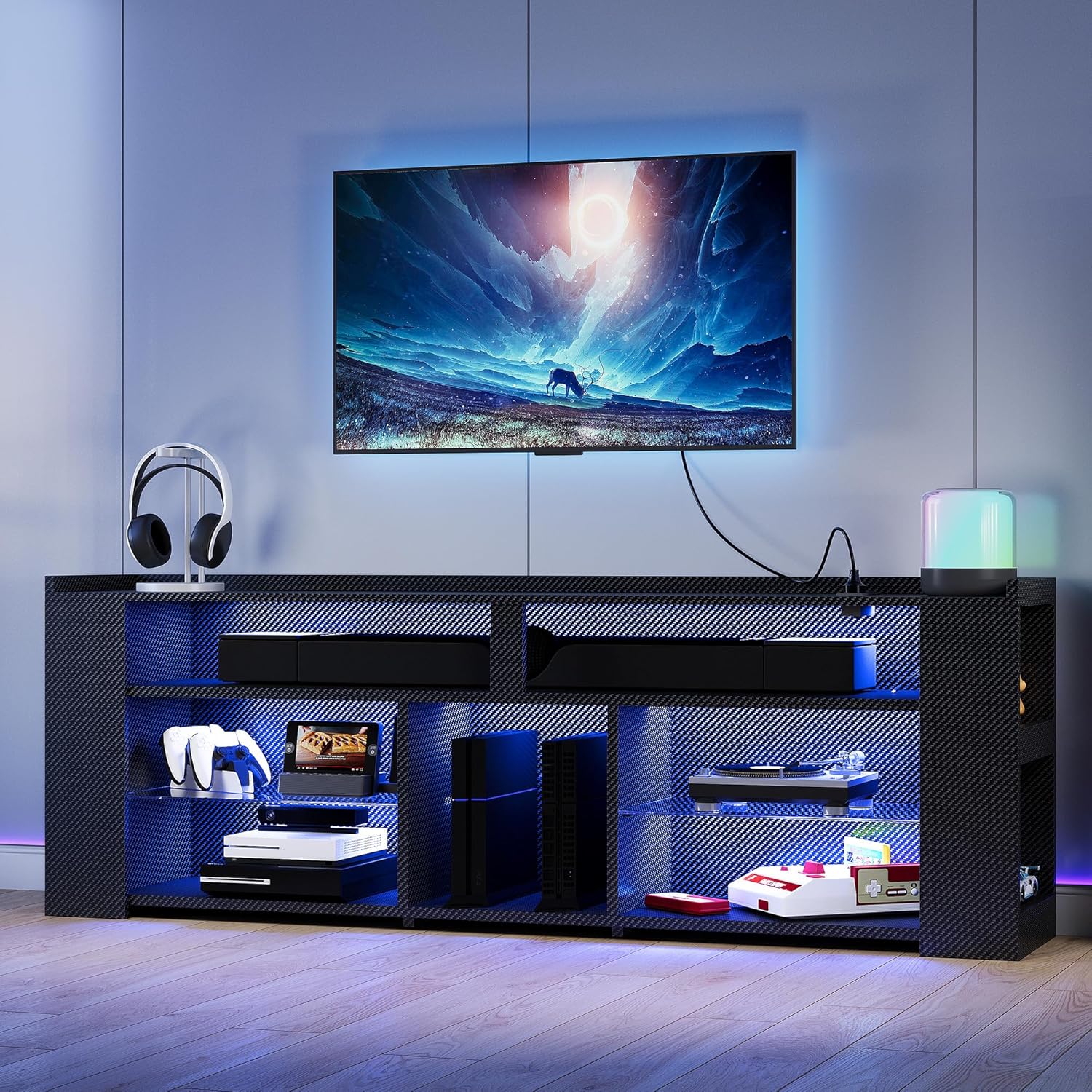
The IRONCK Entertainment Center, fully assembled and illuminated with blue LED lights, showcasing its storage capabilities for a television, gaming consoles, and other media equipment.
Safety Information
Adherence to the following safety guidelines is crucial for preventing injury and damage to the product:
- Always ensure cables are properly managed and not left exposed to prevent tripping hazards.
- This product requires assembly. Follow the provided instructions carefully to ensure stability and prevent injuries.
- Do not exceed the weight limit of the product to maintain its structural integrity.
- Place the entertainment center on a flat, stable surface.
- Keep small parts and packaging materials away from children during assembly.
Package Contents
Verify that all components are present before beginning assembly. The package typically includes:
- Carbon fiber board panels
- 3 height-adjustable glass shelves
- LED light strips with remote control
- Built-in charging station (2 USB ports, 2 standard sockets)
- Assembly hardware (screws, dowels, etc.)
- Instruction manual
Assembly
The IRONCK Entertainment Center is designed for straightforward assembly. Detailed, numbered instructions and all necessary hardware are included in the package. Please follow these instructions step-by-step to ensure correct and secure construction.
- Unpack all components and verify against the parts list.
- Identify each panel and hardware piece using the provided labels.
- Follow the graphical and written instructions for each assembly step.
- Ensure all connections are tightened securely, but do not overtighten.
- Install the LED light strips and charging station as directed.
For assistance during assembly, refer to the contact information in the Warranty and Support section.
Setup
Placement Considerations
The entertainment center measures 13.6"D x 70.9"W x 24.6"H. Choose a location in your living room or entertainment area that provides adequate space and is away from direct sunlight or heat sources. The raised base provides added stability.
TV Placement
This entertainment center is suitable for flat-screen TVs ranging from 50 to 75 inches. Ensure your TV's base fits securely on the top surface. If your TV has wide legs, consider a center-stand TV or wall-mounting the TV above the unit for optimal stability and aesthetics.

Visual representation of TV size compatibility, demonstrating how different TV sizes fit on the 70.9-inch entertainment center.
Device Connections
The unit features 11 compartments and 3 height-adjustable glass shelves, ideal for organizing gaming consoles, media players, soundbars, and other accessories. Cable holes at the back of the unit help manage wires for a tidy setup.

An overview of the entertainment center's storage capacity, showing 9 distinct shelves for organizing various items.

Detailed views of the adjustable shelves, open design for larger items, and the transparent glass shelves.

Details of the carbon fiber panel, cable management holes, and the LED light strip integrated into the baffle.
Operating Instructions
LED Lighting
The integrated LED light strips enhance the ambiance of your entertainment area. Use the included remote control to adjust colors, brightness, and lighting modes. The remote allows for selection of 7 main colors, as well as dynamic RGB effects.

The remote control for the LED lights, demonstrating the range of colors and dynamic modes available.
Charging Station
The built-in charging station provides convenient power for your devices. It includes two standard AC outlets, one USB port, and one Type-C port. Connect your gaming consoles, TV, or other electronics directly to the station for easy access and reduced cable clutter.
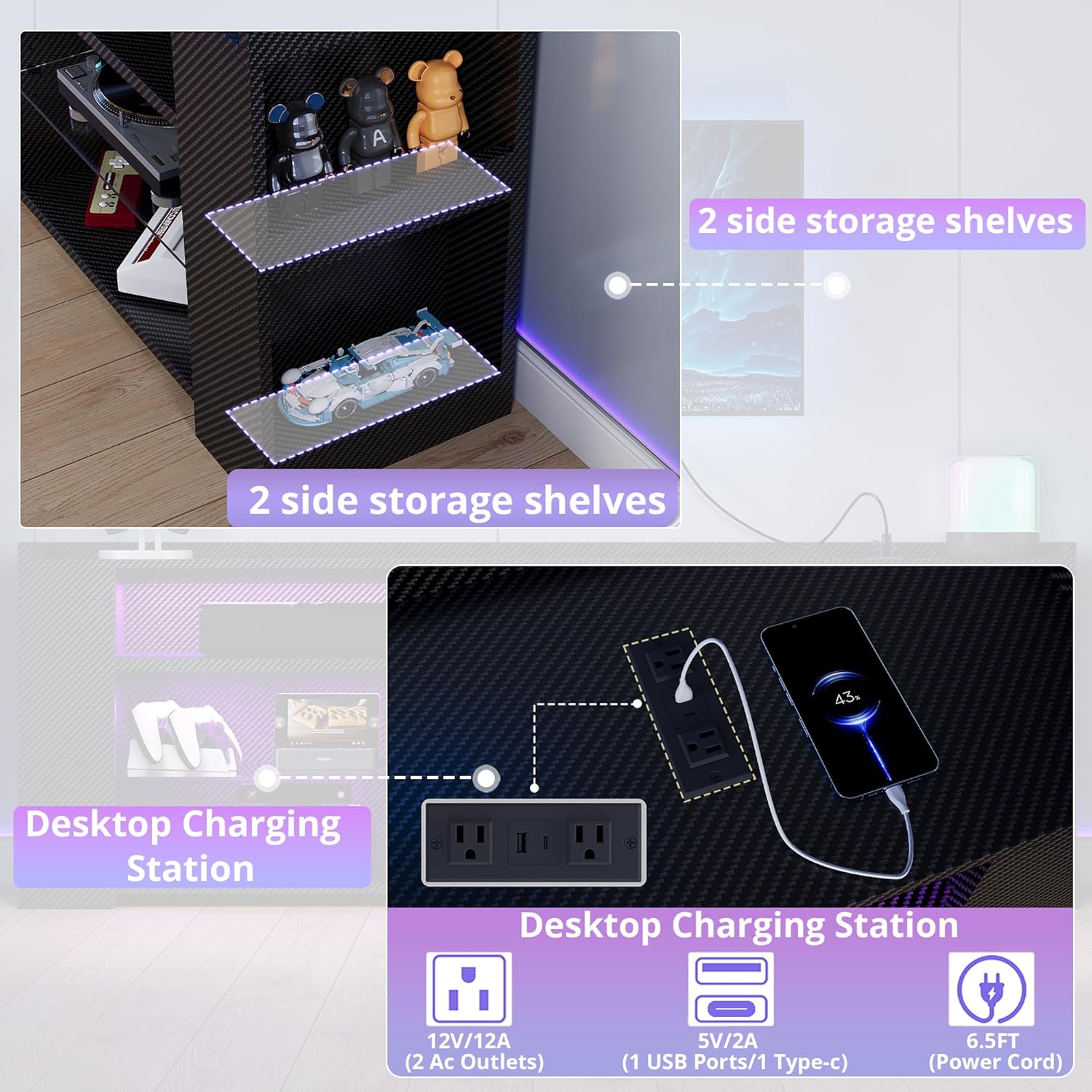
A detailed view of the integrated charging station, illustrating its various power and USB ports.
Video demonstrating the IRONCK Entertainment Center, highlighting its features and design.
Maintenance
To maintain the appearance and longevity of your entertainment center:
- The waterproof surface can be easily wiped clean with a damp cloth. Avoid abrasive cleaners.
- Regularly check all hardware connections and tighten if necessary.
- Keep the unit away from excessive moisture and direct heat.
Troubleshooting
If you encounter issues with your IRONCK Entertainment Center, consider the following:
- LED Lights Not Functioning: Ensure the power connection is secure and the remote control batteries are functional. If the adhesive for the LED strips is insufficient, use additional double-sided tape.
- TV Stability: For TVs larger than 55 inches, especially those with wide-set legs, ensure the TV base is fully supported. Consider using a TV with a central stand or wall-mounting the TV above the unit.
- Gaming Console Fit: Verify the dimensions of your gaming console against the internal shelf dimensions. Some larger consoles may need to be placed horizontally or in specific compartments.
- Missing Parts/Damage: If parts are missing or damaged upon arrival, contact customer support immediately.
Specifications
| Feature | Detail |
|---|---|
| Brand | IRONCK |
| Model Name | HK-TS-TV03 |
| Product Dimensions | 13.6"D x 70.9"W x 24.6"H |
| Color | Black Carbon Fiber |
| Material | Carbon Fiber |
| Number of Compartments | 11 |
| Number of Shelves | 3 (height-adjustable glass shelves) |
| Special Feature | Built-In Charging Station (2 AC outlets, 1 USB, 1 Type-C) |
| Assembly Required | Yes |
| Recommended TV Size | 50 - 75 inches |

Dimensional drawing of the entertainment center, providing precise measurements for planning your space.
Warranty and Support
For warranty information, product support, or to report missing/damaged parts, please contact IRONCK customer service directly. Refer to the packaging or the official IRONCK website for the most current contact details.