
Introduction
Welcome to the instruction manual for your new Uleway T185 4G LTE Senior Mobile Phone. This device is designed for ease of use, featuring large buttons, a clear display, and essential functionalities to keep you connected. It is compact, lightweight, and supports 4G networks for reliable communication. Please read this manual carefully to ensure proper operation and maintenance of your phone.
1. Setup
1.1 Unboxing
Upon opening the package, you will find the Uleway T185 mobile phone, a USB-C charger, earphones, a rechargeable battery, and this user manual.
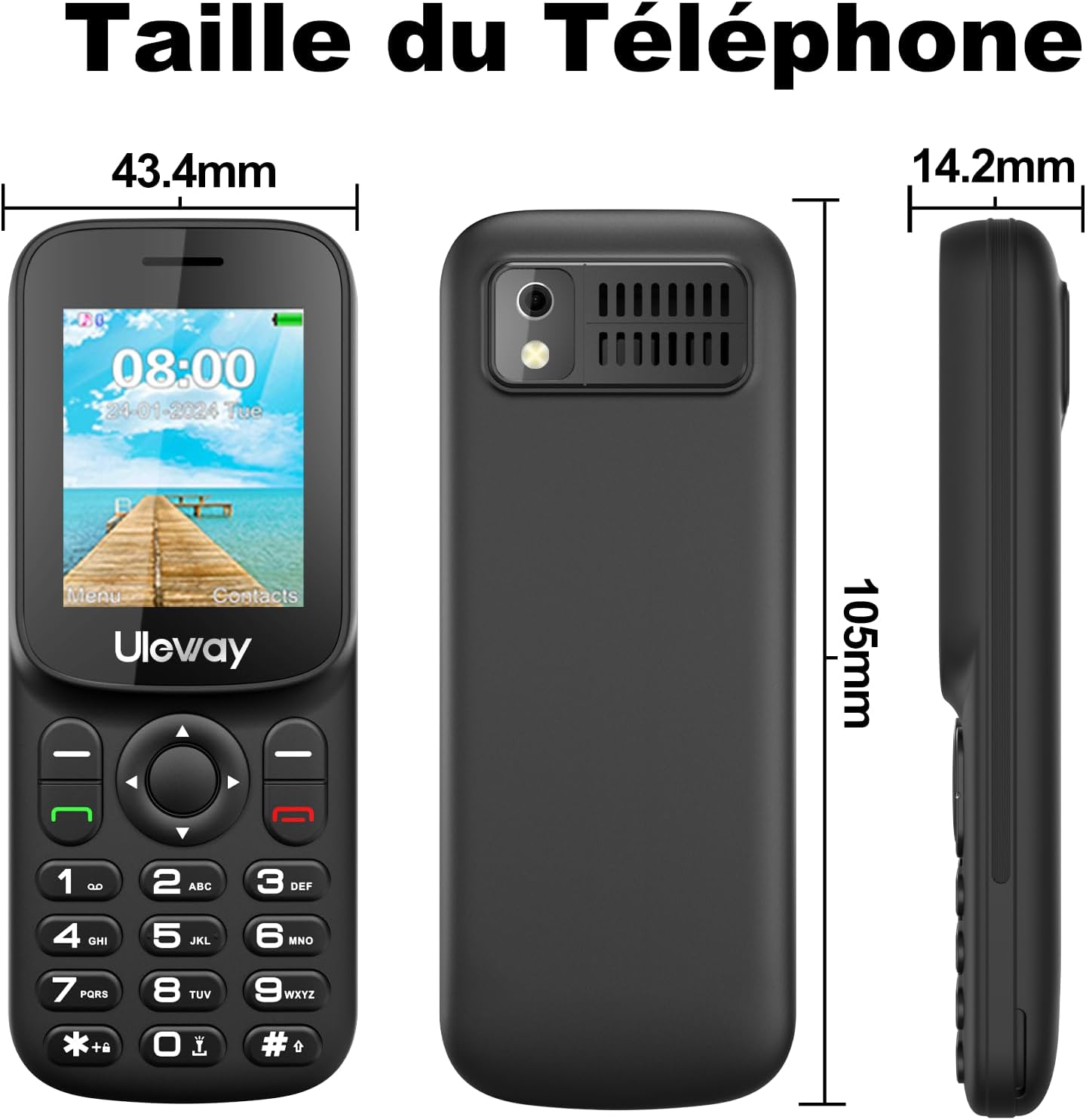
Image: Contents of the Uleway T185 package, including the phone, charger, earphones, battery, and manual.
1.2 Battery and SIM Card Installation
To install the battery and SIM card(s), first remove the back cover of the phone. The Uleway T185 supports dual Nano SIM cards and an expandable memory card up to 32GB.
- Carefully remove the back cover of the phone.
- Insert your Nano SIM card(s) into the designated slots (SIM1 and SIM2). Ensure the gold contacts face downwards.
- If desired, insert a microSD memory card into the dedicated slot for expanded storage.
- Place the rechargeable 1000mAh battery into its compartment.
- Replace the back cover, ensuring it clicks securely into place.
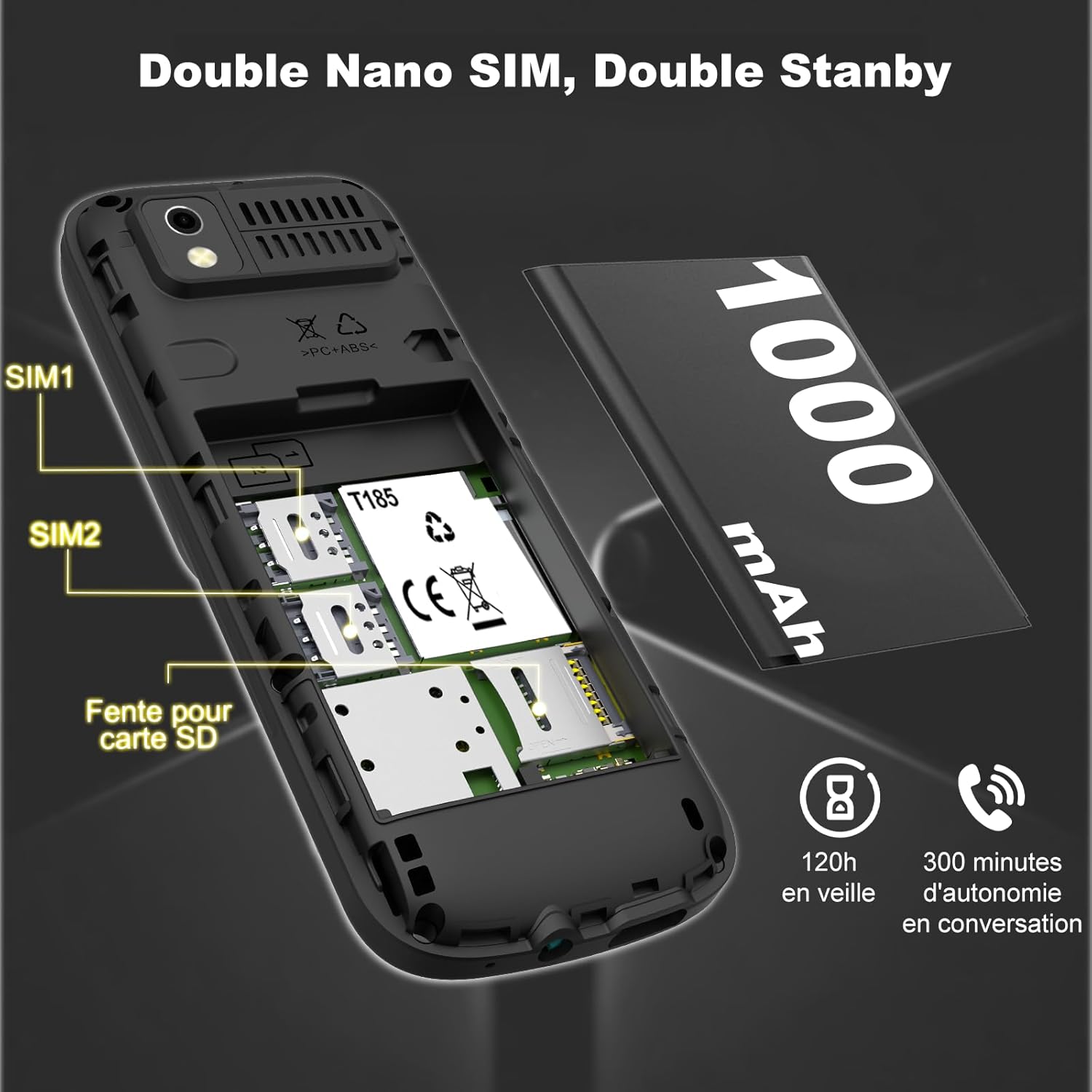
Image: Detailed view of the Uleway T185's internal compartments for dual Nano SIM cards, a microSD card, and the battery.
1.3 Charging the Phone
The Uleway T185 features a convenient USB-C charging port.
- Connect the USB-C cable to the charging port at the bottom of the phone.
- Plug the other end of the cable into a compatible USB power adapter or computer.
- The phone will indicate that it is charging. A full charge provides up to 240 hours of standby time or 180 minutes of talk time.
Video: Demonstrates charging the phone via a USB-C cable and navigating basic menu options, including setting a password for the SIM card.
Important: When inserting a SIM card for the first time, you may be prompted to set a password. This password is for phone security and is different from your SIM card PIN. This is a mandatory security measure.
2. Operating Instructions
2.1 Power On/Off
To power on the phone, press and hold the red "End Call" button until the screen lights up. To power off, press and hold the same button until the power-off options appear, then select "Power off".

Image: The Uleway T185 phone showcasing its multi-functional interface, including options for messages, call logs, profiles, contacts, multimedia, settings, radio FM, and applications.
2.2 Basic Navigation and Display
The phone features a 1.77-inch LCD color screen and large, easy-to-press buttons for simple navigation. Use the directional pad (up, down, left, right) to move through menus and the central "OK" button to confirm selections.

Image: The Uleway T185 phone emphasizing its clear stereo audio quality, with sound waves emanating from the speaker.
Video: Demonstrates the large buttons and clear display of a senior mobile phone, showing how to dial numbers, use the flashlight, and navigate through the menu for call logs, multimedia, and settings.
2.3 Making and Receiving Calls
- To Make a Call: Enter the phone number using the keypad and press the green "Call" button.
- To Receive a Call: Press the green "Call" button when the phone rings.
- Speed Dial: Assign frequently called numbers to keys 2-9 for quick dialing. Press and hold the assigned key to call the contact.

Image: The Uleway T185 phone with a magnified view of the keypad, indicating the speed dial functionality for keys 2-9.
2.4 Messaging (SMS)
Navigate to the "Message" menu to compose and send text messages. The large buttons facilitate easier typing.
2.5 Contacts Management
The phonebook can store up to 200 entries. You can easily add, edit, and delete contacts.
- Go to the "Contacts" menu.
- Select "Add New" to create a new contact entry.
- Enter the name and phone number, then save.
2.6 Multimedia and Tools
- FM Radio: Access the FM Radio feature through the multimedia menu. Earphones may be required as an antenna.
- MP3/MP4 Player: Play audio and video files stored on your memory card.
- Flashlight: Activate the built-in LED flashlight by pressing and holding the '0' key. It offers an illumination distance of 20m.
- Camera: The phone includes a basic camera for capturing photos.
- Alarm, Calendar, Calculator: These standard tools are available in the applications menu.
- Bluetooth: Connect to Bluetooth headsets or other devices for hands-free communication.

Image: The Uleway T185 phone demonstrating its flashlight feature, showing a bright beam illuminating a dark area.
3. Maintenance
- Cleaning: Use a soft, dry cloth to clean the phone's exterior. Avoid liquid cleaners.
- Battery Care: To prolong battery life, avoid extreme temperatures and do not leave the phone fully discharged for extended periods.
- Storage: Store the phone in a cool, dry place away from direct sunlight and moisture.
4. Troubleshooting
| Problem | Solution |
|---|---|
| Phone does not power on | Ensure the battery is correctly installed and charged. Connect the charger and try again. |
| Cannot make or receive calls | Check if the SIM card is properly inserted and activated. Verify network signal strength. |
| Poor audio quality during calls | Ensure the speaker is not obstructed. Adjust the call volume. Move to an area with better network coverage. |
| Battery drains quickly | Reduce screen brightness. Close unused applications. Limit background data usage if applicable. |
5. Specifications
| Feature | Detail |
|---|---|
| Brand | Uleway |
| Model | T185 |
| Color | Black |
| Screen Size | 1.77 inches |
| Cellular Technology | 4G (LTE, WCDMA, GSM) |
| SIM Card Type | Dual Nano SIM |
| RAM | 48 MB |
| ROM | 128 MB |
| Expandable Memory | Up to 32GB (microSD card) |
| Battery Capacity | 1000 mAh |
| Standby Time | Up to 240 hours |
| Talk Time | Up to 180 minutes |
| Charging Port | USB-C |
| Languages Supported | English, German, French, Spanish, Italian, Portuguese, Dutch |
| Dimensions | 105mm x 43.4mm x 14.2mm |
| Weight | 67g (with battery) |

Image: Diagram showing the dimensions of the Uleway T185 phone: 105mm length, 43.4mm width, and 14.2mm thickness.
6. Warranty and Support
Uleway offers an 18-month worry-free warranty and friendly customer service for your mobile phone. Please refer to the included "Guide de bienvenue" for more details on how to access support.
