
1. Important Safety Instructions
Please read this user manual carefully before using the Roborock Q7 L5+ robot vacuum cleaner and save it for future reference. This appliance can be used by children aged 8 years and above and persons with reduced physical, sensory or mental capabilities or lack of experience and knowledge if they have been given supervision or instruction concerning use of the appliance in a safe way and understand the hazards involved. Children shall not play with the appliance. Cleaning and user maintenance shall not be made by children without supervision.
- Do not use the robot in areas where it might fall (e.g., on stairs, open balconies).
- Ensure the charging dock is placed on a level surface against a wall.
- Keep hair, loose clothing, fingers, and all parts of the body away from openings and moving parts.
- Do not use the robot to pick up large debris, liquids, or burning/smoking objects.
- Only use the original battery and charging dock provided by the manufacturer.
2. Product Overview
The Roborock Q7 L5+ is an advanced robot vacuum and mop designed for comprehensive home cleaning. It features powerful suction, precise navigation, and an auto-empty dock for hands-free maintenance.
Key Components and Features
- Robot Vacuum: Equipped with LiDAR navigation, main brush, side brush, and mopping module.
- Auto-Empty Dock: Automatically empties the robot's dustbin into a large 2.7L dust bag, providing up to 7 weeks of hands-free cleaning.
- HyperForce Suction: Delivers 8000Pa suction power for deep cleaning carpets and hard floors.
- 2-in-1 Vacuum and Mop: Simultaneous vacuuming and mopping with adjustable water flow levels.
- LiDAR PreciSense Navigation: Creates accurate maps of your home for efficient cleaning paths and multi-floor mapping.
- Dual Anti-Tangle System: Designed to prevent hair entanglement on brushes.
- Smart App Control: Customize cleaning schedules, set no-go zones, and manage maps via the Roborock app.
- Threshold Climbing: Capable of climbing obstacles up to 2cm (0.8 inches).

This image shows the Roborock Q7 L5+ robot vacuum cleaner alongside its white auto-empty dock and a smartphone displaying the Roborock app interface.
3. Setup
Unpacking and Initial Placement
- Carefully remove the robot vacuum and auto-empty dock from the packaging.
- Place the auto-empty dock on a hard, level surface against a wall, ensuring there is at least 0.5 meters (1.6 feet) of clear space on both sides and 1.5 meters (4.9 feet) in front.
- Connect the power cord to the dock and plug it into a power outlet.
- Place the robot vacuum onto the charging contacts of the dock. Ensure the robot is properly seated and begins charging. The power indicator light on the robot will illuminate.
First Use and Charging
For optimal battery life, fully charge the robot before its first use. A full charge typically takes approximately 6 hours. The robot is ready for use once fully charged.

A diagram illustrating the automatic dust collection process from the robot vacuum into the self-emptying station, highlighting the 7-week capacity.
4. Operating Instructions
Connecting to the Roborock App
- Download the Roborock app from the App Store (iOS) or Google Play Store (Android).
- Open the app and create an account or log in.
- Tap the "+" icon to add a new device and follow the on-screen instructions to connect your Roborock Q7 L5+ to your Wi-Fi network.
Starting a Cleaning Cycle
- Via Robot Buttons: Press the power button on the robot to start a full cleaning cycle. Press again to pause.
- Via Roborock App: Open the app, select your robot, and tap "Clean" to start. You can also select specific rooms or zones to clean.

A smartphone screen displaying the Roborock app, illustrating features like personalized room cleaning, intelligent no-go zone suggestions, selective room cleaning, and real-time mapping.
Suction Power and Mopping Function
The Q7 L5+ offers powerful 8000Pa suction and integrated mopping. You can adjust the suction power and water flow levels through the Roborock app to suit different floor types and cleaning needs.

An underside view of the robot vacuum showing powerful suction, capable of picking up pet hair, crumbs, pet food, and coffee grounds.
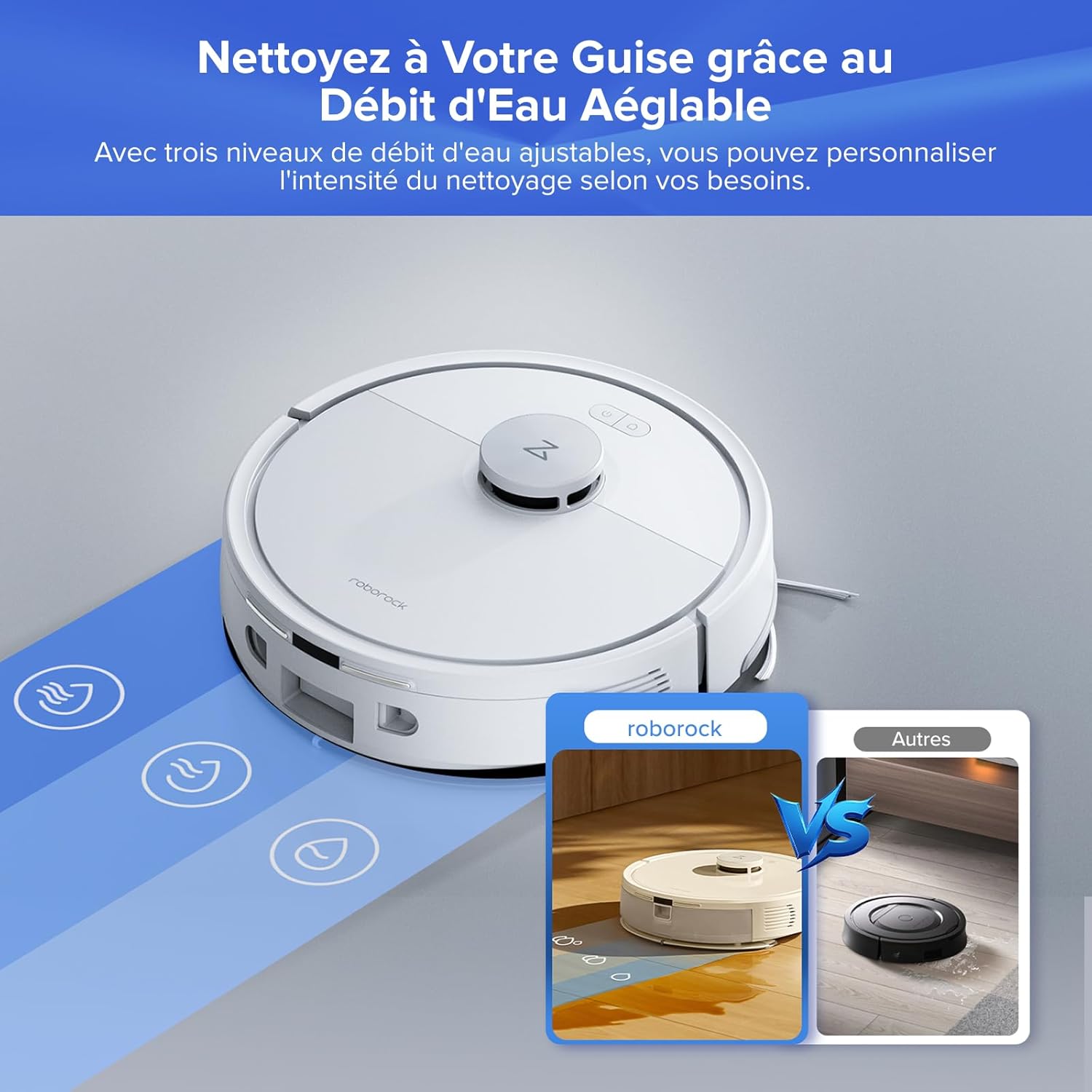
The robot vacuum is shown with three adjustable water flow levels, allowing customization of mopping intensity for different floor types.
Advanced Navigation and Mapping
The robot uses LiDAR PreciSense navigation to accurately map your home, allowing for efficient cleaning paths and advanced features like multi-floor mapping and virtual no-go zones.

The robot vacuum is depicted mapping a room using 360-degree LiDAR scanning for precise and efficient navigation, including express mapping and multi-map saving.
Mobility and Anti-Tangle System
The Q7 L5+ can easily navigate over thresholds and features a dual anti-tangle system to minimize hair wrapping around the brushes.
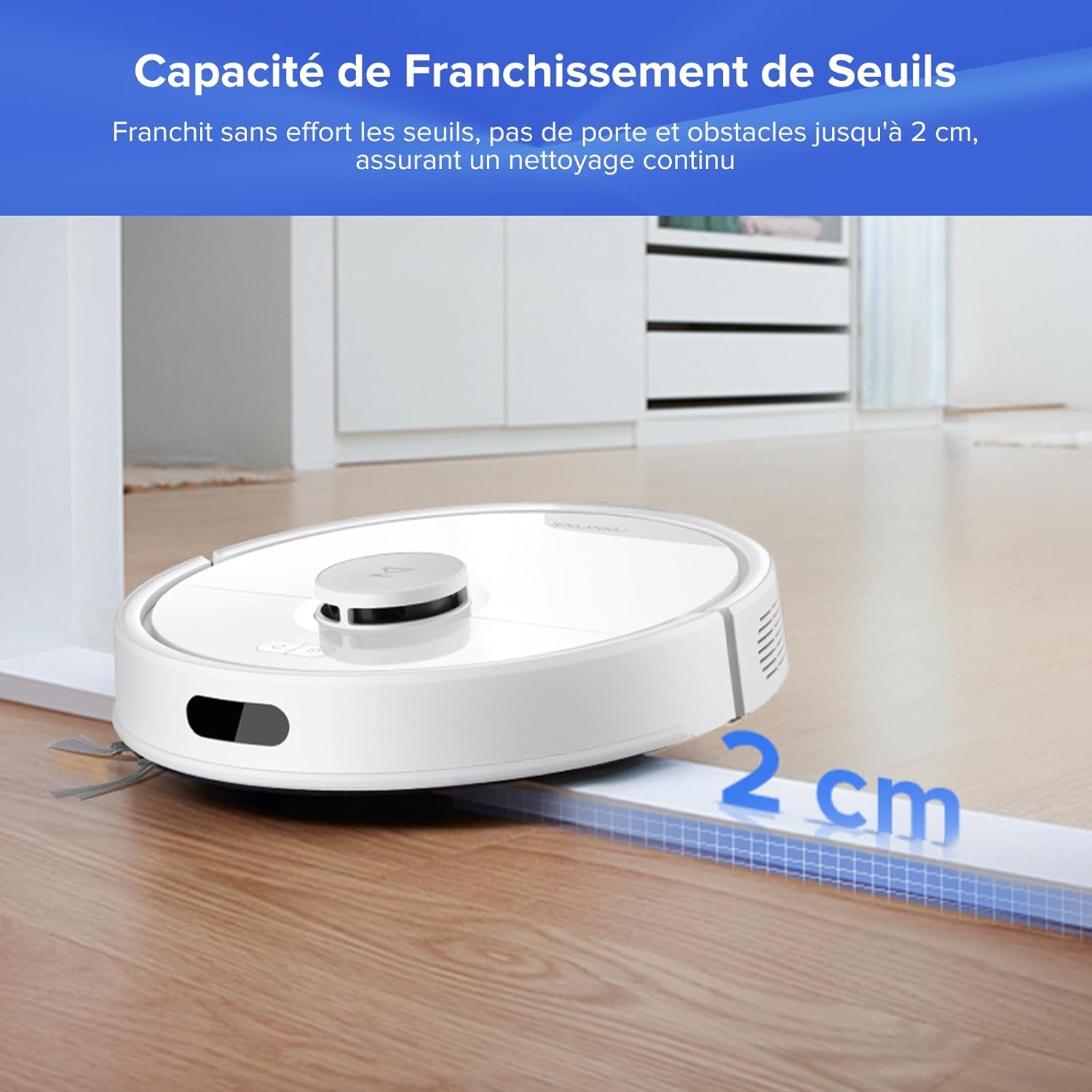
The robot vacuum is shown effortlessly crossing a 2cm (0.8 inch) threshold, demonstrating its ability to navigate between rooms and over obstacles.
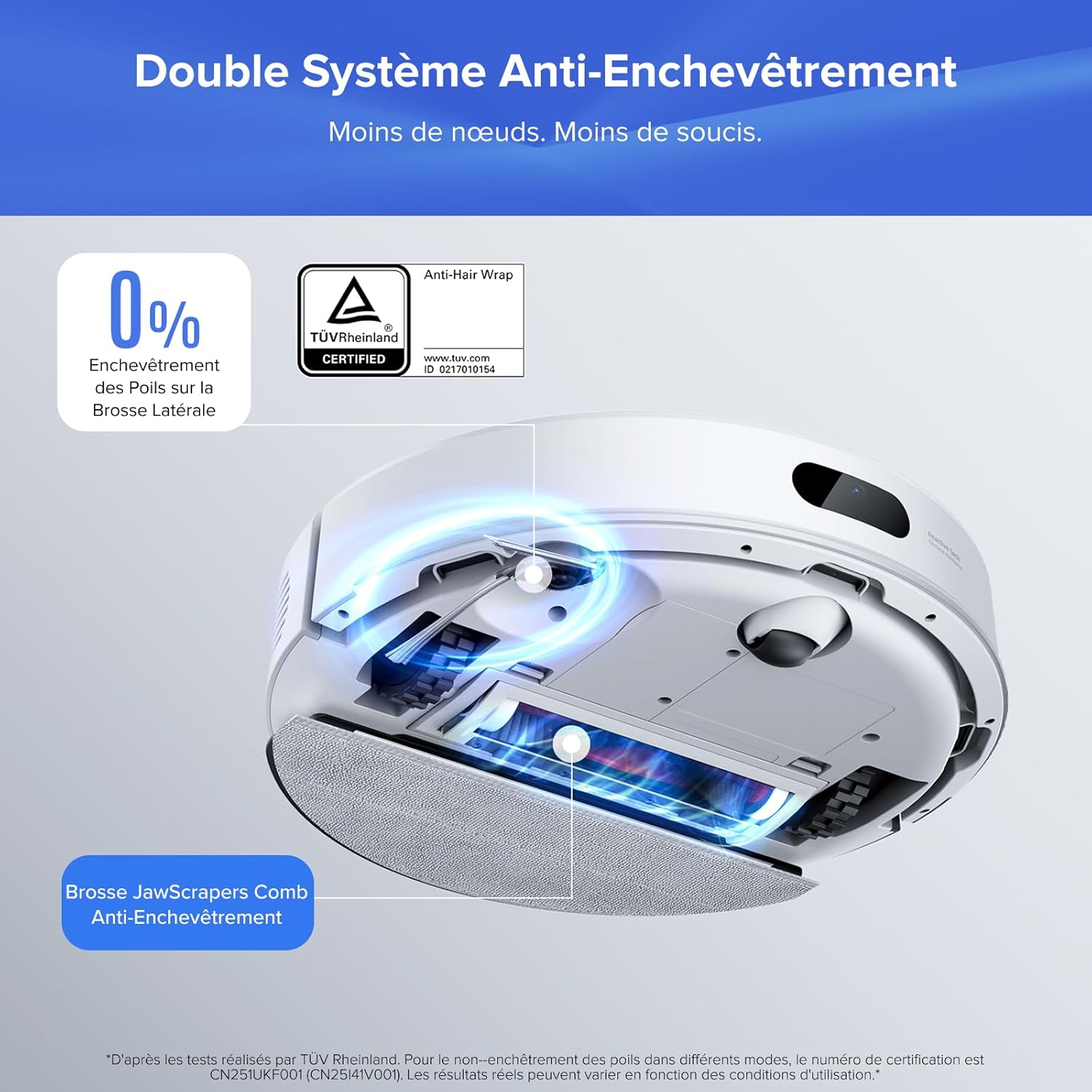
An internal view highlighting the dual anti-tangle system, including the JawScrapers Comb brush, designed to prevent hair entanglement.
5. Maintenance
Regular maintenance is crucial for the optimal performance and longevity of your Roborock Q7 L5+.
Cleaning Frequency Guide
| Component | Recommended Cleaning Frequency |
|---|---|
| Dust Bag (Auto-Empty Dock) | Every 7 weeks or when full |
| Main Brush | Weekly |
| Side Brush | Monthly |
| Washable Filter | Every 2 weeks (rinse with water) |
| Water Tank & Mopping Cloth | After each use |
| Sensors (Cliff, Wall, Charging) | Monthly (wipe with a dry cloth) |
| Charging Contacts | Monthly (wipe with a dry cloth) |
Detailed Cleaning Instructions
- Dust Bag Replacement: Open the top cover of the auto-empty dock, remove the full dust bag, and insert a new one. Close the cover securely.
- Main Brush Cleaning: Remove the main brush cover and the brush. Use the cleaning tool to remove tangled hair and debris. Reinstall the brush and cover.
- Side Brush Cleaning: Unscrew the side brush, remove any tangled hair or debris, and reattach it.
- Washable Filter Cleaning: Remove the dustbin from the robot, open it, and take out the filter. Rinse the filter under running water until clean. Allow it to air dry completely for at least 24 hours before reinstalling.
- Water Tank and Mopping Cloth: Detach the mopping module. Empty any remaining water from the tank. Remove the mopping cloth and wash it. Allow both to dry before reattaching.
- Sensor Cleaning: Gently wipe all sensors on the robot (cliff sensors on the bottom, wall sensor on the side, and charging contacts) with a clean, dry cloth.
6. Troubleshooting
If you encounter issues with your Roborock Q7 L5+, refer to the following common problems and solutions.
Common Issues and Solutions
- Robot not charging: Ensure the charging contacts on both the robot and the dock are clean and free of debris. Verify the power cord is securely plugged into the dock and the outlet.
- Robot not starting/responding: Check if the battery is charged. Press and hold the power button for a few seconds to restart the robot.
- Poor suction performance: Check if the dustbin is full or the dust bag in the auto-empty dock needs replacement. Clean the main brush and filter. Ensure there are no blockages in the suction path.
- Mopping not effective: Ensure the water tank is filled and the mopping cloth is clean and properly attached. Adjust the water flow level in the app.
- Robot getting stuck frequently: Clear obstacles from the cleaning path. Use the app to set no-go zones or virtual walls around problematic areas. Clean the cliff sensors.
- App connection issues: Ensure your Wi-Fi network is 2.4GHz. Restart your router, robot, and smartphone. Try re-pairing the robot with the app.
- Unusual noises: Check the main brush, side brush, and wheels for any tangled hair or foreign objects.
If the problem persists after trying these solutions, please contact Roborock customer support.
7. Specifications
Detailed technical specifications for the Roborock Q7 L5+ Robot Vacuum and Mop.
| Specification | Value |
|---|---|
| Brand | roborock |
| Model Name | roborock Q7 L5+ |
| Color | Q7 L5+ White |
| Product Dimensions (L x W x H) | 49.7 x 32.5 x 26 cm (19.57 x 12.8 x 10.24 inches) |
| Item Weight | 4.8 Kilograms (10.58 lbs) |
| Suction Power | 8000 Pa |
| Noise Level | 60 dB |
| Battery Life | 2 hours and 30 minutes |
| Battery Composition | Lithium-ion |
| Filter Type | Cloth |
| Controller Type | Voice Control, App Control, Button Control |
| Surface Recommendation | Carpet, Tile, Wood, Laminate, Marble |
| Automatic Stop Function | Yes |
| Compatibility | Amazon Echo, Smartphones, Smartwatches, Google Home |
8. Warranty and Support
Warranty Information
Your Roborock Q7 L5+ comes with a manufacturer's warranty. Please refer to the warranty card included in your product packaging for specific terms and conditions, including warranty period and coverage details. Keep your proof of purchase for warranty claims.
Customer Support
For technical assistance, troubleshooting not covered in this manual, or warranty inquiries, please contact Roborock customer support. You can typically find contact information on the official Roborock website or through the Roborock app.
Before contacting support, please have your product model (Q7 L5+ White) and serial number ready, which can usually be found on a label on the robot or its packaging.


