Introduction
Thank you for choosing the YITAHOME 52-inch Tropical Ceiling Fan. This manual provides essential information for the safe installation, operation, and maintenance of your new ceiling fan. Please read these instructions thoroughly before beginning installation and retain them for future reference.
Safety Information
- Always disconnect power at the circuit breaker before installation or servicing.
- All electrical connections must comply with local codes and national electrical codes. If you are unfamiliar with electrical wiring, consult a qualified electrician.
- Ensure the mounting structure can support the weight of the fan (approximately 16.54 lbs).
- Do not bend the blade holders during installation or cleaning.
- Keep hands clear of the fan blades when the fan is operating.
- This fan is designed for indoor and outdoor (covered patio) use. Do not expose to direct water.
Package Contents
Verify that all components are present before beginning installation:
- 1 x Ceiling Fan with Light
- 1 x Remote Control
- 2 x Suspension Rods (4.5" and 12")
- Mounting Hardware
- Instruction Manual
Specifications
| Brand | YITAHOME |
| Model Name | MAYIH9v16J |
| Product Dimensions | 52"L x 52"W x 15.2"H |
| Color | Walnut |
| Material | Copper, Glass, Iron, Plastic |
| Style | Tropical Ceiling Fan |
| Power Source | DC |
| Light Source Type | LED |
| Light Color | 3CCT (3000K, 4500K, 6000K) |
| Wattage | 18 watts |
| Control Method | Remote Control |
| Item Weight | 16.54 Pounds |
| Indoor/Outdoor Usage | Indoor, Outdoor (covered patio) |
Installation
Mounting Options
The fan includes two suspension rods (4.5 inches and 12 inches) to accommodate various ceiling heights and types. It supports both vertical and slanted ceilings up to a 15-degree tilt.

Image: The YITAHOME 52-inch ceiling fan shown installed with a longer downrod for high ceilings and a shorter downrod for low ceilings.
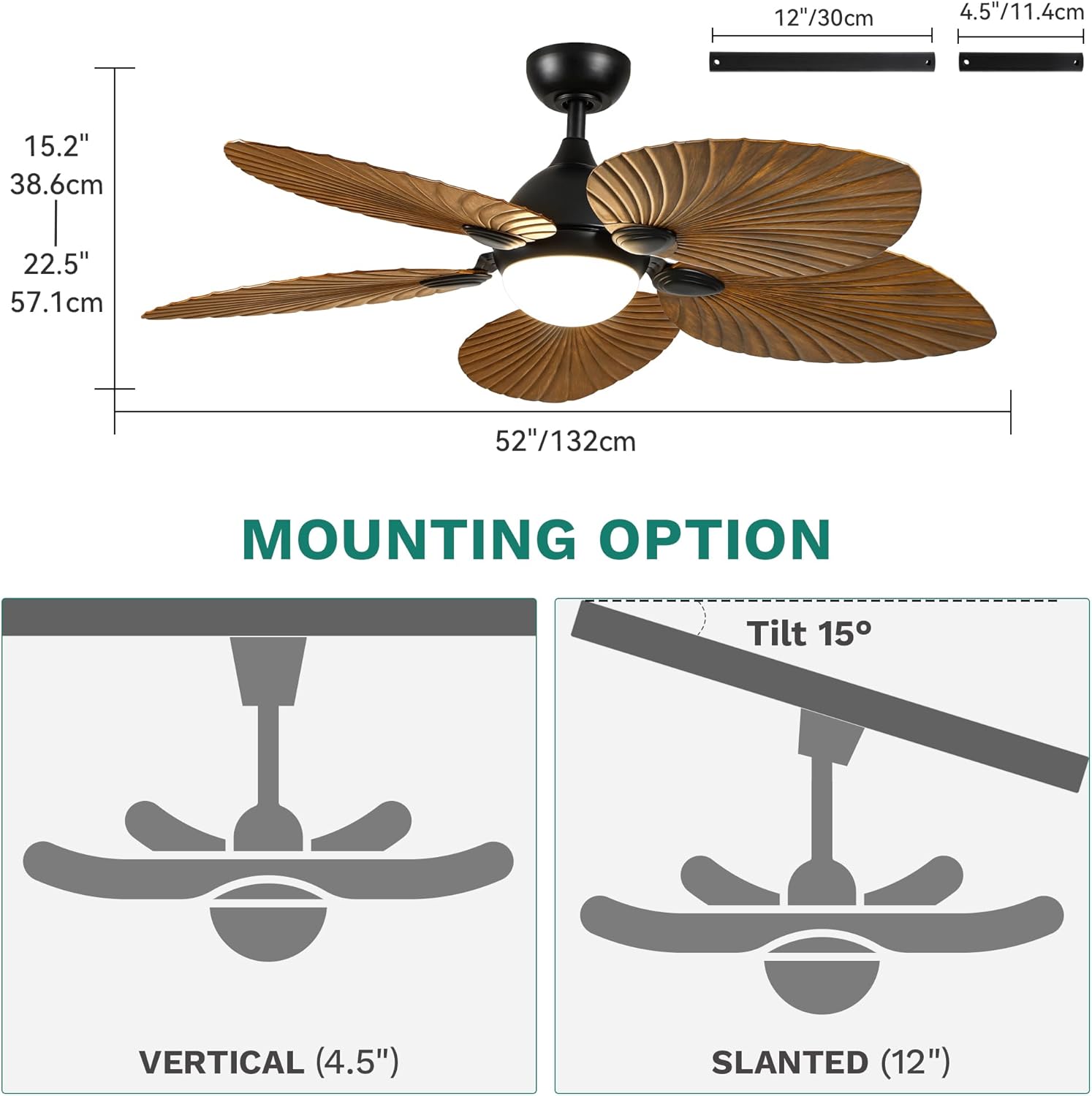
Image: A diagram illustrating the fan's dimensions and two mounting configurations: vertical installation using the 4.5-inch downrod and slanted installation (up to 15 degrees) using the 12-inch downrod.
General Installation Steps (Consult full manual for detailed wiring)
- Prepare for Installation: Turn off power at the circuit breaker. Secure the electrical box to the building structure.
- Assemble the Fan: Attach the fan blades to the motor housing. Connect the downrod to the motor and canopy.
- Mount the Fan: Secure the mounting bracket to the electrical box. Hang the fan assembly from the mounting bracket.
- Wire the Fan: Connect the electrical wires according to the wiring diagram provided in the full manual. Ensure all connections are secure.
- Install the Light Kit: Attach the LED light kit and glass lampshade.
- Test Operation: Restore power and test all fan and light functions using the remote control.
Operation
Remote Control Functions
The included remote control allows for convenient adjustment of all fan and light settings:
- Fan Speed: Select from 6 speed levels or a natural breeze mode.
- Fan Direction: Change the rotation direction for summer (downdraft) or winter (updraft) modes.
- Timer: Set the fan to turn off automatically after 1, 2, 4, or 8 hours.
- Sleep Mode: Automatically circulates air at lower speeds (1-3) for optimal sleep comfort.
- Light Control: Turn the light on/off and adjust color temperature.
Reversible Motor for Seasonal Use
The fan features a reversible DC motor to optimize air circulation throughout the year.
- Summer Mode (Downdraft): Blades rotate counter-clockwise, pushing cool air downwards to create a cooling effect.
- Winter Mode (Updraft): Blades rotate clockwise, drawing cool air up and pushing warm air down from the ceiling, helping to redistribute heat.
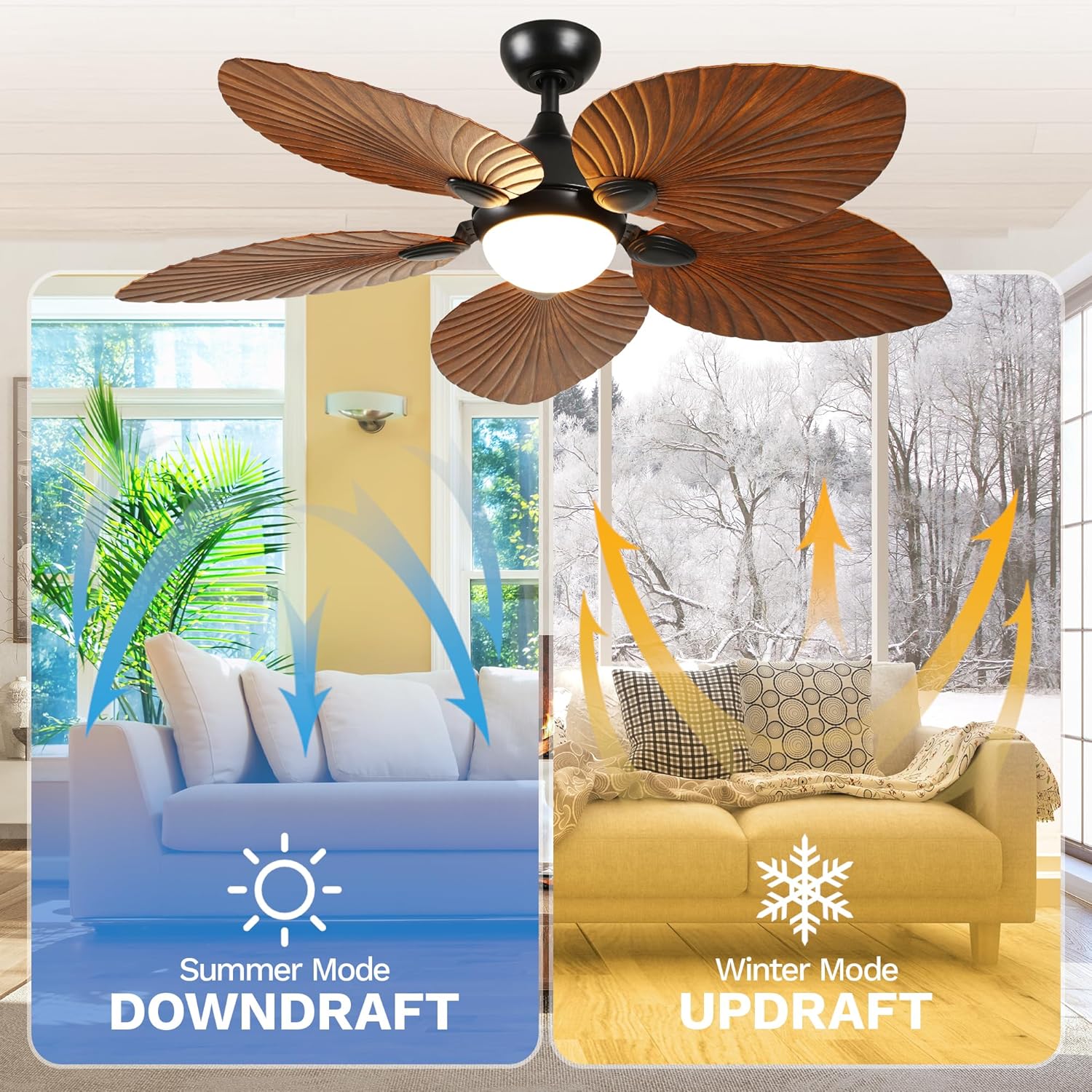
Image: A visual representation of the fan's reversible airflow, demonstrating how it creates a downdraft for cooling in summer and an updraft to circulate warm air in winter.
Adjustable LED Lighting
The integrated 18W LED light offers three adjustable color temperatures to suit your preference:
- 3000K (Warm White): For a cozy and inviting ambiance.
- 4500K (Clear White): A neutral white light suitable for general tasks.
- 6000K (Cool White): Bright, crisp light ideal for focused activities.
The light features a memory function that recalls your last setting when turned on again.

Image: This image displays the fan's LED light output at three distinct color temperatures: 3000K (warm white), 4500K (clear white), and 6000K (cool white), illustrating the customizable lighting options.
Quiet DC Motor
The high-efficiency DC motor operates at under 35dB, ensuring a quiet environment suitable for bedrooms, offices, or living rooms.

Image: This image illustrates the fan's six speed levels, categorized into three groups (1-2, 3-4, 5-6), with suggested activities for each range, such as sleeping/reading for lower speeds and fitness/sports for higher speeds.
Product Overview Video
Video: This video provides a brief overview of the YITAHOME walnut tropical ceiling fan, showcasing its design, light, and remote control features.
Maintenance
Regular maintenance ensures optimal performance and longevity of your ceiling fan.
- Cleaning: Use a soft, damp cloth to clean the fan blades and motor housing. Do not use abrasive cleaners or solvents.
- Light Kit: Clean the glass lampshade with a mild glass cleaner. Ensure the light is off and cool before cleaning.
- Tighten Fasteners: Periodically check and tighten all screws and fasteners to prevent noise and ensure safe operation.
- No Lubrication Needed: The DC motor is permanently lubricated and does not require additional oiling.
Troubleshooting
Refer to the table below for common issues and their solutions.
| Problem | Possible Cause | Solution |
|---|---|---|
| Fan does not start | No power supply; Loose wire connections; Remote control battery low. | Check circuit breaker; Verify all wire connections; Replace remote control battery. |
| Light does not work | Loose wire connection in light kit; LED module faulty. | Check light kit wiring; Contact customer support if LED module is faulty. |
| Fan wobbles | Loose blades or mounting hardware; Unbalanced blades. | Ensure all blade screws and mounting screws are tight; Use a balancing kit (not included) if necessary. |
| Remote control not working | Battery low or incorrectly installed; Remote not paired with fan. | Replace battery, ensuring correct polarity; Refer to the full manual for remote pairing instructions. |
Warranty and Support
This YITAHOME ceiling fan comes with a 1-year warranty from the date of purchase, covering manufacturing defects. For warranty claims, technical support, or replacement parts, please contact YITAHOME customer service. Keep your purchase receipt as proof of purchase.


