
Orbit 62061N
Orbit 62061N Single-Outlet Hose Watering Timer
Model: 62061N
Your Guide to Efficient Outdoor Watering
Introduction
Thank you for choosing the Orbit 62061N Single-Outlet Hose Watering Timer. This manual provides detailed instructions for setting up, operating, and maintaining your new watering timer. Designed for ease of use, this timer helps you manage your garden's watering schedule efficiently, conserving water and ensuring your plants thrive.
Key features include a large, easy-to-read LCD screen, an intuitive dial for programming, and a rain delay function to prevent overwatering.

Image: The Orbit 62061N Single-Outlet Hose Watering Timer, showcasing its green and grey design with a clear LCD screen and programming dial.
Setup
1. Battery Installation
The Orbit 62061N timer requires two (2) AA alkaline batteries (not included). Ensure you use new alkaline batteries for optimal performance and longevity. Do not mix old and new batteries, or different types of batteries (e.g., alkaline with carbon-zinc or rechargeable).
- Locate the battery compartment on the back of the timer.
- Slide the battery cover off.
- Insert two AA alkaline batteries, observing the correct polarity (+/-) as indicated inside the compartment.
- Replace the battery cover securely.

Image: The rear view of the Orbit 62061N timer, highlighting the battery compartment and important usage warnings.
2. Attaching to Faucet
The timer features a swivel coupling for easy and secure attachment to your outdoor faucet.
- Ensure the faucet is turned off.
- Thread the swivel coupling of the timer onto your outdoor faucet. Hand-tighten only; do not overtighten.
- Attach your garden hose to the outlet at the bottom of the timer.
- Slowly turn on your faucet.
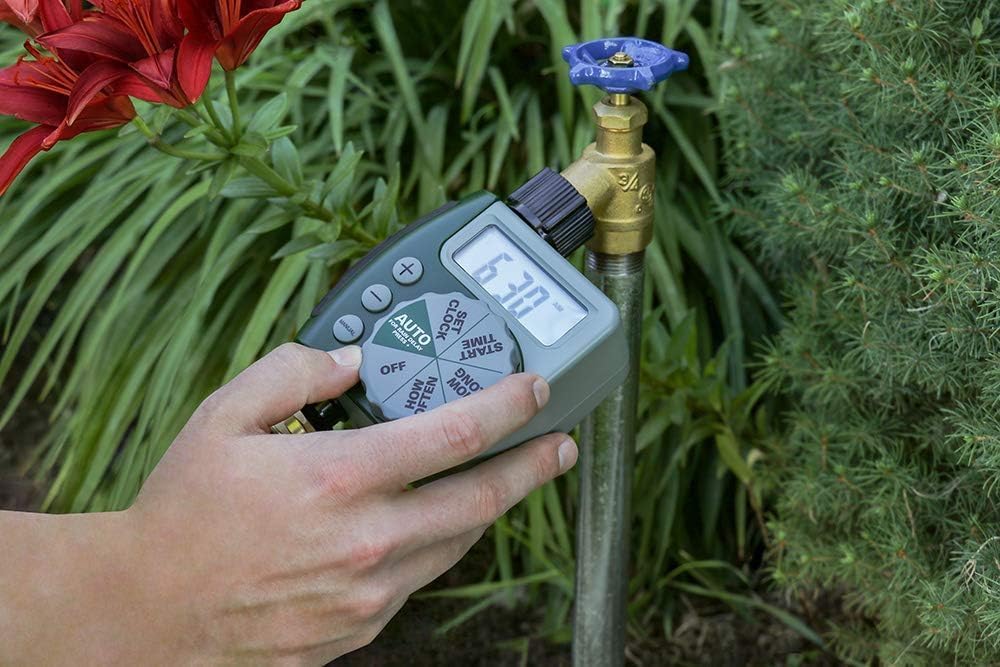
Image: A hand demonstrating the attachment of the Orbit 62061N timer to an outdoor garden faucet.

Image: A close-up view of the Orbit 62061N timer's swivel coupling, designed for easy and secure hose attachment.
Operating Instructions
The Orbit 62061N timer features a large, intuitive dial and an LCD screen for easy programming.

Image: A detailed view of the Orbit 62061N timer's large digital display and intuitive programming dial.
1. Setting the Clock
- Turn the dial to SET CLOCK.
- Use the + and - buttons to set the current time. The time will advance in 15-minute increments.
- Press the MANUAL button to switch between AM and PM.
2. Setting Watering Programs
The timer allows you to set a start time, duration, and frequency for your watering cycles.
a. Set Start Time
- Turn the dial to START TIME.
- Use the + and - buttons to select your desired watering start time.
b. How Long (Watering Duration)
- Turn the dial to HOW LONG.
- Use the + and - buttons to set the watering duration from 1 to 240 minutes (4 hours).

Image: The Orbit 62061N timer attached to a faucet, illustrating its capability for timed watering cycles.
c. How Often (Watering Frequency)
- Turn the dial to HOW OFTEN.
- Use the + and - buttons to select the watering frequency. Options include every 6 hours, every 12 hours, or once every 1 to 7 days.

Image: The Orbit 62061N timer displaying its watering interval settings, allowing for flexible scheduling.
3. Auto Mode
After setting your desired watering program, turn the dial to AUTO. The timer will now operate according to your programmed schedule.
4. Manual Watering
To manually water without interrupting your programmed schedule:
- Turn the dial to MANUAL.
- Use the + and - buttons to set the desired manual watering duration.
- The timer will begin watering immediately for the set duration. Once complete, it will return to your programmed schedule.
5. Rain Delay
The rain delay feature allows you to pause your watering schedule for a set period, conserving water after rainfall.
- While the dial is in the AUTO position, press and hold the + button for 3 seconds.
- The display will show '24h', indicating a 24-hour rain delay.
- Press the + button again to cycle through 48-hour and 72-hour delay options.
- The timer will automatically resume its programmed schedule after the selected delay period.
- To cancel a rain delay, press and hold the + button until the display returns to the current time.

Image: The Orbit 62061N timer attached to a faucet, displaying the rain delay function, which helps save water by skipping cycles after rain.
6. Turning Off the Timer
To turn off all watering programs, turn the dial to OFF. This will stop all automatic and manual watering cycles.
Maintenance
Battery Replacement
When the battery indicator on the LCD screen is low, replace the batteries promptly to ensure continuous operation. Follow the battery installation steps outlined in the Setup section.
Winterization and Storage
To prevent damage from freezing temperatures, remove the timer from the faucet and store it indoors in a location where the temperature remains above 32°F (0°C). Remove batteries before long-term storage.
Cleaning
Periodically check the filter washer located in the swivel coupling for debris. Remove and rinse the filter under running water to clear any blockages. This helps maintain optimal water flow and prevents internal damage.
Troubleshooting
| Problem | Possible Cause | Solution |
|---|---|---|
| Timer display is blank or dim. | Low or dead batteries; incorrect battery installation. | Replace with new AA alkaline batteries; ensure correct polarity. |
| Timer does not water at scheduled time. | Incorrect program settings; timer is in OFF mode; rain delay is active; low water pressure. | Verify program settings (Start Time, How Long, How Often); ensure dial is on AUTO; check for active rain delay; ensure faucet is fully open and water pressure is adequate. |
| Timer waters continuously. | Timer is in MANUAL mode; internal malfunction. | Turn dial to AUTO or OFF to stop manual watering; if problem persists, contact customer support. |
| Water leaks from connections. | Loose connections; worn washer; damaged threads. | Hand-tighten connections; check and replace rubber washer if worn; ensure threads are not cross-threaded. |
Specifications
- Model Number: 62061N
- Brand: Orbit
- Color: Green
- Product Dimensions: 4"D x 2"W x 2"H
- Power Source: 2 x 1.5V AA Alkaline Batteries (not included)
- Maximum Operating Pressure: 100 PSI
- Operating Temperature: Do not operate at temperatures exceeding 120°F (49°C). Store above 32°F (0°C).
- UPC: 840041572216
- Manufacturer: Orbit
Warranty Information
Orbit products are manufactured with quality materials and workmanship. For specific warranty details and terms, please refer to the warranty information provided with your product packaging or visit the official Orbit website. Keep your purchase receipt as proof of purchase for any warranty claims.
Customer Support
If you have any questions, require technical assistance, or need to troubleshoot issues not covered in this manual, please contact Orbit customer support:
- Website: www.orbitonline.com
- Phone: Refer to the Orbit website for regional contact numbers.
Please have your model number (62061N) and purchase information ready when contacting support.
Related documents62061N


Ask a question about this manual
Ask about setup, troubleshooting, compatibility, parts, safety, or missing instructions. Manuals+ will review the question and use this page’s manual context to help answer it.