
Introduction
This manual provides detailed instructions for the installation, operation, and maintenance of your SANNCE 16CH 8MP NVR Wireless Security Camera System. This system is designed to provide comprehensive surveillance for homes, offices, and supermarkets, offering crystal-clear 8MP image preview, recording, and playback capabilities.
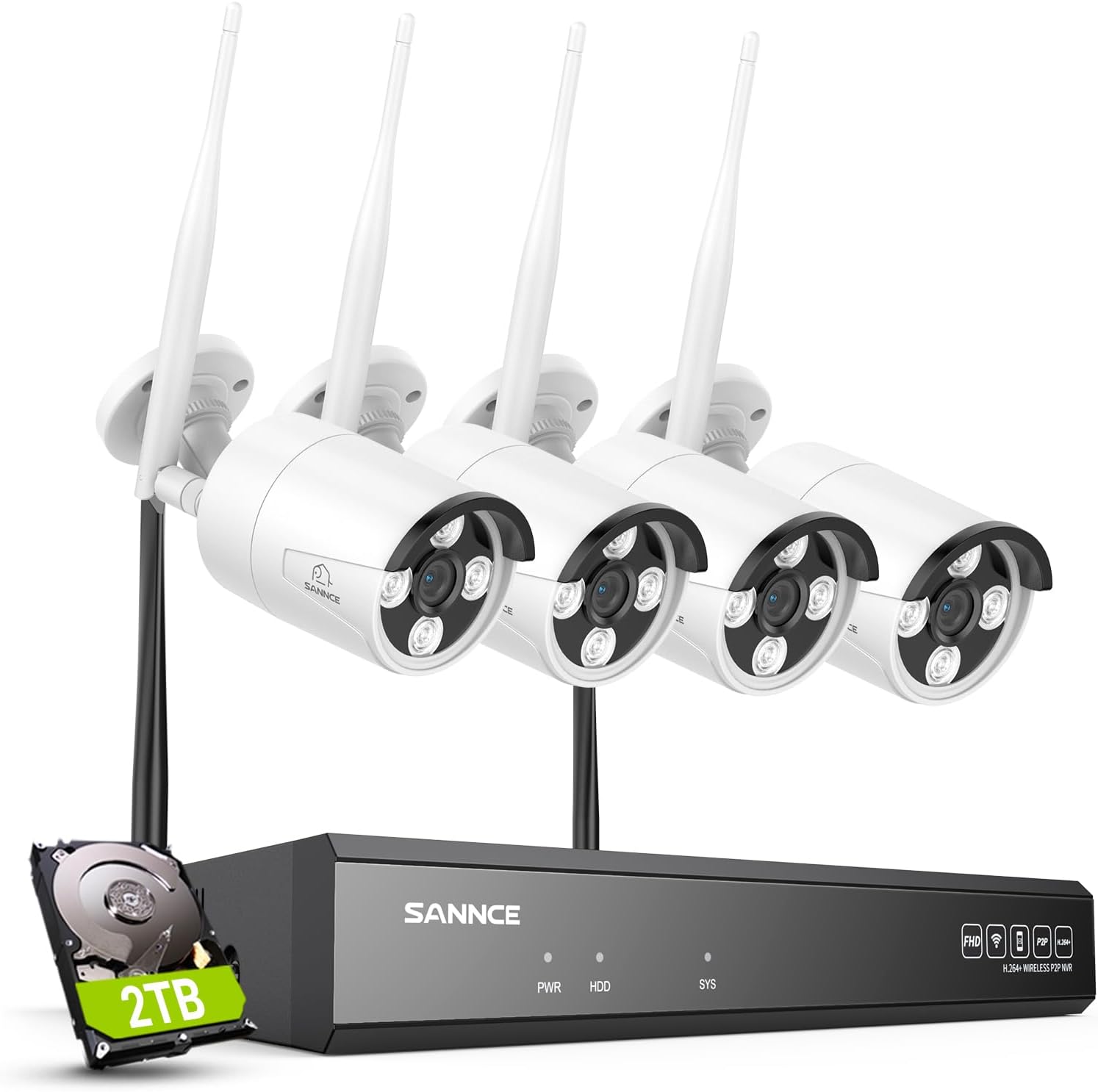
Image: The SANNCE 16-channel 8MP NVR system, featuring the NVR unit, four wireless 8MP IP cameras, and a 2TB hard disk drive for storage.
Package Contents
Before beginning installation, please verify that all components are present in your package:
- 1 x SANNCE 16CH 8MP NVR
- 4 x SANNCE 8MP IP66 Waterproof Surveillance IP Cameras
- 1 x 2TB HDD (Pre-installed in NVR)
- Power Adapters for NVR and Cameras
- USB Mouse
- Ethernet Cable
- Mounting Screw Kits
- Quick Start Guide
The system includes the NVR (Network Video Recorder) and the necessary cameras, along with a pre-installed 2TB hard drive for immediate use. All required accessories for power and mounting are provided.
Setup
1. Physical Installation
NVR Placement: Place the NVR in a secure, central location, away from direct sunlight and moisture. Ensure adequate ventilation.
Camera Mounting: The cameras are IP66 waterproof and designed for both indoor and outdoor use. Mount cameras in desired surveillance areas, ensuring a clear field of view. Use the provided mounting screws. The cameras are built to withstand harsh weather conditions, operating between -20℃ and 60℃.

Image: A SANNCE IP66-rated waterproof outdoor security camera shown in various weather conditions, including rain and snow, highlighting its durability and operational temperature range from -20°C to 60°C.
2. Power Connection
- Connect the NVR to a power outlet using its dedicated power adapter.
- Connect each camera to its respective power adapter and plug into a power outlet.
- The system supports plug & play functionality, automatically pairing cameras with the NVR upon power-up.
3. Network Connection
Connect the NVR to your router using the provided Ethernet cable for initial setup and remote access. The system adapts to 2.4/5.8GHz dual-band WiFi Pro-tech for stronger signal anti-interference and better stability, offering up to 985ft wireless distance in open environments.

Image: A diagram illustrating the dual-band WiFi coverage provided by the SANNCE system, showing the NVR and cameras strategically placed around a house for stable and reliable wireless connection.
4. Initial Configuration
Connect the NVR to a monitor via HDMI or VGA. Use the USB mouse to navigate the on-screen menu for initial setup, including date/time, network settings, and recording preferences.
Operating Instructions
1. Live View
Access live video feeds from all connected cameras directly on your monitor or via the mobile application. The system provides crystal-clear 8MP image preview.
2. Recording Options
The system supports various customized recording modes:
- 24/7 Continuous Recording: For constant surveillance.
- Motion Detection Recording: Records only when motion is detected.
- Human Motion Detection: Advanced detection focusing specifically on human shapes, reducing false alarms.
- Alarm Triggered Recording: Initiated by specific alarm events.
- Scheduled Recording: Records during pre-defined time periods.
Advanced H.264+ video coding helps reduce storage space significantly while maintaining video quality. You can freely switch between HD and SD video recording.

Image: An illustration of the intelligent human detection feature, showing the system identifying and highlighting human figures within the surveillance area, enabling customized video recording and 24/7 monitoring.
3. Playback
Review recorded footage stored on the 2TB HDD. The NVR supports local playback. You can also access playback remotely via the mobile application.
4. Remote Access and Monitoring
Monitor your property from anywhere using the dedicated mobile application (SANNCE SIGHT) or through Alexa smart voice control. The app provides real-time alerts and notifications for events like human shape detection.

Image: Various devices (laptop, desktop monitor, tablet, smartphone) displaying live feeds from the SANNCE security system, demonstrating the remote viewing capabilities via the APP and Alexa integration.
5. Night Vision
The cameras offer up to 98ft (30m) IR night vision and 33ft (10m) full-color night vision, ensuring 24/7 security coverage even in low-light or no-light conditions.

Image: A comparison showing a house during the day and at night, demonstrating the 10-meter full-color night vision capability of the SANNCE cameras, providing clear visibility even in darkness.
Maintenance
1. Cleaning
Regularly clean the camera lenses with a soft, damp cloth to ensure clear image quality. Do not use harsh chemicals.
2. Firmware Updates
Periodically check the SANNCE official website or the mobile application for firmware updates to ensure optimal performance and security. Follow the provided instructions for updating.
3. Storage Management
The NVR comes with a 2TB HDD. The system supports up to 8TB local HDD storage. Additionally, cloud storage options are available to ensure sufficient space for continuous recording and playback. Regularly back up important footage.

Image: Icons representing cloud storage and an 8TB hard drive, indicating the expandable storage options available for the system.
Troubleshooting
If you encounter issues with your SANNCE security system, please refer to the following common solutions:
| Problem | Possible Cause / Solution |
|---|---|
| No Video Display |
|
| Remote Access Failure |
|
| Poor Image Quality |
|
| Hard Drive Not Recording |
|
For further assistance, please contact SANNCE customer support.
Specifications
- Brand: SANNCE
- Model Number: N98WHG2-94FC
- Connectivity Technology: Wireless
- Video Capture Resolution: 8MP
- Number of Channels: 16
- Storage: 2TB HDD (expandable up to 8TB local storage, cloud storage available)
- Video Coding: H.264+
- WiFi: Dual-Band (2.4/5.8GHz)
- Wireless Distance: Up to 985ft (open environments)
- Camera Weatherproof Rating: IP66
- Operating Temperature: -20℃ to 60℃ (-4°F to 140°F)
- IR Night Vision Range: Up to 98ft (30m)
- Full-Color Night Vision Range: Up to 33ft (10m)
- Viewing Angle: 90 Degrees
- Hardware Interface: USB (2 ports)
- Dimensions (NVR): 12 x 12 x 8 inches
- Item Weight: 4.5 pounds (system)
- Special Features: App Control, Human Motion Detection, Alexa Smart Voice Control
Warranty and Support
SANNCE products are backed by a manufacturer's warranty. For specific warranty terms and conditions, please refer to the warranty card included with your product or visit the official SANNCE website.
For technical support, troubleshooting assistance, or any product-related inquiries, please contact SANNCE customer service. You can often find support resources, FAQs, and contact information on the official SANNCE website or through the SANNCE mobile application.
Visit the SANNCE Store on Amazon for more information and support.