
Introduction
Welcome to the world of authentic outdoor cooking with your new Ooni Karu 2 Pro Pizza Oven and Peel Bundle. This multi-fuel oven is engineered for superior performance, reaching temperatures up to 932°F (500°C) to cook pizzas in as little as 60 seconds. Its versatile design allows you to use wood, charcoal, or an optional gas burner, providing ultimate control over your cooking experience. The integrated digital temperature hub and included 14-inch pizza peel enhance precision and ease of use, making it perfect for a wide range of dishes beyond just pizza.

The Ooni Karu 2 Pro Pizza Oven and included 14-inch Pizza Peel, ready for use.
Setup
Before operating your Ooni Karu 2 Pro, ensure it is properly assembled and placed on a stable, heat-resistant surface outdoors. The oven is designed for countertop installation.
Unpacking and Assembly
- Carefully remove all components from the packaging.
- Attach the chimney to the top of the oven. Ensure it is securely locked in place.
- Insert the pizza stone into the oven chamber.
- If using the optional gas burner (sold separately), follow its specific installation instructions to attach it to the rear of the oven.

An exploded view showing the main components of the Ooni Karu 2 Pro, including the chimney, oven body, and base.
Placement
- Place the oven on a sturdy, non-combustible surface away from any flammable materials.
- Ensure adequate clearance around the oven for safe operation and ventilation.
Operating Instructions
Fueling the Oven
The Ooni Karu 2 Pro is a multi-fuel oven, offering flexibility in your cooking method.
- Wood/Charcoal: For a traditional wood-fired experience, load small pieces of hardwood or charcoal into the fuel tray at the rear of the oven.
- Gas (with optional burner): If you have the Ooni Gas Burner, attach it according to its instructions. This provides convenient, consistent heat.
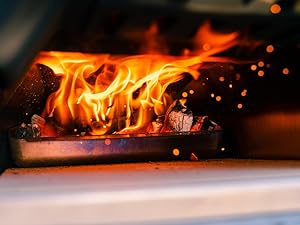
Close-up of wood burning in the fuel tray at the rear of the oven.

A user connecting the optional gas burner to the back of the Ooni Karu 2 Pro.
Preheating
The Ooni Karu 2 Pro reaches optimal cooking temperatures of 932°F (500°C) in approximately 15 minutes. Allow the oven to fully preheat to ensure a perfectly cooked crust.
This video demonstrates the key features of the Ooni Karu 2 Pro Pizza Oven, including its multi-fuel capability, wide cooking surface, and digital temperature hub. It shows the oven reaching high temperatures and various foods being cooked.
Temperature Monitoring with Ooni Connect
The integrated Ooni Connect digital temperature hub allows you to monitor the oven's temperature directly on its front display or via the Ooni app on your smartphone (Bluetooth connection required). This ensures precise temperature control for consistent results.
- Oven Temperature: The front display shows the current internal temperature of the oven.
- Food Probe: Use the included digital food probe to monitor the internal temperature of larger items like roasts or steaks.

A user checking the Ooni app on their smartphone, which displays the oven's temperature via Ooni Connect.
Cooking
The large cooking area accommodates pizzas up to 16 inches, as well as other dishes like roasted meats and vegetables.
- Pizza: Launch your pizza onto the hot stone using the 14-inch pizza peel. Rotate the pizza frequently for even cooking.
- Other Dishes: Use oven-safe cookware for roasting or baking. The spacious internal height allows for larger items like whole chickens.

A pizza being carefully inserted into the Ooni Karu 2 Pro oven using the pizza peel.

A collage highlighting the Ooni Karu 2 Pro's features: powder-coated carbon steel outer shell, ClearView glass door, huge cooking area, and Ooni Connect digital temperature hub with food probe.
Maintenance
Regular maintenance will ensure the longevity and optimal performance of your Ooni Karu 2 Pro.
Cleaning
- Oven Exterior: Allow the oven to cool completely. Wipe down the powder-coated carbon steel exterior with a damp cloth. Avoid abrasive cleaners.
- Pizza Stone: After the oven has cooled, scrape off any burnt food residue from the pizza stone. The stone is porous and should not be cleaned with soap or water. High heat during subsequent uses will sanitize it.
- ClearView Glass Door: The ClearView technology minimizes soot buildup. For any residue, use a non-abrasive glass cleaner designed for high-temperature glass once the oven is cool.
- Fuel Tray: Empty ash from the fuel tray after each use once it has cooled.
Storage
Store the oven in a dry, protected area when not in use. Consider purchasing an Ooni Karu 2 Pro cover for added protection against the elements.
Troubleshooting
If you encounter any issues with your Ooni Karu 2 Pro, refer to the following common solutions:
- Oven Not Reaching Temperature:
- Ensure sufficient fuel (wood/charcoal) or proper gas connection and flow.
- Check that the chimney baffle and rear baffle are open to allow proper airflow.
- Allow adequate preheating time (at least 15 minutes).
- Pizza Not Cooking Evenly:
- Ensure the oven is fully preheated.
- Rotate the pizza frequently (every 20-30 seconds) during cooking.
- Check for consistent flame across the oven chamber.
- Digital Temperature Hub Not Connecting:
- Ensure Bluetooth is enabled on your smartphone.
- Check that the Ooni app is updated to the latest version.
- Verify the temperature hub has sufficient battery power.
For further assistance, please contact Ooni customer support.
Specifications
| Feature | Specification |
|---|---|
| Brand | ooni |
| Model | Karu 2 Pro |
| Installation Type | Countertop |
| Special Features | Portable |
| Oven Cooking Mode | Combustion, Gas (with optional burner) |
| Color | Black |
| Door Hinges | Forward |
| Heating Method | Combustion, Gas |
| Finish Type | Polished |
| First Available | January 30, 2025 |
Warranty and Support
For information regarding product warranty and customer support, please refer to the official Ooni website or contact Ooni customer service directly. You can also visit the Ooni Store on Amazon for additional resources and contact details.
This product is eligible for a 30-day refund/replacement return policy through Amazon.


