
Remax RM-C03
Remax RM-C03 Car Phone Holder User Manual
Universal Centre Console Mount, Adjustable Mobile Stand
1. Product Overview
The Remax RM-C03 Car Phone Holder is designed to provide a secure and convenient mounting solution for your smartphone in your vehicle. Its adjustable design ensures compatibility with a wide range of mobile devices, offering hands-free access for navigation, calls, and music.

Figure 1: Remax RM-C03 Car Phone Holder and its retail packaging.
Key Features:
- Universal Compatibility: Fits all phones, including iPhone, Nokia mobile, OnePlus mobile phone, LG mobile, and more.
- Secure Adjustable Mount: Adjustable design provides a secure hold for mobile phones of different sizes and models.
- Convenient for Hands-Free Use: Perfect for GPS, hands-free calls, and music, keeping you focused on the road.
- Durable & Long-Lasting: Crafted from durable materials to ensure lasting use and reliability in your car.
- Compact & Space-Saving: Organize your car's center console with this space-saving mobile stand holder.
- Ideal for Various Devices: Compatible with mobile phones under 500 AED, including iPhones, OnePlus, and other smartphones.
- 360 Degree Rotation: Allows for optimal viewing angles in both portrait and landscape modes.
2. Package Contents
Please ensure all items are present before proceeding with installation.
- Remax RM-C03 Car Phone Holder (Main Unit)
- User Manual (this document)
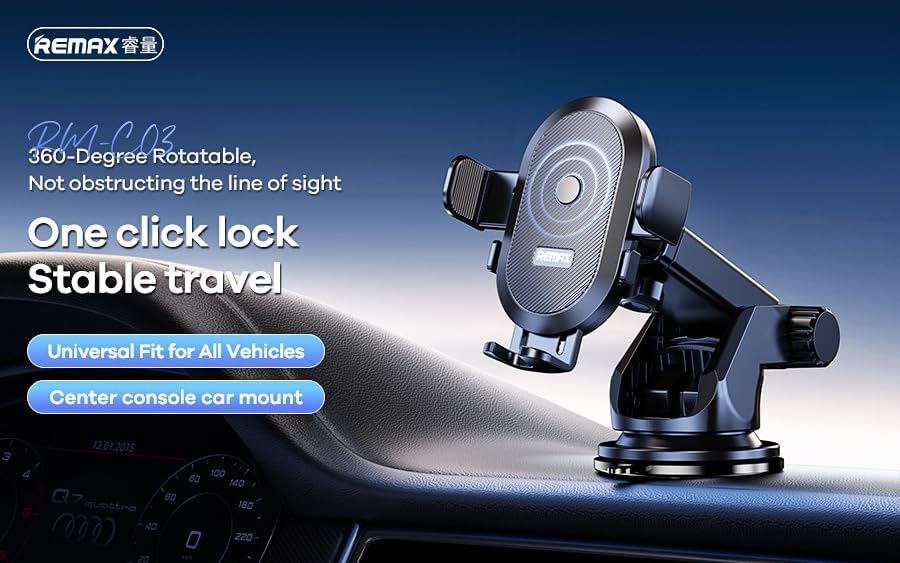
Figure 2: The Remax RM-C03 Car Phone Holder main unit.
3. Setup and Installation
Follow these steps to properly install your Remax RM-C03 Car Phone Holder.
- Choose a Location: Select a clean, flat, and smooth surface on your car's dashboard or windshield. Ensure the chosen location does not obstruct your view of the road or interfere with airbags.
- Clean the Surface: Wipe the chosen surface with a clean, damp cloth, then dry it thoroughly. This ensures optimal suction.
- Attach the Holder: Place the suction cup base firmly onto the cleaned surface. Press down on the center of the suction cup while flipping the locking lever down to create a strong vacuum seal.
- Adjust the Arm: Loosen the adjustment knobs on the holder's arm to position it to your desired height and angle. Tighten the knobs securely once positioned.
- Adjust the Phone Cradle: The cradle features a 360-degree rotation. Loosen the nut behind the cradle, adjust to your preferred orientation (portrait or landscape), and then tighten the nut.

Figure 3: Illustration of the adjustable features and installation on a car dashboard.
4. Operating Instructions
Using your Remax RM-C03 Car Phone Holder is simple and intuitive.
- Inserting Your Phone: Gently press the release button or squeeze the side arms of the cradle to open them. Place your phone into the cradle, ensuring it rests on the bottom support. The side arms will automatically close to secure your phone, or you may need to gently push them inwards until they grip the phone firmly.
- Removing Your Phone: Press the release button (if applicable) or gently pull the side arms apart to release your phone.
- Adjusting Viewing Angle: Use the adjustable arm and the 360-degree rotating cradle to achieve your optimal viewing angle. Ensure all knobs are tightened after adjustment to prevent movement during driving.

Figure 4: The phone holder securely gripping a smartphone.
5. Maintenance
To ensure the longevity and optimal performance of your phone holder, follow these maintenance tips:
- Cleaning: Wipe the holder regularly with a soft, damp cloth. Avoid using harsh chemicals or abrasive cleaners, as they may damage the material.
- Suction Cup Care: If the suction cup loses its grip, rinse it with warm water and let it air dry. This can restore its adhesive properties. Ensure the mounting surface is always clean and smooth.
- Storage: When not in use for extended periods, store the holder in a cool, dry place away from direct sunlight.
6. Troubleshooting
If you encounter any issues with your Remax RM-C03 Car Phone Holder, refer to the following common problems and solutions:
| Problem | Possible Cause | Solution |
|---|---|---|
| Holder does not stick to surface. | Surface is dirty, uneven, or suction cup is dusty. | Clean the mounting surface and the suction cup thoroughly. Ensure the surface is flat and smooth. Re-apply the holder, pressing firmly and engaging the locking lever. |
| Phone is not held securely. | Side arms not fully closed or phone is too large/small. | Ensure the side arms are fully gripping the phone. Check phone compatibility with the holder's size range (4-6.5 inches). |
| Holder sags or moves during driving. | Adjustment knobs are loose. | Tighten all adjustment knobs and the nut behind the cradle firmly after positioning. |
7. Specifications
Detailed specifications for the Remax RM-C03 Car Phone Holder:
- Brand: Remax
- Model Number: RM-C03
- Product Dimensions: 12 x 7 x 7 cm
- Item Weight: 150 g
- Color: Black
- Special Features: 360 Degree Rotation
- Compatible Devices: Smartphones
- Compatible Phone Models: Universal (e.g., iPhone, Android phones 4-6.5 inches)
- Mounting Type: Handlebar (or Dashboard/Windshield via suction cup)
8. Warranty and Support
Remax products are manufactured to high-quality standards. For warranty information or technical support, please refer to the warranty card included with your purchase or contact your local Remax distributor or customer service center. Please retain your proof of purchase for any warranty claims.
For further assistance, you may visit the official Remax website or contact their customer support channels.
Ask a question about this manual
Ask about setup, troubleshooting, compatibility, parts, safety, or missing instructions. Manuals+ will review the question and use this page’s manual context to help answer it.