
1. Introduction
This manual provides essential information for the safe and effective use of your PDi medTV16 patient television. The medTV16 is a 16-inch arm-mounted HDTV specifically engineered for healthcare environments, offering a clear 1080p LCD display and integrated audio. It is designed for patient viewing and interaction within medical facilities.
Please read this manual thoroughly before installation and operation, and retain it for future reference.
2. Safety Information
- This device is UL-listed for use in the USA and Canada, ensuring compliance with stringent safety standards for healthcare environments.
- Ensure proper installation by qualified personnel, especially for arm-mounted systems, to prevent injury or damage.
- Only use the specified COAX cable for power and signal. Do not attempt to power the unit with alternative methods, as this may cause damage or electrical hazards.
- Do not block ventilation openings on the television. Adequate airflow is necessary to prevent overheating.
- Keep liquids away from the device. In case of liquid spills, immediately disconnect power and contact service personnel.
- Do not attempt to open or service the television yourself. Refer all servicing to qualified service personnel.
3. Package Contents
Verify that all items are present in the package:
- PDi medTV16 Patient Television Unit
- User Manual (this document)
- Mounting Hardware (typically included with the PDi arm system, sold separately)
- COAX Cable (for power and signal connection)
4. Setup
Follow these steps for initial setup of your PDi medTV16 television:
- Mounting: Securely attach the medTV16 to a compatible PDi arm system. Refer to the arm system's specific installation guide for detailed instructions on mounting and positioning. Ensure the television is stable and properly balanced.
- Power and Signal Connection: Connect the COAX cable to the RF input on the television. This single cable provides both power and signal to the unit. Ensure the COAX cable is securely connected to the facility's COAX outlet.
- Initial Power On: Once the COAX cable is connected and the facility's COAX power source is active, the television should power on automatically or can be powered on using the power button on the unit.
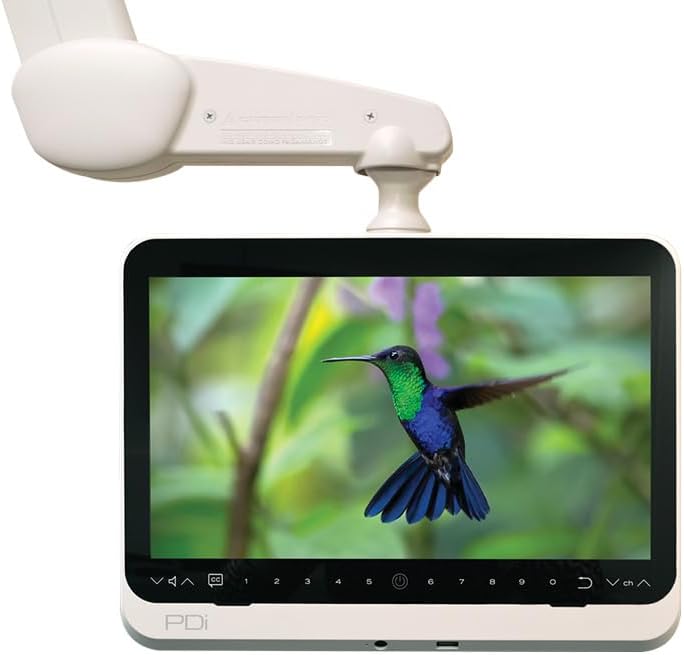
An image showing the PDi medTV16, a 16-inch arm-mounted television, with a vibrant image of a hummingbird on its screen. The white mounting arm is visible above the display, illustrating the typical installation.
5. Operating Instructions
The medTV16 features intuitive controls located on the front panel below the screen.
- Power On/Off: Press the Power button (often indicated by a circle with a vertical line) on the front panel to turn the television on or off.
- Channel Selection: Use the Channel Up/Down buttons (often indicated by 'V^' and 'Vv' or 'CH+' and 'CH-') to navigate through available channels. Numeric buttons (0-9) can be used for direct channel entry.
- Volume Control: Adjust the audio level using the Volume Up/Down buttons (often indicated by '+' and '-').
- Input Selection: Press the Input button (often indicated by an arrow entering a box or 'Source') to cycle through available input sources (e.g., HDMI, USB, RF).
- Closed Captioning (CC): Press the CC button to enable or disable closed captioning.
6. Connectivity
The medTV16 supports various wired connectivity options for integrating external devices:
- HDMI Input: Connect devices such as laptops, gaming consoles, or media players using an HDMI cable. Select the corresponding HDMI input via the Input button on the television's control panel.
- USB Port: Insert a USB flash drive into the USB port to view compatible media files (e.g., photos, videos, music). Access the USB media player through the Input menu.
- RF Input: The primary connection for television channels and power is via the COAX RF input. This input receives both the television signal and power from the facility's COAX infrastructure.
7. Maintenance
Proper care and maintenance will ensure the longevity and optimal performance of your PDi medTV16.
- Cleaning the Screen: Gently wipe the screen with a soft, lint-free cloth. For stubborn marks, lightly dampen the cloth with water or a non-abrasive, electronics-safe screen cleaner. Do not spray cleaner directly onto the screen.
- Cleaning the Casing: Use a soft, dry cloth to clean the exterior casing. Avoid harsh chemicals, abrasive materials, or solvents, as these can damage the finish.
- Ventilation: Regularly check that the ventilation openings on the television are not obstructed by dust or debris to prevent overheating.
- Disinfection: For healthcare environments, follow facility protocols for disinfection using approved cleaning agents that are safe for electronic surfaces.
8. Troubleshooting
If you encounter issues with your medTV16, refer to the following common troubleshooting steps:
- No Power:
- Verify the COAX cable is securely connected to both the television and the wall outlet.
- Ensure the facility's COAX power source is active.
- No Picture / No Signal:
- Check if the correct input source (RF, HDMI, USB) is selected using the Input button.
- If using an external device (HDMI/USB), ensure it is powered on and functioning correctly.
- For RF input, confirm the COAX cable connection and signal availability from the facility.
- No Sound:
- Check the volume level and ensure the television is not muted.
- If using an external device, check its volume and audio output settings.
- Poor Picture Quality:
- Adjust display settings (brightness, contrast, sharpness) if available in the menu.
- For RF input, signal interference might be present; contact facility maintenance for assistance.
If these steps do not resolve the issue, please contact PDi Communication Systems support or your facility's technical staff.
9. Specifications
| Feature | Specification |
|---|---|
| Model Number | medTV16 (PDI-P16TV5-xAC) |
| Screen Size | 16 Inches (41 cm visible diagonal) |
| Display Technology | LCD with LED Backlight |
| Resolution | 1080p |
| Aspect Ratio | 1.77:1 (16:9) |
| Contrast Ratio | 800:1 |
| Speakers | 2 integrated 1.7-Watt RMS speakers |
| Connectivity | HDMI, USB, RF Input |
| Power Consumption (On-mode) | 25 watts |
| Power Source | COAX Cable ONLY Power over COAX |
| Item Weight | 7 pounds |
| Product Dimensions (D x W x H) | 2.5" x 15.2" x 14.8" |
| Color | Starlight Gray |
| Certifications | UL-listed for USA and Canada |
| Refresh Rate | 60 Hz |
10. Warranty and Support
This PDi medTV16 television is covered by a manufacturer's warranty. For specific warranty terms and conditions, including duration and coverage details, please refer to the documentation provided with your purchase or visit the PDi Communication Systems official website.
For technical support, service, or to inquire about replacement parts, please contact PDi Communication Systems directly. Contact information, including phone numbers and email addresses, can typically be found on their official website or in your purchase documentation.
