
Introduction
Welcome to the user manual for your INTERPHONE Portable Air Compressor. This device is engineered for convenient and efficient inflation of motorcycle, car, and bike tires, and also features a power bank function for charging your electronic devices. Please read this manual thoroughly before use to ensure safe and optimal performance.
Important Safety Information
- Always read and understand all instructions before operating the device.
- Keep the device out of reach of children and pets.
- Do not expose the device to water or extreme temperatures.
- Ensure the correct pressure is set for the item being inflated to prevent over-inflation, which can cause damage or injury.
- Use the device in a well-ventilated area.
- Do not attempt to disassemble or repair the device yourself. Contact qualified service personnel for assistance.
- Dispose of the device and its battery responsibly according to local regulations.
Package Contents
Please check the box for the following items:
- INTERPHONE Portable Air Compressor
- USB-C Charging Cable
- Inflation Nozzles/Adapters (e.g., for bicycle valves, ball needles)
- User Manual
Product Overview
Familiarize yourself with the main components of your INTERPHONE Portable Air Compressor.

Figure 1: Front View. This image displays the front of the portable air compressor, featuring a large digital display that shows pressure readings in PSI, BAR, and KPA. Below the screen are intuitive control buttons for operation.

Figure 2: Back View. The rear view of the device, highlighting the manufacturer's label with model information and the USB-C charging port.
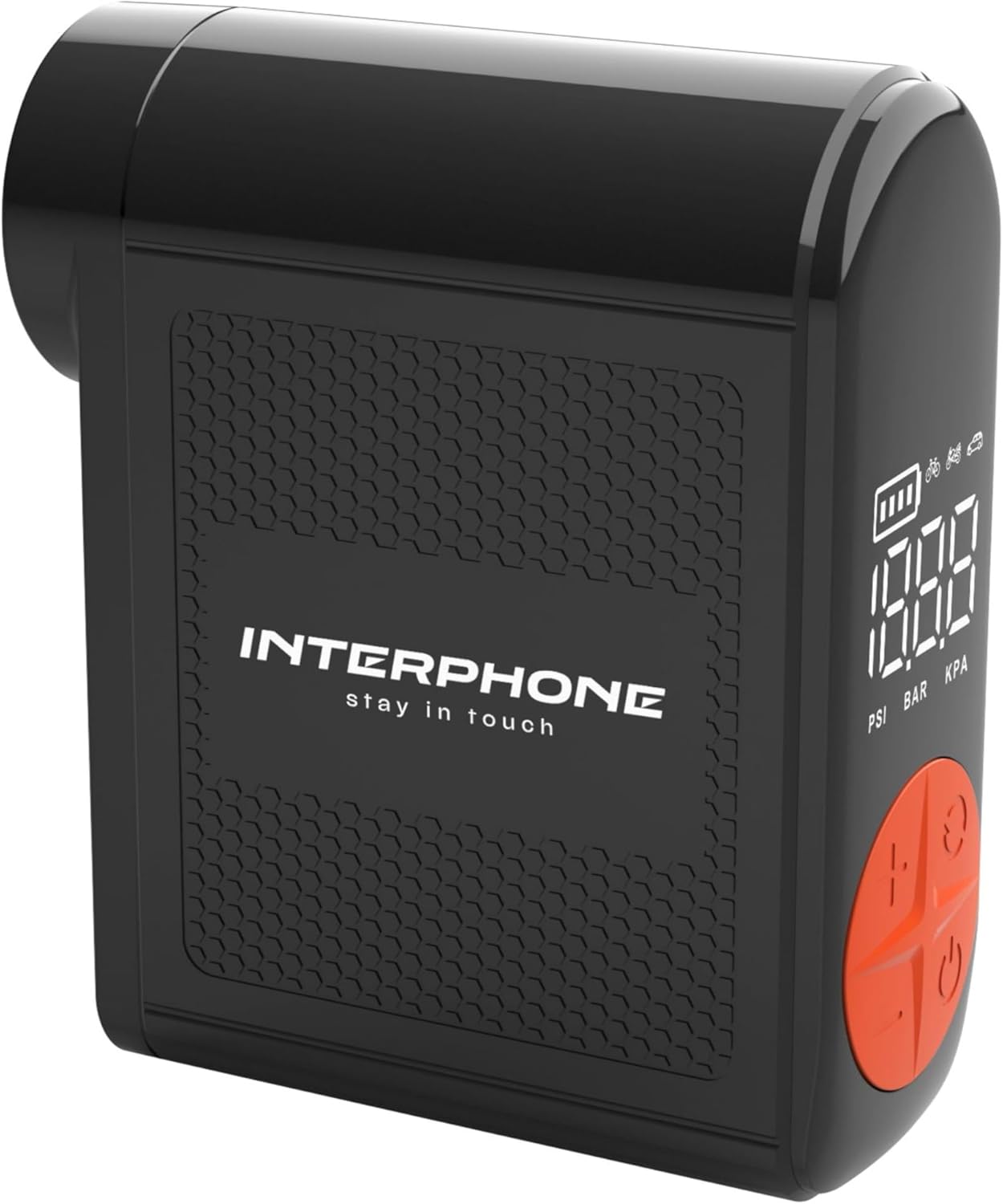
Figure 3: Side View with Hose. This image shows the side of the compressor where the integrated inflation hose is stored, ready for use.
Setup
Charging the Device
Before first use, fully charge the portable air compressor. Connect the provided USB-C cable to the charging port on the device and the other end to a suitable USB power adapter (not included). The battery indicator on the digital display will show the charging status. A full charge ensures optimal performance and standby time.
Attaching the Hose
The device features an integrated inflation hose. Gently pull out the hose from its storage slot on the side of the compressor. Select the appropriate nozzle adapter for your tire valve (e.g., Presta, Schrader) and securely attach it to the end of the hose.
Operating Instructions
Powering On/Off
To turn the device on, press and hold the power button (usually marked with a power symbol) for a few seconds until the display illuminates. To turn the device off, press and hold the power button again until the display turns off.
Setting Pressure Units
After powering on, you can cycle through the available pressure units (PSI, BAR, KPA) by briefly pressing the 'M' (Mode) or unit selection button. Select the unit appropriate for your needs.
Setting Target Pressure
Use the '+' and '-' buttons on the control panel to adjust the desired target pressure. The dual backlit display will show the current pressure and the target pressure simultaneously. Refer to your vehicle's manual or tire sidewall for recommended pressure values.
Inflation Process
- Securely connect the inflation hose with the correct adapter to the tire valve. Ensure there are no air leaks.
- Once connected, the display will show the current tire pressure.
- Press the start/inflate button (often marked with a play symbol or a circle) to begin the inflation process.
- The compressor will automatically stop when the set target pressure is reached.
- Carefully disconnect the hose from the tire valve.
Power Bank Function
The INTERPHONE Portable Air Compressor can also function as a power bank. Locate the USB-A output port on the device. Connect your electronic device (e.g., smartphone, tablet) to this port using its charging cable. The compressor will then provide power to charge your device.
LED Light Operation
The built-in LED light is useful for operating in low-light conditions or as an emergency light. Press the dedicated light button (or a multi-function button, refer to device markings) to turn the LED light on or off.
Maintenance
Proper maintenance ensures the longevity and reliability of your air compressor.
- Cleaning: Wipe the device with a soft, dry cloth. Do not use harsh chemicals or abrasive cleaners. Ensure no liquids enter the device.
- Storage: Store the compressor in a cool, dry place away from direct sunlight and extreme temperatures. Ensure the integrated hose is properly retracted into its slot.
- Battery Care: For long-term storage, charge the battery to approximately 50-70% every 3-6 months to maintain battery health. Avoid fully discharging the battery frequently.
Troubleshooting
If you encounter issues with your INTERPHONE Portable Air Compressor, refer to the table below for common problems and solutions.
| Problem | Possible Cause | Solution |
|---|---|---|
| Device does not turn on. | Low or depleted battery. | Charge the device fully using the provided USB-C cable. |
| Air is not inflating or inflating slowly. | Hose not securely connected to valve; incorrect nozzle adapter; hose kinked. | Ensure the hose is tightly screwed onto the tire valve. Check that the correct adapter is used and the hose is not bent. |
| Device stops before reaching target pressure. | Battery is low; internal safety mechanism (overheat protection). | Recharge the device. If the device feels hot, allow it to cool down for 15-20 minutes before resuming operation. |
| Display shows error message. | Internal malfunction or sensor error. | Turn off the device, wait a few seconds, and turn it back on. If the error persists, contact customer support. |
Specifications
Detailed technical specifications for the INTERPHONE Portable Air Compressor.
| Feature | Specification |
|---|---|
| Manufacturer | Cellularline S.p.A. |
| Brand | Interphone |
| Model | INTERPHOAIRPUMP3K |
| Package Dimensions | 18 x 12.1 x 4.1 cm |
| Item Weight | 400 g |
| Inflation Capacity | Up to 4 motorcycle tyres on a single charge |
| Inflation Time | Less than 4 minutes per tyre |
| Standby Time | More than 6 months |
| Pressure Units | PSI, BAR, KPA |
| Additional Features | Power bank function, Built-in LED light, Integrated inflation tube, Dual backlit display, Auto-stop function |
Warranty Information and Customer Support
This product comes with a standard manufacturer's warranty. Please refer to the warranty card included in your package for specific terms and conditions regarding coverage and duration.
For technical support, service, or any inquiries regarding your INTERPHONE Portable Air Compressor, please visit the official Interphone website:


