
XIAOMI 24044RN32L
XIAOMI Redmi A3X Smartphone User Manual
Model: 24044RN32L
1. Introduction
This manual provides essential instructions for setting up, operating, and maintaining your XIAOMI Redmi A3X smartphone. Please read this guide thoroughly to ensure proper use and to maximize the device's capabilities. The Redmi A3X features a 6.71-inch HD+ display, a 5000mAh battery, and runs on Android 14.
2. Package Contents
Verify that all items are present in your product box:
- XIAOMI Redmi A3X Mobile Phone
- USB Type-C Cable
- SIM Eject Tool
- Quick Start Guide
- Warranty Card
- Safety Information
- Wall Charger (Note: Availability may vary by region.)
3. Device Overview
Familiarize yourself with the physical components of your Redmi A3X smartphone.
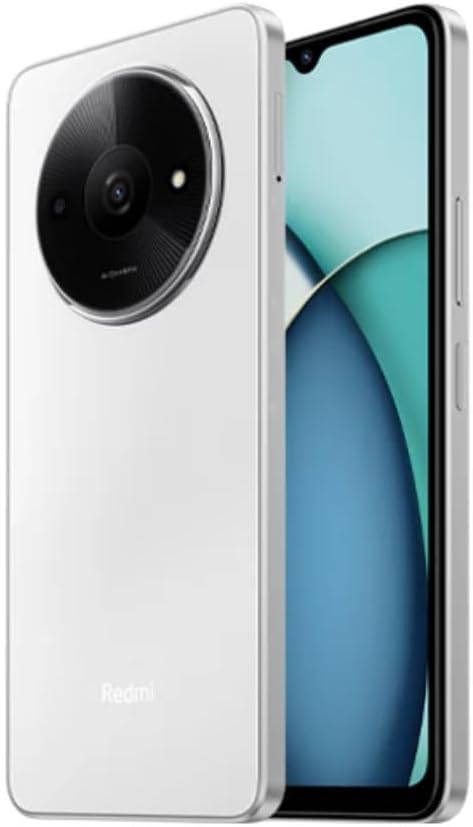
Figure 3.1: Front and Rear View of the Redmi A3X. This image displays the phone in Moonlight White, highlighting its 6.71-inch display and the distinctive circular camera module on the back.

Figure 3.2: Redmi A3X Certification Information. This image shows the phone's screen displaying regulatory details such as the model number (24044RN32L), FCC ID (2AFZZN32L), and battery capacity (5000mAh).
3.1 Physical Features
- Display: 6.71-inch Dot Drop HD+ display.
- Rear Camera: Circular module housing the 8MP main camera and auxiliary lens.
- Front Camera: Located in the display's dot drop notch.
- Side Fingerprint Sensor: Integrated into the power button for convenient unlocking.
- USB Type-C Port: For charging and data transfer.
- 3.5mm Headphone Jack: For audio accessories.
- SIM Tray: Supports Dual SIM and microSD card expansion.
4. Setup
4.1 Inserting SIM Cards and MicroSD Card
- Locate the SIM tray on the side of your device.
- Insert the SIM eject tool into the small hole on the SIM tray to open it.
- Place your Nano-SIM card(s) and/or microSD card into the tray with the gold contacts facing down. Ensure correct orientation as indicated on the tray.
- Carefully push the tray back into the phone until it is flush with the side.
Note: This device supports dual SIM cards and a microSD card simultaneously. For USA market, this phone is compatible with T-Mobile, Mint, Tello, and other T-Mobile network providers. Outside the USA, it works with any GSM carrier SIM.
4.2 Initial Power On and Charging
- To power on, press and hold the power button (located on the side) until the XIAOMI logo appears.
- Follow the on-screen prompts to complete the initial setup, including language selection, Wi-Fi connection, and Google account setup.
- To charge the device, connect the USB Type-C cable to the phone's charging port and the other end to the provided wall charger.
- The device supports 10W charging. Use only XIAOMI-approved chargers and cables.
5. Operating Instructions
5.1 Basic Navigation
Your Redmi A3X runs on Android 14. Navigate the interface using gestures or on-screen buttons. Swipe up from the bottom to access the app drawer, swipe down from the top for notifications and quick settings.
5.2 Display Features
- 6.71" HD+ Dot Drop Display: Offers a wide viewing area.
- 90Hz Refresh Rate: Provides a smoother visual experience for scrolling and app usage. This can be adjusted in display settings.
- DC Dimming: Reduces screen flickering at low brightness levels for improved eye comfort.
- Night Light: Adjusts screen colors to warmer tones to reduce blue light exposure, especially useful before sleep. Activate this feature in Display settings.
6. Camera Features
The Redmi A3X is equipped with an 8MP main rear camera and a 5MP front camera, offering various modes for photography and videography.
6.1 Rear Camera
- Resolution: 8MP with f/2.0 aperture and a 4P lens. Includes an auxiliary QVGA lens.
- Video Recording: Supports 1080P at 30fps and 720P at 30fps.
- Modes: filmCamera, HDR mode, Portrait mode, Time-lapse.
6.2 Front Camera
- Resolution: 5MP with f/2.2 aperture.
- Video Recording: Supports 1080P at 30fps and 720P at 30fps.
- Modes: filmCamera, HDR mode, Soft-light ring, Portrait mode, Time-lapse.
7. Connectivity
7.1 Network Bands
The device supports a wide range of network bands for global compatibility:
- 4G LTE TDD: 38/40/41
- 4G LTE FDD: 1/3/5/7/8/20/28
- 3G WCDMA: 1/5/8
- 2G GSM: 2/3/5/8
7.2 Wireless Connectivity
- Wi-Fi: Supports 2.4GHz and 5GHz Wi-Fi networks.
- Bluetooth: Version 5.4 for connecting wireless accessories.
- FM Radio: Supported via the 3.5mm headphone jack.
- GPS: Integrated GPS, Glonass, Galileo, and Beidou for accurate location services.
8. Security Features
Your Redmi A3X offers multiple options to secure your device and data.
- Side Fingerprint Sensor: Register your fingerprint(s) for quick and secure unlocking. Access this in Settings > Security & privacy > Device unlock.
- AI Face Unlock: Use your face to unlock the device. Ensure good lighting conditions for optimal performance. Access this in Settings > Security & privacy > Device unlock.
9. Maintenance
9.1 General Care
- Keep the device dry. Moisture can damage electronic circuits.
- Avoid extreme temperatures. High temperatures can shorten the life of electronic devices and damage batteries.
- Do not drop, knock, or shake the device. Rough handling can break internal circuit boards and fine mechanics.
- Clean the screen and body with a soft, dry cloth. Avoid using harsh chemicals or abrasive materials.
9.2 Software Updates
Your Redmi A3X will receive regular software updates. It is designed to receive 2 major Android version updates and 3 years of security patch updates. Ensure your device is connected to Wi-Fi and has sufficient battery before performing updates.
10. Troubleshooting
| Problem | Possible Solution |
|---|---|
| Device does not power on. | Ensure the battery is charged. Connect the charger and wait a few minutes before attempting to power on again. |
| Cannot connect to network. | Check if the SIM card is correctly inserted. Verify that mobile data is enabled in settings. Restart the device. Confirm network compatibility with your carrier. |
| Fingerprint sensor not working. | Ensure your finger is clean and dry. Re-register your fingerprint in settings if the issue persists. |
| Slow performance. | Close unused applications. Clear cache from apps. Restart the device. Consider performing a factory reset if issues persist (back up data first). |
11. Specifications
| Feature | Detail |
|---|---|
| Model Number | 24044RN32L |
| Display | 6.71" Dot Drop HD+ (1650x720), 90Hz Refresh Rate, DC Dimming |
| Processor | Unisoc T603, Octa-core up to 1.8GHz |
| RAM | 3GB |
| Internal Storage | 64GB |
| Expandable Storage | microSD (up to 1TB, shared with SIM slot) |
| Rear Camera | 8MP (f/2.0) + Auxiliary lens |
| Front Camera | 5MP (f/2.2) |
| Battery | 5000mAh (typ), 10W charging |
| Operating System | Android 14 |
| Connectivity | Dual SIM, 4G LTE, Wi-Fi (2.4GHz/5GHz), Bluetooth 5.4, GPS, FM Radio |
| Sensors | Side fingerprint sensor, AI face unlock, Virtual proximity, Virtual ambient light, Accelerometer, Electronic compass |
| Audio Jack | 3.5mm |
| Dimensions | Approx. 7.11 x 3.25 x 0.33 inches (based on package dimensions and 8.3mm thickness from description) |
| Weight | 12.8 ounces |
12. Warranty and Support
Your XIAOMI Redmi A3X comes with a warranty. Please refer to the included Warranty Card for detailed terms and conditions. For technical support or further assistance, please visit the official XIAOMI support website or contact their customer service.
You can find more information and support resources on the XIAOMI Store on Amazon.
Related documents24044RN32L


Ask a question about this manual
Ask about setup, troubleshooting, compatibility, parts, safety, or missing instructions. Manuals+ will review the question and use this page’s manual context to help answer it.