
SANODESK 63 x 48 inch
SANODESK L Shaped Standing Desk
Adjustable Height Electric Corner Desk - Model: 63 x 48 inch
Brand: SANODESK
1. Introduction
Thank you for choosing the SANODESK L Shaped Electric Standing Desk. This manual provides detailed instructions for the assembly, operation, and maintenance of your new adjustable height desk. Designed for ergonomic comfort and productivity, this desk allows you to effortlessly switch between sitting and standing positions throughout your workday.

Image: The SANODESK L Shaped Standing Desk in white, showcasing its spacious surface with a laptop, external monitor, and printer setup.

Image: The SANODESK L Shaped Standing Desk integrated into a modern office environment, demonstrating its aesthetic appeal and functional space.
2. Key Features
- Sturdy L-Shaped Design with Three-Leg Stability: Constructed with a heavy-duty steel frame and a durable laminate desktop, this L-shaped desk provides exceptional stability. Its innovative three-leg design optimizes floor space while offering robust support for multiple monitors and equipment.
- Smooth Electric Height Adjustment: The quiet and powerful lift system allows seamless transitions between 28.3 inches (sit) and 45.9 inches (stand). The desk supports a weight capacity of up to 220 lbs.
- Smart Control Panel with Memory Presets: Easily program and recall up to four preferred height settings, enabling quick adjustments for individual ergonomic needs or shared workspaces.
- Spacious Workspace & Smart Organization: The generous surface accommodates multiple monitors, laptops, and accessories. The sleek, scratch-resistant finish complements various office decors.
- Anti-Collision System: Equipped with an anti-collision feature that automatically reverses the desk's movement if it encounters an obstacle during height adjustment, ensuring safety.
- Flexible Right/Left Orientation: The L-shaped design can be configured for either a left-sided or right-sided setup, offering adaptability to different room layouts.
- Durable 1" Thick Commercial-Grade Desktop: The desktop is designed for longevity and is suitable for mounting monitor arms.

Image: Illustration of the anti-collision feature, showing the desk reversing movement when an object is detected underneath.

Image: Demonstrates the anti-collision system with a visual of a dog under the desk and the silent operation with a sleeping cat on the desk.
3. Specifications
| Attribute | Detail |
|---|---|
| Brand | SANODESK |
| Model | L Shaped Standing Desk (63 x 48 inch) |
| Product Dimensions (D x W x H) | 48"D x 63"W x 28.3"H |
| Color | White |
| Adjustable Height Range | 28.3 inches to 45.9 inches |
| Weight Capacity | Up to 220 lbs |
| Top Material Type | Engineered Wood (1" Thick Commercial-Grade) |
| Base Material | Heavy-duty Steel |
| Assembly Required | Yes |
| Certifications | FSC-Certified wood, BIFMA certified |
| UPC | 840460438650 |
| ASIN | B0DV4HX8B4 |

Image: Detailed diagram illustrating the dimensions of the L-shaped desk, including length, width, and height adjustment range.

Image: Visual comparison highlighting the 1-inch thick commercial-grade desktop of the SANODESK, suitable for monitor mounts, compared to thinner alternatives.
4. Setup and Assembly
The SANODESK L Shaped Standing Desk is designed for straightforward assembly. It typically takes under 45 minutes to set up. Please ensure you have adequate space and, if possible, a second person to assist with certain steps, especially when flipping the desk.
4.1 Before You Begin
- Unpack all components and verify against the parts list (refer to your included physical manual for the complete list).
- Clear a spacious area for assembly. Placing cardboard or a soft cloth on the floor can protect the desktop surfaces.
- Ensure you have the necessary tools. While many parts are pre-attached, a drill may be helpful for creating pilot holes if needed, as some holes might not be pre-drilled to accommodate various top sizes.
4.2 Assembly Steps (General Guidance)
- Assemble the Desk Frame: Follow the instructions to connect the three leg sections and crossbars. Ensure all connections are secure.
- Attach Desktop Panels: The L-shaped desktop consists of two main panels. Carefully align the pre-drilled holes on the desktop panels with the frame. Note that the two top pieces may look similar but have different hole alignments on the underside; test fit them before securing. Use the provided screws to attach the desktop to the frame. If some holes are not pre-drilled, carefully create pilot holes before screwing.
- Configure L-Shape Orientation: The desk can be assembled in either a left-sided or right-sided L-shape to fit your space. Refer to the diagrams below to determine your preferred configuration.
- Install Control Panel: Secure the smart control panel to the underside of the desk in the designated location.
- Connect Wiring: Connect all motor and control panel cables according to the wiring diagram in your physical manual. Ensure all connections are firm.
- Flip the Desk: With assistance, carefully flip the assembled desk upright onto its feet. This step is easier and safer with two people due to the desk's size and weight.
- Initial Power-Up and Calibration: Plug the desk into a power outlet. Follow the initial calibration steps outlined in your physical manual, which typically involves lowering the desk to its lowest point and then raising it to its highest to synchronize the motors.

Image: Visual representation of how the L-shaped desk can be configured for both left and right orientations to suit different room layouts.

Image: An overhead view illustrating the flexible right/left orientation of the L-shaped standing desk, showing two possible configurations.

Image: A diagram detailing the two panel configurations for flexible corner desk assembly, highlighting how the desk adapts to various spatial layouts.
5. Operating Instructions
Your SANODESK L Shaped Standing Desk features an intuitive smart control panel for easy height adjustment and memory functions.
5.1 Control Panel Overview
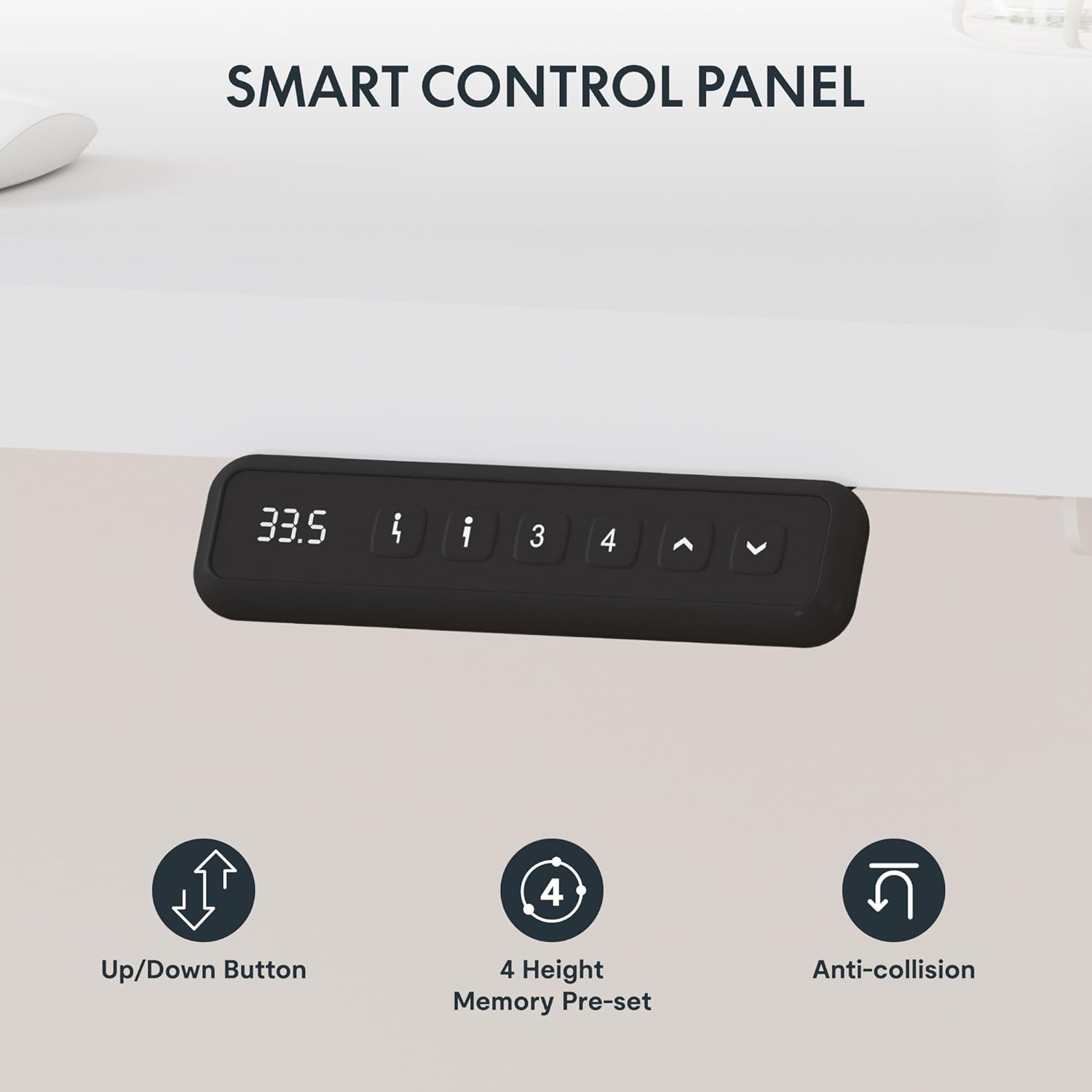
Image: A detailed view of the smart control panel, showing the digital height display, up/down buttons, memory preset buttons (1-4), and anti-collision indicator.

Image: Illustrates the key functions of the smart control panel: up/down movement, four height memory presets, and the anti-collision feature.
- Up/Down Buttons (^ / v): Press and hold to continuously adjust the desk height up or down. Release to stop at your desired height.
- Memory Presets (1, 2, 3, 4): These buttons allow you to save and recall up to four different height settings.
- To Save a Height: Adjust the desk to your desired height using the up/down buttons. Press the "M" or "Set" button (if present, otherwise typically hold the number button) followed by the desired number button (1, 2, 3, or 4). The display may flash or beep to confirm the setting is saved.
- To Recall a Height: Simply press the corresponding number button (1, 2, 3, or 4). The desk will automatically move to the saved height.
- Anti-Collision Feature: The desk is equipped with a sensor that detects obstacles during movement. If an object is detected, the desk will automatically stop and reverse slightly to prevent damage.
5.2 Initial Use and Calibration
Upon first use or after a power interruption, the desk may require calibration. Refer to your physical manual for specific calibration steps, which typically involve:
- Pressing and holding the down button until the desk reaches its lowest point and slightly rebounds.
- Releasing the button and then pressing it again until the desk completes its calibration cycle.
6. Maintenance
Proper care and maintenance will ensure the longevity and optimal performance of your SANODESK L Shaped Standing Desk.
- Cleaning: Wipe the desktop surface with a soft, damp cloth. For stubborn marks, use a mild, non-abrasive cleaner. Avoid harsh chemicals or abrasive materials that could damage the finish.
- Frame Care: Periodically check the steel frame for any loose screws or connections and tighten them as needed. Dust the frame with a dry cloth.
- Cable Management: Ensure all cables are neatly organized and not pinched or tangled, which could affect the desk's movement or cause damage.
- Motor Inspection: While the motors are designed for durability, avoid placing excessive weight beyond the specified capacity (220 lbs) to prevent strain. Listen for any unusual noises during operation.
7. Troubleshooting
If you encounter any issues with your SANODESK L Shaped Standing Desk, please refer to the following common troubleshooting steps. If the problem persists, contact customer support.
| Problem | Possible Cause | Solution |
|---|---|---|
| Desk does not move. | No power, loose cable connection, motor error. | Check power cord connection to outlet and desk. Ensure all motor cables are securely plugged into the control box. Try unplugging and replugging the desk after 30 seconds. |
| Desk moves unevenly or makes unusual noise. | Overload, obstruction, motor synchronization issue. | Reduce weight on the desk. Check for any obstructions under or around the desk. Perform a calibration cycle (refer to Section 5.2 or your physical manual). |
| Height memory presets not working. | Settings not saved correctly. | Re-save your desired height settings following the instructions in Section 5.1. |
| Anti-collision system triggers frequently. | Obstruction, sensitive setting. | Ensure there are no objects in the desk's path during movement. Consult your physical manual for instructions on adjusting anti-collision sensitivity if available. |
8. Warranty and Support
SANODESK stands behind the quality of its products. Your L Shaped Standing Desk comes with the following warranty coverage:
- 5-Year Frame Warranty: Covers defects in materials and workmanship for the desk frame.
- 2-Year Motor Coverage: Covers defects in materials and workmanship for the electric motor components.
For warranty claims, technical assistance, or any other inquiries, please contact SANODESK customer service. We offer 24/7 customer support to assist you.
Please visit the official SANODESK store on Amazon for more information and support: SANODESK Store
Related documents63 x 48 inch

Ask a question about this manual
Ask about setup, troubleshooting, compatibility, parts, safety, or missing instructions. Manuals+ will review the question and use this page’s manual context to help answer it.