
1. Introduction
This manual provides detailed instructions for the assembly, operation, maintenance, and troubleshooting of your Jocoevol Full Size Floating Bed Frame. This innovative bed frame features a unique visual floating design with integrated LED lights, an ergonomic hidden storage headboard, and a convenient charging station. Please read this manual thoroughly before assembly and use to ensure safe and optimal performance.
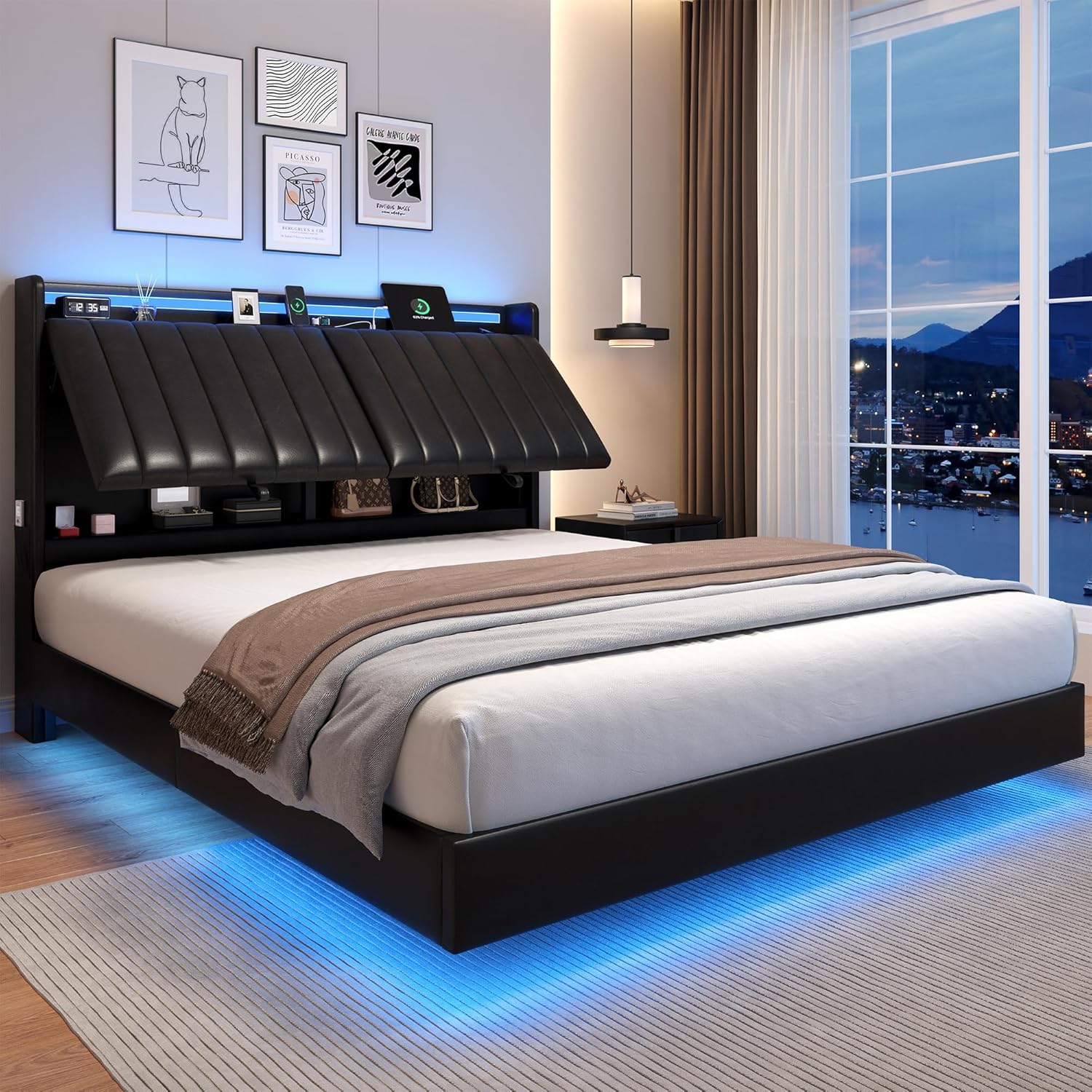
Image 1.1: Jocoevol Full Size Floating Bed Frame with integrated LED lighting and hidden headboard storage.
2. Safety Information
Adhering to these safety guidelines is crucial for preventing injury and damage to the product.
- Maximum Weight Capacity: Do not exceed the maximum weight recommendation of 1000 lbs (approximately 453.59 kg). Overloading the bed frame can lead to structural failure and injury.
- Assembly Precautions: Be cautious of sharp edges and metal components during assembly. It is recommended to wear gloves to prevent cuts.
- Stable Placement: Ensure the bed frame is placed on a level and stable surface. The adjustable legs should be properly set to compensate for uneven floors.
- Electrical Safety: When using the charging station and LED lights, ensure all electrical connections are secure and not overloaded. Do not expose electrical components to water or excessive moisture.
- Children and Pets: Keep small children and pets away from the assembly area. Do not allow children to play on or under the bed frame without supervision.
- Mattress Compatibility: For optimal performance and safety, use a mattress between 8-12 inches thick. Do not exceed 12 inches. No box spring is needed.
3. Setup and Assembly
The Jocoevol Full Size Floating Bed Frame is designed for straightforward assembly. All necessary tools, labeled parts, and detailed instructions are included in the package.
3.1 Unpacking and Preparation
- Carefully open the packaging and remove all components. The bed frame is typically packed in one box.
- Verify that all parts listed in the included installation manual are present.
- Clear an adequate space for assembly, ensuring enough room to maneuver the components.
3.2 Assembly Steps
Follow the numbered steps provided in the separate Installation Manual for detailed assembly instructions. Key components include the headboard, frame sections, and wooden slats.
- Assemble the main frame structure, ensuring all connections are secure.
- Attach the headboard, paying attention to the adjustable angle mechanism.
- Install the wooden slats evenly across the frame. The silent sponge strips on the middle beam should be positioned to reduce friction.
- Connect the LED light strips and charging station wiring as per the manual.
- Adjust the 9 metal legs, especially the 3 adjustable ones, to ensure the bed frame is stable and level on your floor.

Image 3.1: Full size bed frame dimensions, including recommended mattress thickness (8-12 inches).

Image 3.2: Illustration of the innovative hidden support legs design, providing a floating appearance.
4. Operating Instructions
4.1 Adjustable Ergonomic Headboard
The headboard features three adjustable angles to enhance comfort for various activities such as reading, watching TV, or relaxing.
- Gently push or pull the headboard to adjust it to your desired angle. The mechanism is designed to hold the position securely.
- Ensure the headboard is fully engaged in one of the three set positions for stability.

Image 4.1: Demonstrating the three-angle adjustable headboard for personalized comfort.
4.2 Hidden Storage and Charging Station
The headboard incorporates a hidden storage compartment and a built-in charging station for convenience.
- Hidden Storage: Access the 6.7-inch deep open shelf and 15.7-inch high hidden private storage space by lifting the top section of the headboard. This area is ideal for storing books, personal items, or decorations.
- Charging Station: The integrated charging station includes 2 standard AC outlets (125V/12A), 1 USB port (5V/2A), and 1 Type-C port (5V/3A). Use these ports to charge your electronic devices directly from your bedside.
- Side Pockets: Utilize the side storage pockets for easy access to smaller items like phones or remote controls.

Image 4.2: Detailed view of the headboard's storage compartments and integrated charging station.
4.3 Smart RGB LED Lights
The bed frame features smart RGB LED lights located under the frame and within the headboard, controllable via a remote or a dedicated mobile application.
- Power On/Off: Use the remote control or APP to turn the LED lights on or off.
- Color Selection: Choose from over 60,000 colors to customize your bedroom ambiance.
- Brightness Adjustment: Adjust the brightness level to your preference.
- Mode Selection: Select from various lighting modes, including static colors, dynamic effects, and timing functions.
- Music Sync Mode: Activate Music Sync mode to make the LED lights change color and flash rhythmically with music.
- APP Control: Download the specified mobile application (details in the separate LED light manual) for advanced control features.

Image 4.3: Overview of the Smart RGB LED light features, including remote and app control options.
5. Maintenance
Regular maintenance will help preserve the appearance and functionality of your bed frame.
- Cleaning the Faux Leather: Wipe the faux leather surfaces with a soft, damp cloth. For stubborn stains, use a mild soap solution and immediately wipe dry. Avoid harsh chemicals or abrasive cleaners, as they can damage the material.
- Frame Cleaning: Dust the metal and wooden components with a dry cloth. For deeper cleaning, a slightly damp cloth can be used, followed by immediate drying.
- Checking Connections: Periodically inspect all screws and bolts to ensure they remain tight. Re-tighten if necessary to maintain stability and prevent squeaking.
- LED Lights: The LED strips are encased in a transparent aluminum housing for protection. If cleaning is needed, gently wipe the housing with a dry, soft cloth. Do not attempt to open the housing or clean the LED components directly.
- Charging Station: Keep the charging ports free of dust and debris. Do not insert foreign objects into the ports.
6. Troubleshooting
This section addresses common issues you might encounter.
6.1 Squeaking Noises
- Cause: Loose connections or friction between metal parts.
- Solution: Ensure all screws and bolts are securely tightened. The bed frame is designed with silent sponge strips on the middle beam to reduce friction; verify these are correctly positioned.
6.2 LED Lights Not Functioning
- Cause: Power disconnection, remote control battery depletion, or APP connectivity issues.
- Solution:
- Check that the power cord for the LED lights is securely plugged into a working outlet.
- Ensure the connection between the LED strip and the power adapter is secure.
- Replace the battery in the remote control if it's not responding.
- If using the APP, ensure your device's Bluetooth is enabled and the APP is correctly paired with the LED controller. Refer to the separate LED light manual for specific APP troubleshooting.
6.3 Charging Station Not Working
- Cause: Power disconnection or device incompatibility.
- Solution:
- Verify that the bed frame's main power cord (which powers the charging station) is securely plugged into a working wall outlet.
- Test the charging station with different devices and cables to rule out device-specific issues.
- Ensure the total power draw of connected devices does not exceed the station's capacity (12A for AC outlets, 2A for USB, 3A for Type-C).
6.4 Headboard Adjustment Issues
- Cause: Obstruction or mechanism misalignment.
- Solution: Check for any objects obstructing the headboard's movement. Ensure the headboard is properly seated in its tracks or hinges. Do not force the adjustment.
7. Specifications
| Feature | Specification |
|---|---|
| Brand | Jocoevol |
| Model Name | Floating Bed Frame with Ergonomic Hidden Storage Headboard and LED Lights |
| ASIN | B0DV13MGD3 |
| Size | Full |
| Material | Faux Leather (Upholstered) |
| Color | Black |
| Product Dimensions (L x W x H) | 2.09L x 1.4W x 1.05H Meters (approx. 82.3"L x 55.1"W x 41.3"H) |
| Item Weight | 107.6 Pounds (approx. 48.8 kg) |
| Maximum Recommended Load | 1000 lbs (approx. 453.59 kg) |
| Assembly Required | Yes |
| Box Spring Needed | No |
| Recommended Mattress Thickness | 8-12 inches |
| Charging Station | 2 AC Outlets (125V/12A), 1 USB Port (5V/2A), 1 Type-C Port (5V/3A) |
| LED Features | RGB, Over 60,000 Colors, Brightness Adjustment, Multiple Modes, Music Sync, APP/Remote Control |
8. Warranty and Support
For information regarding product warranty, please refer to the documentation provided at the time of purchase or contact Jocoevol customer service directly.
If you have any questions, concerns, or require assistance with assembly, operation, or troubleshooting, please do not hesitate to contact our responsive customer service team.
Manufacturer: Jocoevol
Contact Information: Please refer to the product packaging or the official Jocoevol website for the most current contact details.