
1. Product Overview
The ODK 63 Inches Gaming Desk is designed to enhance your gaming and work experience with its multi-functional features and robust construction. It includes a full-length monitor shelf, integrated LED lighting, a built-in USB charging port, and flexible storage options.
Key features include:
- Integrated LED Lighting: Features multiple color modes and dynamic effects to create an immersive atmosphere.
- Monitor Stand: An elevated shelf designed to accommodate two monitors or laptops, promoting ergonomic viewing.
- Built-in USB Charging Port: Conveniently power your devices directly from the desk.
- Reversible PC Stand Shelves: Offers flexible storage for your CPU tower and other accessories.
- Durable Construction: Crafted with a premium metal frame and thick particleboard for stability and longevity.
- Scratch-resistant and Water-resistant Surface: Ensures easy maintenance and durability.
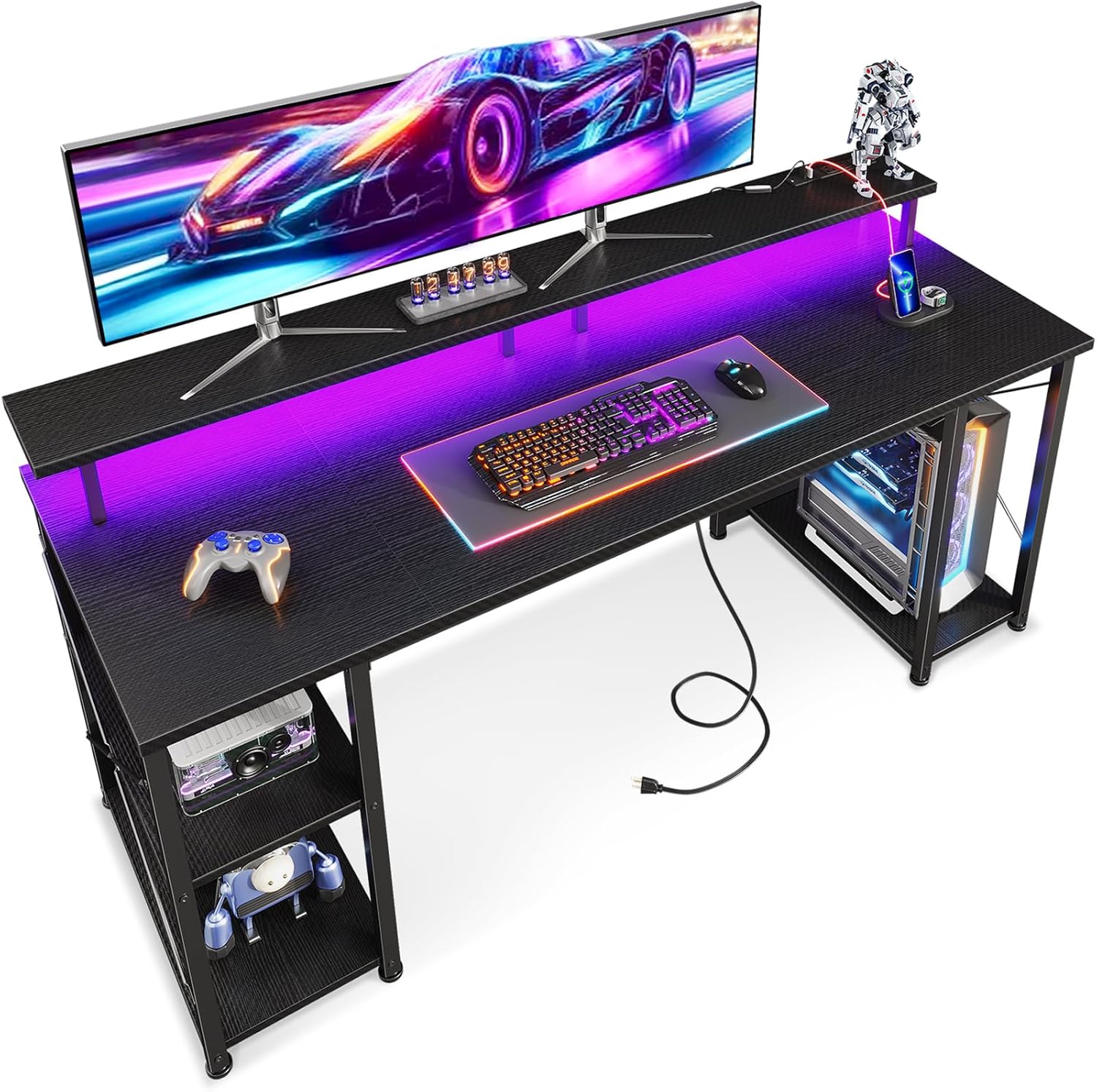
Figure 1.1: The ODK 63 Inches Gaming Desk, showcasing its spacious design, integrated LED lighting, and monitor stand.
2. Setup and Assembly
The ODK Gaming Desk is designed for hassle-free assembly, typically taking around 30 minutes. All necessary tools and clear instructions are included in the package.
2.1 Unpacking and Component Check
Carefully unpack all components and verify them against the included parts list. Ensure all hardware and desk sections are present and undamaged before beginning assembly.
2.2 Assembly Steps
Follow the step-by-step instructions provided in the assembly manual. Key structural elements include the premium metal frame and the X-frame crossbar, which contribute to the desk's stability.
- Assemble the main desk frame first, ensuring all screws are tightened securely.
- Attach the desktop panels, aligning them properly.
- Install the monitor stand onto the designated positions on the desktop.
- Mount the recessed power strip and connect its power cord.
- Assemble and attach the reversible PC stand shelves as desired. These shelves can be removed to accommodate larger CPU towers.
- Attach the headphone hook to a convenient location.

Figure 2.1: The desk features a stable X-bracket design and versatile two-tier shelves, which can be removed to create a dedicated CPU stand area.

Figure 2.2: The removable shelf design allows for flexible configuration, enabling space for a CPU tower or additional storage.
3. Operating Instructions
3.1 LED Lighting System
The desk features integrated RGB LED lights with 10 dynamic modes and 10 color variations to customize your gaming environment. The lighting system is controlled via an inline remote.

Figure 3.1: The RGB LED lighting strip offers a wide range of colors and dynamic effects to personalize your setup.

Figure 3.2: Control the LED lights using the inline remote. Press 'C' for static colors, 'M' for dynamic modes, and the power button for speed, brightness, and on/off functions.
Control Functions:
- Static Color Button (C): Press to cycle through static colors.
- Dynamic Mode Button (M): Press to switch between dynamic lighting effects. Hold for 3 seconds to enter demo mode, which cycles through various dynamic modes.
- Speed & Brightness and Power Button (⑂):
- In static mode, press to adjust brightness levels.
- In dynamic mode, press to adjust dynamic mode speed.
- Press and hold to turn off the strip when it is on. Press to turn on when off.
The product has a power-off memory function, meaning the strip will restore the color, brightness, and mode from its last setting upon next power-on.
3.2 Recessed Power Strip and USB Ports
The desk includes a recessed power strip with 3 AC outlets (120V/12A) and 2 USB ports (5V/2A) for convenient device charging and power access. The power cord is 6.6 feet long.

Figure 3.3: The integrated recessed power strip provides easy access to power outlets and USB charging ports for your devices.
3.3 Monitor Stand Usage
The full-length monitor shelf is designed to elevate your monitors to an ergonomic viewing height, reducing strain during long sessions. It can comfortably accommodate two monitors or a monitor and a laptop.

Figure 3.4: The ergonomic monitor stand helps maintain proper posture and comfortable viewing height.
4. Maintenance
To ensure the longevity and appearance of your ODK Gaming Desk, follow these simple maintenance guidelines:
- Cleaning: Wipe the desk surface regularly with a soft, damp cloth. Avoid abrasive cleaners or harsh chemicals, as the surface is scratch-resistant and water-resistant but can still be damaged by strong agents.
- Spills: In case of spills, wipe them immediately to prevent any potential damage, although the surface is water-resistant.
- Hardware Check: Periodically check all screws and fasteners to ensure they remain tight. Re-tighten if necessary to maintain stability.
- LED Lights: Ensure the LED strip and its connections are free from dust and debris. Do not attempt to disassemble the LED strip or its controller.
5. Troubleshooting
This section addresses common issues you might encounter with your ODK Gaming Desk.
| Problem | Possible Cause | Solution |
|---|---|---|
| Desk feels wobbly or unstable. | Loose fasteners; uneven floor. | Ensure all screws and bolts are securely tightened. Adjust the leveling feet on the desk legs to compensate for uneven flooring. |
| LED lights are not turning on or functioning correctly. | Power connection issue; faulty controller. | Check if the LED strip is properly connected to the power source and the controller. Ensure the power outlet is functional. If issues persist, contact customer support. |
| USB ports or AC outlets are not working. | Power strip not plugged in; circuit overload. | Verify that the main power cord for the recessed power strip is securely plugged into a working wall outlet. Avoid overloading the outlets with too many high-power devices. |
| Missing or defective parts during assembly. | Manufacturing defect or shipping error. | Immediately contact ODK customer support with your purchase details and a description of the missing or defective parts for assistance with replacements. |
6. Specifications
| Feature | Detail |
|---|---|
| Brand | ODK |
| Model Number | SPCB01120201009USDF-1 |
| Product Dimensions | 63"D x 21.65"W x 34.06"H |
| Color | Black |
| Style | Modern |
| Top Material Type | Engineered Wood |
| Base Material | Metal (feet Pad) |
| Item Weight | 42.77 Pounds |
| Included Components | Headphone Hook, Recessed Power Strip, LED Lights |
| Required Assembly | Yes |
| Power Strip | 3 AC Outlets (120V/12A), 2 USB Ports (5V/2A), 6.6-Foot Power Cord |
| LED Lights | 10 Dynamic Modes, 10 Color Variations, 3 Brightness Levels |
7. Warranty and Support
For any questions, concerns, or assistance with your ODK Gaming Desk, please contact ODK customer support. Keep your purchase receipt and model number handy for faster service.
While specific warranty details are not provided in this manual, ODK typically offers support for manufacturing defects and component issues. For information regarding extended protection plans, please refer to your point of purchase or the ODK official website.
You can visit the official ODK Store for more information and support: ODK Store on Amazon


