
1. Introduction
This manual provides essential instructions for the safe and effective use of your OasisSpace Folding Walker. Please read this manual thoroughly before assembly or operation to ensure proper function and user safety. This walker is designed to assist with ambulation and improve gait for individuals requiring mobility support.

Image 1.1: The OasisSpace Folding Walker, showcasing its design with 5-inch wheels and padded armrests.
2. Product Features
- Durable Construction: Manufactured from thick aluminum alloy with an anti-rust finish, supporting up to 300 lbs. The H-shaped frame enhances stability.
- Easy Assembly and Storage: Tool-free assembly, typically completed within 8 minutes. Features a release lever on each side for convenient folding, allowing storage in compact spaces.
- Adjustable Design: Removable padded armrests and 8-level adjustable height legs allow customization to user height and recovery needs. Padded armrests provide upper body support, reducing wrist, back, and leg strain.
- Smooth Mobility: Equipped with two unidirectional 5-inch wheels for smooth movement indoors and outdoors. Two non-slip foot pads enhance stability and safety on various surfaces.
- Lightweight and Versatile: Designed to be lightweight for easy control and navigation, promoting an upright posture. Can be used as a walking assistant with armrests or as a toilet safety rail by detaching the armrests.
3. Assembly Instructions
The OasisSpace Folding Walker is designed for quick, tool-free assembly. Follow these steps:
- Unpack all components from the packaging.
- Unfold the main walker frame. Ensure the locking mechanisms engage securely.
- Attach the padded armrests to the designated slots on the upper frame. Ensure they click into place.
- Adjust the height of the walker legs and armrests as described in Section 4.

Image 3.1: Visual guide to the walker's dimensions and the release lever for folding.
To fold the walker for storage or transport, locate the release levers on each side of the frame. Lift these levers to collapse the walker. The compact design allows it to fit through narrow doorways and in car trunks.

Image 3.2: Detail of the folding release lever, indicating how to operate it for compact storage.

Image 3.3: The walker's compact size allows it to easily pass through narrow doorways.
4. Adjustments
Proper adjustment of the walker's height and armrests is crucial for comfort and safety.
4.1. Height Adjustment
The walker features 8 levels of height adjustment. To adjust the height:
- Locate the spring-loaded pins on each leg.
- Press the pin and slide the leg up or down to the desired height.
- Ensure the pin fully re-engages in one of the adjustment holes on all four legs before use.

Image 4.1: Detail of the height adjustment pin and holes on the walker leg.
4.2. Padded Armrest Adjustment
The padded armrests can be adjusted for width and can be removed for alternative uses.
- To adjust the width, locate the adjustment mechanism near the base of each armrest.
- Press the release button or lever and slide the armrest inward or outward to achieve a comfortable width (adjustable from 17 to 21 inches).
- Ensure the armrest is securely locked in place before use.
- To remove the armrests, follow the reverse procedure for attachment.
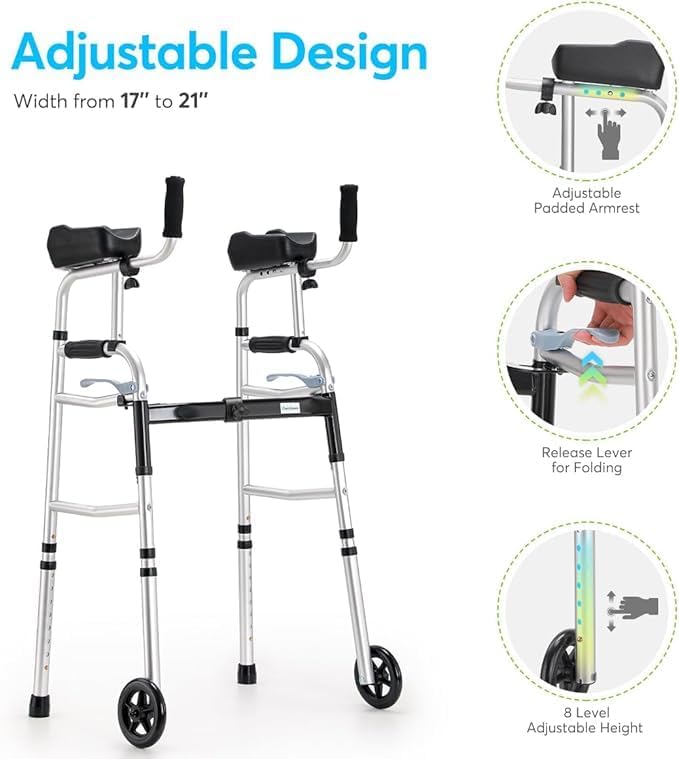
Image 4.2: The adjustable design highlights the customizable width of the armrests and the 8-level height adjustment.

Image 4.3: Detail of how to adjust the padded armrests for optimal user comfort.
5. Operating Instructions
The OasisSpace Folding Walker is designed to provide stable support for walking and assisting with standing.
5.1. Walking Assistance
To use the walker for walking:
- Ensure the walker is fully open and all locking mechanisms are engaged.
- Stand upright with the walker in front of you, gripping the handgrips firmly.
- Push the walker forward a short distance.
- Step forward with one leg, then bring the other leg to meet it, maintaining balance and support from the walker.
- Repeat the process, moving the walker and then stepping forward.
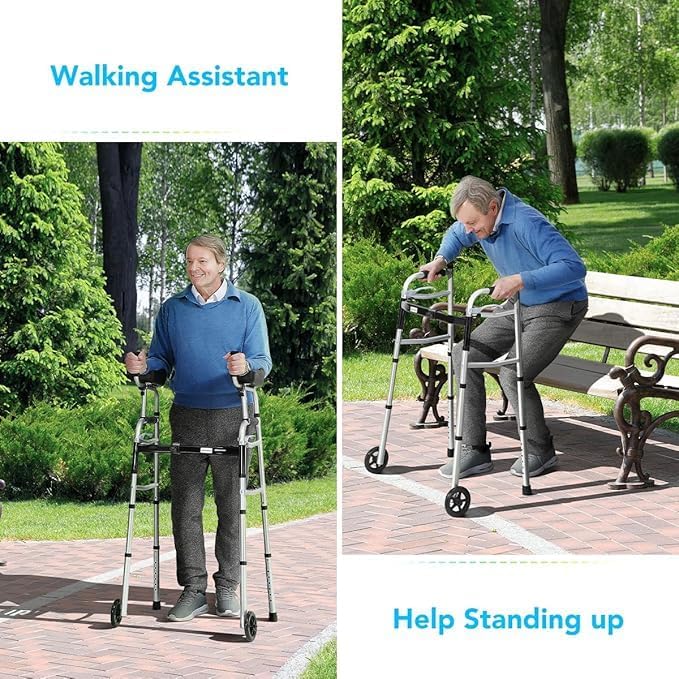
Image 5.1: The walker assists users in maintaining an upright posture while walking and provides support for standing up.
5.2. Standing Assistance
To use the walker to assist with standing up from a seated position:
- Position the walker directly in front of you while seated, ensuring it is stable.
- Place both hands firmly on the handgrips or padded armrests.
- Lean forward slightly and use your arms to push yourself up to a standing position, utilizing the walker for support.
- Once standing, adjust your grip and posture as needed.
5.3. Multi-functional Use
The walker's design allows for versatile use:
- Walking Assist: Provides stable support for mobility.
- Getting-Up Assist: Aids in transitioning from a seated to a standing position.
- Toilet Safety Rail: Armrests can be detached, and the frame can be positioned around a toilet for support.
- Portable & Storage: Folds compactly for easy transport and storage.

Image 5.2: The OasisSpace walker offers multiple functions, including walking assistance, standing support, use as a toilet safety rail, and compact portability.
6. Maintenance
Regular maintenance ensures the longevity and safe operation of your walker.
- Cleaning: Wipe down the frame and padded surfaces with a damp cloth and mild soap. Avoid abrasive cleaners.
- Inspection: Periodically check all screws, bolts, and locking mechanisms to ensure they are tight and secure. Inspect the wheels and foot pads for wear and tear.
- Storage: Store the walker in a dry place away from extreme temperatures.
7. Troubleshooting
If you encounter any issues with your walker, refer to the following common problems and solutions:
- Walker feels unstable: Ensure all height adjustment pins are fully engaged and all frame connections are secure. Verify that the walker is fully unfolded and locked.
- Wheels not rolling smoothly: Check for debris caught in the wheels. Clean the wheel axles if necessary.
- Difficulty folding/unfolding: Ensure the release levers are fully actuated. Check for any obstructions in the folding mechanism.
For issues not resolved by these steps, please contact customer support.
8. Specifications
| Feature | Specification |
|---|---|
| Brand | OasisSpace |
| Model | B0DTSWV4TS |
| Material | Aluminum |
| Color | Silver |
| Style | Folding |
| Weight Capacity | 300 lbs |
| Package Dimensions | 17.49 x 13.55 x 7.24 inches |
| Item Weight | 9.9 Pounds |
| Age Range (Description) | Adult |

Image 8.1: The OasisSpace Folding Walker is designed to support a maximum weight capacity of 300 lbs.
9. Safety Information
Please observe the following safety guidelines to prevent injury and ensure proper use of the walker:
- Always ensure the walker is fully assembled and all locking mechanisms are engaged before use.
- Do not exceed the maximum weight capacity of 300 lbs.
- Use on flat, stable surfaces. Avoid uneven terrain, stairs, or escalators.
- Regularly inspect the walker for any signs of damage or wear. Do not use if damaged.
- Consult with a healthcare professional to determine if this walker is appropriate for your specific mobility needs.
- Legal Disclaimer: Statements regarding dietary supplements have not been evaluated by the FDA and are not intended to diagnose, treat, cure, or prevent any disease or health condition. (Note: This disclaimer appears in the original product information and is included for completeness, though it may not directly apply to a walker.)
10. Warranty and Support
For warranty information, product support, or to inquire about replacement parts, please contact OasisSpace customer service. Refer to the product packaging or the OasisSpace official website for contact details.


