
Introduction
Thank you for choosing Raycon Bone Conduction Headphones. This manual provides essential information for the proper use, setup, and maintenance of your device. Please read it thoroughly before use.
These headphones utilize bone conduction technology, allowing you to hear audio while keeping your ears open to your surroundings. They are designed for active lifestyles, featuring a lightweight, water-resistant build and a secure fit.
Package Contents
- Raycon Bone Conduction Headphones
- Magnetic Charging Cable
- User Manual (this document)
Product Overview
Familiarize yourself with the components of your Raycon Bone Conduction Headphones.

Figure 1: Front view of the Raycon Bone Conduction Headphones. The image shows the purple headphones with the Raycon logo visible on the left side, highlighting the open-ear design and the flexible band connecting the two ear pieces.

Figure 2: Side view of the Raycon Bone Conduction Headphones. This image displays the control buttons located on the right ear piece, along with the charging port area. The overall lightweight and ergonomic design is visible.
Key Features:
- Open-Ear Design: Allows situational awareness.
- Bone Conduction Technology: Delivers audio through cheekbones.
- IP68 Water Resistance: Protection against sweat, rain, and spills.
- Lightweight Build: Comfortable for extended wear.
- Adjustable Conduction Buds: For personalized sound and awareness balance.
- Bluetooth 5.3: Stable wireless connectivity.
- 13-Hour Playtime: Extended battery life.
Setup
1. Charging the Headphones
Before first use, fully charge your headphones.
- Connect the magnetic charging cable to the charging port on your headphones.
- Connect the other end of the cable to a USB power adapter (not included) or a computer's USB port.
- The LED indicator will show charging status (e.g., red for charging, blue for fully charged).
- A full charge typically takes approximately 1.5-2 hours.
2. Powering On/Off
- To Power On: Press and hold the Power button for 3 seconds until the LED indicator flashes blue and you hear a power-on prompt.
- To Power Off: Press and hold the Power button for 5 seconds until the LED indicator flashes red and you hear a power-off prompt.
3. Bluetooth Pairing
Pair your headphones with your Bluetooth-enabled device (smartphone, tablet, laptop).
- Ensure the headphones are powered off.
- Press and hold the Power button for 5-7 seconds until the LED indicator flashes red and blue alternately, indicating pairing mode.
- On your device, go to Bluetooth settings and enable Bluetooth.
- Search for available devices and select "Raycon Bone Conduction" (or similar name).
- Once connected, the LED indicator will flash blue slowly, and you will hear a connection confirmation.
- The headphones will automatically reconnect to the last paired device when powered on, if within range.
Operating Instructions
Wearing the Headphones
Place the headphones with the transducers resting on your cheekbones, just in front of your ears. The band should wrap around the back of your head.

Figure 3: Illustration demonstrating the correct placement of the bone conduction headphones on the head, with the transducers positioned on the cheekbones near the ears. This image emphasizes the open-ear design.
The adjustable conduction buds allow you to slide them closer to your ear for louder sound or pull them back for increased environmental awareness. Experiment to find your preferred balance.
Button Functions
| Button/Action | Function |
|---|---|
| Power Button (Press & Hold 3s) | Power On |
| Power Button (Press & Hold 5s) | Power Off / Enter Pairing Mode |
| Multi-function Button (Single Press) | Play/Pause Music, Answer/End Call |
| Multi-function Button (Double Press) | Next Track |
| Multi-function Button (Triple Press) | Previous Track |
| Volume Up (+) Button (Single Press) | Increase Volume |
| Volume Down (-) Button (Single Press) | Decrease Volume |
| Volume Up (+) Button (Press & Hold) | Activate Voice Assistant |
Making and Receiving Calls
- Answer Call: Press the Multi-function Button once.
- End Call: Press the Multi-function Button once during a call.
- Reject Call: Press and hold the Multi-function Button for 2 seconds.
- Voice Assistant: Press and hold the Volume Up (+) button to activate your device's voice assistant (Siri, Google Assistant, etc.).
Maintenance and Care
- Cleaning: Wipe the headphones with a soft, damp cloth. Do not use harsh chemicals or abrasive cleaners.
- Water Resistance (IP68): These headphones are IP68 rated, meaning they are protected against dust and can withstand immersion in water up to 1.5 meters for up to 30 minutes. However, they are not designed for swimming or prolonged underwater use. Ensure the charging port is dry before charging.
- Storage: Store the headphones in a cool, dry place away from direct sunlight and extreme temperatures.
- Battery Care: To prolong battery life, avoid fully discharging the headphones frequently. Charge them regularly, even if not in use for extended periods.
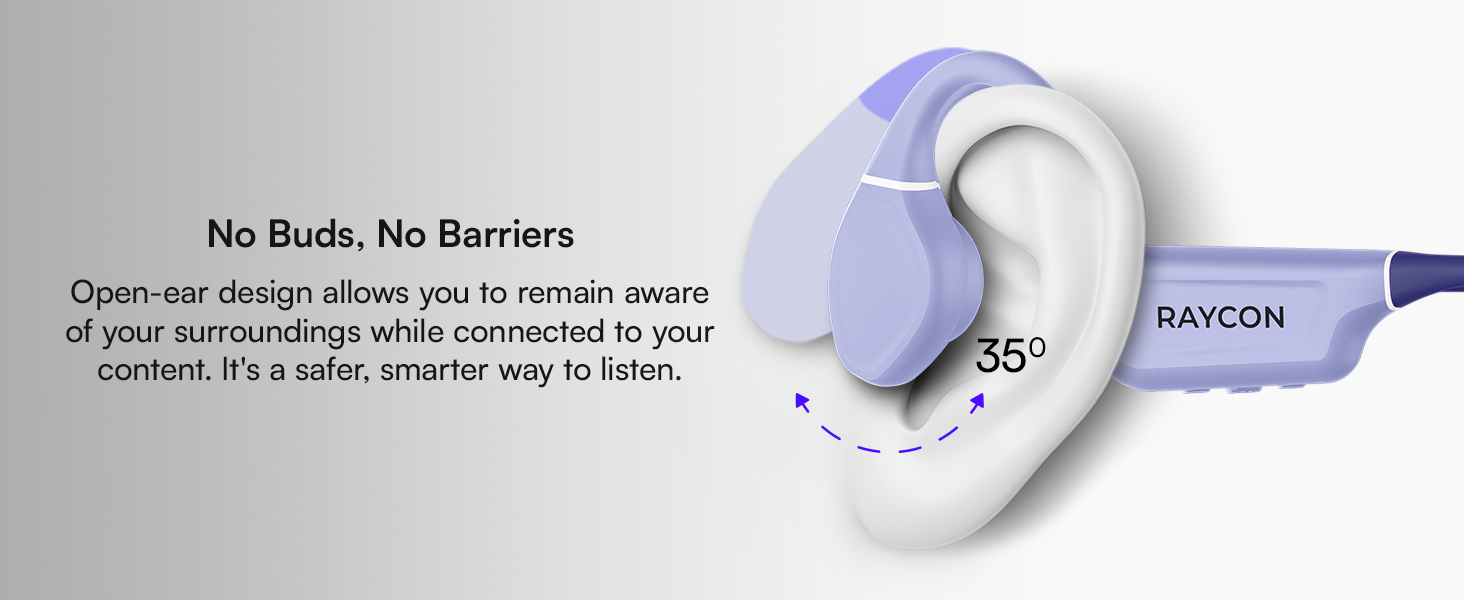
Figure 4: Image illustrating the water-resistant feature of the Raycon Bone Conduction Headphones, with water droplets splashing around them. This visually confirms their suitability for use in various weather conditions or during workouts.
Troubleshooting
| Problem | Possible Solution |
|---|---|
| Headphones do not power on. | Ensure the headphones are charged. Connect to the charging cable and check the LED indicator. |
| Cannot pair with device. |
|
| No sound or low volume. |
|
| Poor call quality. |
|
Specifications
| Feature | Detail |
|---|---|
| Model Name | Bone Conduction Headphones |
| Model Number | RBB842-24E |
| Connectivity Technology | Wireless (Bluetooth 5.3) |
| Bluetooth Range | Up to 33 feet (10 meters) |
| Audio Driver Type | Bone Conduction Driver |
| Audio Driver Size | 16 Millimeters |
| Frequency Range | 20 Hz - 20 KHz |
| Sensitivity | 91 dB |
| Impedance | 8 Ohm |
| Battery Life | Up to 13 hours |
| Water Resistance Level | IP68 |
| Material | Acrylonitrile Butadiene Styrene (ABS), Silicone |
| Item Weight | 5.6 ounces |
| Included Components | Magnetic Charging Cable |
| UPC | 811162032804 |
Warranty and Support
For warranty information and customer support, please refer to the official Raycon website or contact their customer service directly. Keep your proof of purchase for warranty claims.
Online Support: Visit Raycon Global Support for FAQs, troubleshooting guides, and contact options.
Safety Information
- Do not disassemble, repair, or modify the product.
- Do not expose the product to fire or extreme heat.
- Avoid listening at high volumes for extended periods to prevent hearing damage.
- Use caution when using headphones in situations requiring awareness of your surroundings.
- Keep out of reach of children.


