
Introduction
The BOSS VG-800 is an advanced V-Guitar Processor designed to expand the creative possibilities for guitar and bass players. Utilizing cutting-edge V-Guitar technology and the Serial GK divided pickup, this unit delivers high-performance, latency-free operation, and realistic modeling of various instruments. It offers extensive sound shaping capabilities, including dual instrument functions, independent string tuning, harmony generation, and a wide array of effects and synth sounds.
What's in the Box
Upon unpacking your BOSS VG-800 V-Guitar Processor, please verify that all the following items are included:
- BOSS VG-800 V-Guitar Processor Unit
- AC Adaptor
- Quick Start Guide
- "Read Me First" Leaflet
- Rubber Feet (x4)
- MIDI Cable
- Guitar Picks
- Polishing Cloth

Image: The BOSS VG-800 V-Guitar Processor shown with its bundled accessories, including the power supply, MIDI cable, guitar picks, and a polishing cloth.
Setup
Power Connection
- Ensure the VG-800 is switched off.
- Connect the included AC adaptor to the DC IN jack on the rear panel of the VG-800. Use only a Roland PSB-1U adaptor.
- Plug the AC adaptor into a standard AC outlet.
Audio Connections
The VG-800 offers various input and output options for integration into your setup.
- Guitar Input: Connect your guitar's standard 1/4-inch cable here.
- GK IN: Connect a guitar equipped with a Roland GK-compatible divided pickup using a 13-pin cable. This is essential for accessing the V-Guitar technology features.
- Output (L/Phones, R/Mono): Connect these 1/4-inch jacks to your amplifier, mixer, or audio interface. The L/Phones jack also functions as a stereo headphone output.
- Send/Return (Stereo): Use these 1/4-inch jacks to integrate external effects pedals or processors into the VG-800's signal chain.

Image: The rear panel of the VG-800, displaying the Guitar Input, GK In, Send/Return, Output (L/Phones, R/Mono), CTL 2,3/EXP 1, and DC IN connections.
MIDI and Control Connections
The VG-800 provides comprehensive connectivity for external control and integration.
- MIDI IN/OUT: Connect to other MIDI devices for control or data exchange.
- USB-C: Use for audio/MIDI communication with a computer.
- CTL 2,3/EXP 1 and CTL 4,5/EXP 2: Connect external footswitches or expression pedals for additional real-time control over parameters.
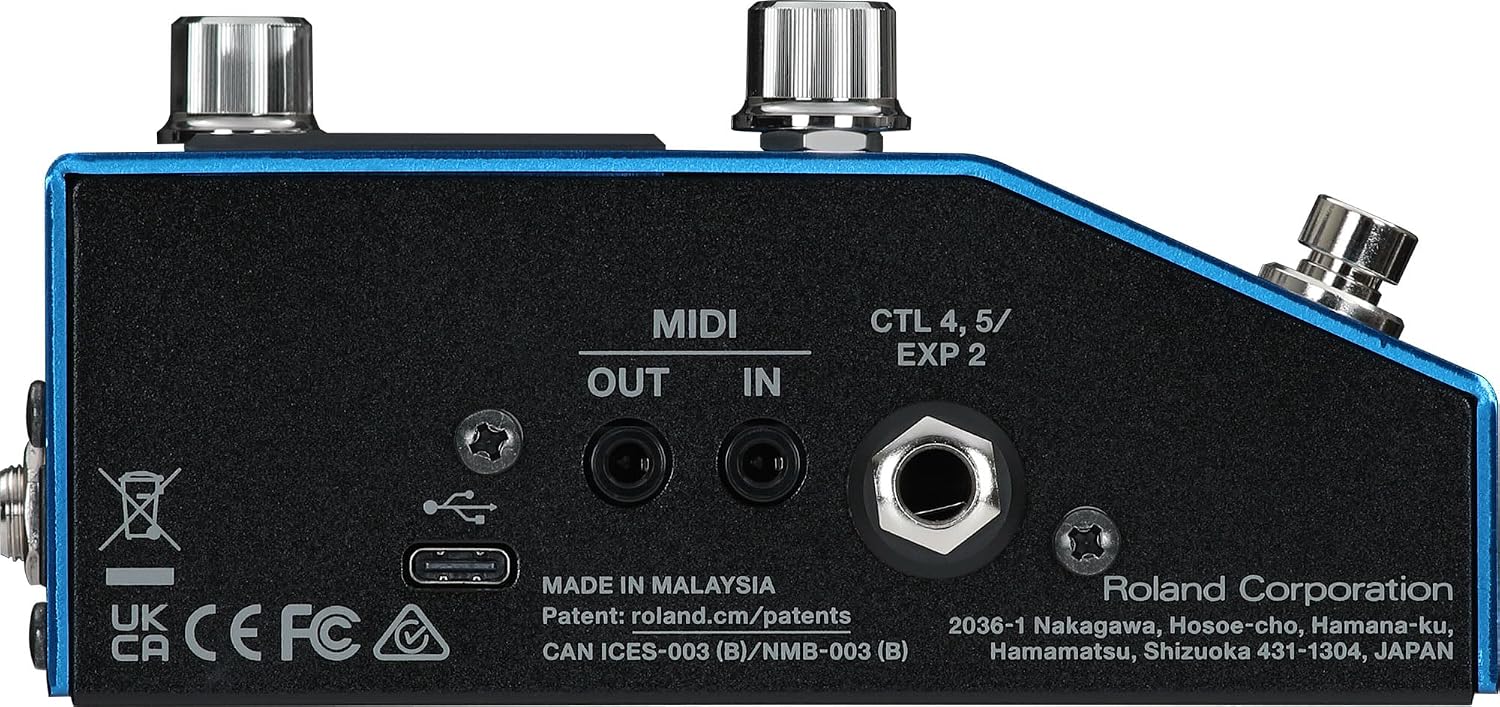
Image: The side panel of the VG-800, illustrating the MIDI IN/OUT, USB-C port, and additional control input jacks.
Operating the VG-800
Front Panel Controls Overview
The VG-800's front panel features an intuitive layout for easy navigation and sound manipulation.

Image: A detailed view of the VG-800's front panel, highlighting the central display, five rotary knobs, navigation buttons, and three footswitches.
- Display Screen: Shows current patch number, instrument settings, effect parameters, and other operational information.
- Knobs (1-5): These five rotary knobs are used to adjust various parameters displayed on the screen. Their function changes depending on the selected menu.
- OUTPUT LEVEL Knob: Controls the overall output volume of the VG-800.
- INST, EFFECTS, MENU, EXIT, PAGE Buttons: Used for navigating through the VG-800's menus and selecting different modes.
- DOWN/UP/CTL1 Footswitches: These footswitches allow for patch changes, tuner activation, and control over assigned functions.
- LOCK/WRITE Button: Used to save your customized settings.
Basic Operation
- Power On: After connecting all cables, press the power button to turn on the unit.
- Selecting Patches: Use the DOWN/UP footswitches to cycle through the stored patches. The display will show the current patch number and name.
- Editing Parameters: Press the INST or EFFECTS button to access instrument or effect parameters. Use the PAGE buttons to navigate through different parameter pages. Adjust the five rotary knobs to change values.
- Saving Settings: After making changes, press the LOCK/WRITE button to save your custom patch. Follow the on-screen prompts to confirm.
- Tuner Function: Press the TUNER footswitch to activate the built-in tuner.
V-Guitar Technology and Sound Modeling
The VG-800 leverages advanced V-Guitar technology to provide a wide range of instrument models and unique sonic capabilities:
- Serial GK Interface: Ensures latency-free performance for precise tracking and response.
- Instrument Modeling: Access hyper-realistic models of electric and acoustic guitars, basses, and unique instruments like sitar and banjo.
- Dual Guitar/Bass Functions: Combine or split different instrument sounds for complex textures.
- Independent String Tuning: Adjust the tuning of individual strings digitally without physically retuning your instrument.
- Harmony Generation: Create intelligent harmonies based on your playing.
- Extensive Effects: Over 150 types of effects are available, including distortion, delay, chorus, reverb, and synth sounds.
- GR-300 Emulation: Includes a detailed emulation of the iconic Roland GR-300 guitar synthesizer.
Maintenance
Cleaning
To maintain the appearance and functionality of your VG-800, follow these cleaning guidelines:
- Always disconnect the power adaptor before cleaning.
- Use the included polishing cloth or a soft, dry cloth to wipe down the unit.
- For stubborn dirt, lightly dampen the cloth with water and a mild, non-abrasive cleaner. Avoid harsh chemicals, solvents, or abrasive materials, as these can damage the finish and components.
- Do not allow liquids to enter the unit's openings.
Storage
When not in use for extended periods, store the VG-800 in a cool, dry place away from direct sunlight, extreme temperatures, and high humidity. Protect it from dust and physical impact.
Troubleshooting
If you encounter issues with your BOSS VG-800, refer to the following common troubleshooting steps:
- No Power: Ensure the AC adaptor is securely connected to both the VG-800 and a working power outlet. Verify that you are using the correct Roland PSB-1U adaptor.
- No Sound:
- Check all audio cable connections (guitar input, GK input, output to amplifier/mixer).
- Verify the OUTPUT LEVEL knob is turned up.
- Ensure your amplifier or monitoring system is powered on and functioning correctly.
- Check the patch settings within the VG-800; some patches might have very low volume or muted effects.
- Unexpected Behavior/Sound Issues:
- Perform a factory reset if necessary (refer to the Quick Start Guide for instructions). This will erase all user-saved data.
- Ensure your GK pickup is properly installed and calibrated if you are using V-Guitar features.
- MIDI Communication Problems:
- Check MIDI cable connections.
- Verify MIDI settings on both the VG-800 and the connected MIDI device.
If problems persist after attempting these steps, please contact BOSS customer support for further assistance.
Specifications
| Feature | Specification |
|---|---|
| Sampling Frequency | 48 kHz |
| Processing | 32-bit floating point |
| Memories (Guitar Mode) | 150 |
| Memories (Bass Mode) | 150 |
| Effects | Over 150 types (Distortion, Delay, Chorus, Reverb, Synth, etc.) |
| Nominal Input Level (Guitar Input/Return) | -10 dBu |
| Max Input Level (Guitar Input) | +12 dBu |
| Max Input Level (Return) | +7 dBu |
| Nominal Output Level (Output L/Phones, R/Mono, Send) | -10 dBu |
| Max Output Level (Output L/Phones, R/Mono, Send) | +7 dBu |
| Input Impedance (Guitar Input/Return) | 1 MΩ |
| Output Impedance (Output L/Phones, R/Mono) | 44 Ω |
| Output Impedance (Send) | 1 kΩ |
| Controls | DOWN/UP/CTL1 switches, INST, EFFECTS, MENU, EXIT, PAGE buttons, 5 Knobs, SELECT, OUTPUT LEVEL |
| Dimensions (without foot) | 173 x 135 x 63 mm (6-13/16" x 5-3/8" x 2-1/2") |
| Dimensions (with foot) | 173 x 135 x 65 mm (6-13/16" x 5-3/8" x 2-9/16") |
| Weight (excluding adaptor) | 920 g / 2 lbs 1 oz |
| Power Source | AC Adaptor (Roland PSB-1U only) |
| Connector Types | TRS, USB-C, MIDI |
| Hardware Interface | Serial Interface |
| Material Type | Plastic, Circuit Boards |
Support and Warranty
For detailed warranty information, please refer to the warranty card included with your product or visit the official BOSS website. For technical support, product inquiries, or service, please contact BOSS customer support through their official channels. Keep your purchase receipt as proof of purchase for warranty claims.
You can find additional resources and support information on the official BOSS website: www.boss.info


