
1. Introduction
Welcome to the Roborock Saros 10 Robot Vacuum instruction manual. This document provides essential information for the safe and efficient operation, maintenance, and troubleshooting of your new robot vacuum. The Roborock Saros 10 is engineered for high-performance cleaning, featuring powerful suction, a slim design for reaching under furniture, an AdaptiLift chassis for threshold crossing, and an advanced mopping system for thorough floor care.
2. Safety Information
Before using your Roborock Saros 10, please read all safety instructions carefully. Keep this manual for future reference. Always ensure the robot is placed on a stable surface and away from water or heat sources. Do not allow children or pets to operate the device without supervision. Use only the original charging dock and power adapter provided by Roborock. Avoid using the robot in areas with loose cables or small objects that could get tangled in the brushes.
3. Product Overview
The Roborock Saros 10 Robot Vacuum is designed to provide comprehensive and efficient cleaning for various floor types. Key features include:
- Industry-Leading 22,000 Pa HyperForce Suction: Captures fine dust, large debris, and pet hair effectively.
- 7.98cm Ultra-Thin Design: Allows the robot to clean under low-profile furniture such as beds and cabinets.
- Industry-First AdaptiLift Chassis: Automatically raises the omni-wheel to cross thresholds up to 4cm and adjusts the vacuum body by 15mm for improved cleaning on carpets.
- FlexiArm Design Riser Side Brush: Features an extendable telescopic design and spiral arc shape to reach corners and edges, maintaining a 0% hair tangle rate.
- Dual Anti-Tangle System: DuoDivide twin rollers and spiral blades guide hair directly into the dustbin, preventing clogging (SGS and TUV certified for 100% hair removal).
- VibraRise 4.0 Mopping System: Combines two sonic vibrating zones operating at 4,000 movements per minute with 8N of downward pressure for effective stain removal. The mop automatically lifts in vacuum-only modes to protect carpeted areas.
- Deep Clean, With Maximum Hygiene: Upgraded hot water mopping cleans the mop pads at up to 80°C with three adjustable temperature settings, reducing over 99.99% of bacteria.
- Pet-Friendly Features: Designed to handle pet hair and dander efficiently.
Product Features in Detail

Figure 3.1: The Roborock Saros 10 Robot Vacuum, showcasing its sleek design and compact form factor.
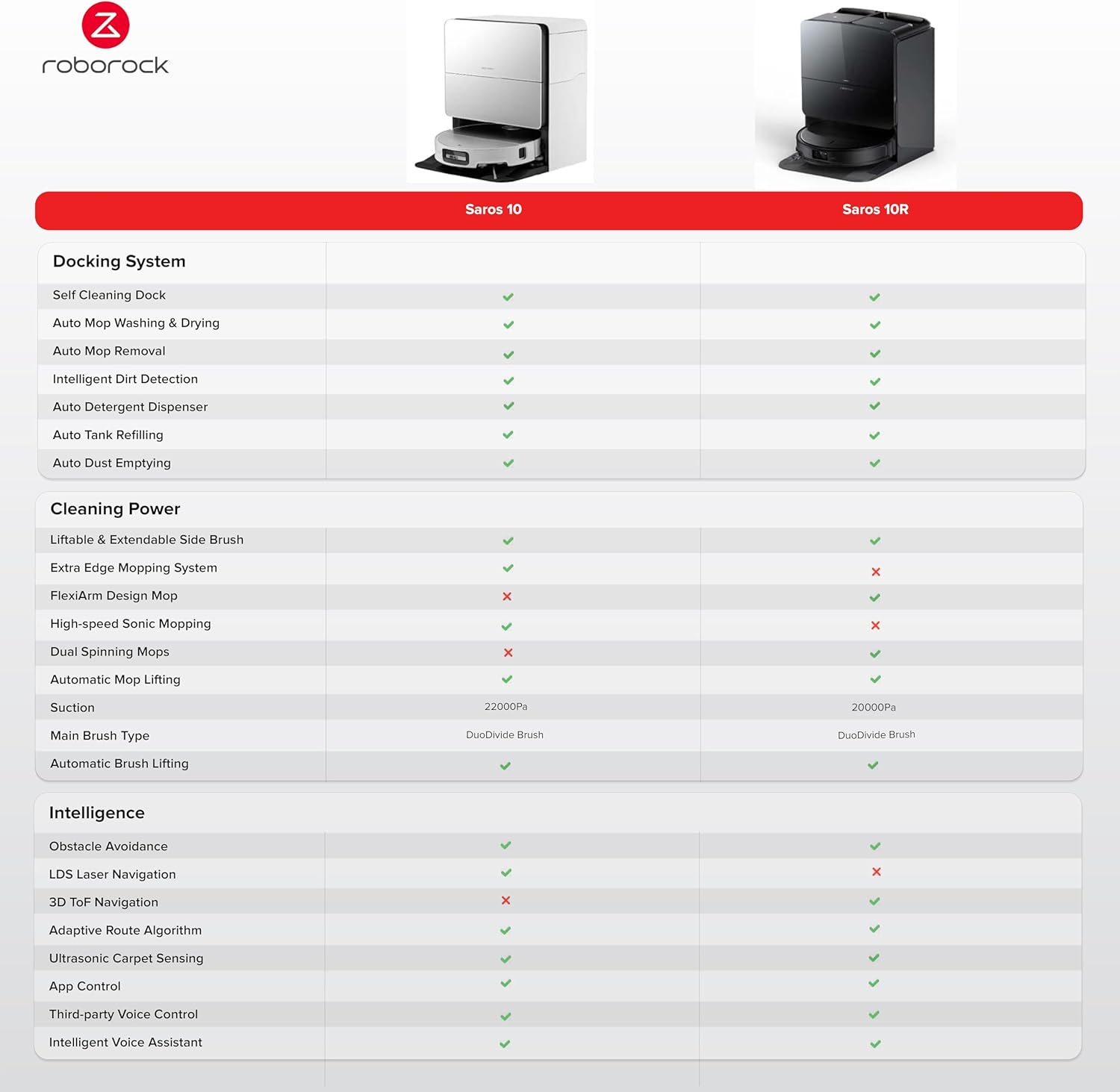
Figure 3.2: The Roborock Saros 10 positioned with its charging dock, ready for automated cleaning and maintenance.

Figure 3.3: Close-up view highlighting the 7.98cm ultra-thin design of the Roborock Saros 10, enabling it to clean under low furniture.

Figure 3.4: Illustration of the AdaptiLift Chassis in action, demonstrating its ability to raise the robot for crossing thresholds and adjusting for carpets.

Figure 3.5: View of the advanced LiDAR navigation system, which ensures precise mapping and efficient cleaning paths.
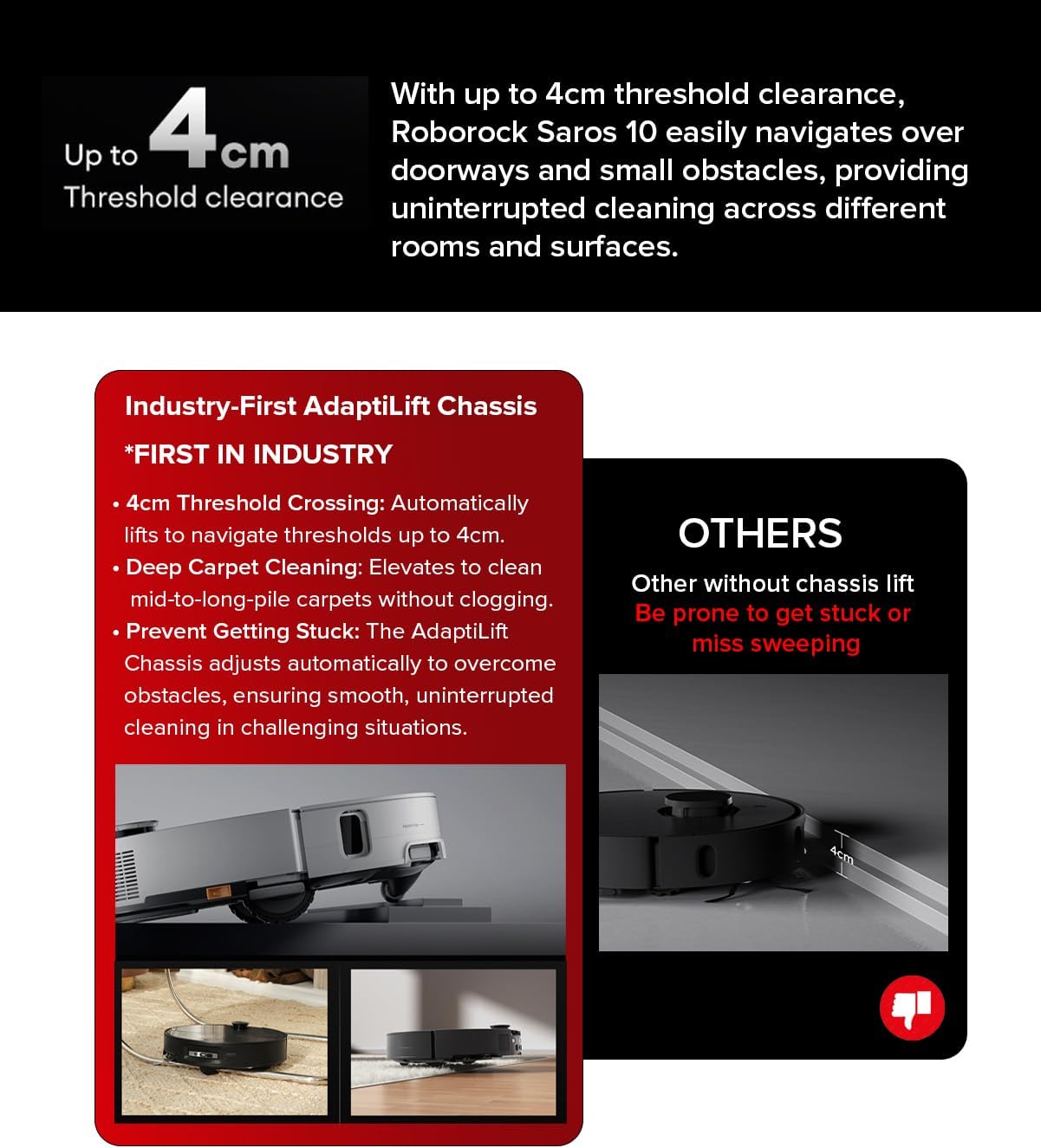
Figure 3.6: The robot seamlessly navigating over a threshold, showcasing its 4cm threshold clearance capability.
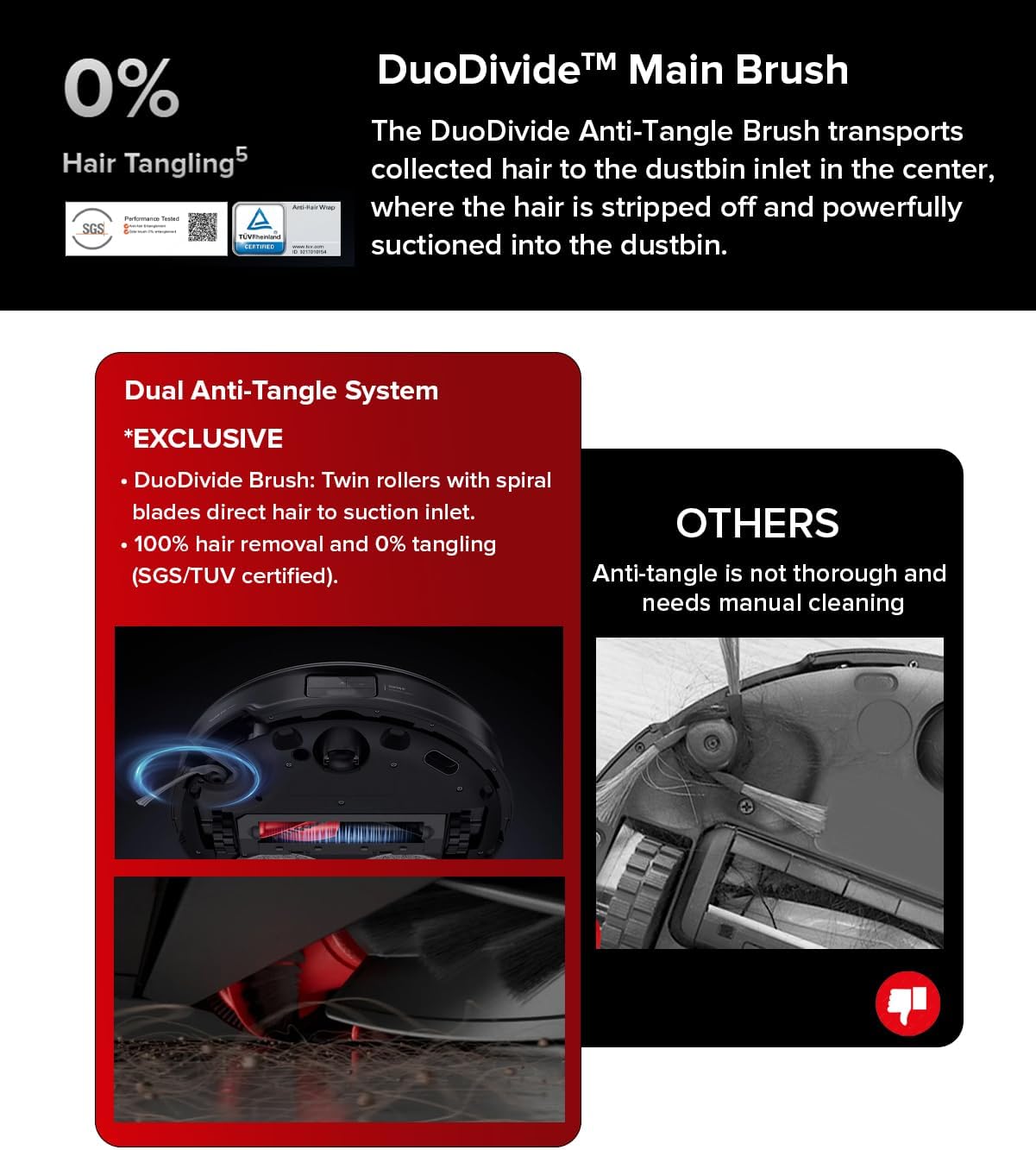
Figure 3.7: Detailed view of the Dual Anti-Tangle System, featuring DuoDivide twin rollers designed to prevent hair tangling.
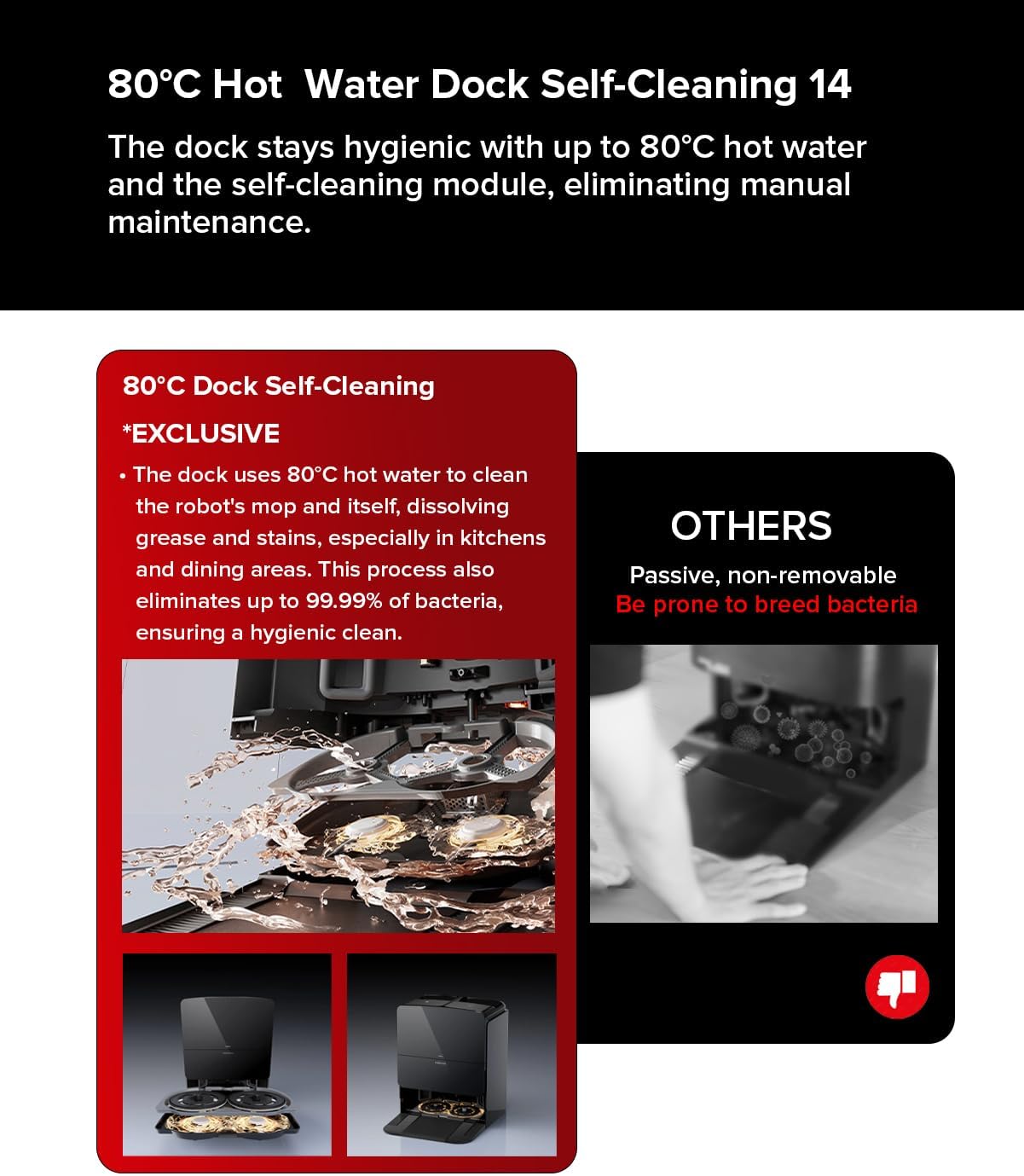
Figure 3.8: The 80°C hot water mopping system in operation, illustrating its ability to clean mop pads and ensure hygienic cleaning.
4. Setup
- Unpacking: Carefully remove all components from the packaging. Ensure all protective films and packing materials are removed from the robot and charging dock.
- Charging Dock Placement: Place the charging dock against a wall on a hard, level surface. Ensure there is at least 0.5 meters (1.6 feet) of clear space on both sides and 1.5 meters (4.9 feet) in front of the dock. Connect the power cable to the dock and plug it into a power outlet.
- Initial Charge: Place the robot onto the charging dock. The robot will automatically power on and begin charging. For first-time use, fully charge the robot before operation.
- App Connection: Download the Roborock app from your device's app store. Follow the in-app instructions to connect your Roborock Saros 10 to your home Wi-Fi network and complete the initial setup. This will allow you to control the robot, set cleaning schedules, and access advanced features.
5. Operation
The Roborock Saros 10 offers various cleaning modes and smart features for customized cleaning.
5.1 Starting a Clean
- Via Robot: Press the Power button on the robot to start a general cleaning cycle.
- Via App: Open the Roborock app, select your device, and choose a cleaning mode (e.g., Auto, Zone, Spot) or start a full clean.
5.2 Cleaning Modes
- Vacuum Only: The robot will only vacuum. The mop will automatically lift when on carpets.
- Mop Only: The robot will only mop. Ensure the water tank is filled and mop pads are attached.
- Vacuum & Mop: The robot will perform both vacuuming and mopping simultaneously.
- Custom Cleaning: Use the app to define specific areas for cleaning, set no-go zones, or adjust suction power and water flow levels.
5.3 Scheduling
Set up cleaning schedules through the Roborock app to automate your cleaning routine. You can specify cleaning times, days, and modes for different areas of your home.
6. Maintenance
Regular maintenance ensures optimal performance and extends the lifespan of your Roborock Saros 10.
6.1 Dustbin and Filter
- Emptying: The All-in-one Station automatically empties the dustbin. Check the dust bag in the station periodically and replace it when full.
- Cleaning Filter: Remove the filter from the dustbin and tap it to remove debris. Rinse with water if necessary and allow it to air dry completely before reinserting.
6.2 Main Brush and Side Brush
- Main Brush: Remove the main brush cover and the brush itself. Use the cleaning tool to remove any tangled hair or debris. The Dual Anti-Tangle System significantly reduces tangles, but occasional checks are recommended.
- Side Brush: Check the side brush for tangled hair or damage. Clean or replace as needed.
6.3 Mop Pads and Water Tanks
- Mop Pads: The VibraRise 4.0 Mopping System includes hot water self-cleaning for the mop pads at the dock. Ensure the dock's water tanks are filled for this feature.
- Water Tanks: The All-in-one Station collects dirty water and refills clean water automatically. Regularly clean the dirty water tank and refill the clean water tank.
6.4 Sensors and Charging Contacts
- Wipe all sensors (cliff sensors, wall sensors, LiDAR sensor) and charging contacts on both the robot and the dock with a soft, dry cloth to ensure proper function.
7. Troubleshooting
If you encounter issues with your Roborock Saros 10, refer to the following common problems and solutions:
- Robot not charging: Ensure the charging contacts on both the robot and the dock are clean and free of debris. Verify the power cable is securely connected to the dock and the outlet.
- Robot not starting: Check if the robot is fully charged. If not, place it on the charging dock. Ensure no error indicators are present.
- Poor cleaning performance: Clean the main brush, side brush, and filter. Empty the dustbin. Check if the suction power setting is appropriate for the floor type.
- Navigation issues: Clean all sensors. Ensure there are no obstacles blocking the robot's path or the LiDAR sensor. Restart the robot and allow it to remap if necessary.
- Mopping not effective: Ensure the clean water tank is filled and the mop pads are clean and properly attached. Check the water flow settings in the app.
For persistent issues, consult the Roborock app for specific error messages or contact Roborock customer support.
8. Specifications
| Feature | Specification |
|---|---|
| Brand | Roborock |
| Model | Saros 10 |
| Dimensions | 40.9 x 44 x 47 cm (Product); 44L x 47W x 40.9H cm (Product) |
| Item Weight | 20.38 kg |
| Noise Level | 52 Decibels |
| Voltage | 200 Volts |
| Power Source Type | Battery Powered |
| Battery Average Life | 220 minutes |
| Battery Cell Composition | Lithium Ion |
| Filter Type | Hepa |
| Special Features | Wet/Dry |
| Surface Recommendation | Carpet, marble, laminate, wood, tile, etc. |
| Controller Type | App Control, Voice Control |
| Included Components | Mop Pad, Water Tank |
9. Warranty and Support
Your Roborock Saros 10 Robot Vacuum comes with a manufacturer's warranty. Please refer to the warranty card included in your product packaging for specific terms and conditions. For technical support, service, or to purchase replacement parts, please visit the official Roborock website or contact their customer service directly. Keep your purchase receipt as proof of purchase for warranty claims.


