1. Introduction
This manual provides instructions for the proper use and maintenance of your Health o meter Digital Body Composition Scale. This scale is designed to measure body weight, Body Mass Index (BMI), body fat percentage, and water mass percentage for up to four users. Please read this manual thoroughly before use to ensure accurate readings and safe operation.

Image 1.1: The Health o meter Digital Body Composition Scale, featuring a clear digital display and carbon fiber platform.
2. Package Contents
Verify that all items are present in the package:
- Health o meter Digital Body Composition Scale
- 3 AAA Batteries
- Instruction Manual (this document)
3. Safety Information
- Always place the scale on a hard, flat surface. Using it on carpet or uneven flooring may affect accuracy.
- The scale surface may become slippery when wet. Ensure the surface is dry before stepping on.
- Do not use this device if you have a pacemaker or other internal medical device.
- Do not use this device if you are pregnant.
- Keep out of reach of children.
- Do not immerse the scale in water.
- The body composition measurements (BMI, body fat, water mass) are for reference only and should not be used for medical diagnosis or treatment. Consult a healthcare professional for health-related concerns.
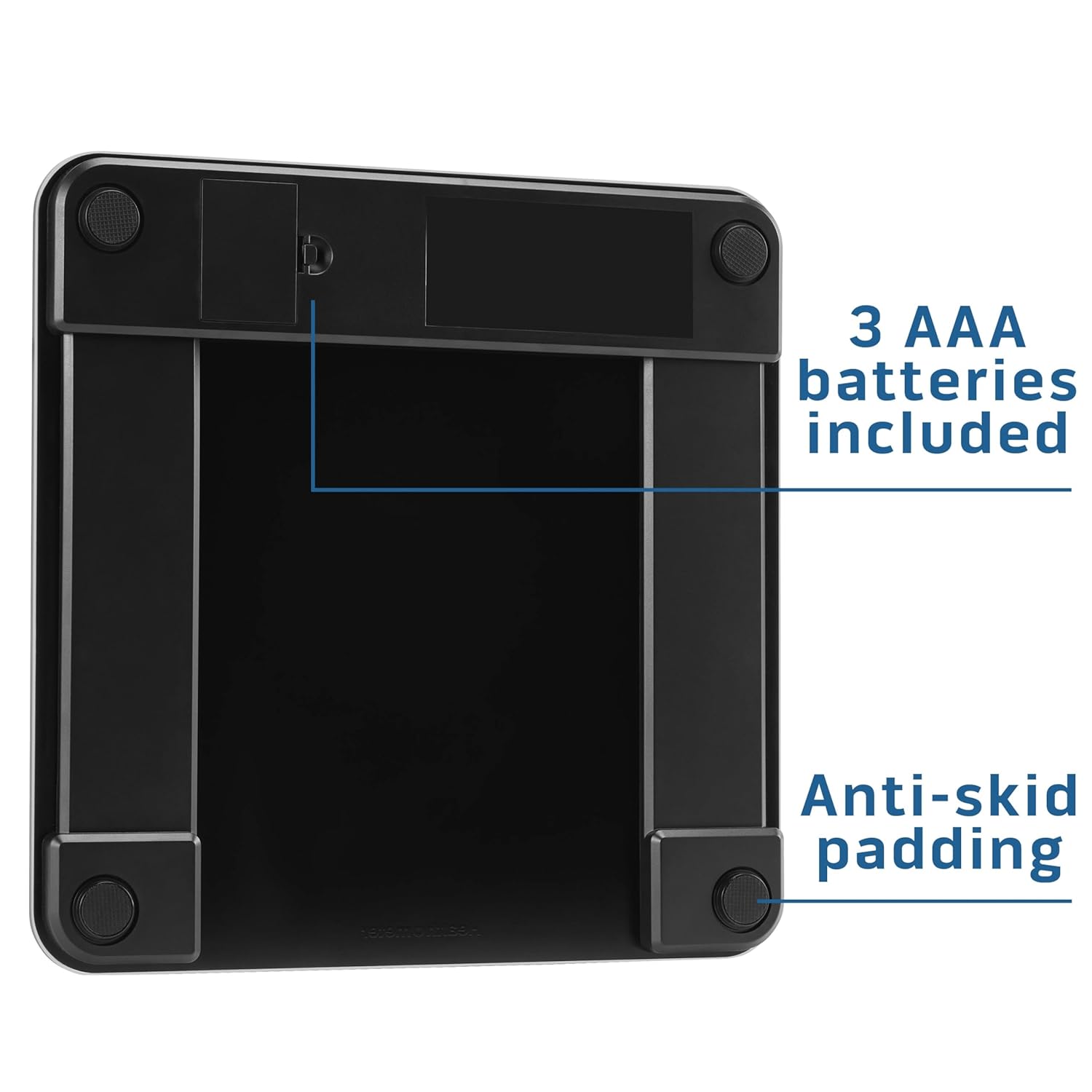
Image 3.1: The underside of the scale, highlighting the battery compartment and anti-skid feet for stability.
4. Setup
4.1. Battery Installation
- Open the battery compartment cover on the underside of the scale.
- Insert the 3 AAA batteries, ensuring correct polarity (+/-).
- Close the battery compartment cover securely.
4.2. Initial Calibration
For the first use or if the scale has been moved, perform an initial calibration:
- Place the scale on a hard, flat, and stable surface.
- Lightly step on the scale to turn it on, then step off immediately.
- The display will show '0.0' or 'CAL' and then turn off. The scale is now calibrated and ready for use.
5. Operating Instructions
5.1. Basic Weight Measurement
- Ensure the scale is on a hard, flat surface.
- Step onto the scale with bare feet, standing still and centered on the platform.
- The display will show your weight. Wait for the reading to stabilize and flash before stepping off.

Image 5.1: A user's feet on the scale, demonstrating the large, backlit LCD display for clear readability.
5.2. Unit Conversion
The scale typically allows switching between pounds (lb) and kilograms (kg). Look for a button on the underside of the scale, usually labeled 'UNIT' or 'lb/kg', to toggle between units.
6. Multi-User Tracking and Body Composition Measurement
This scale supports tracking for up to 4 users, providing personalized body composition data.

Image 6.1: The scale in use, illustrating its capacity of up to 450 lbs and multi-user tracking capability.
6.1. Setting Up User Profiles
To utilize body composition analysis, you must set up a user profile:
- With the scale off, press the 'SET' button. The user number (P1, P2, P3, P4) will flash.
- Use the '▲' (Up) or '▼' (Down) buttons to select a user number (P1-P4). Press 'SET' to confirm.
- The gender icon will flash. Use '▲' or '▼' to select male or female. Press 'SET' to confirm.
- The height value will flash. Use '▲' or '▼' to adjust your height. Press 'SET' to confirm.
- The age value will flash. Use '▲' or '▼' to adjust your age. Press 'SET' to confirm.
- The display will show '0.0' and turn off, indicating the profile is saved.
6.2. Taking Body Composition Measurements
After setting up your profile:
- Press the 'SET' button to select your user number (P1-P4).
- Wait for the display to show '0.0'.
- Step onto the scale with bare feet, ensuring your feet are positioned on the metal electrodes. Stand still until all measurements are displayed.
- The scale will display your weight, followed by BMI, body fat percentage, and water mass percentage. The readings will cycle through several times before the scale turns off.

Image 6.2: Visual representation of the body composition metrics measured by the scale: body fat percentage, muscle mass, hydration levels, and BMI.
7. Maintenance and Care
- Clean the scale with a damp cloth and mild detergent. Do not use abrasive cleaners or immerse in water.
- Store the scale in a dry place at room temperature.
- Remove batteries if the scale will not be used for an extended period to prevent leakage.
- Avoid dropping the scale or subjecting it to strong impacts, as this may damage the sensors.
8. Troubleshooting
| Problem | Possible Cause | Solution |
|---|---|---|
| Inaccurate readings | Scale on uneven surface; not calibrated; moved recently. | Place on hard, flat surface. Perform initial calibration (Section 4.2). |
| Display shows 'Lo' or 'Err' | Low battery. | Replace all 3 AAA batteries. |
| Display shows 'O-Ld' | Overload (weight exceeds maximum capacity). | Step off the scale. The maximum capacity is 450 lbs (204 kg). |
| No body composition readings | Feet not bare or not making contact with electrodes; user profile not set up. | Ensure bare feet are on all four metal electrodes. Set up a user profile (Section 6.1). |
| Scale does not turn on | Batteries incorrectly installed or dead. | Check battery polarity or replace batteries. |
9. Specifications
- Model: 32910032
- Capacity: 450 lbs (204 kg)
- Precision: 0.2 lbs (0.1 kg)
- Platform Size: 12.4 inches x 12.4 inches
- Display: Backlit LCD (3.1" x 1.5")
- Power: 3 x AAA batteries (included)
- User Profiles: Up to 4 users
- Measurements: Weight, BMI, Body Fat Percentage, Water Mass Percentage
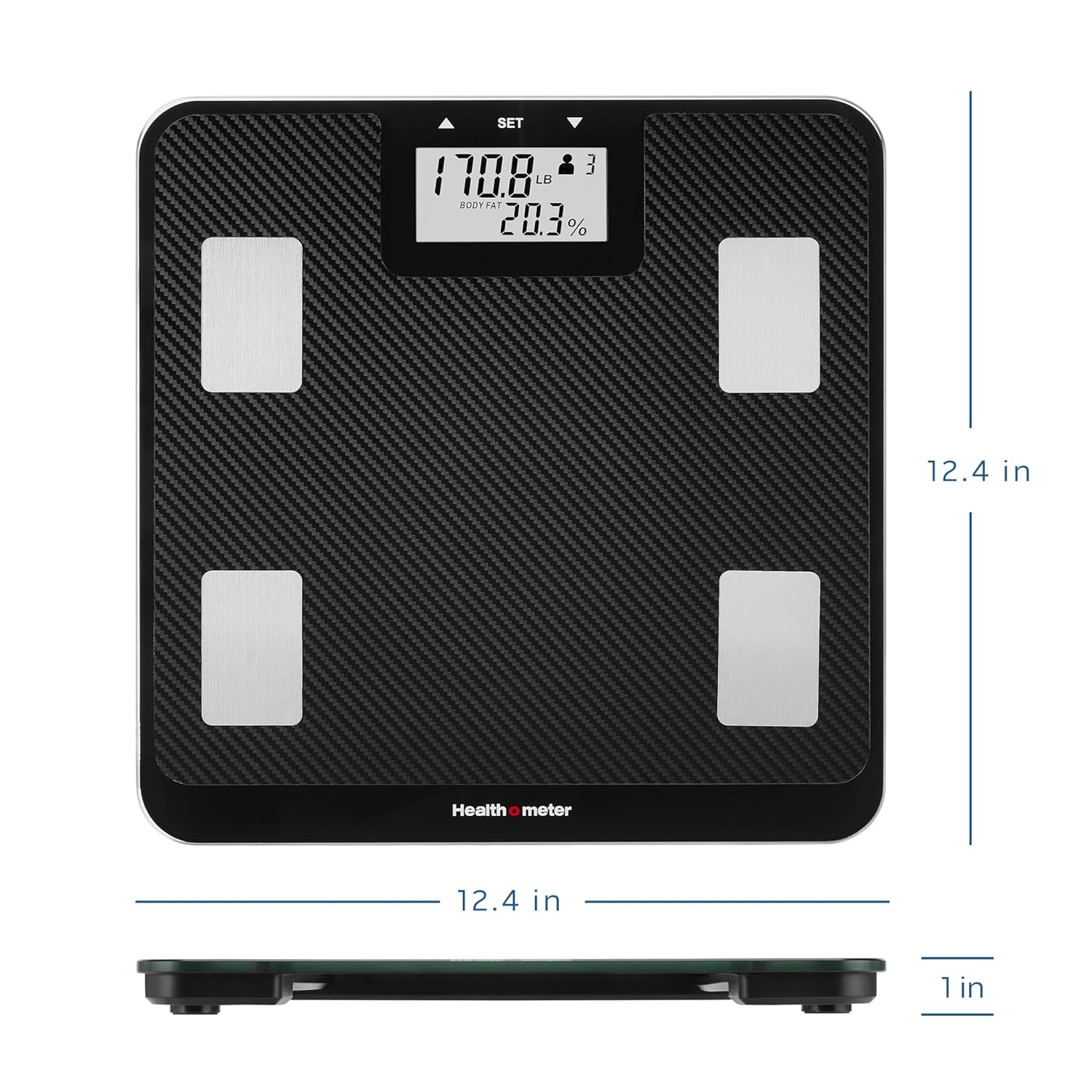
Image 9.1: The scale with its physical dimensions indicated for reference.
10. Warranty and Support
Your Health o meter Digital Body Composition Scale is backed by a 5-year limited warranty. This warranty covers defects in materials and workmanship under normal use. For warranty claims or technical support, please refer to the contact information provided with your product packaging or visit the official Health o meter website.


