
1. Product Overview
This manual provides detailed instructions for the ANCEL FX2000-US OBD2 Scanner Diagnostic Tool and the ANCEL PB600 Power Circuit Probe Tester. These devices are designed to assist in automotive diagnostics and electrical system testing.
1.1 Package Contents
- 1x ANCEL FX2000-US OBD2 Scanner Diagnostic Tool
- 1x ANCEL PB600 Automotive Power Circuit Probe Tester
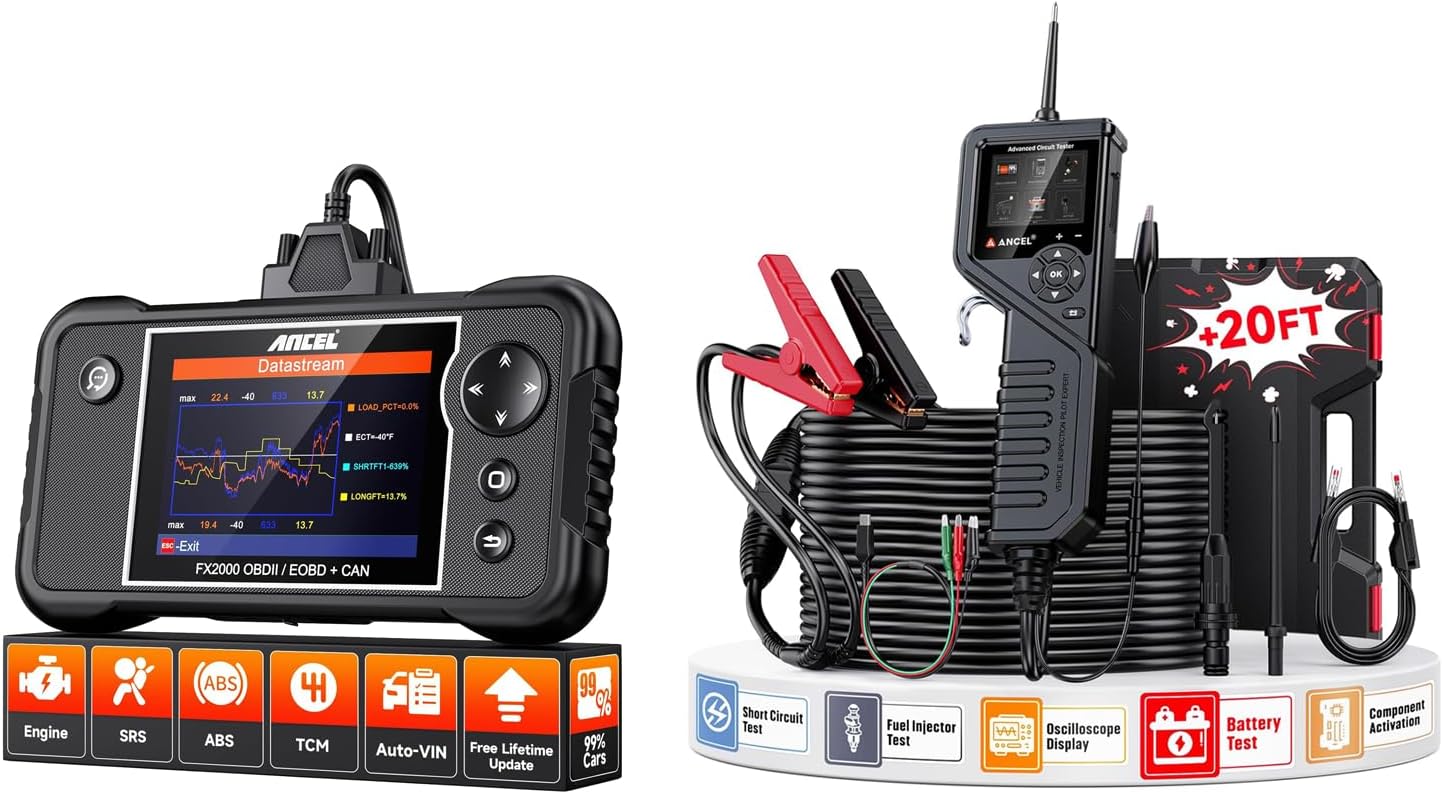
Image: The ANCEL FX2000-US OBD2 Scanner (left) and the ANCEL PB600 Power Circuit Probe Tester (right) displayed together, showcasing their compact designs and included accessories.
2. Setup and Connection
2.1 ANCEL FX2000-US OBD2 Scanner Setup
The ANCEL FX2000-US is designed for plug-and-play operation, making it easy to connect and use for vehicle diagnostics.
- Step 1: Plug into OBD-II Port - Locate your vehicle's OBD-II port, typically found under the dashboard on the driver's side. Plug the diagnostic tool's cable into this port.
- Step 2: Turn on the Car - Turn the vehicle's ignition to the "ON" position, or start the engine.
- Step 3: Access Scanner - The scanner will power on automatically. Navigate the menu to begin diagnosis.
No additional tools are required for installation. The device connects via a standard OBD2 cable and features a user-friendly interface for ease of use. Diagnostic reports can be saved and shared.

Image: A visual guide demonstrating the three simple steps to connect and use the ANCEL FX2000-US OBD2 Scanner: plugging into the OBD-II port, turning on the car, and accessing the diagnostic scanner.
2.2 ANCEL PB600 Power Circuit Probe Tester Setup
The PB600 connects directly to the vehicle's battery for power and operation. Connect the red clamp to the positive (+) battery terminal and the black clamp to the negative (-) battery terminal. The device will power on and be ready for use.
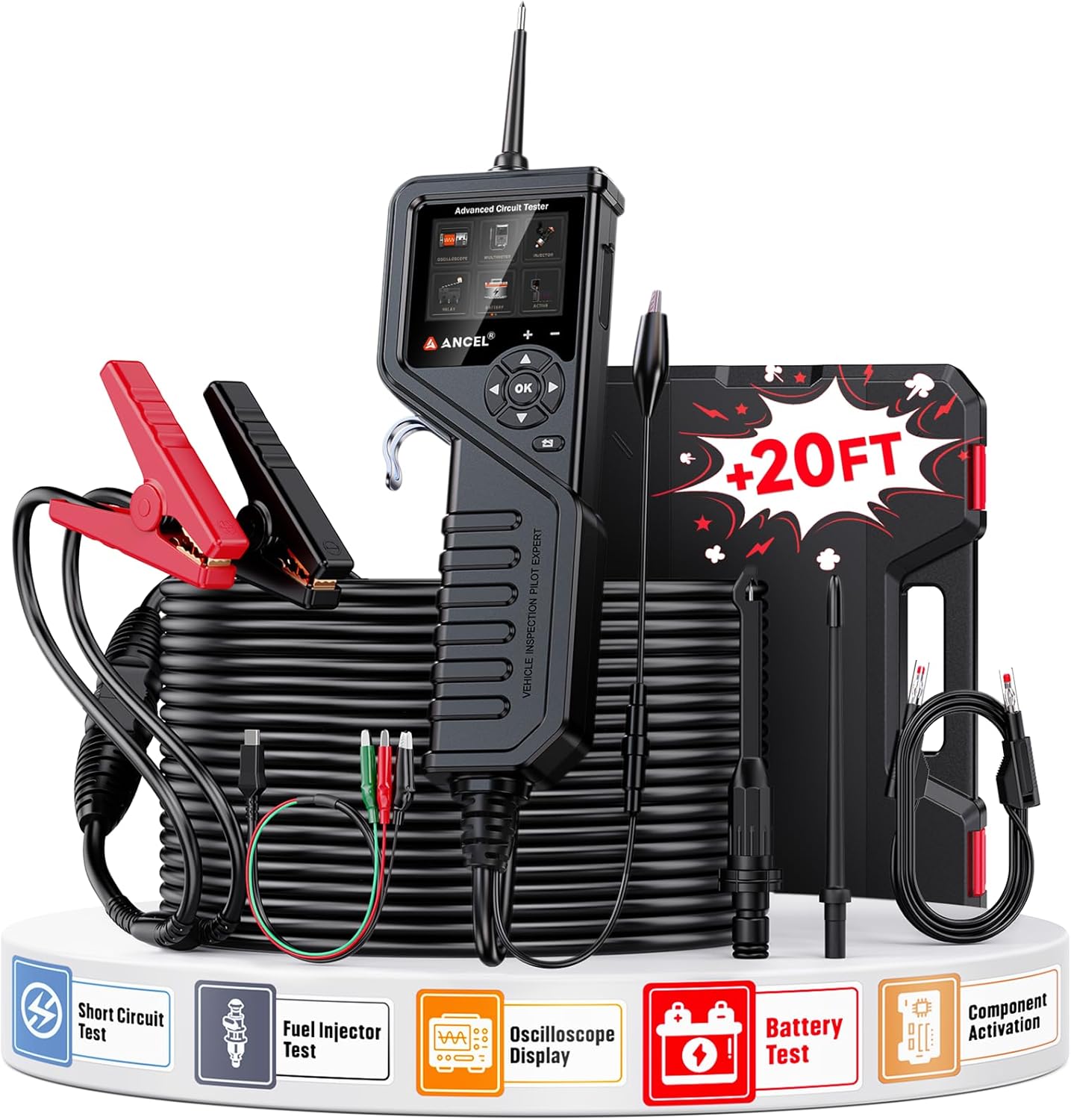
Image: The ANCEL PB600 Power Circuit Probe Tester, showing its main unit, long cable, battery clamps, and various testing accessories, ready for automotive electrical diagnostics.
3. Operating Instructions
3.1 ANCEL FX2000-US OBD2 Scanner Operation
The FX2000-US provides comprehensive diagnostic capabilities for various vehicle systems.
- 4-System Diagnostics: This tool can diagnose issues within the Engine, Anti-lock Braking System (ABS), Supplemental Restraint System (SRS) Airbag, and Transmission (A/T). It can pinpoint problem components and turn off warning lights once issues are resolved.
- Auto-VIN Technology: For compatible models, the scanner can automatically identify vehicle information, streamlining the diagnostic process. Manual model selection is also available.
- Live Data Stream: View real-time sensor data in both text and graphical formats. This includes parameters such as Engine RPM, Engine Oil Temperature, Fluid Temperature, Vehicle Speed, and Cylinder Balance Rates. Graphical displays, data logging, and DTC tips assist in quickly determining the cause of trouble codes.
- I/M Readiness: Check your vehicle's readiness for annual inspection.
- Diagnostic Report: Generate and print diagnostic reports for detailed analysis or sharing.

Image: An illustration depicting the ANCEL FX2000-US scanner's ability to diagnose four key vehicle systems: Engine, Airbag (SRS), ABS, and A/T Transmission, with the scanner connected to a car.

Image: A close-up of the ANCEL FX2000-US screen showing a 4-in-1 live data stream, displaying real-time graphs for various sensor parameters like engine RPM, oil temperature, and fluid temperature.
3.2 ANCEL PB600 Power Circuit Probe Tester Operation
The PB600 is a versatile tool for testing various electrical components and circuits in automotive systems.
- Circuit Tester: Test for voltage, continuity, and ground in circuits.
- Battery Tester: Perform battery health checks.
- Injector Tester: Test fuel injectors for proper operation. This function is compatible with over 99% of vehicles.
- Oscilloscope Tester: Display waveforms for electrical signals, useful for diagnosing complex electrical issues.
- Additional Tests: Includes DC/AC Voltage Test, Frequency Test, Cranking Test, Duty Cycle Test, Relay Test, Resistance & Diode Test, Injector Signal Test, Component Activation, and Charging Test.

Image: The ANCEL PB600 highlighting its four primary functions: Circuit Tester, Battery Tester, Injector Tester, and Oscilloscope Tester, with corresponding visual examples of each test in action.

Image: A detailed graphic illustrating the extensive testing capabilities of the ANCEL PB600, including DC/AC Voltage, Battery, Frequency, Cranking, Duty Cycle, Relay, Resistance & Diode, Injector Signal, Component Activation, and Charging tests.
4. Maintenance
4.1 Software Updates
The ANCEL FX2000-US OBD2 Scanner offers free lifetime software updates. To update the device, connect it to a PC using a USB cable. You may need to use a card reader and SD card to transfer update files. Refer to the ANCEL official website for the latest update instructions and software.

Image: A composite image illustrating various features of the ANCEL FX2000-US, including its ability to print reports via PC connection, its robust TPU protective case, handheld design, and the process for free lifetime software updates.
4.2 General Care
- Keep both devices clean and free from dust and moisture.
- Store in a cool, dry place when not in use.
- The FX2000-US features a robust TPU protective case for durability.
5. Troubleshooting
5.1 Common Issues with FX2000-US
- Device Not Powering On: Ensure the OBD-II cable is securely connected to both the vehicle's port and the scanner. Verify the vehicle's ignition is in the "ON" position or the engine is running.
- No Communication with Vehicle: Check the vehicle's OBD-II port for damage. Ensure the vehicle is compatible with the scanner (refer to specifications). Try connecting to a different compatible vehicle if possible to rule out scanner issues.
- Incorrect Readings/DTCs: Ensure the software is up to date. Verify the vehicle information (VIN, make, model) is correctly entered or automatically detected.
5.2 Common Issues with PB600
- Device Not Powering On: Ensure the red and black clamps are securely connected to the correct battery terminals (red to positive, black to negative). Check battery voltage to ensure it's within the operating range (8-35V).
- Inaccurate Readings: Ensure good contact between the probe tip and the circuit/component being tested. Clean any corrosion from battery terminals or test points.
For persistent issues, refer to the technical support section.
6. Specifications
6.1 ANCEL FX2000-US OBD2 Scanner
| Feature | Description |
|---|---|
| Diagnostic Systems | Engine, ABS, SRS (Airbag), Transmission (A/T) |
| Compatibility |
|
| Data Display | Live data stream (text and graph), DTC definitions |
| Updates | Free lifetime software updates |
| Additional Features | Auto-VIN, I/M Readiness, Diagnostic Report Printing/Sharing, Hand-held design, Robust TPU protective case |
6.2 ANCEL PB600 Power Circuit Probe Tester
| Feature | Description |
|---|---|
| Operating Voltage | 8-35V DC |
| Functions | Circuit Tester, Battery Tester, Injector Tester, Oscilloscope Tester |
| Tests Performed | DC/AC Voltage Test, Frequency Test, Cranking Test, Duty Cycle Test, Relay Test, Resistance & Diode Test, Injector Signal Test, Component Activation, Charging Test |
| Cable Length | Over 20 feet (approx. 6 meters) |
7. Technical Support
For technical assistance or inquiries, please contact ANCEL customer support. ANCEL provides 7/24 technical support to assist users with any operational or technical challenges.
Refer to the official ANCEL website or your product packaging for specific contact details.


