
Skuehod KDYJT006-20
Richmat HJH13D Remote Control User Manual
Model: HJH13D | Brand: Skuehod
Introduction
This manual provides instructions for the Richmat HJH13D Remote Control, designed as a replacement for adjustable bed parts. It is crucial to verify that your original remote control is the Richmat HJH13D model, as this replacement is not universal and is specifically designed for this model only.

Image: Front and back view of the Richmat HJH13D remote control, showcasing its sleek black design and button layout on the front, and the battery compartment and model label on the back.
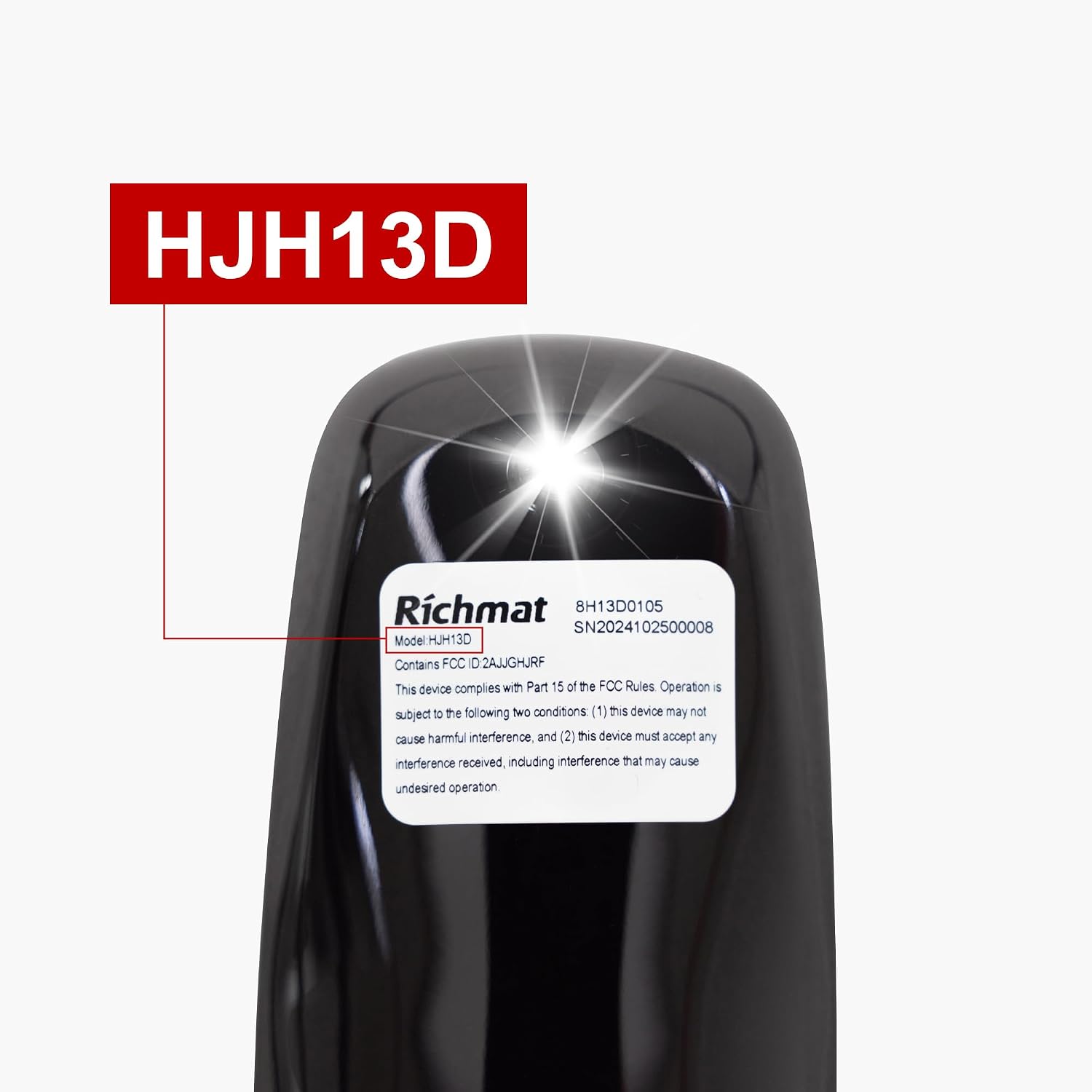
Image: A close-up view of the label on the back of the remote control, clearly showing "Richmat" and "Model: HJH13D", confirming the specific model compatibility.
Important: This remote is a unique item and is not universal. Always check the label on your original remote to ensure it matches "Richmat HJH13D" before use.
Setup
1. Battery Installation
The Richmat HJH13D remote control requires two (2) AAA batteries (not included). Follow these steps to install them:
- Locate the battery compartment cover on the back of the remote control.
- Slide the cover downwards to open the compartment.
- Insert two AAA batteries, ensuring the positive (+) and negative (-) terminals align correctly with the markings inside the compartment.
- Slide the battery compartment cover back into place until it clicks securely.

Image: The open battery compartment of the remote control, showing the slots for two AAA batteries and the removable cover.
2. Pairing Instructions
To ensure proper functionality, the remote control must be paired with your adjustable bed's control box. Follow these steps carefully:

Image: A static visual guide illustrating the pairing process for the Richmat HJH13D remote, showing the buttons to press and the steps involved.

Image: An animated guide demonstrating the pairing process, highlighting the buttons to press on the remote for successful pairing.
Step 1: Prepare the Remote
Keep pressing the two (2) buttons on the remote control that correspond to the "Head Up" and "Foot Up" functions (the top-left and top-right buttons, respectively) as shown in the image. Do not release these buttons.
Step 2: Initiate Pairing Mode on Control Box
Option A: Press the Pair Button
Locate the "Pair" button on your bed's control box and press it to enter pairing mode.
Option B: Power Cycle
Cut off power to the bed for approximately 3 minutes. Then, restore power. The control box will automatically enter pairing mode during the first 5 seconds of power-on.
Step 3: Confirm Pairing
Successful pairing is indicated by three (3) audible beeps from the control box. Once you hear the beeps, you can release the buttons on the remote control.
Note: Ensure the remote is within 1 meter (3 feet) of the control box during pairing and avoid any obstacles that might interfere with the signal.
Operating Instructions
The Richmat HJH13D remote control features a simple 7-button layout for intuitive operation of your adjustable bed.

Image: A clear diagram labeling each button on the remote control with its corresponding function, such as head up/down, foot up/down, memory, flashlight, and flat position.
Head Up/Down Buttons:
Use these buttons (top-left and bottom-left of the four main adjustment buttons) to raise or lower the head section of your adjustable bed.
Foot Up/Down Buttons:
Use these buttons (top-right and bottom-right of the four main adjustment buttons) to raise or lower the foot section of your adjustable bed.
"M" (Memory Position) Button:
This button allows you to save and recall a favorite bed position. To set a memory position:
- Adjust the bed to your desired position.
- Press and hold the "M" button for approximately 3 seconds.
- The remote's backlight will flash, and the control box will emit a buzzer sound, indicating the current position has been saved to the "M" position.
To recall the saved memory position, simply press the "M" button once.

Image: A visual guide demonstrating how to set a memory position using the "M" button on the remote, showing the action of holding the button for 3 seconds.
Flashlight Button:
Press the button with the flashlight icon to activate the built-in flashlight for convenience in low-light conditions.
"FLAT" Button:
Press this button to quickly return your adjustable bed to a completely flat position.

Image: A hand holding the Richmat HJH13D remote control, demonstrating its use in adjusting an adjustable bed in a bedroom setting.
Maintenance
Battery Replacement:
Replace batteries when the remote's performance degrades or if the backlight/flashlight becomes dim. Always use new AAA batteries and dispose of old batteries responsibly.
Cleaning:
Wipe the remote control with a soft, dry cloth. For stubborn dirt, a slightly damp cloth can be used, but ensure no moisture enters the remote. Do not use harsh chemicals or abrasive cleaners.
Storage:
Store the remote in a dry place, away from direct sunlight and extreme temperatures. If storing for an extended period, remove the batteries to prevent leakage.
Troubleshooting
If you experience issues with your Richmat HJH13D remote control, consider the following:

Image: An animated sequence of important notes, including battery requirements, the need to keep the remote close to the control box, and clarification that the remote syncs to the control box, not the power supply.
Remote Not Responding:
- Check if the batteries are correctly installed and have sufficient charge. Replace them if necessary.
- Ensure the remote is within range of the bed's control box (ideally within 1 meter or 3 feet) and there are no significant obstructions.
- Verify that the bed's power supply is connected and functioning correctly.
Remote Not Pairing:
- Re-attempt the pairing process as described in the "Setup" section. Follow all steps precisely.
- Ensure you are holding the correct buttons on the remote and initiating pairing mode on the control box correctly.
- Confirm that your bed's control box is indeed compatible with the Richmat HJH13D remote.
Intermittent Operation:
- This could indicate low battery power. Try replacing the batteries.
- Ensure there is no interference from other electronic devices.
If problems persist after following these troubleshooting steps, please contact the seller or manufacturer for further assistance.
Specifications
| Feature | Detail |
|---|---|
| Product Model | HJH13D (Remote Control) / KDYJT006-20 (Item Model Number) |
| Brand | Skuehod |
| Manufacturer | Richmat |
| Color | Sliver (Black casing) |
| Item Weight | 2.89 ounces |
| Package Dimensions | 8.66 x 5.98 x 1.5 inches |
| Power Source | 2 x AAA Batteries (not included) |
| Number of Buttons | 7 |
| Country of Origin | China |
| UPC | 717016023977 |
| ASIN | B0DT3Z1MBS |
Warranty and Support
Information regarding specific warranty terms for this Richmat HJH13D remote control is not provided in this manual. For warranty details, returns, or technical support, please refer to the documentation included with your purchase or contact the seller directly.
You may also visit the Skuehod Store on Amazon for additional product information or to contact their customer service.
Related documentsKDYJT006-20

Ask a question about this manual
Ask about setup, troubleshooting, compatibility, parts, safety, or missing instructions. Manuals+ will review the question and use this page’s manual context to help answer it.