
1. Introduction
This manual provides detailed instructions for the assembly, operation, and maintenance of your Yaheetech Armless Office Chair, Model 592837. Please read this manual thoroughly before assembly and use to ensure proper function and safety.

Image 1.1: The Yaheetech Armless Office Chair, Model 592837, in Turquoise.
Key Features:
- Space-Saving Armless Design: Allows the chair to be tucked under desks, ideal for small spaces.
- Ergonomic S-shaped Backrest: Designed to support the natural curvature of the spine for comfort during extended use.
- Adjustable Seat Height: Easily modify seat height from 16.3 to 21.7 inches to suit individual preferences.
- Comfortable Padded Seat: Features high-density foam and a dual-layer mesh covering for enhanced seating comfort.
- Sturdy and Durable Construction: Built with a plastic backrest, foam-padded seat, steel gas spring, and nylon base with wheels, supporting up to 300 lbs.
2. Important Safety Information
Please adhere to the following safety guidelines to prevent injury and ensure the longevity of your chair:
- Do not stand on the chair.
- Ensure all components are securely fastened before use.
- Do not exceed the maximum weight capacity of 300 pounds (136 kg).
- Keep hands and fingers clear of moving parts during adjustment.
- Use the chair on a flat, stable surface.
3. Package Contents
Verify that all parts are present before beginning assembly. If any parts are missing or damaged, please contact customer support.
- 1 x Office Chair (disassembled components)
- 1 x Instruction Manual
- Necessary assembly hardware (screws, tools, etc. - typically included with chair components)
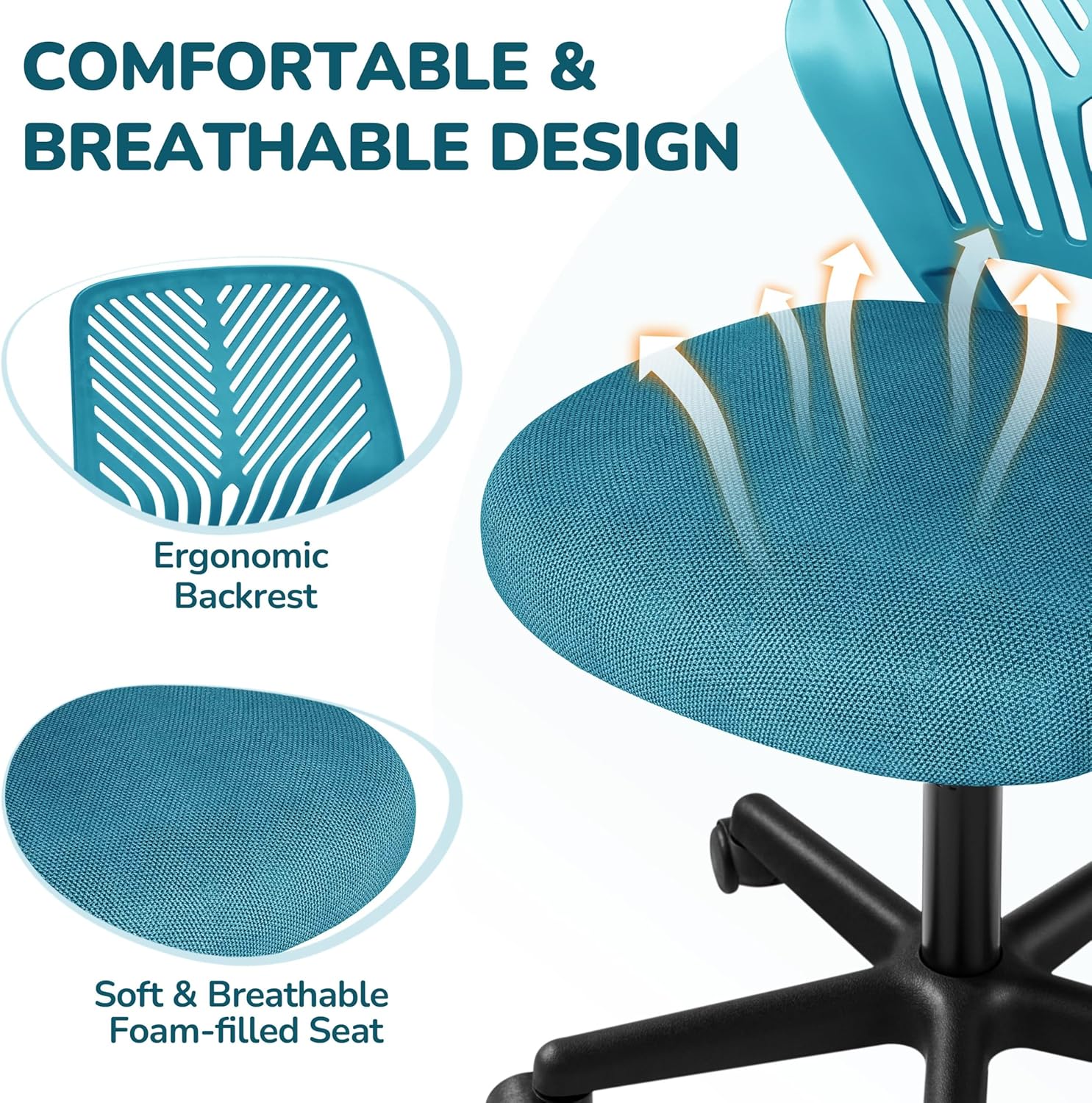
Image 3.1: Detail of the ergonomic backrest and breathable seat material.
4. Setup and Assembly
Assembly typically takes approximately 15 minutes. Follow the steps below for proper setup. It is recommended to assemble the chair on a soft, clean surface to prevent scratches.
- Attach Casters to Base: Insert the five casters (wheels) into the holes at the end of each leg of the chair base. Push firmly until they click into place.
- Insert Gas Lift: Place the gas lift cylinder into the center hole of the assembled chair base.
- Attach Seat Plate to Seat: Secure the seat plate (mechanism with the lever) to the underside of the seat cushion using the provided screws. Ensure the lever faces the front of the seat.
- Attach Backrest to Seat: Connect the backrest to the seat plate using the designated screws.
- Connect Seat Assembly to Gas Lift: Carefully place the assembled seat and backrest onto the gas lift cylinder, aligning the center hole of the seat plate with the top of the gas lift. Press down firmly to secure.

Image 4.1: Key functional components of the chair, including the gas lift and wheels.

Image 4.2: Detail of the 360-degree rolling caster wheel.
5. Operating Instructions
5.1. Adjusting Seat Height
To adjust the seat height, locate the lever beneath the right side of the seat cushion. The chair allows height adjustment between 16.3 and 21.7 inches.
- To Raise the Seat: While seated, pull the lever upwards and slightly lift your weight off the seat. The seat will rise automatically. Release the lever at the desired height.
- To Lower the Seat: While seated, pull the lever upwards. The seat will lower under your body weight. Release the lever at the desired height.
5.2. Swivel Function
The chair is designed with a 360-degree swivel function, allowing for easy rotation without moving the base.
5.3. Rolling Casters
The five-star nylon base is equipped with smooth-gliding 360-degree rolling wheels, enabling effortless movement across various floor surfaces.

Image 5.1: Visual representation of the chair's adjustable functions.
6. Maintenance
Regular maintenance will help prolong the life and appearance of your chair.
- Cleaning:
- For the mesh backrest and fabric seat, use a soft cloth dampened with mild soap and water. Avoid harsh chemicals.
- Wipe plastic and metal parts with a clean, damp cloth.
- Ensure the chair is completely dry before use.
- Caster Care: Periodically check the wheels for accumulated hair or debris and clean them to ensure smooth rolling.
- Hardware Check: Every few months, inspect all screws and bolts to ensure they are tight. Re-tighten if necessary.
7. Troubleshooting
If you encounter any issues with your chair, refer to the following common problems and solutions:
| Problem | Possible Cause | Solution |
|---|---|---|
| Chair does not adjust height. | Gas lift cylinder not properly installed or damaged; lever mechanism faulty. | Ensure the gas lift is fully inserted into the base and seat plate. Check if the lever is engaging the mechanism. If issues persist, contact support. |
| Chair wobbles or feels unstable. | Loose screws or uneven assembly. | Check and tighten all assembly screws. Ensure the chair is on a flat surface. |
| Casters do not roll smoothly. | Debris (hair, dust) caught in casters. | Remove any obstructions from the caster wheels. |
8. Product Specifications
| Feature | Detail |
|---|---|
| Brand | Yaheetech |
| Model Name | Office Chair |
| Item Model Number | 592837 |
| Color | Turquoise |
| Dimensions (Overall) | 20"D x 22"W x 36"H (approx. 35.63 x 21.65 x 19.69 inches) |
| Seat Depth | 18 inches |
| Adjustable Height Range | 16.3 - 21.7 inches |
| Maximum Weight Recommendation | 300 Pounds (136 kg) |
| Material | PP, Polyester Fibre, Nylon, Foam |
| Back Style | Mesh Back (S-shaped) |
| Arm Style | Armless |
| Leg Style | Wheels (Nylon Base) |
| Item Weight | 12.85 pounds (5.83 kg) |
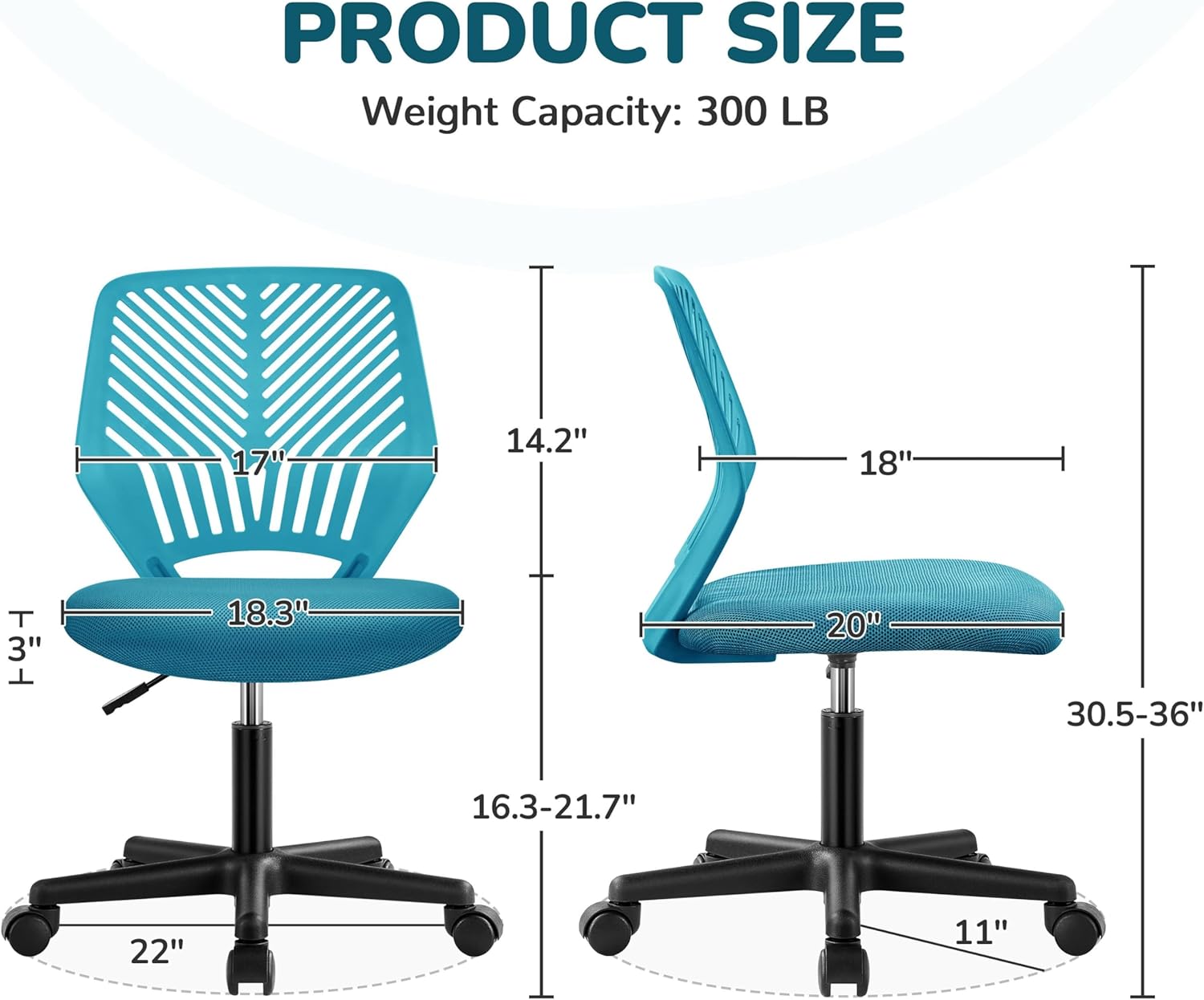
Image 8.1: Detailed product dimensions.
9. Warranty and Support
For warranty information or technical support, please refer to the documentation included with your purchase or contact Yaheetech customer service directly. Keep your purchase receipt for warranty claims.
Manufacturer: Yaheetech
For further assistance, please visit the official Yaheetech website or contact their customer support channels.

