
Fanttik X9 APEX
Fanttik X9 APEX Portable Air Compressor User Manual
Model: X9 APEX | Brand: Fanttik
Introduction
The Fanttik X9 APEX is a versatile and powerful cordless air compressor designed for quick and efficient inflation of various items, including car tires, motorcycle tires, bike tires, and sports balls. It also functions as a power bank and a multi-mode flashlight, making it an essential tool for automotive and outdoor needs.
Product Overview and Components
The Fanttik X9 APEX is engineered for portability and ease of use, featuring a compact design with integrated accessory storage.
Key Features:
- Jet-Inflate: Inflates car tires (28 to 33 PSI) in approximately 35 seconds.
- Long-Lasting Battery: Inflates up to 27 car tires on a single charge (28 to 33 PSI).
- Portability: Compact design with integrated accessory storage and a charging cable that doubles as a carry strap.
- Multi-functionality: Functions as a power bank and a flashlight with white light, white/red strobe, and warning modes.
- Accuinflate Technology: High-precision sensors and Fanttik Precision Compensation Technology ensure accurate inflation.
- One-click Preset: Automatic shut-off upon reaching desired pressure, with 5 preset modes for various applications.
Included Components:
- Fanttik X9 APEX Tire Inflator
- Air tube (with Schrader valve adapter)
- Presta valve adapter
- Ball needle
- Storage pouch
- Charging cable
- User Manual
Product Visuals:
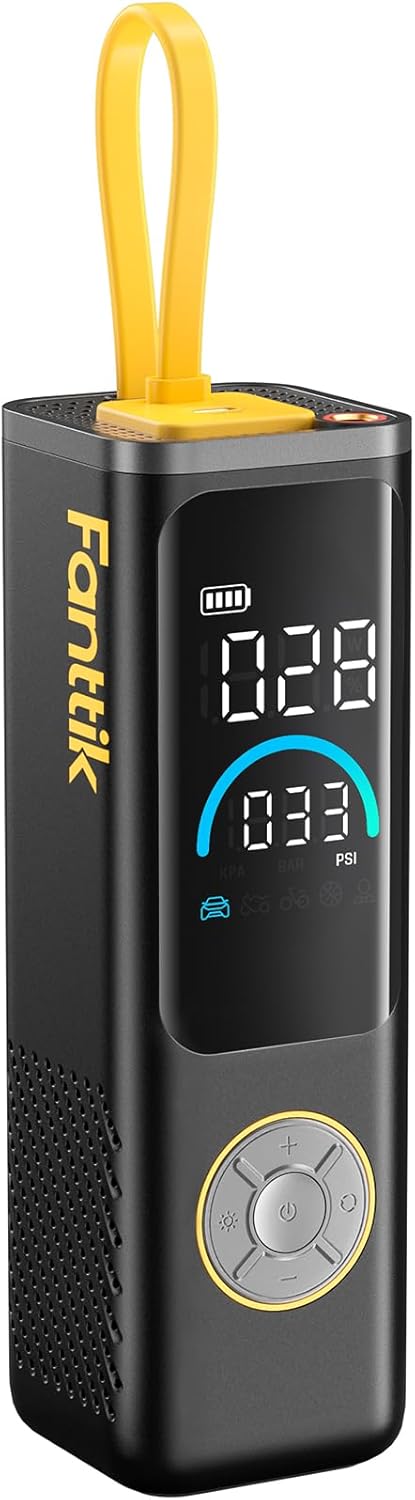


Setup
- Charging the Device:
Before first use, fully charge the Fanttik X9 APEX. Connect the included USB-C charging cable to the device's charging port and a compatible power adapter. The battery indicator on the display will show charging progress.
- Attaching the Air Hose:
Screw the air tube (with Schrader valve adapter) securely into the inflation port at the top of the device. Ensure it is tightened to prevent air leakage.

Image: A close-up of the Fanttik X9 APEX showing the integrated storage compartment at the base for accessories like the ball needle and Presta valve adapter. - Accessory Storage:
The device features a convenient storage compartment at the base for the Presta valve adapter and ball needle. Open the cover, insert the accessories, and close securely.
Operating Instructions
Power On/Off:
Press and hold the power button (center button on the control panel) to turn the device on or off.
Setting Pressure Units:
When the device is on, long press the mode selection button (circular button with arrows) to cycle through pressure units: PSI, BAR, and KPA.
Selecting Inflation Mode:
Short press the mode selection button to switch between 5 preset modes: Car, Motorcycle, Bike, Ball, and Manual. Each mode has a default pressure setting, which can be adjusted.

Adjusting Target Pressure:
Use the + and - buttons on the control panel to increase or decrease the target pressure.
Tire Inflation:
- Connect the air hose to the tire valve. Ensure a secure connection to prevent air leakage. The display will show the current tire pressure.
- Select the appropriate inflation mode and set the desired target pressure.
- Press the power button to start inflation. The device will automatically stop once the target pressure is reached.
Using as a Power Bank:
The Fanttik X9 APEX can be used to charge other devices. It features a built-in Type-C charging cable that also serves as a portable carry strap. Additionally, there is a separate Type-C input/output port.

Flashlight Function:
Press the light button (sun icon) on the control panel to activate the flashlight.
Short press the light button to cycle through different light modes:
- White light for daily illumination.
- White and red strobe for emergencies.
- Red warning light.

Official Product Videos:
The following videos provide visual demonstrations of the Fanttik X9 APEX's features and operation.
Video: "X9 APEX-Fully Upgraded" - This video provides an overview of the fully upgraded features of the Fanttik X9 APEX, showcasing its design and capabilities.
Video: "What's in the box?" - This video details the contents of the Fanttik X9 APEX package, showing each included accessory.
Video: "X9 APEX-Fast Inflation" - This video demonstrates the rapid inflation capabilities of the Fanttik X9 APEX, highlighting its speed and efficiency.
Maintenance
- Cleaning: Wipe the device with a soft, dry cloth. Do not use harsh chemicals or abrasive cleaners.
- Storage: Store the air compressor in a cool, dry place away from direct sunlight and extreme temperatures. Ensure the air hose and accessories are properly stored in their designated compartments.
- Battery Care: To prolong battery life, avoid fully discharging the device frequently. Recharge it periodically if not used for extended periods.
Troubleshooting
- Device not turning on: Ensure the battery is charged. If the battery is low, connect it to a power source and allow it to charge.
- Inflation is slow or not working:
- Check if the air hose is securely connected to both the device and the tire valve.
- Ensure the correct inflation mode is selected for the item being inflated.
- Verify that the target pressure is set correctly and is within the device's operating range (up to 150 PSI).
- Check for any blockages in the air hose or valve.
- Inaccurate pressure reading: Ensure the air hose is properly connected to the valve. The Accuinflate Technology provides precise readings, but a loose connection can affect accuracy.
- Device overheating: If the device becomes excessively hot during prolonged use, allow it to cool down before continuing operation.
Specifications
| Attribute | Detail |
|---|---|
| Brand | Fanttik |
| Model | X9 APEX |
| Color | Black |
| Material | Rubber |
| Product Dimensions | 2.5"L x 2.5"W x 7.9"H |
| Item Weight | 3.06 pounds |
| Power Source | Battery Powered |
| Maximum Pressure | 150 PSI |
| Hose Length | 18.11 Inches |
| Wattage | 28.86 Watt-hours |
| Battery Type | 12V Lithium Ion (included) |
| Special Features | Portable, LED Light, Cordless, Digital, Automatic Shut-Off |
Warranty and Support
The Fanttik X9 APEX Portable Air Compressor comes with a 1-Year Manufacturer Warranty.
For technical support, warranty claims, or further assistance, please refer to the contact information provided in the included user manual or visit the official Fanttik website.
Related documentsX9 APEX


Ask a question about this manual
Ask about setup, troubleshooting, compatibility, parts, safety, or missing instructions. Manuals+ will review the question and use this page’s manual context to help answer it.