
1. Introduction
The Hakimonoe AX913B is a versatile 2-in-1 USB adapter designed to upgrade your PC or laptop with the latest Wi-Fi 6 (802.11ax) and Bluetooth 5.4 technologies. This compact device provides high-speed wireless connectivity for both internet access and seamless pairing with a wide range of Bluetooth devices, all through a single USB port. It features a built-in driver for easy plug-and-play installation on compatible Windows operating systems.
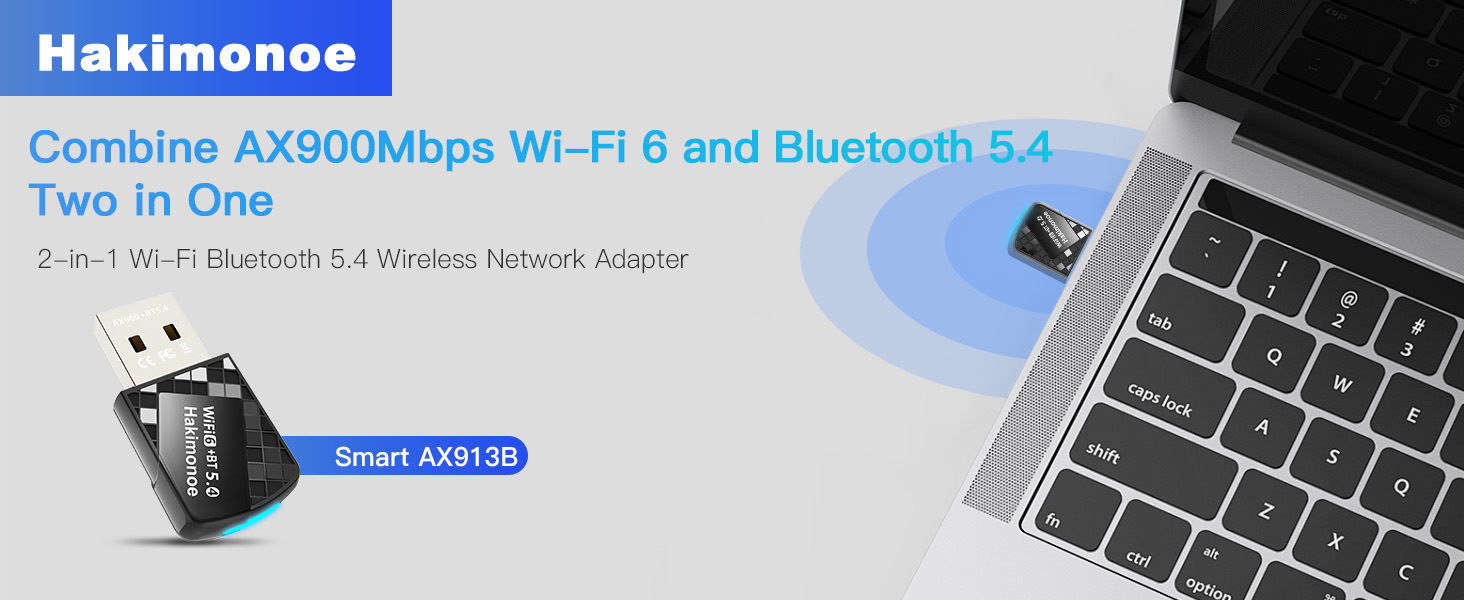
Image: The Hakimonoe AX913B 2-in-1 USB adapter, showcasing its compact design and dual functionality for Wi-Fi 6 and Bluetooth 5.4 connectivity.
2. What's in the Box
- 1 x AX913B AX900Mbps WiFi Bluetooth 5.4 USB Adapter
- 1 x User Manual
3. Setup Guide
The AX913B adapter features a built-in driver for convenient installation. Follow these steps to set up your adapter:
- Disable Existing Adapters: Before inserting the AX913B, it is highly recommended to disable any built-in or third-party Wi-Fi and Bluetooth devices on your PC to prevent conflicts. Refer to the 'Troubleshooting' section for instructions on disabling built-in Bluetooth devices.
- Insert the Adapter: Plug the AX913B USB adapter into an available USB port on your desktop PC or laptop. For optimal recognition, it is recommended to use the back USB ports on desktop computers.
- Automatic Driver Installation: Upon insertion, the built-in driver software will automatically pop up. Click on the prompt to initiate the installation process.
- Restart Computer: Once the driver installation is complete, restart your computer to ensure all changes take effect and the adapter is properly recognized.

Image: Visual guide for the easy setup process on Windows 11/10, demonstrating the plug-and-play driver installation.
Compatibility Notes:
- Wi-Fi function supports Windows 11, Windows 10, and Windows 7.
- Bluetooth function supports Windows 11 and Windows 10 only.
- Not compatible with Mac OS, Linux, TV systems, or car systems.
4. Operating Instructions
4.1. Wi-Fi Connectivity
After successful driver installation and computer restart, your PC will be able to detect and connect to Wi-Fi 6 networks. The adapter supports dual-band frequencies (2.4GHz and 5GHz) for optimal performance.
- Connecting to Wi-Fi: Navigate to your computer's network settings, select the desired Wi-Fi network, and enter the password if prompted.
- High-Speed Performance: The 5GHz band offers speeds up to 600Mbps, ideal for streaming, gaming, and large downloads. The 2.4GHz band provides speeds up to 286Mbps, suitable for general browsing and longer range.
- Advanced Features: Supports 802.11ax protocol, MU-MIMO, and OFDMA technologies for reduced latency, improved network efficiency, and stable connections in congested environments.

Image: A comparison illustrating the higher data transfer rates of the AX900Mbps Wi-Fi 6 dongle compared to older Wi-Fi 5 adapters.
4.2. Bluetooth Connectivity
The AX913B adapter enables your PC to connect with various Bluetooth 5.4 compatible devices, offering enhanced stability, lower latency, and wider coverage.
- Pairing Devices: Ensure Bluetooth is enabled on your PC (after disabling any built-in Bluetooth). Go to your PC's Bluetooth settings, turn on Bluetooth, and search for devices. Select the device you wish to pair and follow the on-screen prompts.
- Supported Devices: Connect Bluetooth headphones, headsets, mice, keyboards, printers, tablets, smartphones, and game controllers.
- Audio Quality: Enjoy superior stereo music streaming and clear calls with Bluetooth headphones or speakers.
- Data Transfer: Transfer files to and from mobile phones and tablets.
- Multi-Device Support: Up to 7 Bluetooth devices can be connected simultaneously.

Image: An illustration of how the adapter facilitates connection between your computer and various Bluetooth peripherals.
5. Maintenance
To ensure the longevity and optimal performance of your Hakimonoe AX913B adapter, consider the following:
- Handle with Care: The adapter is compact; avoid excessive force when inserting or removing it from USB ports.
- Keep Clean: Periodically clean the USB connector with a dry, soft cloth to prevent dust buildup.
- Avoid Extreme Conditions: Do not expose the adapter to extreme temperatures, humidity, or direct sunlight.
- Secure Placement: When not in use, store the adapter in a safe place to prevent loss or damage.
6. Troubleshooting
If your AX913B Wi-Fi 6 USB Adapter is not recognized or not working properly, please follow these troubleshooting steps:
- Try a Different USB Port: Change the adapter to another USB port on your PC. It is often best to use a USB port directly on the motherboard (e.g., on the back of a desktop computer).
- Disable Built-in Network Devices: Press 'Win+X' on your keyboard, then select 'Device Manager'. Locate and disable your PC's built-in Wi-Fi network devices and Bluetooth devices to avoid conflicts.
- Reinstall Driver: Check if the driver is correctly installed. If not, uninstall the current driver (if any), unplug the adapter, then plug it back into your PC's USB port and allow the built-in driver to reinstall automatically.
- Restart Your PC: Turn off your PC completely, then restart it. This can often resolve minor software glitches.
- Contact Support: If the issue persists after trying the above steps, please refer to the user manual for more detailed troubleshooting or contact customer support.
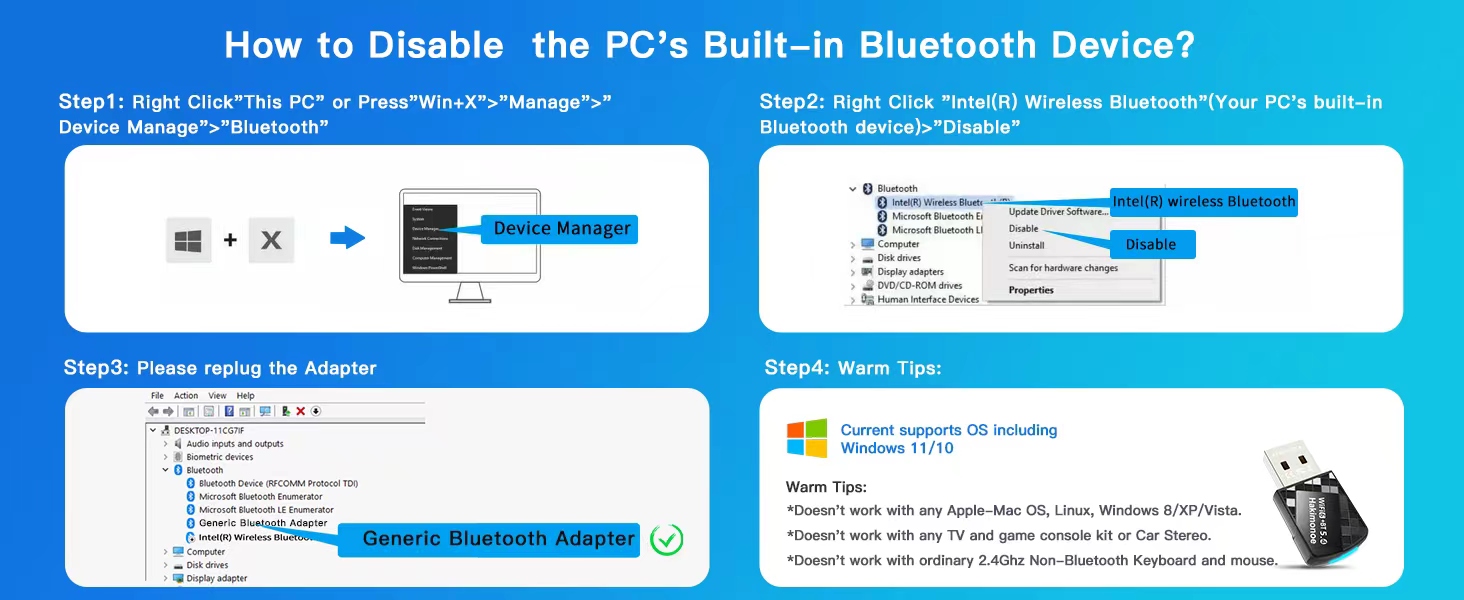
Image: A visual guide outlining common troubleshooting steps for connectivity issues with the AX913B adapter.
How to Disable PC's Built-in Bluetooth Device:
- Right-click 'This PC' or press 'Win+X' and select 'Manage' > 'Device Manager'.
- In Device Manager, expand 'Bluetooth'. Right-click on your PC's built-in Bluetooth device (e.g., 'Intel(R) Wireless Bluetooth') and select 'Disable device'.
- Re-plug the AX913B adapter. It should now be recognized as a 'Generic Bluetooth Adapter'.
7. Specifications
| Feature | Description |
|---|---|
| Model Number | AX913B |
| Dimensions | 1.25 x 0.66 x 0.27 inches (32mm x 15mm x 7mm) |
| Weight | 0.176 ounces (5 Grams) |
| Wi-Fi Standard | IEEE 802.11ax (Wi-Fi 6), backward compatible with a/b/g/n |
| Wi-Fi Data Rate | Up to 900Mbps (600Mbps on 5GHz, 286Mbps on 2.4GHz) |
| Bluetooth Standard | Bluetooth 5.4, backward compatible with 5.3/5.1/5.0/4.2/4.0/3.0/2.1/2.0/1.1 |
| Hardware Interface | USB 2.0 |
| Security | WPA3 Encryption |
| Supported OS (Wi-Fi) | Windows 11, Windows 10, Windows 7 |
| Supported OS (Bluetooth) | Windows 11, Windows 10 |
| Manufacturer | SHEN ZHEN XIN HUA TIAN TECHNOLOGY CO., LTD |

Image: A detailed view of the advanced Bluetooth 5.4 chip, emphasizing its performance benefits.
8. Warranty and Support
For any product inquiries, technical support, or warranty information, please refer to the official Hakimonoe website or contact their customer service directly. You may also find additional resources and FAQs on the product's Amazon listing page.
Additional support documents, such as a detailed User Guide (PDF) and Troubleshooting Guide (PDF), are available for download:


