1. Introduction
Thank you for choosing the Toputure TP4 Foldable Electric Treadmill. This versatile 4-in-1 treadmill is designed to provide an effective and convenient workout experience in the comfort of your home or office. With its compact design, manual incline, app connectivity, and quiet operation, the TP4 is an ideal solution for maintaining an active lifestyle. Please read this manual thoroughly before use to ensure proper operation, maintenance, and safety.
2. Important Safety Instructions
To reduce the risk of serious injury, read all instructions before using this treadmill. Keep this manual for future reference.
- Always place the treadmill on a flat, stable surface.
- Keep children and pets away from the treadmill during operation.
- Ensure adequate clear space (at least 2 meters behind and 0.6 meters on each side) around the treadmill.
- Do not operate the treadmill if it has a damaged cord or plug, or if it is not working properly.
- Wear appropriate athletic footwear and clothing.
- Consult a physician before starting any exercise program.
- Do not use the treadmill outdoors or in damp areas.
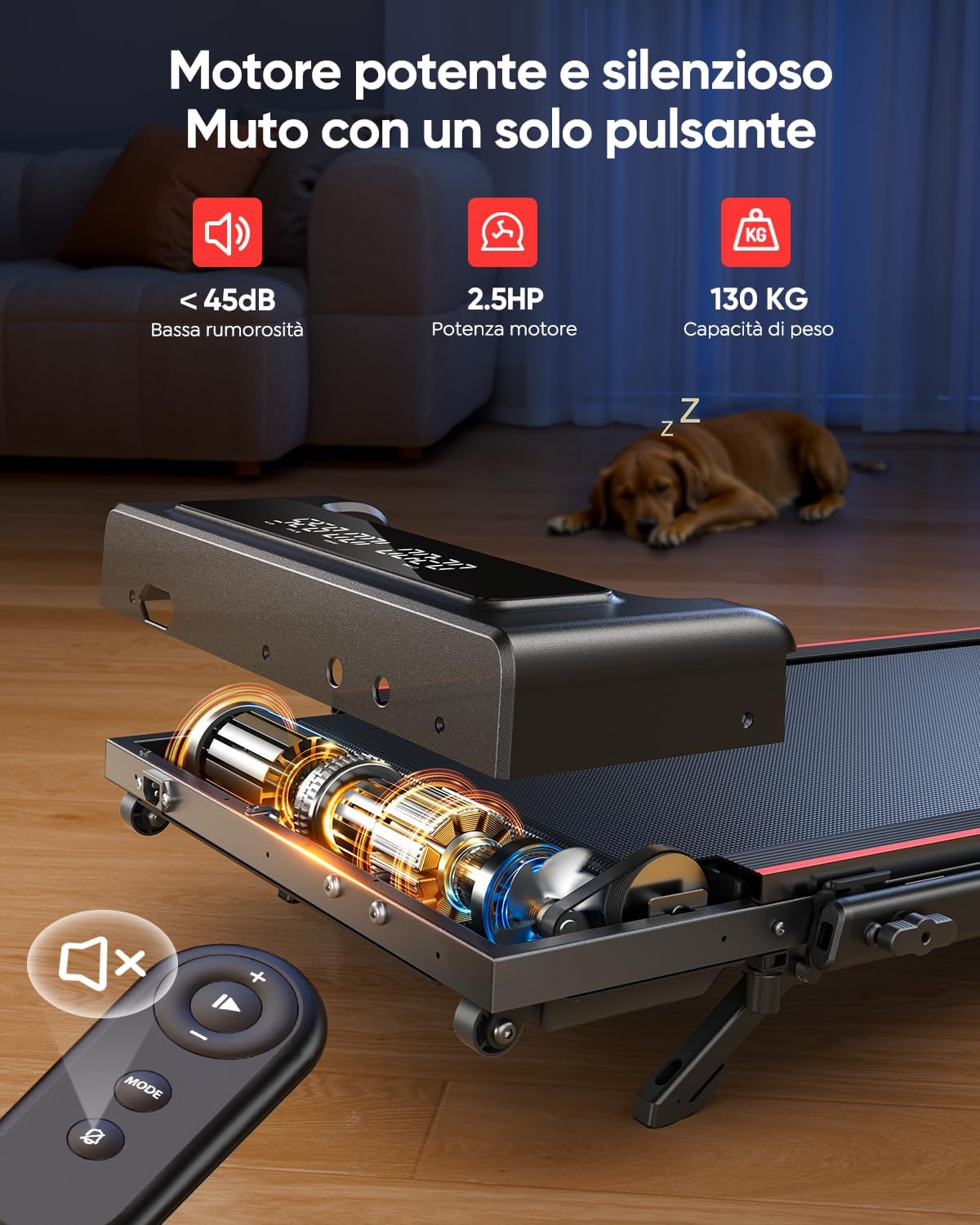
- The maximum user weight capacity for this treadmill is 130 kg.
- Always hold the handrails when starting or stopping the treadmill.
- In case of emergency, pull the safety key to immediately stop the treadmill.

The treadmill features a multi-layer shock absorption system designed to protect your knees and joints during exercise.
3. Package Contents
Please check the box for the following items:
- Toputure TP4 Foldable Electric Treadmill (Main Unit)
- Remote Control
- Power Cord
- Tool Kit (for minor adjustments)
- User Manual (this document)
4. Setup Guide
4.1 Unfolding the Treadmill
The Toputure TP4 treadmill comes pre-assembled and requires no complex installation. Simply remove it from the packaging and unfold it for use.
- Carefully lift the treadmill out of its packaging.
- Place the treadmill on a flat, level surface.
- If using the handrail, lift it into the upright position and secure it with the locking mechanisms.

The Toputure TP4 treadmill can be used with the handrail up for running or folded down for under-desk walking.

The treadmill features a space-saving foldable design and integrated transport wheels for easy movement and storage.
4.2 Adjusting Manual Incline
The treadmill offers a manual incline adjustment up to 9% to increase workout intensity.
- Locate the adjustable feet/supports at the rear of the treadmill.
- Lift the rear of the treadmill slightly.
- Extend the incline supports to the desired position. The treadmill has a fixed 9% incline option.
- Ensure the supports are securely locked in place before use.

Follow these three steps to adjust the manual incline: 1. Open the footrests, 2. Insert the pin, 3. Adjust the central footrest.

Utilizing the 9% manual incline can significantly increase calorie expenditure during your workout.
5. Operating Instructions
5.1 Powering On/Off
Connect the power cord to a grounded electrical outlet and then to the treadmill. Press the power button on the treadmill to turn it on. To turn off, press the power button again or disconnect from the power source.
5.2 Speed Control
The treadmill offers a speed range of 1-12 km/h. You can adjust the speed using the remote control or the buttons on the treadmill's display panel.
- Remote Control: Use the '+' and '-' buttons to increase or decrease speed. The remote also features a mute button for quiet operation.
- Display Panel: Use the speed control buttons on the main display for quick adjustments.
5.3 Understanding the Dual Display
The treadmill features a dual LED display that provides real-time workout data at a glance.
- Time: Displays the duration of your workout.
- Speed: Shows your current speed in km/h.
- Distance: Tracks the total distance covered during your session.
- Calories: Estimates the calories burned during your workout.

The dual LED display provides clear visualization of your workout data, while the silent remote control allows for convenient adjustments.
5.4 App Connectivity
Enhance your workout experience by connecting your treadmill to the dedicated smart app via Bluetooth.
- Download the compatible fitness app (refer to the product packaging or quick start guide for app name).
- Enable Bluetooth on your smartphone or tablet.
- Open the app and follow the on-screen instructions to pair with your TP4 treadmill.
- Once connected, you can synchronize real-time workout data, access personalized programs, monitor progress, and participate in challenges.
Connect to the smart app to track your progress, access personalized programs, and make your workouts more engaging.
5.5 Operating Modes
The TP4 treadmill supports various modes to suit your fitness needs:
- Walking Mode (1-8 km/h): Ideal for casual walks or under-desk use.
- Running Mode (8-12 km/h): For more intense cardio workouts.
- Climbing Mode (1-5 km/h with incline): Simulates uphill walking/running for increased calorie burn.
- Working Mode (1-2 km/h under desk): Perfect for staying active while working.

The 4-in-1 walking pad offers versatile modes for running, climbing, walking, and working, adapting to various fitness routines.
6. Maintenance
Regular maintenance ensures the longevity and optimal performance of your treadmill.
6.1 Lubrication
The running belt requires periodic lubrication to reduce friction and extend its lifespan. Use only silicone-based treadmill lubricant.
- Turn off and unplug the treadmill.
- Lift the edge of the running belt on one side.
- Apply a small amount of lubricant (approx. 5ml or one teaspoon) in a Z-pattern under the belt, about 10-15 cm from the front.
- Repeat on the other side.
- Plug in the treadmill and run it at a low speed (e.g., 3 km/h) for 5 minutes to distribute the lubricant.
- Lubricate every 3-6 months depending on usage.

Ensure regular lubrication through the designated port and adjust the belt as needed for optimal performance.
6.2 Cleaning
Wipe down the treadmill with a damp cloth after each use to remove sweat and dust. Do not use abrasive cleaners or solvents.
6.3 Belt Adjustment
If the running belt slips or drifts to one side, it may need adjustment. Use the included tool kit to turn the rear roller adjustment bolts in small increments (quarter turns) until the belt is centered and taut.
7. Troubleshooting Guide
Refer to this table for common issues and their solutions.
| Problem | Possible Cause | Solution |
|---|---|---|
| Treadmill does not power on. | Power cord not connected; Power switch off; Circuit breaker tripped. | Ensure power cord is securely plugged in; Turn power switch on; Reset circuit breaker. |
| Running belt slips. | Belt too loose; Insufficient lubrication. | Adjust belt tension (see 6.3); Lubricate belt (see 6.1). |
| Running belt drifts to one side. | Belt not centered. | Adjust belt alignment (see 6.3). |
| Unusual noise during operation. | Loose parts; Lack of lubrication; Motor issue. | Check for loose bolts and tighten; Lubricate belt; If noise persists, contact customer support. |
| Remote control not working. | Batteries dead; Remote not paired. | Replace batteries; Refer to pairing instructions in the quick start guide. |
8. Product Specifications
| Feature | Specification |
|---|---|
| Model Number | TP4 |
| Brand | Toputure |
| Product Dimensions (Unfolded) | 127 x 58 x 107 cm |
| Product Dimensions (Folded) | 127 x 58 x 11.5 cm |
| Item Weight | 21.1 kg |
| Maximum Weight Capacity | 130 kg |
| Motor Horsepower | 2.5 HP |
| Speed Range | 1-12 km/h |
| Incline Type | Manual (up to 9%) |
| Display Type | Dual LED |
| Connectivity | Bluetooth (App Compatible) |
| Frame Material | Carbon Steel / Alloy Steel |
| Special Features | Shock Absorption, Compact Design, Foldable, Portable, Quiet Operation |
9. Warranty and Customer Support
Your Toputure TP4 Treadmill comes with a standard manufacturer's warranty. Please refer to the warranty card included in your package for specific terms and conditions. For any product inquiries, technical support, or warranty claims, please contact Toputure customer service through the retailer's platform or the contact information provided on the official Toputure website.


