
DOOCK B06-US-1

DOOCK Night Vision Goggles
User Manual
Introduction
Thank you for choosing the DOOCK Night Vision Goggles. These advanced binoculars are designed to provide exceptional visibility in low-light and complete darkness, featuring 4K Ultra HD video recording, 52MP image capture, and an 8X digital zoom. With a powerful 5200mAh rechargeable battery and adjustable IR illuminators, they are ideal for a variety of outdoor activities including camping, hunting, wildlife observation, and security operations. This manual will guide you through the setup, operation, and maintenance of your device to ensure optimal performance and longevity.
Package Contents
Please verify that all items listed below are included in your package:
- 4K Night Vision Goggles x1
- Carrying Case x1
- Neck Strap x1
- 32GB Memory Card x1
- Type-C Cable x1

Image: The DOOCK Night Vision Goggles along with the carrying case, neck strap, 32GB memory card, and Type-C charging cable.
Key Features
Advanced Night Vision Capability
Equipped with 5-level adjustable 3W 850nm IR illuminators, these night vision goggles deliver crystal-clear visibility in total darkness. The 35mm objective lens aperture and high-sensitivity CMOS sensor provide a 2x wider field of view and superior image clarity compared to conventional models, ensuring exceptional low-light performance for tactical precision.
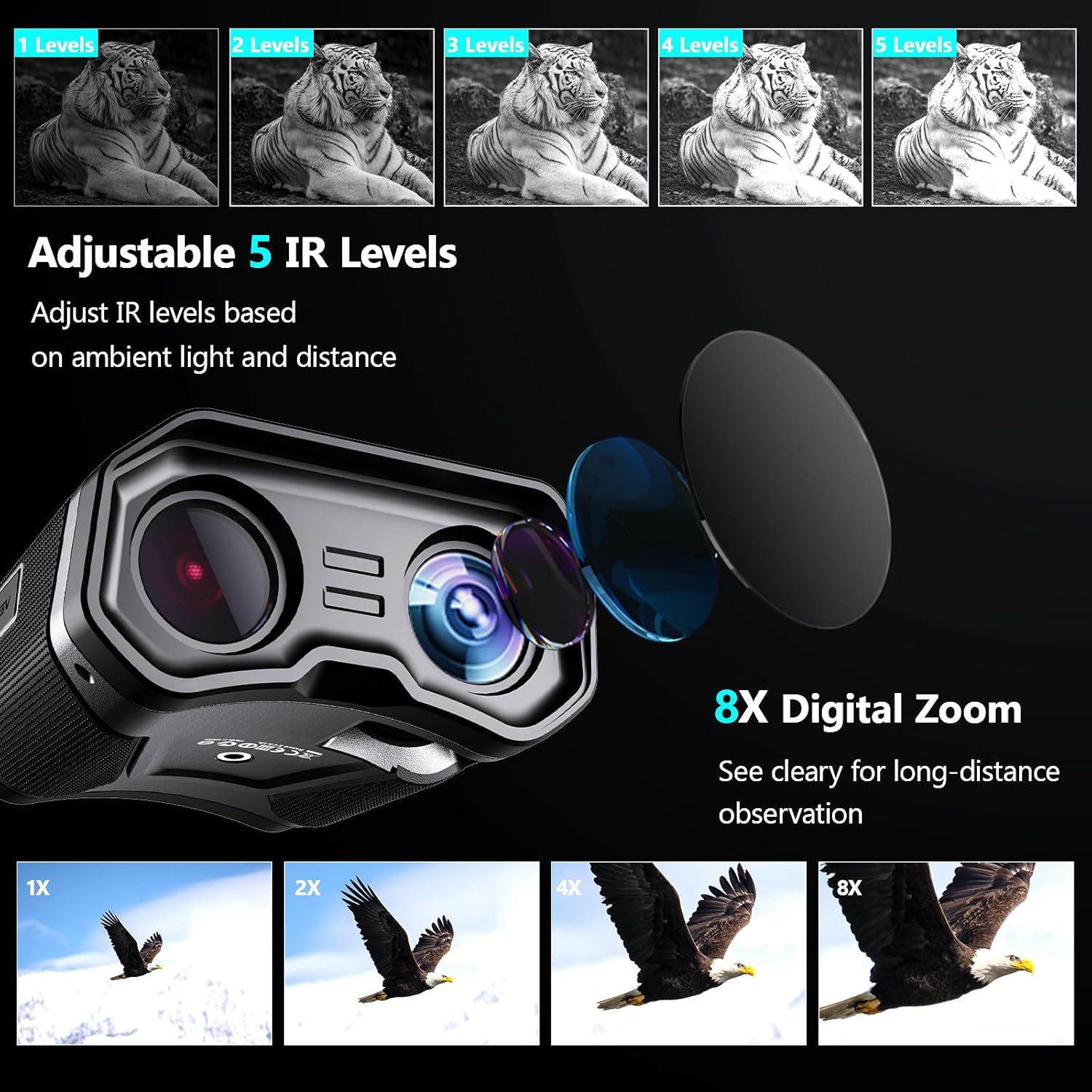
Image: Illustration of 5 adjustable IR levels and 8X digital zoom capability.

Image: Comparison highlighting the larger 35mm lens for clearer images and greater eye comfort.
4K Ultra HD Imaging & Audio
Capture night adventures in stunning detail with 52MP photos and 4K video recording. The built-in microphone preserves authentic ambient sound while the 3" HD display enables instant playback. Seamlessly share content via social media or showcase expeditions through vivid visual documentation.

Image: The digital night vision device showcasing its photo, video, and playback modes.

Image: Demonstrating the full-color capability in low light conditions.
Low-Light Color Accuracy & 8x Zoom
Experience true-to-life color reproduction and intricate detail retention even in minimal light. The 8x digital zoom allows versatile framing of distant subjects and close-up shots, complemented by 5-level adjustable screen brightness for customized viewing across environments.
Tactical Ergonomic Design
Operate discreetly with backlit buttons and auto-screen dimming to maintain situational awareness. The ruggedized, weather-resistant chassis features anti-slip grip textures for secure handling in harsh conditions. Compact and lightweight, it's engineered for extended mobile use.
Extended Power Performance
A 5200mAh rechargeable lithium battery delivers 5+ hours runtime with IR active (12hrs standby). Ideal for extended outdoor activities including night hunting, surveillance, wildlife observation, and security operations. Includes USB-C fast charging and low-power alerts.

Image: The internal 5200mAh rechargeable battery and Type-C charging port.
Getting Started (Setup)
- Charging the Device: Before first use, fully charge the night vision goggles using the provided USB-C cable. Connect the cable to the Type-C port on the device and a compatible USB power adapter (not included) or computer. The charging indicator will show the charging status.
- Inserting the Memory Card: Locate the memory card slot. Insert the included 32GB TF memory card into the slot until it clicks into place. Ensure the card is inserted in the correct orientation. The device supports up to 128GB memory cards.
- Attaching the Neck Strap: Securely attach the adjustable neck strap to the designated attachment points on the goggles for convenient and safe carrying during use.
Image: The Type-C charging port on the device, illustrating how to connect for power.
Operation Guide
- Power On/Off: Press and hold the power button (usually marked with a power symbol) to turn the device on or off. The 3-inch HD display will illuminate.
- Mode Selection: Use the mode button (often labeled with an 'M' or mode icon) to cycle through available modes: Photo Mode, Video Mode, and Playback Mode.
- Adjusting Digital Zoom: In Photo or Video mode, use the zoom buttons (often '+' and '-' or directional arrows) to adjust the 8X digital zoom.
- Adjusting IR Levels: In low-light or complete darkness, activate the infrared (IR) illuminators. Use the IR adjustment buttons (often marked with an IR symbol or up/down arrows) to select one of the 5 IR levels based on ambient light and distance for optimal visibility.
- Capturing Photos: In Photo Mode, press the shutter button (often marked with a camera icon) to take a 52MP image.
- Recording Videos: In Video Mode, press the record button (often marked with a red dot or video camera icon) to start recording 4K UHD video. Press again to stop recording.
- Playback: In Playback Mode, use the navigation buttons to browse through your captured photos and videos. Press the OK/Play button to view or play selected media.
- Screen Brightness: Adjust the screen brightness through the settings menu to suit your viewing preference and environment.
Image: Overview of the device's control buttons for photo, video, and playback functions.

Image: Demonstrates the device's capability for long-distance viewing in both complete darkness and daytime.
Care and Maintenance
- Cleaning Lenses: Use a soft, lint-free cloth specifically designed for optical lenses to gently wipe the objective and eyepiece lenses. Avoid using abrasive materials or harsh chemicals.
- Cleaning Body: Wipe the body of the device with a soft, damp cloth. Do not submerge the device in water.
- Storage: When not in use, store the goggles in their carrying case in a cool, dry place away from direct sunlight and extreme temperatures.
- Battery Care: To prolong battery life, avoid fully discharging the battery frequently. Charge the device regularly, even if not in use for extended periods.
Troubleshooting
| Problem | Possible Cause | Solution |
|---|---|---|
| Image lacks clarity or is blurry | Incorrect focus; insufficient IR illumination; dirty lens. | Adjust the focus wheel; increase IR level (1-5); clean the objective lens. |
| Device does not power on | Battery is depleted; power button not held long enough. | Charge the device fully; press and hold the power button for 3-5 seconds. |
| Cannot record video or take photos | Memory card full or not inserted correctly; incorrect mode selected. | Check memory card insertion and ensure it has free space; format the memory card if necessary; switch to Photo or Video mode. |
| Night vision and zoom buttons conflict | Shared button functionality. | Be precise with button presses. If night vision activates when trying to zoom, turn it off and re-adjust zoom. The device may default to night vision in dark conditions. |
| Short battery life | High IR level usage; frequent recording; cold environment. | Reduce IR level if possible; limit continuous recording; ensure full charge before use. |
Technical Specifications
| Feature | Specification |
|---|---|
| Product Dimensions | 5.28 x 4.88 x 2.28 inches |
| Item Weight | 15.3 ounces |
| Model Number | B06-US-1 |
| Batteries | 1 Lithium Ion battery (included), 5200mAh |
| Objective Lens Diameter | 35 Millimeters |
| Magnification Maximum | 8 x (Digital Zoom) |
| IR Illuminator | 3W 850nm, 5-level adjustable |
| Image Resolution | Up to 52MP |
| Video Resolution | Up to 4K Ultra HD |
| Display Screen | 3-inch HD LCD |
| Memory Card Support | 32GB TF card included, supports up to 128GB |
| Connectivity | USB-C |
| Country of Origin | China |
Warranty and Customer Support
DOOCK offers a 1-year manufacturer service for this product. For any product quality issues encountered within one year of purchase, we provide a replacement service rather than repairs. Please contact our official after-sales support for assistance.
Software Updates: We regularly update the product's software to enhance the user experience. To obtain the latest software updates, please contact our after-sales support team.
Contact Support: For all inquiries regarding warranty, replacements, software updates, or general support, please reach out to our official after-sales team at support@doock.life.
Related documentsB06-US-1

Ask a question about this manual
Ask about setup, troubleshooting, compatibility, parts, safety, or missing instructions. Manuals+ will review the question and use this page’s manual context to help answer it.