
SMALLRIG 3893
SMALLRIG Rotating Side Handle with REC Trigger User Manual
Model: 3893
Product Overview
The SmallRig Rotating Side Handle with REC Trigger (Model 3893) is designed to enhance the stability and control of select Sony mirrorless cameras during handheld shooting. It features an integrated REC trigger for convenient recording control, a rotatable design for ergonomic flexibility, and a built-in power output for accessories.

Image: The SmallRig Rotating Side Handle (Model 3893) shown with its included control cable and NATO rail attachment. This image highlights the main components of the product.
Key Features
- Ergonomic Design: Provides a secure grip for seamless camera control, ensuring comfort during extended use.
- Integrated REC Control: Features a built-in shutter control with a free control cable to start and stop recording directly from the handle.
- 360° Rotation: Allows continuous, one-click rotation for fluid camera movement at any angle, enhancing shooting flexibility.

Image: The SmallRig handle demonstrating its 360-degree rotation capability when mounted on a camera, allowing for flexible positioning.
- USB-C Power Output: Supports PD fast charging with a maximum input/output of 20W, enabling power supply to other devices or charging the handle itself when used with NP-F550/570 batteries.

Image: The SmallRig handle connected to a camera via a USB-C cable, illustrating its 20W fast charging and discharging capability for powering devices.
- Multiple Attachment Points: Features 1/4"-20 threaded holes, a cold shoe mount, and a strap slot for attaching accessories like monitors, fill lights, and wrist straps.
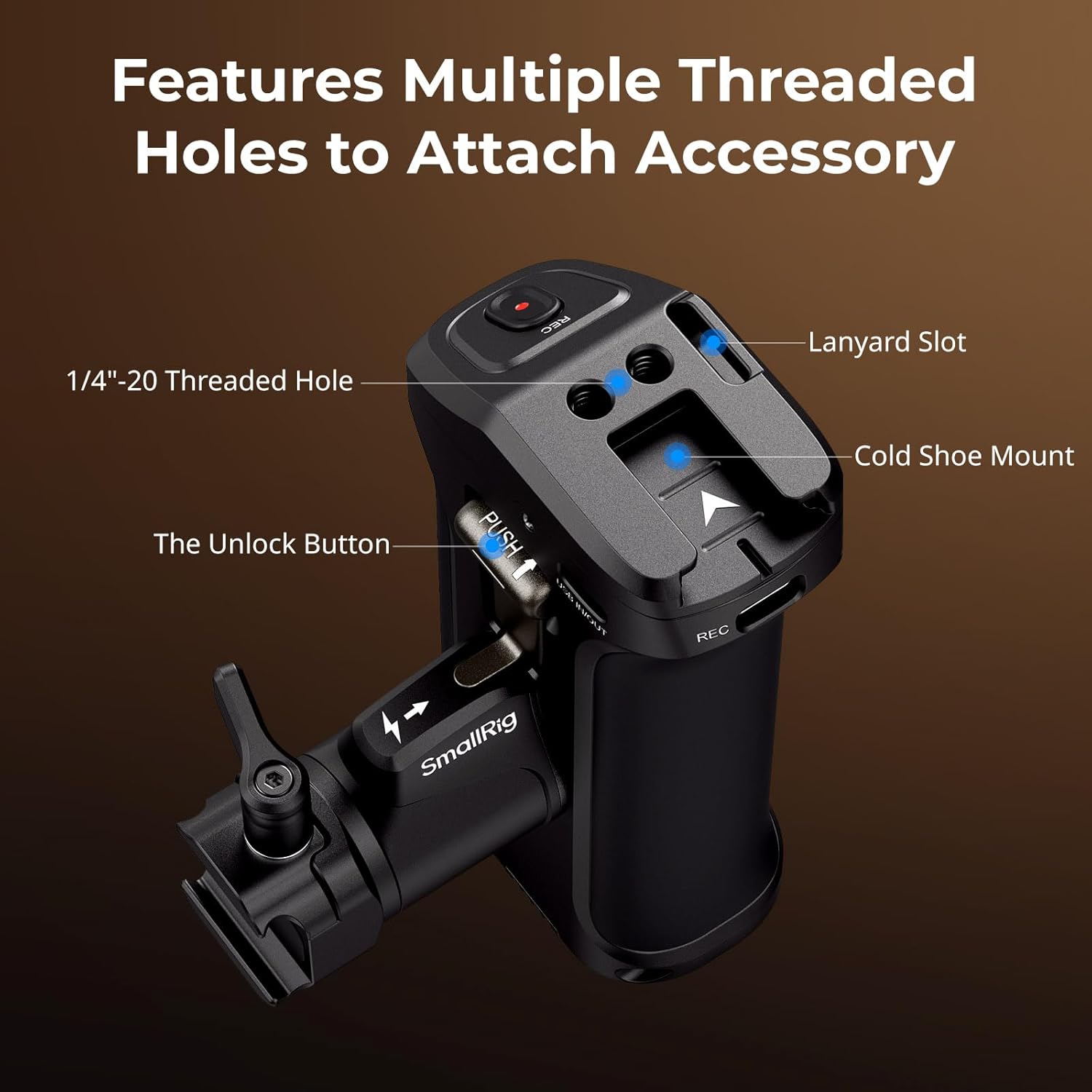
Image: A detailed view of the SmallRig handle highlighting its various attachment points, including the 1/4"-20 threaded hole, cold shoe mount, and lanyard slot.
Package Contents
- 1 x Handle
- 1 x Control Cable for Sony
- 1 x NATO Rail
- 1 x Allen Wrench

Image: An illustration of the complete package contents for the SmallRig Rotating Side Handle, including the handle itself, NATO rail, Allen wrench, and Sony control cable.
Compatibility
This handle is compatible with the following Sony mirrorless camera models:
- Sony Alpha 7 III
- Sony Alpha 7 IV
- Sony Alpha 7R III
- Sony Alpha 7R IV
- Sony Alpha 7R V
- Sony Alpha 7S III
- Sony FX3
- Sony FX30
- Sony Alpha 1
- Sony Alpha 1 II
- Sony Alpha 9
- Sony Alpha 9 II
- Sony Alpha 9 III

Image: A visual representation of several compatible Sony mirrorless cameras, emphasizing the broad compatibility of the SmallRig handle.
Setup Instructions
- Attaching the Handle:
Secure the handle to your camera cage or rig using the integrated NATO rail mounting system. Ensure the locking lever is fully tightened for a stable connection.
- Connecting the REC Control Cable:
Connect one end of the provided control cable to the REC port on the handle and the other end to the appropriate control port on your compatible Sony camera.

Image: A user demonstrating the immediate start/stop recording function by pressing the REC button on the SmallRig handle, highlighting its remote control capability.
- Battery Installation (Optional):
If using NP-F550/570 batteries for extended power or charging, install them into the designated compartment at the bottom of the handle. If using SmallRig NP-F550 (ID: 4331 / 4791) batteries, remove the adapter plate inside the handle first.
Operating Instructions
- Recording Control:
Press the REC button on the handle to start or stop video recording on your connected Sony camera. This function works even without an NP-F550/570 battery installed in the handle.
- Adjusting Handle Angle:
To rotate the handle for optimal ergonomics, press the unlock button (if present) and rotate the handle to your desired angle. Release the button to lock it in place. When installed on both sides, press the buttons one by one to rotate the angle, ensuring machine safety.

Image: The SmallRig handle demonstrating its ergonomic design and ability to be used comfortably on either side of a camera setup.
- Using USB-C Power Output:
Connect external devices (e.g., monitors, lights) to the USB-C IN/OUT port on the handle to supply power, provided an NP-F550/570 battery is installed. The handle supports various fast charging protocols (PD, QC, AFC, FCP) with up to 20W output.

Image: The SmallRig handle connected to a power source via USB-C, highlighting its security protection design against overvoltage and overcurrent.
- Attaching Accessories:
Utilize the 1/4"-20 threaded holes, cold shoe mount, or strap slot to attach additional camera accessories as needed.
Maintenance
- Cleaning: Use a soft, dry cloth to clean the handle. Avoid abrasive cleaners or solvents.
- Storage: Store the handle in a cool, dry place away from direct sunlight and extreme temperatures.
- Inspection: Periodically check all screws and connections to ensure they are secure. Tighten with the provided Allen wrench if necessary.
Troubleshooting
| Problem | Possible Cause | Solution |
|---|---|---|
| REC button not working. |
|
|
| Handle rotation is stiff or loose. |
|
|
| USB-C power output not working. |
|
|
Specifications
| Attribute | Value |
|---|---|
| Model Number | 3893 |
| Brand | SMALLRIG |
| Dimensions (L x W x H) | 11.53 x 8.5 x 5.67 cm (4.5 x 3.3 x 2.2 inches) |
| Weight | 312 Grams (11.0 oz) |
| Material | Aluminum Alloy, Stainless Steel, Silicone, Copper, TPE |
| Connectivity Technology | USB |
| Color | Black |
| Max Power Output/Input | 20W (with NP-F550/570 battery) |
Warranty and Support
For warranty information and technical support, please visit the official SmallRig website or contact their customer service directly. Keep your purchase receipt for warranty claims.
Official SmallRig Store: SmallRig Amazon Store
Related documents3893


Ask a question about this manual
Ask about setup, troubleshooting, compatibility, parts, safety, or missing instructions. Manuals+ will review the question and use this page’s manual context to help answer it.