
Introduction
Thank you for choosing the Jazmm Portable AM FM Shortwave Radio with NOAA Weather Alert. This manual provides detailed instructions for the setup, operation, maintenance, and troubleshooting of your new radio. Please read this manual thoroughly before using the product to ensure proper function and longevity.
Package Contents
Please check the box for the following items:
- 1 x AM FM SW WB Radio
- 1 x Owner's Manual
- 1 x Power Cord
- 1 x Gift Box
Product Overview
The Jazmm Portable Radio is a versatile device offering multiple listening modes and essential features for everyday use and emergencies.

Front and side view of the Jazmm Portable Radio, highlighting its compact design, digital display, speaker, and side ports.
Key Features
- Portable Multi-Band Radio with NOAA: Equipped with an advanced DSP chip, supporting FM (87-108MHz), AM (520-1710 KHz), SW (4.75-21.85MHz), and WB (162.400-162.550MHz) bands. Includes real-time NOAA Weather Alert for emergency preparedness.
- 1250mAh Rechargeable Battery & Flashlight: Durable built-in 1250mAh battery provides 10-12 hours of use on a single Type-C charge. Integrated flashlight for illumination in emergencies.
- 5W Large Speaker Clear Sound: Powerful 5W speaker delivers clear, noise-free audio. Features a 3.5mm headphone jack for private listening and 6 EQ stereo sound effects.
- Bluetooth 5.4 & TF Card Playback: Connects effortlessly to smartphones, tablets, or laptops via Bluetooth 5.4 to function as a wireless speaker. Supports TF card playback (up to 128GB) for personalized music playlists.
- User-Friendly Controls & Back Clip: Intuitive buttons and a large, bright digital display for easy navigation. Designed with a back clip and wrist strap for convenient portability.
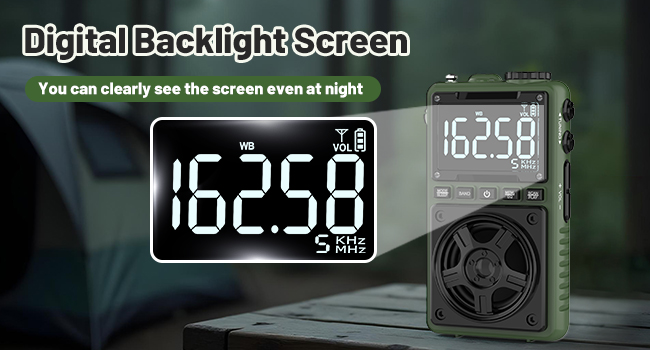
The radio features a digital backlight screen for clear visibility even at night.
Setup
Charging the Battery
Before first use, fully charge the radio's built-in 1250mAh rechargeable battery. Use the provided Type-C power cord to connect the radio to a compatible USB power adapter (not included).
- Charging Time: Approximately 1.5 hours.
- Using Time: Up to 8-12 hours depending on volume and mode.

The radio being charged via its Type-C port, illustrating the 1250mAh battery capacity.
Operating Instructions
Power On/Off
Press the Power button () to turn the radio on or off.
Band Selection (AM/FM/SW/WB)
Press the BAND button to cycle through the available radio bands: FM, AM, Shortwave (SW), and NOAA Weather Band (WB).

Illustration of the radio receiving signals across FM, AM, SW, and WB bands with its built-in antenna.
Tuning and Presets
- Manual Tuning: Use the Tuning knob on the side to manually adjust the frequency.
- Auto Scan: Press and hold the SCAN/PLAY button to automatically scan for and save available stations. The radio supports up to 100 preset stations.
- Accessing Presets: Use the +/- buttons to navigate through saved preset stations.

The radio displaying a preset station, indicating its capability for 100 presets and a sleep timer function.
NOAA Weather Alert
The radio can receive real-time weather alerts from the National Oceanic and Atmospheric Administration (NOAA).
- To enter the weather alert section, hold the right button (likely the SCAN/PLAY button) until 'ALE' appears on the screen.
- To return to normal weather mode, hold the button again.

The radio with its antenna extended, showing a weather alert symbol and a flashlight beam, indicating its NOAA and SOS features.
Bluetooth Connectivity
The radio can function as a Bluetooth speaker.
- Switch the radio to Bluetooth mode using the MODE button. The display will show 'BT'.
- On your smartphone or other Bluetooth device, search for 'Jazmm Radio' and pair.
- Note: Bluetooth transmission to headphones is not supported.

Diagram showing the radio connecting via Bluetooth to a smartphone, tablet, and laptop within a 10-meter range.
MP3 Playback (TF Card)
Insert a TF (Micro SD) card (up to 128GB) into the TF card slot on the side of the radio to play MP3 audio files.
- The radio will automatically switch to MP3 mode when a TF card is inserted.
- Use the SCAN/PLAY button to play/pause and the +/- buttons to skip tracks.
- A 3.5mm earphone jack is available for private listening.

A person enjoying music through headphones connected to the radio, with insets showing the TF card slot and 3.5mm earphone jack.
Equalizer Settings
The radio offers 6 EQ stereo sound effects (Normal, Rock, Pop, Jazz, Class, Village) for Bluetooth and TF card playback.
- While in Bluetooth or MP3 mode, press and hold the MEM/EQ button to cycle through the equalization settings.

The radio's 5W speaker with visual representations of different EQ modes like Normal, Rock, Pop, Jazz, Class, and Village.
Flashlight Function
The radio includes a built-in LED flashlight.
- Press the LOCK/LIGHT button on the side of the radio to turn the flashlight on or off.
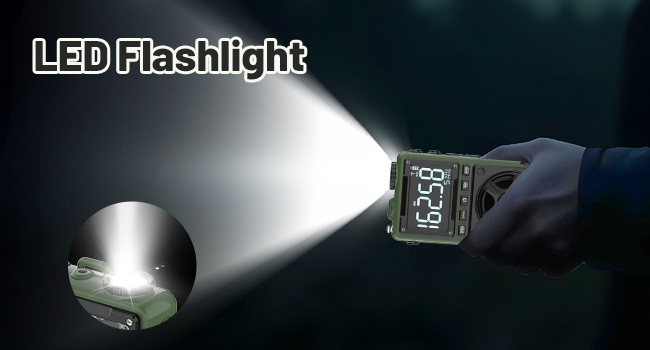
The radio's top-mounted LED flashlight illuminating a dark area.
Sleep Timer
The radio features a sleep timer function.
- Press the MODE/SLEEP button to set the sleep timer (e.g., 10, 60, 90, 120 minutes). The radio will automatically turn off after the set time.
Button Lock
To prevent accidental button presses, use the button lock feature.
- Press and hold the LOCK/LIGHT button to activate or deactivate the button lock. A lock icon will appear on the display when activated.
Portability Features
The radio is designed for easy carrying.
- Back Clip: Attach the radio to your bag or belt using the integrated back clip.
- Wrist Strap: Use the included wrist strap for secure carrying.

A person jogging with the radio attached to their belt via the back clip, and an inset showing the wrist strap.
Video Demonstration: Undocumented Functions
This video demonstrates some less obvious functions of the radio, including specific operations for the NOAA weather alert mode and how to access and cycle through the equalization settings for Bluetooth and MP3 playback.
Maintenance
To ensure the longevity and optimal performance of your Jazmm radio, follow these maintenance guidelines:
- Cleaning: Wipe the radio with a soft, dry cloth. Do not use abrasive cleaners or solvents.
- Storage: Store the radio in a cool, dry place away from direct sunlight and extreme temperatures.
- Battery Care: If not used for extended periods, charge the battery at least once every three months to maintain its health.
- Water Exposure: This radio is not waterproof. Avoid exposure to water or high humidity.
Troubleshooting
If you encounter any issues with your radio, please refer to the following common problems and solutions:
| Problem | Possible Cause | Solution |
|---|---|---|
| Radio does not power on | Battery is depleted | Charge the radio using the provided Type-C cable. |
| Poor radio reception | Weak signal, antenna not extended | Extend the telescopic antenna fully. Try repositioning the radio for better signal. |
| Bluetooth not connecting | Radio not in Bluetooth mode, device too far, already paired | Ensure radio is in 'BT' mode. Keep devices within 10 meters. Unpair from other devices if necessary. |
| MP3s not playing from TF card | Card not inserted correctly, unsupported format, card corrupted | Reinsert TF card. Ensure MP3 files are correctly formatted. Try a different TF card. |
| No sound | Volume too low, headphones connected | Increase volume using the volume knob. Disconnect headphones if using the speaker. |
Specifications
| Feature | Detail |
|---|---|
| Product Dimensions | 2.3 x 4 x 1.3 inches (5.84 x 10.16 x 3.3 cm) |
| Item Weight | 9.1 ounces (257.98 grams) |
| Model Number | 6f9846ec-031e-4f5a-876d-0ee9460591cb |
| Batteries | 1250mAh Rechargeable (built-in) |
| Tuner Technology | AM/FM/SW/WB (4-Band) |
| Connectivity Technology | Bluetooth 5.4, USB (Type-C for charging) |
| Special Features | Built-In Flashlight, Portable, Rechargeable, SOS Alarm, Digital Backlight Screen, TF Card Slot (Max 128GB), 3.5mm Earphone Jack, 6 EQ Sound Effects, 100 Preset Stations, Sleep Timer, Back Clip, Wrist Strap |
| Manufacturer | Jimeng |
Warranty and Support
Jazmm products are designed for reliability and performance. For any product-related inquiries, technical support, or warranty claims, please refer to the contact information provided with your purchase or visit the official Jazmm store on Amazon. Keep your purchase receipt as proof of purchase for warranty purposes.