
1. Introduction
This manual provides instructions for the Smartby BN59-01432A Solar Voice Remote, a replacement remote control designed for various Samsung Neo QLED Smart 8K HDR Ultra HD TVs. This remote features a rechargeable solar cell and voice control capabilities, offering a convenient and eco-friendly way to manage your television.
2. Setup and Pairing
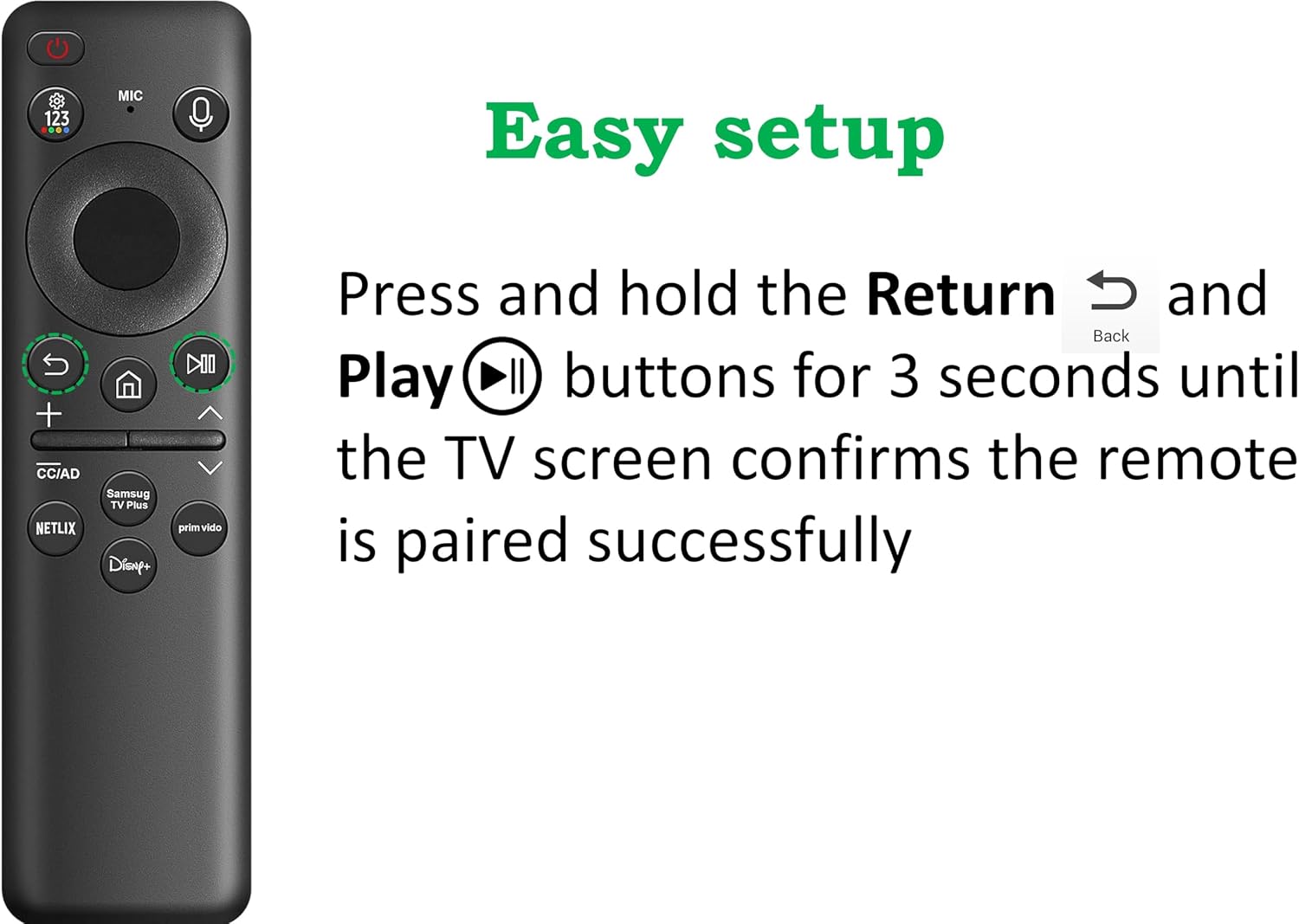
To use the voice function and ensure full compatibility, the remote must be paired with your Samsung TV.
- Ensure your Samsung TV is powered on.
- Point the remote control towards your TV.
- Simultaneously press and hold the Return and Play/Pause buttons for 3 seconds.
- Release the buttons when a pairing confirmation message appears on your TV screen. The remote is now paired and ready for use.
3. Charging the Solar Voice Remote
The Smartby BN59-01432A remote offers two convenient charging methods:
- Solar Charging: The remote features a built-in solar panel. Simply place the remote with the solar panel facing upwards in an area exposed to indoor or outdoor lighting. The remote will charge automatically, eliminating the need for disposable batteries.
- USB-C Charging: For faster charging or when solar charging is not feasible (e.g., in low light conditions), you can charge the remote using a standard USB-C charging cable. Connect the cable to the USB-C port on the remote and a compatible power source.

4. Operation
4.1 Basic Functions
Once paired, the remote functions like a standard Samsung TV remote. Use the directional pad for navigation, volume buttons for audio control, and channel buttons for changing channels. Dedicated buttons for streaming services (e.g., Netflix, Prime Video, Disney+) provide quick access.
4.2 Voice Control
The remote supports voice search and commands. After successful pairing, press the Microphone button (usually labeled "MIC" or with a microphone icon) and speak your command clearly into the remote. Ensure your TV's voice assistant is enabled and configured.

5. Compatibility
This BN59-01432A Solar Voice Remote is a replacement for original Samsung TV remotes and is compatible with a wide range of Samsung Neo QLED Smart 8K HDR Ultra HD TVs, including models from 2023, 2024, and 2025. Some compatible model numbers include, but are not limited to:
- UN43CU8000BXZA, UN75CU8000DXZA, UN55CU8000BXZA, UN55CU8000FXZA, UN75CU8000BXZA, UN65CU8000FXZA, UN65CU8000DXZA, UN50CU8000BXZA, UN85CU8000DXZA, UN75CU8000FXZA, UN50CU8000FXZA, UN43CU8000FXZA, UN85CU8000FXZA, UN65CU8000BXZA, UN55CU8000DXZA
- QN65Q60CBFXZA, QN55Q60CBFXZA, QN77S95CAFXZA, QN75QN90CAFXZA, QN65QN900CFXZA, QN43Q60CAFXZA, QN85QN850CFXZA, QN98QN990CFXZA, QN65S90CDFXZA, QN55Q80CDFXZA
- QN75Q60CAFXZA, QN32Q60CAFXZA, QN83S90CDEXZA, QN85QN95CAFXZA, QN85QE1CAFXZA, QN85Q80CAFXZA, QN83S90CAEXZA, QN75QN90CDFXZA, QN70QE1CAFXZA, QN75QN800CFXZA, QN55S90CAFXZA, QN65QN85CDFXZA, QN65S95CAFXZA, QN77S89CBFXZA, QN75QN850CFXZA, QN85QN90CDFXZA, QN55S90CDFXZA, QN77S90CAFXZA, QN65Q60CAFXZA, QN98Q80CAFXZA, QN75Q80CAFXZA, QN85QN90CAFXZA, QN50Q80CAFXZA, QN75Q80CDFXZA, QN65QN85CAFXZA
- And many more Samsung Neo QLED Smart TV models.

6. Maintenance
To ensure the longevity and optimal performance of your remote control:
- Cleaning: Wipe the remote with a soft, dry cloth. Avoid using liquid cleaners, aerosols, or abrasive materials, as these can damage the surface or internal components.
- Storage: Store the remote in a cool, dry place away from direct sunlight and extreme temperatures.
- Solar Panel Care: Keep the solar panel clean and unobstructed to ensure efficient charging.
- Avoid Drops: Protect the remote from drops and impacts, which can cause internal damage.
7. Troubleshooting
| Problem | Possible Cause | Solution |
|---|---|---|
| Remote not responding. | Low battery or not charged. | Charge the remote using solar power or a USB-C cable. |
| Remote not pairing with TV. | Incorrect pairing procedure or TV not in pairing mode. | Ensure TV is on. Re-attempt pairing by holding Return and Play/Pause buttons for 3 seconds. Ensure no obstructions between remote and TV during pairing. |
| Voice control not working. | Remote not paired, microphone obstructed, or TV voice assistant disabled. | Verify remote is paired. Ensure nothing is blocking the microphone. Check your TV's settings to confirm the voice assistant is active. |
| Buttons are unresponsive or sticky. | Dirt or debris under buttons. | Gently clean around the buttons with a soft, dry cloth. Avoid forcing buttons. |
8. Specifications
- Model Number: Smartby SS-BN59-01432A
- Product Dimensions: 5.5 x 1.2 x 0.5 inches
- Item Weight: 2 ounces
- Batteries: 1 Nonstandard Battery (included, rechargeable)
- Special Features: Rechargeable (Solar & USB-C), Voice Search
- Color: Black
- Max Number of Supported Devices: 1
- Compatible Devices: Television (Samsung Neo QLED Smart 8K HDR Ultra HD TVs)
9. Warranty and Support
For warranty information and customer support, please refer to the documentation provided with your purchase or contact the seller directly. Keep your proof of purchase for any warranty claims.