
1. Introduction and Overview
The Redragon RGMS-1200W PRO is a high-performance 80 Plus Gold certified power supply unit (PSU) designed for modern PC systems. It features an upgraded ATX 3.1 and PCIe 5.1 standard, ensuring compatibility with the latest high-performance GPUs, including NVIDIA RTX 40/50 Super and AMD GPUs. Built with 100% Japanese capacitors, this fully modular PSU offers exceptional reliability, durability, and stable power delivery. Its compact 150mm size allows for broader chassis compatibility and improved cable management. The Smart ECO low-noise fan operates in a Zero RPM mode until the temperature reaches 60℃, providing quiet operation under light loads.

2. Key Features
- 80 Plus Gold Certification: Ensures high energy efficiency, reduced heat generation, and lower operating noise.
- ATX 3.1 & PCIe 5.1 Ready: Designed for supreme performance with next-generation GPUs, supporting 200% total power excursion and 300% GPU power excursion.
- 100% Japanese Capacitors: Provides maximum powering stability, reliability, and extended durability.
- Smart ECO Low Noise Fan: Features a Zero RPM mode, where the fan remains off until the internal temperature reaches 60℃, ensuring silent operation under low loads. The 120mm FDB fan operates at up to 2000 RPM with 87 CFM max airflow, maintaining an average noise level of 36dB.
- Compact 150mm Size: Enhances compatibility with a wider range of PC chassis and facilitates better cable management.
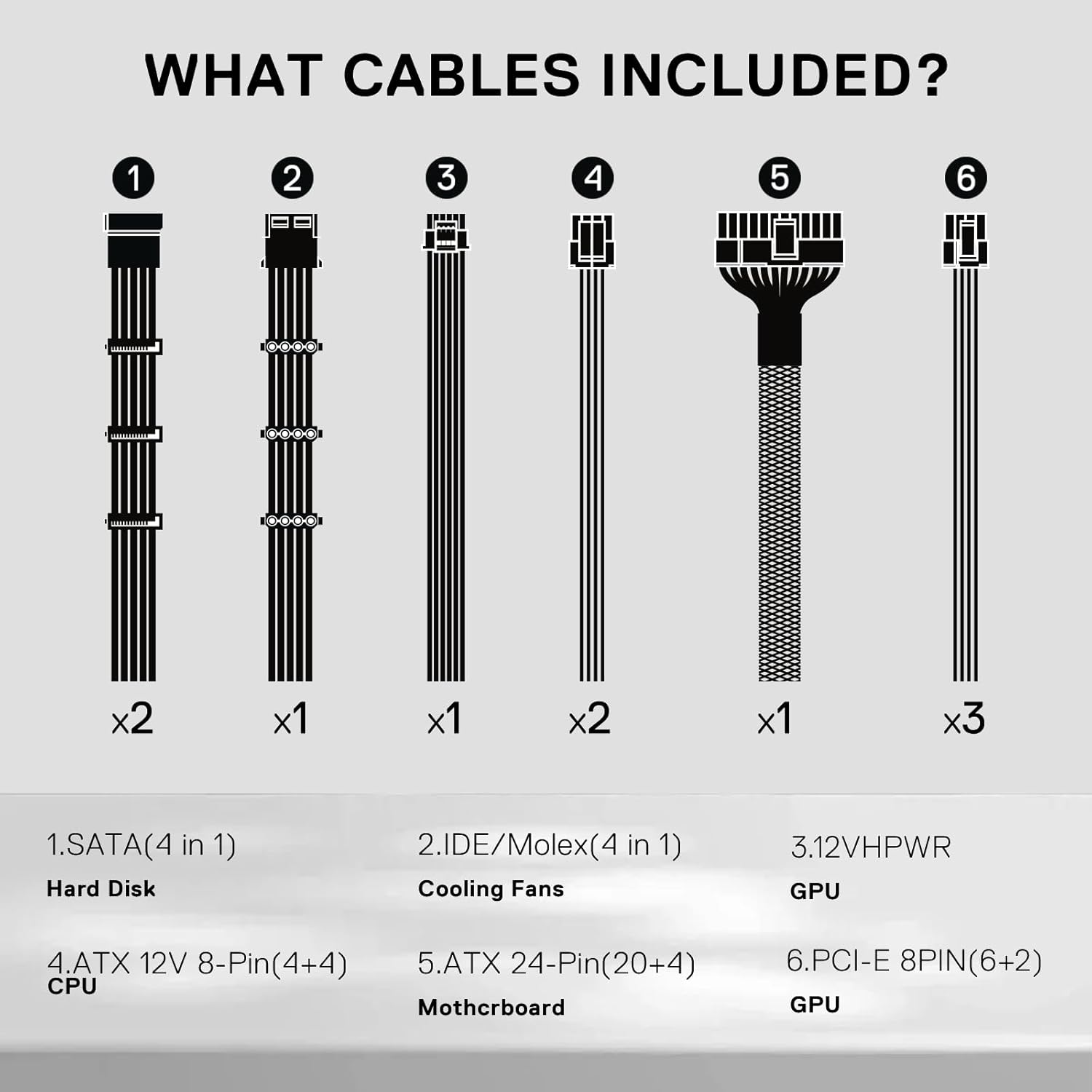
- Fully Modular Flat Cables: Reduces cable clutter, improves airflow within the PC case, and optimizes overall thermal performance. Includes a 12VHPWR cable for high-performance graphics cards.
- Advanced Circuitry: Utilizes Mainstream LLC resonant + DC-DC structure to meet CPU and GPU power supply requirements (100-240Vac). Supports dual CPU P8 (4+4) for server motherboards.
- Comprehensive Protections: Equipped with Over Voltage Protection (OVP), Over Current Protection (OCP), Over Power Protection (OPP), Over Temperature Protection (OTP), Under Voltage Protection (UVP), and Short Circuit Protection (SCP).


3. Setup and Installation
Proper installation of your Redragon RGMS-1200W PRO power supply is crucial for system stability and safety. Please follow these general guidelines and consult your PC case and component manuals for specific instructions.
Safety Precautions:
- Always unplug your computer from the wall outlet before installing or removing any components.
- Discharge any static electricity by touching a grounded metal object before handling components.
- Avoid installing the PSU in areas with high humidity or extreme temperatures.
Installation Steps:
- Prepare Your Case: Ensure your PC case has adequate space for an ATX power supply (150mm compact size).
- Mount the PSU: Secure the PSU into the designated power supply bay in your PC case using the provided screws. Ensure the fan is oriented correctly for optimal airflow (usually facing down if there's a bottom vent, or up if not).
- Connect Modular Cables: This PSU is fully modular, meaning you only connect the cables you need. Refer to the included cable list and your component requirements.
- Motherboard Power: Connect the 24-Pin ATX cable to your motherboard.
- CPU Power: Connect the 8-Pin (4+4) ATX 12V CPU power cable(s) to your motherboard. This PSU supports dual CPU P8 for server motherboards.
- GPU Power: For modern high-performance graphics cards (NVIDIA RTX 40/50 series), use the dedicated 12VHPWR cable. For other GPUs, use the appropriate PCI-E 8PIN (6+2) cables.
- Peripherals: Connect SATA cables for hard drives/SSDs and IDE/Molex cables for cooling fans or other legacy devices as needed.
- Cable Management: Utilize the flat, paracord-sleeved cables to route them neatly behind the motherboard tray or in designated cable management channels to improve airflow and aesthetics.
- Final Checks: Double-check all connections to ensure they are securely seated. Close your PC case.

4. Operating Instructions
Once installed, operating your Redragon RGMS-1200W PRO PSU is straightforward.
Powering On/Off:
- Ensure the main power switch on the back of the PSU is in the 'ON' position (usually marked 'I').
- Power on your computer using the case's power button.
- To power off, shut down your operating system normally. For complete power disconnection, switch the PSU's main power switch to 'OFF' (marked 'O').
Smart ECO Fan Mode:
The Smart ECO fan operates in a Zero RPM mode. This means the fan will not spin when the power supply is under low load and its internal temperature is below 60℃. This feature ensures silent operation during less demanding tasks. The fan will automatically activate and adjust its speed as the load and temperature increase to maintain optimal cooling.
5. Maintenance
Regular maintenance helps ensure the longevity and optimal performance of your power supply.
- Dust Cleaning: Periodically clean the exterior of the PSU and the fan intake/exhaust vents using compressed air. Ensure the computer is powered off and unplugged before cleaning. Do not open the PSU casing.
- Maintain Airflow: Ensure that the PC case's airflow is not obstructed. Keep the area around your computer clear to allow for proper ventilation.
- Cable Management: Good cable management not only improves aesthetics but also enhances airflow, which is vital for cooling all components, including the PSU.
6. Troubleshooting
If you encounter issues with your power supply, try the following troubleshooting steps:
- No Power:
- Check if the power cable is securely plugged into both the PSU and the wall outlet.
- Ensure the main power switch on the PSU is in the 'ON' position ('I').
- Verify that the wall outlet is functional by plugging in another device.
- Confirm all modular cables (24-Pin ATX, CPU, GPU) are firmly connected to both the PSU and the respective components.
- System Instability/Random Shutdowns:
- This could indicate insufficient power or a faulty component. Ensure your system's total power draw does not exceed the PSU's capacity.
- Check for proper ventilation and ensure the PSU fan is spinning when under load (above 60℃).
- If possible, test the PSU with a different system or use a PSU tester to check its output voltages.
- Unusual Noises:
- A slight hum is normal. If you hear grinding or excessive fan noise, ensure no cables are obstructing the fan blades.
- The Smart ECO fan mode means the fan will be off at low loads, which is normal.
If these steps do not resolve the issue, please contact Redragon customer support for further assistance.
7. Specifications
| Feature | Detail |
|---|---|
| Model Name | RGMS-1200W-PRO |
| Brand | Redragon |
| Compatible Devices | PC |
| Connector Type | ATX 3.1 |
| Output Wattage | 1200 Watts |
| Form Factor | ATX12V |
| Cooling Method | Air (120mm FDB Fan) |
| Item Dimensions (L x W x H) | 13.39 x 8.66 x 4.72 inches |
| Maximum Input Voltage | 120 Volts (AC) |
| Minimum Input Voltage | 100 Volts (AC) |
| System Bus Connector Type | ATX |
| Efficiency Certification | 80 Plus Gold |
| Capacitors | 100% Japanese Capacitors |

8. Warranty and Support
The Redragon RGMS-1200W PRO Power Supply comes with a 1-year warranty from the date of purchase. This warranty covers defects in materials and workmanship under normal use.
How to Obtain Warranty Service:
If you experience any issues with your product during the warranty period, please contact Redragon customer support. You may be required to provide proof of purchase and details of the issue. Do not attempt to repair the product yourself, as this may void the warranty.
Customer Support:
For technical assistance, troubleshooting, or warranty inquiries, please visit the official Redragon website or contact their customer service department through the contact information provided in your product packaging or on their website. Please have your product model number (RGMS-1200W) and purchase details ready when contacting support.


