Introduction
Welcome to the user manual for your Replay Audio Pro 2 True Wireless Bluetooth Earbuds. This guide provides essential information on how to set up, operate, maintain, and troubleshoot your earbuds to ensure a seamless audio experience. Please read this manual thoroughly before using your device.
Package Contents
Verify that all items are present in your package:
- 1 Pair of Replay Audio Pro 2 Earbuds
- 1 Charging Case
- 1 Charging Cable (USB-C)
- User Manual
Product Overview
The Replay Audio Pro 2 Earbuds are designed for high-quality audio playback and hands-free communication. They feature a compact design and come with a portable charging case for extended use.
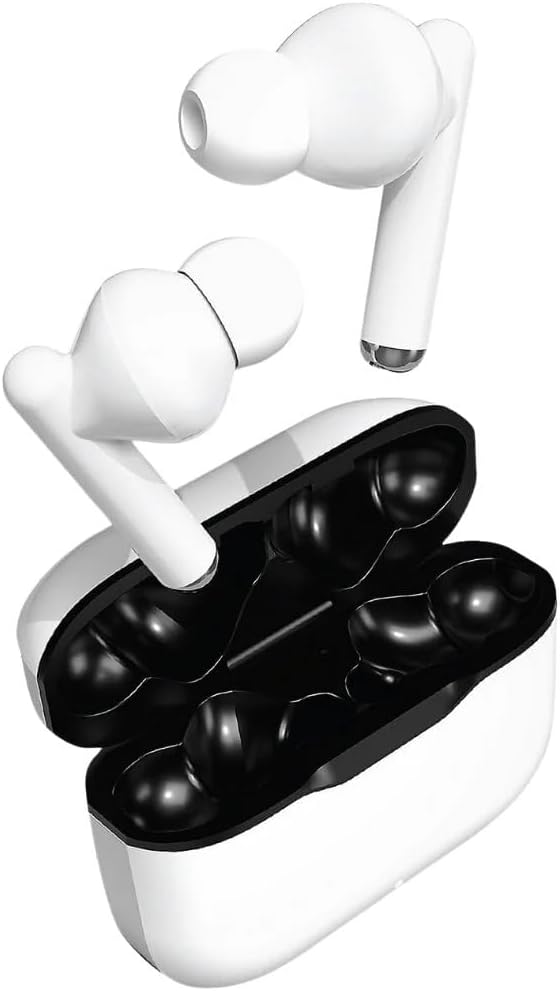
Image: The Replay Audio Pro 2 True Wireless Bluetooth Earbuds shown outside their open charging case, highlighting their sleek white design.

Image: The retail packaging for the Replay Audio Pro 2 True Wireless Earbuds, displaying the product name, brand logo, and a visual of the earbuds and charging case.

Image: The Replay Audio Pro 2 Earbuds and charging case, with a visual indicator showing the compact 2-inch dimension of the charging case.
Setup
Initial Charging
Before first use, fully charge your Replay Audio Pro 2 Earbuds and charging case.
- Connect the provided USB-C charging cable to the charging port on the case.
- Plug the other end of the cable into a USB power adapter (not included) or a computer's USB port.
- The indicator light on the charging case will show charging status. A full charge typically takes 1-2 hours.
- Once fully charged, disconnect the cable.
Pairing with a Device
To connect your earbuds to a Bluetooth-enabled device:
- Ensure the earbuds are charged and placed inside the charging case.
- Open the charging case lid. The earbuds will automatically enter pairing mode, indicated by a flashing LED light on the earbuds.
- On your device (smartphone, tablet, etc.), go to Bluetooth settings and turn Bluetooth on.
- Search for available devices. Select "Replay Audio Pro 2" from the list.
- Once connected, the LED indicator on the earbuds will stop flashing or change color (refer to specific LED behavior in the quick start guide if available).
- The earbuds are now ready for use. They will automatically reconnect to the last paired device when taken out of the case.
Operating Instructions
Power On/Off
- Power On: Open the charging case lid, or remove the earbuds from the case. They will power on automatically.
- Power Off: Place the earbuds back into the charging case and close the lid. They will power off automatically and begin charging.
Music Playback
- Play/Pause: Tap either earbud once.
- Next Track: Double-tap the right earbud.
- Previous Track: Double-tap the left earbud.
Call Management
- Answer/End Call: Tap either earbud once.
- Reject Call: Press and hold either earbud for 2 seconds.
Maintenance and Care
- Keep the earbuds and charging case clean and dry. Use a soft, dry cloth to wipe them.
- Avoid exposing the device to extreme temperatures, humidity, or corrosive substances.
- Do not attempt to disassemble or modify the earbuds or charging case, as this will void the warranty.
- Store the earbuds in their charging case when not in use to protect them and keep them charged.
Troubleshooting
If you encounter issues with your Replay Audio Pro 2 Earbuds, refer to the following table:
| Problem | Solution |
|---|---|
| Earbuds not pairing | Ensure earbuds are charged. Turn off and on your device's Bluetooth. Forget "Replay Audio Pro 2" from your device's Bluetooth list and re-pair. |
| No sound from one earbud | Place both earbuds back in the case, close the lid, then open again. Check device's audio balance settings. |
| Charging case not charging | Ensure the charging cable is securely connected. Try a different USB port or power adapter. |
| Low volume | Increase volume on both your connected device and the earbuds (if applicable via touch controls). Clean any debris from the earbud speakers. |
Product Specifications
- Model Number: 14330551
- Brand: Fun Express
- Color: White
- Material: Metal, Plastic
- Product Dimensions: 2 x 5 x 4 inches (Charging Case)
- Item Weight: 4 ounces
- Connectivity: Bluetooth
- UPC: 886102020814
Warranty and Support
Your Replay Audio Pro 2 True Wireless Bluetooth Earbuds are covered by a standard manufacturer's warranty against defects in materials and workmanship. For specific warranty details, please refer to the documentation included with your purchase or visit the Fun Express official website.
For technical support or customer service inquiries, please contact Fun Express customer support. You can find more information and contact options by visiting the Fun Express Store on Amazon.