
1. Important Safety Information
Please read and understand all safety information before assembly and use of this product. Failure to follow these instructions may result in serious injury.
- Do not exceed the maximum weight capacity of 400 pounds for the bed.
- Always use the ladder properly when accessing or exiting the upper bed.
- Be cautious of potential pinch points during assembly and when operating drawers or moving parts.
- Handle all metal parts carefully to avoid cuts or scrapes.
- Ensure all fasteners are securely tightened before use and periodically check for looseness.
- Keep children away from the assembly area until the product is fully assembled.
- Only use a mattress with a maximum thickness of 6 inches on the upper bunk.
2. Product Overview
The SOFTSEA Full Gaming Loft Bed with Desk and LED Lights (Model x33) is a multi-functional furniture piece designed to maximize space in bedrooms or gaming setups. It features a full-size sleeping area, an integrated desk with built-in LED lighting for an enhanced ambiance, a storage wardrobe, and three linen storage drawers. Constructed from durable metal, this loft bed provides a stable and long-lasting structure, combining sleeping, study, and storage functions efficiently.
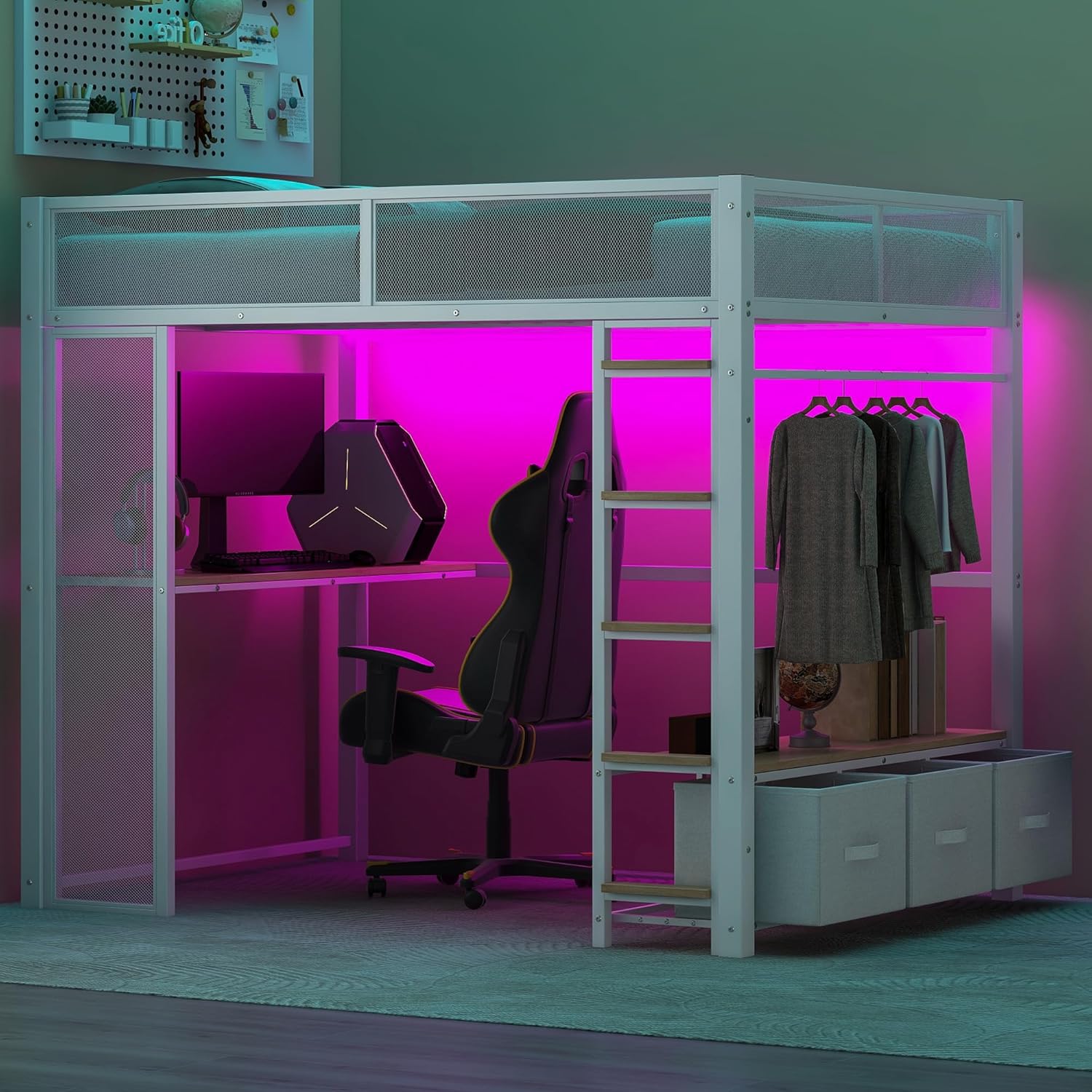
Image: Fully assembled SOFTSEA Full Gaming Loft Bed with integrated desk, LED lights, and storage.
3. Package Contents
Your SOFTSEA Full Gaming Loft Bed will arrive in two separate packages, which may be delivered on different days. Please ensure you have received both packages before beginning assembly. Carefully unpack all components and verify against the parts list provided in your detailed assembly manual.
Typical components include:
- Metal bed frame sections
- Desk surface and supports
- Ladder steps and rails
- Wardrobe frame and hanging rod
- Linen storage drawers (3 units)
- LED light strips and power supply
- Hardware kit (screws, bolts, nuts, Allen wrench)
4. Setup (Assembly Instructions)
Full assembly is required for this product. It is recommended that two people assist with the assembly process to ensure safety and ease. All necessary tools are included in the package.
- Preparation: Clear a spacious area for assembly. Lay out all parts on a soft, clean surface to prevent scratches. Identify each component using the provided parts list.
- Frame Assembly: Begin by assembling the main metal frame sections according to the step-by-step installation manual. Ensure all pre-drilled holes align correctly. Do not fully tighten all screws until the entire frame is loosely assembled.
- Desk and Wardrobe Installation: Attach the desk surface and wardrobe components to the main frame. Ensure they are level and securely fastened.
- Ladder Attachment: Securely attach the ladder to the designated points on the bed frame. Verify that it is stable and can support weight safely.
- Drawer Integration: Place the linen storage drawers into their designated slots under the wardrobe section.
- LED Light Installation: Install the LED light strips in the designated areas, typically under the bed frame and around the desk. Connect them to the power supply.
- Final Tightening: Once all components are in place, systematically tighten all screws and bolts. Do not overtighten.
- Safety Check: Before use, gently shake the bed to ensure stability. Recheck all connections and ensure guardrails are secure.

Image: The SOFTSEA Full Gaming Loft Bed frame, illustrating the structure before full accessorization.
5. Operating Instructions
This loft bed is designed for versatile use, integrating sleeping, working, and storage functions.
- Upper Bed: The full-size upper bed is suitable for a standard full mattress (not included) with a recommended thickness of 6 inches. Always use the ladder to access the bed.
- Integrated Desk: The spacious wooden desk provides a dedicated area for study, work, or gaming. Ensure electronic devices are placed securely.
- LED Lights: The built-in LED light strips are typically controlled by a switch or remote (if included). Plug the power adapter into a standard electrical outlet to activate. Refer to the specific LED light manual for detailed operation.
- Wardrobe: The open wardrobe section includes a hanging rod for clothes and shelves for folded items or decor.
- Storage Drawers: The three linen storage drawers are ideal for organizing clothing, accessories, or other personal items. Pull them out gently for access.
- Ladder: Always face the ladder when climbing up or down. Ensure a firm grip on the handrails.

Image: The integrated desk area of the loft bed, illuminated by LED lights, suitable for gaming or study.
6. Maintenance and Care
Proper maintenance will extend the life and appearance of your loft bed.
- Cleaning: Wipe metal surfaces with a soft, damp cloth. For wooden surfaces (desk, shelves), use a dry or slightly damp cloth. Avoid harsh chemicals or abrasive cleaners, as they may damage the finish.
- Fastener Check: Periodically (e.g., every 3-6 months) check all screws, bolts, and connections to ensure they remain tight. Retighten as necessary to maintain stability.
- Weight Distribution: Distribute weight evenly on the bed and shelves. Avoid concentrating heavy items in one spot.
- LED Lights: If LED lights dim or stop working, check the power connection and the power adapter. If issues persist, contact customer support.
- Avoid Excessive Moisture: Keep the bed in a dry environment to prevent rust or damage to wooden components.
7. Troubleshooting
If you encounter any issues with your loft bed, refer to the following common troubleshooting steps:
- Bed feels wobbly: Ensure all assembly screws and bolts are fully tightened. Check that the bed is placed on a level surface.
- LED lights not working: Verify that the power adapter is securely plugged into both the light strip and a working electrical outlet. Check for any visible damage to the wiring.
- Parts do not align during assembly: Double-check the assembly manual to ensure you are using the correct parts for each step and that they are oriented correctly. Sometimes, loosening previously tightened screws can help with alignment before re-tightening.
- Missing parts: If you find any parts missing from your packages, refer to the parts list in your assembly manual and contact customer support with the specific part numbers.
8. Specifications
| Feature | Specification |
|---|---|
| Model Number | x33 |
| Overall Dimensions (L x W x H) | 77.8'' x 56.1'' x 66.9'' |
| Bed Inner Space | Full |
| Recommended Mattress Thickness | 6 inches |
| Bed Weight Capacity | 400 LBS |
| Overall Product Weight | 125 LBS |
| Material | Metal + MDF |
| Color | White |
| Assembly Required | Yes (Full Assembly) |
| Number of Packages | 2 |
| Special Features | LED Light, Desk, Storage Wardrobe |

Image: Detailed dimensions diagram of the SOFTSEA Full Gaming Loft Bed.
9. Warranty Information
This SOFTSEA product is covered by a one-year warranty against manufacturing defects from the date of purchase. This warranty covers defects in materials and workmanship under normal use. It does not cover damage resulting from improper assembly, misuse, abuse, accidents, or unauthorized modifications. Please retain your proof of purchase for warranty claims.
10. Customer Support
For any questions, concerns, or assistance with your SOFTSEA Full Gaming Loft Bed, please contact our customer support team. When contacting support, please have your model number (x33) and proof of purchase readily available.
You can find more information and contact details by visiting the official SOFTSEA store page: SOFTSEA Store