
Elite Kitchen Supply EKS-E30R
Elite Kitchen Supply AKR-06881 Commercial Upright Reach-in Refrigerator User Manual
Model: EKS-E30R
1. Product Overview
This manual provides essential information for the safe and efficient operation of your Elite Kitchen Supply AKR-06881 Commercial Upright Reach-in Refrigerator. This unit is designed for commercial use, featuring a durable stainless steel construction and precise temperature control for food preservation.
- Certification: ETL certified for safety and sanitation.
- Construction: Full stainless-steel interior and exterior for durability and easy cleaning.
- Cooling System: Energy-efficient bottom-mounted compressor, thick insulation, and fan-forced air circulation.
- Temperature Control: Digital temperature control with a range of 33°F to 41°F.
- Features: Low noise and minimal vibration, LED interior lighting, 4 adjustable removable shelves, safety door lock, auto-defrost function, self-closing door, and lockable casters.
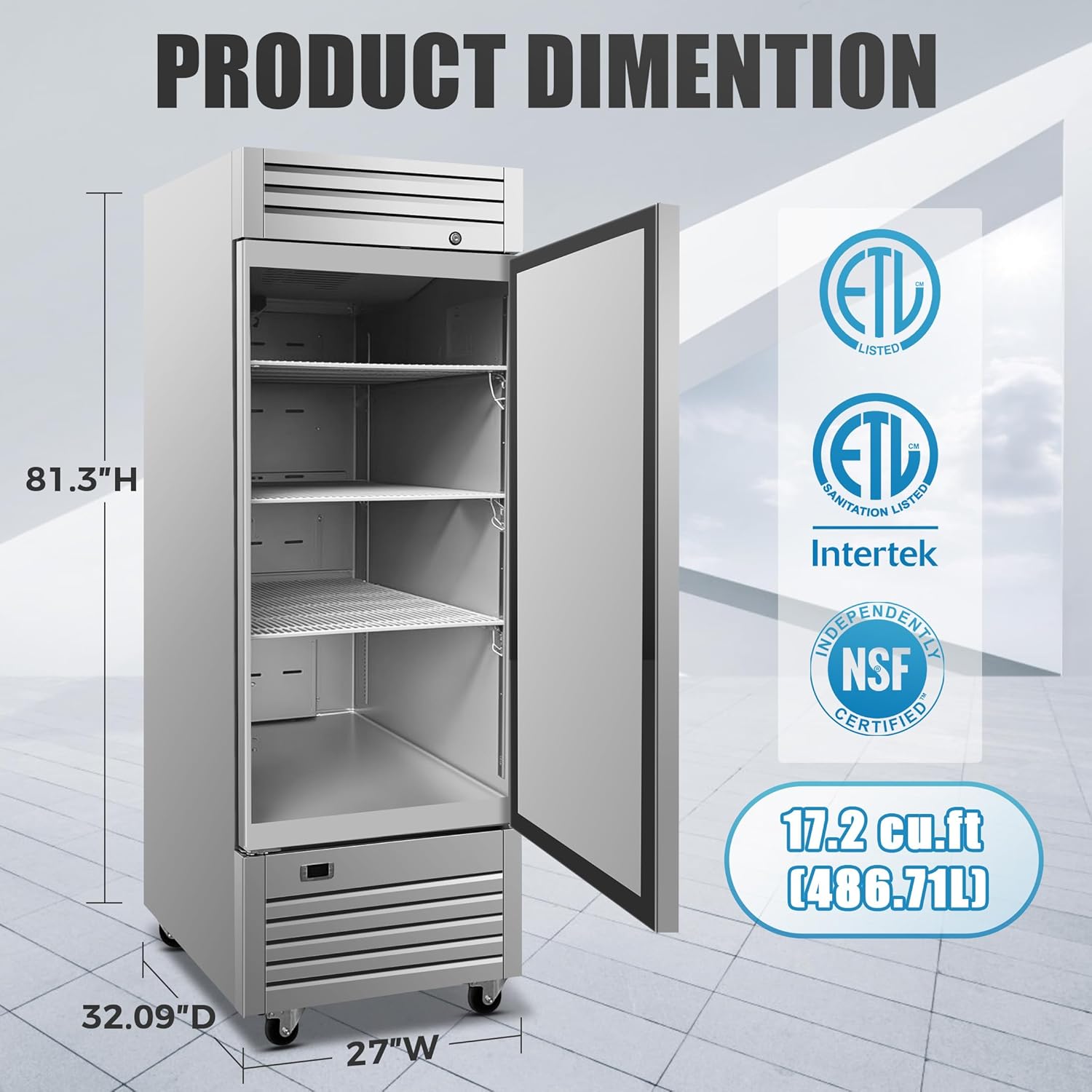
Figure 1: Overall dimensions of the Elite Kitchen Supply AKR-06881 Commercial Upright Reach-in Refrigerator. The unit measures approximately 27.5 inches wide, 32.63 inches deep, and 80.38 inches high.

Figure 2: Key features of the refrigerator including the door lock, adjustable racks, temperature display, and built-in thermometer.
2. Setup and Installation
Proper setup is crucial for the performance and longevity of your refrigerator. Please follow these steps carefully.
2.1 Unpacking
- Remove all packaging materials, including tape and protective film.
- Inspect the unit for any shipping damage. Report any damage immediately to your carrier and supplier.
- Ensure all included components, such as shelves and tools, are present.
2.2 Placement
- Place the refrigerator on a level, stable surface capable of supporting its weight when fully loaded.
- Ensure adequate ventilation around the unit. Maintain at least 4 inches of clearance from walls and other equipment to allow for proper airflow and heat dissipation.
- Avoid placing the unit in direct sunlight or near heat-generating appliances.
- The unit is designed for freestanding installation.
2.3 Electrical Connection
- The refrigerator operates on 110 Volts. Ensure the electrical outlet matches the unit's requirements.
- Connect the unit to a dedicated, grounded electrical circuit. Do not use extension cords.
2.4 Shelf Installation
- The unit comes with 4 adjustable wire shelves.
- Install the shelves at desired heights using the shelf clips provided. Ensure shelves are securely seated before placing items on them.

Figure 3: Interior view of the refrigerator showing the adjustable wire shelves.
Video 1: This video demonstrates the external and internal dimensions of the Elite Kitchen Supply AKR-06881 refrigerator, including measurements of width, depth, and height, and shows the interior layout with shelves.
3. Operating Instructions
This section covers the basic operation of your commercial refrigerator.
3.1 Initial Startup
- After installation, allow the unit to stand upright for at least 2 hours before plugging it in. This allows the refrigerant to settle.
- Plug the unit into the appropriate electrical outlet.
- Turn on the main power switch, usually located near the digital controller.
- Allow the refrigerator to reach its set temperature (approximately 33°F to 41°F) before loading with products. This may take several hours.
3.2 Temperature Control
- The unit features a digital temperature controller (Dixell).
- To adjust the temperature, press the 'SET' button. The current set temperature will flash.
- Use the up and down arrow buttons to change the desired temperature.
- Press 'SET' again to confirm the new temperature.
- The display will show the actual internal temperature.

Figure 4: Close-up of the digital temperature control panel (Dixell) and power switch.
3.3 Loading the Refrigerator
- Do not overload shelves. Ensure proper air circulation around products for efficient cooling.
- Keep the door closed as much as possible to maintain internal temperature and conserve energy. The self-closing door feature assists with this.
4. Maintenance
Regular maintenance ensures optimal performance and extends the lifespan of your refrigerator.
4.1 Cleaning the Interior
- Disconnect the unit from power before cleaning.
- Remove all food items and shelves.
- Clean the interior surfaces with a mild detergent and warm water. Rinse thoroughly and dry with a soft cloth.
- Do not use abrasive cleaners, steel wool, or harsh chemicals, as these can damage the stainless steel.
- The unit features an auto-defrost system, minimizing manual defrosting.
4.2 Cleaning the Exterior
- Wipe down exterior stainless steel surfaces with a soft cloth and a stainless steel cleaner.
- Clean the door gasket regularly to ensure a tight seal.
4.3 Condenser Coil Cleaning
- The condenser coils should be cleaned every 30 days or as needed to maintain efficiency.
- Disconnect power to the unit.
- Locate the condenser coils (typically near the bottom-mounted compressor).
- Use a stiff brush or vacuum cleaner with a brush attachment to remove dust and debris from the coils.
- Failure to clean the condenser coils can lead to reduced cooling efficiency and increased energy consumption.
5. Troubleshooting
If you encounter any issues with your refrigerator, refer to the following common problems and solutions. For problems not listed or if solutions do not resolve the issue, contact customer support.
| Problem | Possible Cause | Solution |
|---|---|---|
| Refrigerator not cooling | Power supply issue, thermostat setting, dirty condenser coils, door not sealing properly. | Check power connection and circuit breaker. Verify thermostat setting. Clean condenser coils. Inspect door gasket for damage or obstructions. |
| Excessive noise | Unit not level, fan obstruction, loose components. | Ensure unit is level. Check for any obstructions around the fan. Contact service if noise persists. |
| Water on floor (leakage) | Clogged drain line, excessive humidity, improper installation. | Check and clear the drain line. Ensure proper ventilation. Verify unit is level. |
6. Specifications
Detailed technical specifications for the Elite Kitchen Supply AKR-06881 Commercial Upright Reach-in Refrigerator.
| Feature | Specification |
|---|---|
| Brand Name | Elite Kitchen Supply |
| Model Info | EKS-E30R |
| Item Weight | 5 pounds (Note: This seems incorrect for a commercial refrigerator, likely a placeholder or error in source data. Actual shipping weight will be significantly higher.) |
| Product Dimensions (D x W x H) | 32.63 x 27.5 x 80.38 inches |
| Capacity | 17.79 Cubic Feet |
| Installation Type | Freestanding |
| Form Factor | Standard Depth |
| Special Features | Automatic Defrost, Digital Temperature Control, Energy Efficient and Quiet |
| Color | Silver |
| Voltage | 110 Volts |
| Defrost System | Automatic |
| Door Hinges | Right |
| Door Material Type | Stainless Steel |
| Shelf Type | Wire |
| Number of Shelves | 4 |
| Certification | ETL, NSF |
| Included Components | Tools |
| Number Of Doors | 1 |

Figure 5: Product label showing the circuit diagram and detailed electrical specifications for the refrigerator.
7. Warranty and Support
Elite Kitchen Supply provides the following warranty for this product:
- Parts: 3-year warranty on all parts.
- Compressor: 6-year warranty on the compressor.
- Labor: 1-year labor warranty.
Important Note: The warranty does not cover equipment used in food trucks, trailers, boats, residential addresses, islands, or built-in decorations.
For technical assistance, warranty claims, or any other inquiries, please contact Elite Kitchen Supply customer service.
Related documentsEKS-E30R


Ask a question about this manual
Ask about setup, troubleshooting, compatibility, parts, safety, or missing instructions. Manuals+ will review the question and use this page’s manual context to help answer it.