
1. Introduction and System Overview
The KOQICALL Wireless Queue Call System C12+A2 1+3 is designed to streamline customer flow and improve service efficiency in various settings such as clinics, banks, offices, and supermarkets. This system consists of a main display unit and three call button transmitters, allowing staff to call the next customer to an available counter.
Key Features:
- Simple Number System: Facilitates efficient customer routing to any available counter.
- Clear LED Number Display: Features outdoor high-brightness lamp beads for visibility up to 150m (500ft) in open areas.
- Long Time Display: Counter number remains displayed until cancelled, ensuring customers do not miss their call.
- Plug and Play Operation: Pre-paired units require no network connection and are ready for immediate use upon power-up.
- Multi-Scenario Application: Ideal for environments requiring organized customer queues.
2. Package Contents
Please verify that all items are present in your package:
- 1 x Dot Matrix Display Unit (C12)
- 3 x Call Button Transmitters (A2)
- 1 x Power Adapter for Display Unit
- 1 x Remote Control
- User Manual (this document)
3. Setup Instructions
The system is designed for quick and easy setup. No complex wiring or network configuration is required as units are pre-paired from the factory.
3.1 Display Unit Setup
- Placement: Position the display unit in a location visible to waiting customers. It can be placed on a desktop using its integrated stand or mounted on a wall using the provided wall mount holes.
- Power Connection: Connect the power adapter to the display unit's power connector and plug it into a standard electrical outlet. The display will power on automatically.

Figure 3.1: Details of the Display Screen. This image illustrates the physical features of the display unit, including its dimensions, mounting options, and port locations.
3.2 Call Button Transmitters Setup
Place each call button transmitter at its designated counter or service point. For optimal visibility, consider labeling each counter with its corresponding number (e.g., 1, 2, 3).
3.3 Remote Control Setup
The remote control is used for advanced functions and power control. Ensure it has batteries installed (not specified if included, assume standard AAA/AA). The remote control operates within a range of 5 meters and requires aiming at the upper right area of the display screen.
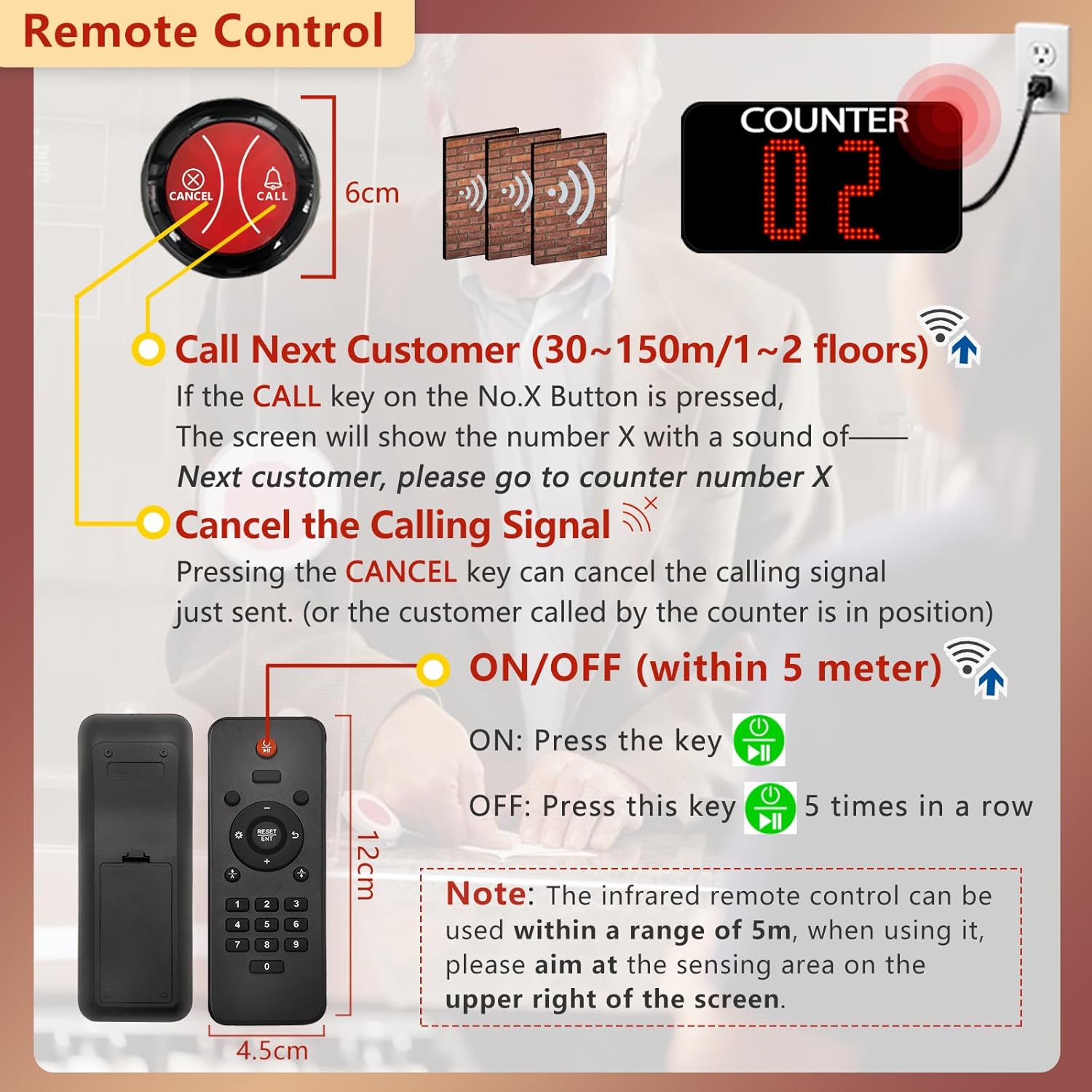
Figure 3.2: Remote Control Functions. This image details the functions of the remote control and the call button, including signal range and power control.
4. Operating Instructions
The KOQICALL system simplifies the customer queuing process. Follow these steps for typical operation:
- Customer Arrival: Customers arrive and wait in the designated waiting area.
- Calling a Customer: When a counter becomes available, the staff member at that counter presses the CALL button on their transmitter.
- Display Notification: The main display unit will show the counter number (e.g., "02") and broadcast an audible message: "Next customer, please go to counter X."
- Customer Service: The waiting customer proceeds to the indicated counter for service.
- Cancelling the Call: Once the customer is seated or service begins, the staff member presses the CANCEL button on their transmitter. This clears the counter number from the display, indicating that the counter is now busy or the call is complete.
Tip: When the display shows a counter number, it indicates that counter is available. When it shows "- - -", it means the counter is currently in service.

Figure 4.1: How the System Works. This diagram visually explains the process of calling a customer to an idle counter.
4.1 Remote Control Functions
- Call Next Customer: Press the CALL key on the remote to activate the display and voice prompt for a specific counter.
- Cancel Calling Signal: Press the CANCEL key to clear the current call from the display.
- Power ON/OFF: Press the ON key to turn the display on. To turn off, press the OFF key 5 times consecutively.
5. Maintenance
To ensure the longevity and optimal performance of your KOQICALL Wireless Queue Call System, follow these simple maintenance guidelines:
- Cleaning: Use a soft, dry cloth to clean the display unit and call buttons. Avoid using abrasive cleaners, solvents, or excessive moisture, which can damage the electronic components.
- Power Supply: Always use the original power adapter provided with the display unit. Using an incorrect adapter may cause damage.
- Battery Replacement: If the remote control or call buttons (if battery-operated) become unresponsive, replace their batteries with new ones of the correct type.
- Environmental Conditions: Avoid exposing the units to extreme temperatures, direct sunlight for prolonged periods, or high humidity.
6. Troubleshooting
If you encounter issues with your queue call system, refer to the following common problems and solutions:
6.1 Display Not Powering On
- Check Power Connection: Ensure the power adapter is securely plugged into both the display unit and a working electrical outlet.
- Test Outlet: Try plugging another device into the same outlet to confirm it is supplying power.
- Remote Control: If the display was previously turned off via remote, press the ON key on the remote control.
6.2 Call Button Not Activating Display
- Proximity: Ensure the call button is within the effective signal range of the display unit (up to 150m in open areas, 30-50m with obstacles).
- Obstructions: Large metal objects or thick walls can interfere with the wireless signal. Try repositioning the units.
- Battery (if applicable): If the call button is battery-powered, check and replace its battery.
- Re-pairing: Although pre-paired, in rare cases, re-pairing might be necessary. Refer to the manufacturer's website or support for specific re-pairing instructions if this issue persists.
6.3 Display Shows "- - -" Continuously
- This indicates that the counter is currently in service. Press the CANCEL button on the corresponding transmitter to clear the status if the counter is actually idle.
7. Specifications
| Feature | Specification |
|---|---|
| Model Number | C12+A2 1+3 |
| Display Type | Dot Matrix LED |
| Display Dimensions | 29 x 15.5 x 4 cm (approx. 11.4 x 6.1 x 1.6 inches) |
| Wireless Range (Open Area) | Up to 150m (500ft) |
| Wireless Range (Obstacle Field) | 30-50m (100-160ft) |
| Remote Control Range | Within 5 meters (line of sight) |
| Item Weight | 1.98 pounds |
| Package Dimensions | 15.75 x 7.68 x 2.17 inches |
| Manufacturer | Quanzhou Koqi Electronic Co.,Ltd |
8. Warranty and Support
For warranty information and technical support, please refer to the documentation provided with your purchase or contact KOQICALL customer service directly. Keep your purchase receipt as proof of purchase for any warranty claims.